
1. Introduction
Thank you for choosing the Yunseity Over Ear Lightweight Earbuds. These earbuds are designed for comfort and high-quality audio, featuring an over-ear design, noise-cancelling dual microphones, and long battery life. This manual provides essential information for setup, operation, and maintenance to ensure optimal performance.
2. Package Contents
Please verify that all items are present in your package:
- 1 Pair x Yunseity Over Ear Lightweight Earbuds
- 1 x Charging Case
- 1 x Charging Cable

Image: The charging case and included charging cable.
3. Product Overview
The Yunseity Over Ear Lightweight Earbuds offer a unique design and advanced audio features:
- Unique Over-Ear Design: Lightweight and comfortable for extended wear.
- Directional Sound Technology: Pulse DT4.0 for accurate sound transmission and reduced sound leakage.
- ACS Panoramic Surround Sound: Professional acoustic tuning with a high-elasticity composite diaphragm for rich sound quality.
- Intelligent Noise Cancelling: Dual microphones enhance call clarity by reducing ambient noise.
- Smart Battery Display: Low-power chip and high-capacity battery for long usage times, with a clear battery level indicator on the charging case.
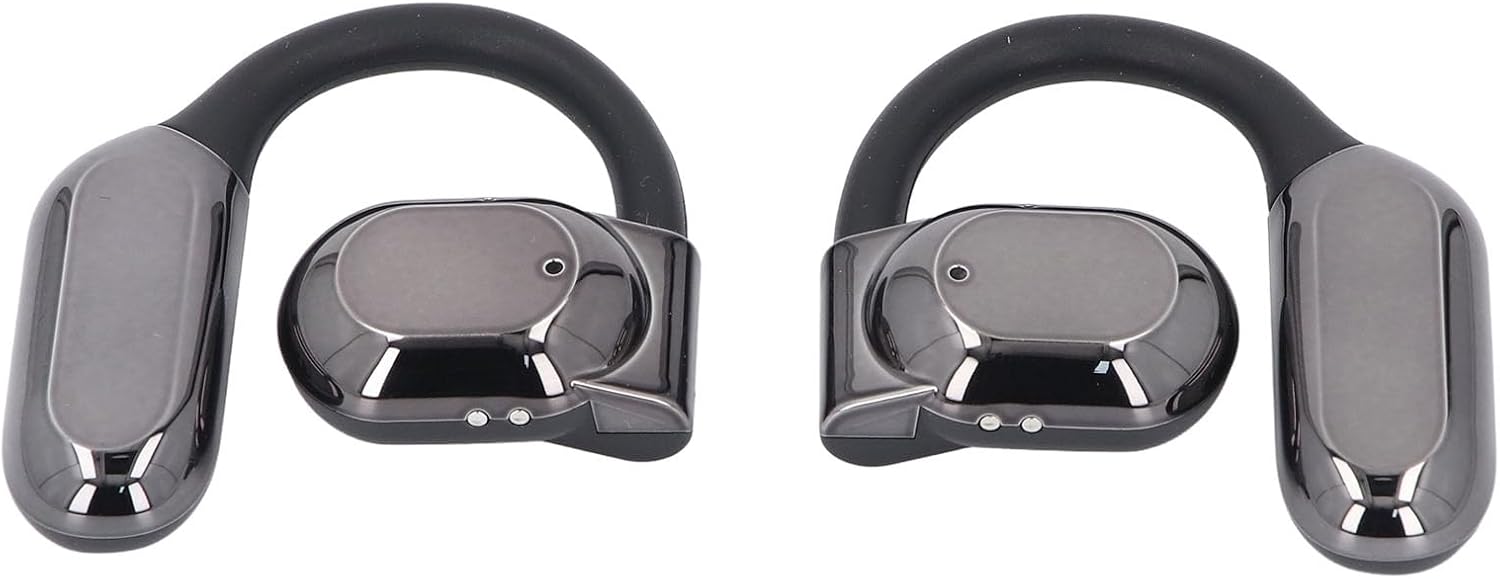
Image: Front view of both earbuds, showcasing their over-ear design.
4. Setup
4.1 Charging the Earbuds and Case
Before first use, fully charge the earbuds and the charging case.
- Place the earbuds into the charging case. Ensure they are correctly seated.
- Connect the charging cable to the charging case and a USB power source.
- The charging case features a smart battery display that shows the current charge level.

Image: The charging case displaying battery percentage while charging.
4.2 Pairing with a Device
The earbuds are designed for easy pairing.
- Ensure the earbuds are charged and removed from the charging case. They will automatically enter pairing mode.
- On your device (smartphone, tablet, computer), go to the Bluetooth settings.
- Search for available Bluetooth devices and select "Yunseity Earbuds" (or similar name) from the list.
- Once connected, the earbuds are ready for use.
5. Operating Instructions
5.1 Wearing the Earbuds
The over-ear design ensures a secure and comfortable fit.
- Identify the left (L) and right (R) earbuds.
- Gently hook the earbud over your ear, ensuring the speaker portion is positioned correctly in your ear canal for optimal sound.

Image: A person wearing the earbuds, demonstrating the over-ear fit.
5.2 Basic Controls
The earbuds feature intuitive touch controls for various functions:
- Play/Pause: Single tap on either earbud.
- Next Track: Double tap the right earbud.
- Previous Track: Double tap the left earbud.
- Answer/End Call: Single tap on either earbud during an incoming call or active call.
- Reject Call: Press and hold either earbud for 2 seconds during an incoming call.
- Activate Voice Assistant: Triple tap on either earbud.
6. Maintenance
6.1 Cleaning
Regular cleaning helps maintain sound quality and hygiene.
- Use a soft, dry, lint-free cloth to wipe the earbuds and charging case.
- Do not use abrasive cleaners, alcohol, or chemical solvents.
- Avoid getting moisture into any openings.
6.2 Storage
When not in use, store the earbuds in their charging case to protect them and keep them charged.
7. Troubleshooting
If you encounter issues, try the following solutions:
| Problem | Solution |
|---|---|
| Earbuds not pairing |
|
| No sound from earbuds |
|
| Charging case not charging |
|
8. Specifications
Key technical specifications for the Yunseity Over Ear Lightweight Earbuds:
- Model: Yunseitye4x1roq60v-11
- Bluetooth Version: V5.46
- Wireless Distance: Up to 10m / 32.8ft
- Charging Case Battery Capacity: 300 mAh (Li Battery)
- Earbuds Battery Capacity: 90 mAh (Li Battery)
- Battery Life (Earbuds): Approximately 7-8 Hours
- Material: PC, ABS
- Form Factor: Over Ear
- Microphones: Dual, with Noise Cancelling
9. Warranty and Support
For warranty information, technical support, or service inquiries, please refer to the documentation provided with your purchase or contact the manufacturer directly. Keep your proof of purchase for warranty claims.