
Introduction
This manual provides instructions for the installation, operation, and maintenance of your Oulice Replacement Shaver Outer Foil and Inner Blade Cutter. This replacement set is designed to restore optimal shaving performance to compatible Panasonic electric shavers. Please read this manual thoroughly before installation and use.
Product Overview
The replacement set includes one outer foil and one inner blade cutter, designed to work together for an efficient shave. The outer foil features a perforated surface that captures hairs, while the inner blades oscillate beneath to cut them.
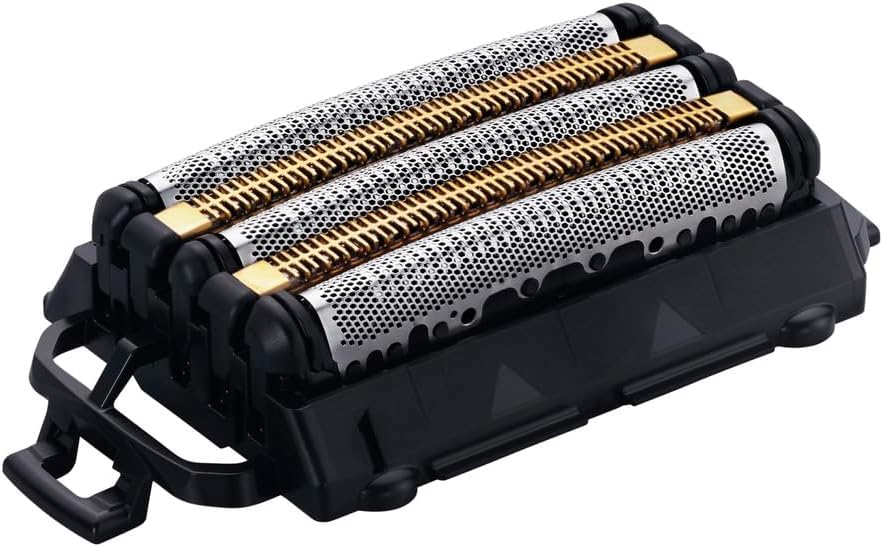
Figure 1: Oulice Replacement Shaver Outer Foil and Inner Blade Cutter. This image displays the complete replacement head assembly, featuring three distinct foil sections (two silver, one gold-colored in the center) mounted on a black plastic base. The foils are perforated, and the inner blades are visible beneath the gold-colored section. A black plastic handle or release mechanism is visible on the left side of the base.
Compatibility
This replacement outer foil and inner blade cutter set is compatible with the following Panasonic electric shaver models:
- Panasonic ES9510
- Panasonic ES-L550D
- Panasonic ES-L550U
- Panasonic ES-L570D
- Panasonic ES-L570W
- Panasonic ES-L580U
Ensure your shaver model matches one of the listed models for proper fit and function.
Installation Instructions
Follow these steps to replace the outer foil and inner blade cutter on your electric shaver:
- Power Off: Ensure the electric shaver is turned off and unplugged from any power source.
- Remove Old Head: Gently press the release buttons (if present) on the sides of the shaver head and lift the old outer foil and inner blade assembly away from the shaver body. Refer to your shaver's original manual for specific removal instructions if needed.
- Clean Shaver: Clean any hair clippings or debris from the shaver body and the area where the new head will be installed.
- Install New Head: Align the new Oulice replacement outer foil and inner blade cutter with the shaver body. Press down firmly until it clicks securely into place. Ensure it is seated correctly and does not wobble.
- Test: Turn on the shaver briefly to ensure the new head operates smoothly and without unusual noise.
Note: Handle the new foil and blades with care to avoid damage or injury.
Operating Instructions
Once installed, the replacement head functions identically to the original. This replacement set supports both wet and dry shaving. For optimal performance:
- Dry Shaving: Use on clean, dry skin for a quick shave.
- Wet Shaving: Can be used with shaving foam or gel for a smoother, more comfortable shave, especially in the shower.
- Pop-up Trimmer: If your shaver includes a pop-up trimmer, it will continue to function independently for detailing mustaches, beards, and sideburns.
Maintenance
Regular cleaning is essential to maintain the performance and longevity of your replacement shaver head.
- Daily Cleaning: After each use, remove the outer foil and inner blade. Rinse both parts thoroughly under running water to remove hair clippings and shaving residue.
- Drying: Allow the outer foil and inner blade to air dry completely before reattaching them to the shaver body. Do not wipe the foil with a towel, as this can damage it.
- Lubrication (Optional): Periodically apply a drop of shaver oil to the inner blades to maintain smooth operation. Refer to your shaver's original manual for specific lubrication recommendations.
- Replacement Frequency: For optimal shaving performance, it is recommended to replace the outer foil and inner blade cutter approximately every 12-18 months, or sooner if you notice a decrease in shaving efficiency or discomfort.
Troubleshooting
| Problem | Possible Cause | Solution |
|---|---|---|
| Poor shaving performance / pulling hairs | Blades or foil are dull or dirty. | Clean the shaver head thoroughly. If performance does not improve, it may be time for a new replacement head. |
| Shaver head does not attach securely | Incorrect alignment or debris preventing proper seating. | Ensure the head is aligned correctly with the shaver body. Check for any obstructions and clean the area. |
| Increased skin irritation | Dull blades or improper shaving technique. | Ensure blades are clean and sharp. Shave against the grain with light pressure. Consider replacing the head if irritation persists. |
Specifications
- Product Type: Replacement Shaver Outer Foil + Inner Blade Cutter
- Material: Stainless Steel (Inner Blades), Metal Alloy (Outer Foil)
- Compatibility: Panasonic ES9510, ES-L550D, ES-L550U, ES-L570D, ES-L570W, ES-L580U
- Manufacturer: Oulice
Warranty and Support
For warranty information or technical support regarding your Oulice Replacement Shaver Outer Foil and Inner Blade Cutter, please contact the retailer or manufacturer directly. Keep your purchase receipt as proof of purchase.