
1. Introduction
This manual provides detailed instructions for the assembly, operation, and maintenance of your DOMSHOCT L Shaped Gaming Desk (Model GMZ012CFB40). Please read this manual thoroughly before assembly and use to ensure proper function and safety. Keep this manual for future reference.
2. Safety Information
Always adhere to the following safety guidelines:
- Assemble the desk strictly according to the provided instructions.
- Ensure the desk is placed on a stable, level surface.
- Do not exceed the maximum weight recommendation of 80 kilograms (176 lbs) for the desktop.
- Keep the power outlet clear of flammable materials.
- Do not overload the built-in power outlet with too many devices.
- Avoid collision of the desktop with sharp objects.
- Periodically check all screws and connections to ensure they remain tight.
3. Package Contents
Verify that all components are present before beginning assembly:
- Thickened Steel Tube Frame
- MDF Panels (Desktop surfaces)
- 1 Storage Bag
- 1 Power Outlet Unit (2 AC, 1 USB, 1 Type-C ports)
- 1 Audio Reactive LED Strip
- 1 Removable Monitor Stand
- Assembly Hardware (screws, tools, etc.)
- Instruction Manual
4. Setup and Assembly
The DOMSHOCT L Shaped Gaming Desk is designed for straightforward assembly. One person is recommended for assembly, and a screwdriver is the primary tool required.
4.1. Before You Begin
- Clear a spacious area for assembly.
- Unpack all components and verify against the package contents list.
- Familiarize yourself with the assembly diagram and hardware.
4.2. Assembly Steps
Follow the detailed step-by-step instructions provided in the separate assembly guide included with your product. Ensure all screws are tightened securely at the final stage of assembly.

5. Operating Instructions
5.1. LED Strip Lights
The desk features an RGB LED strip under the monitor shelf. This strip can be controlled via a button on the strip itself or through a mobile application. It offers 7 basic colors and 22 dynamic modes, including an audio-reactive function that allows the lights to synchronize with music or game sounds.

5.2. Built-in Power Outlets
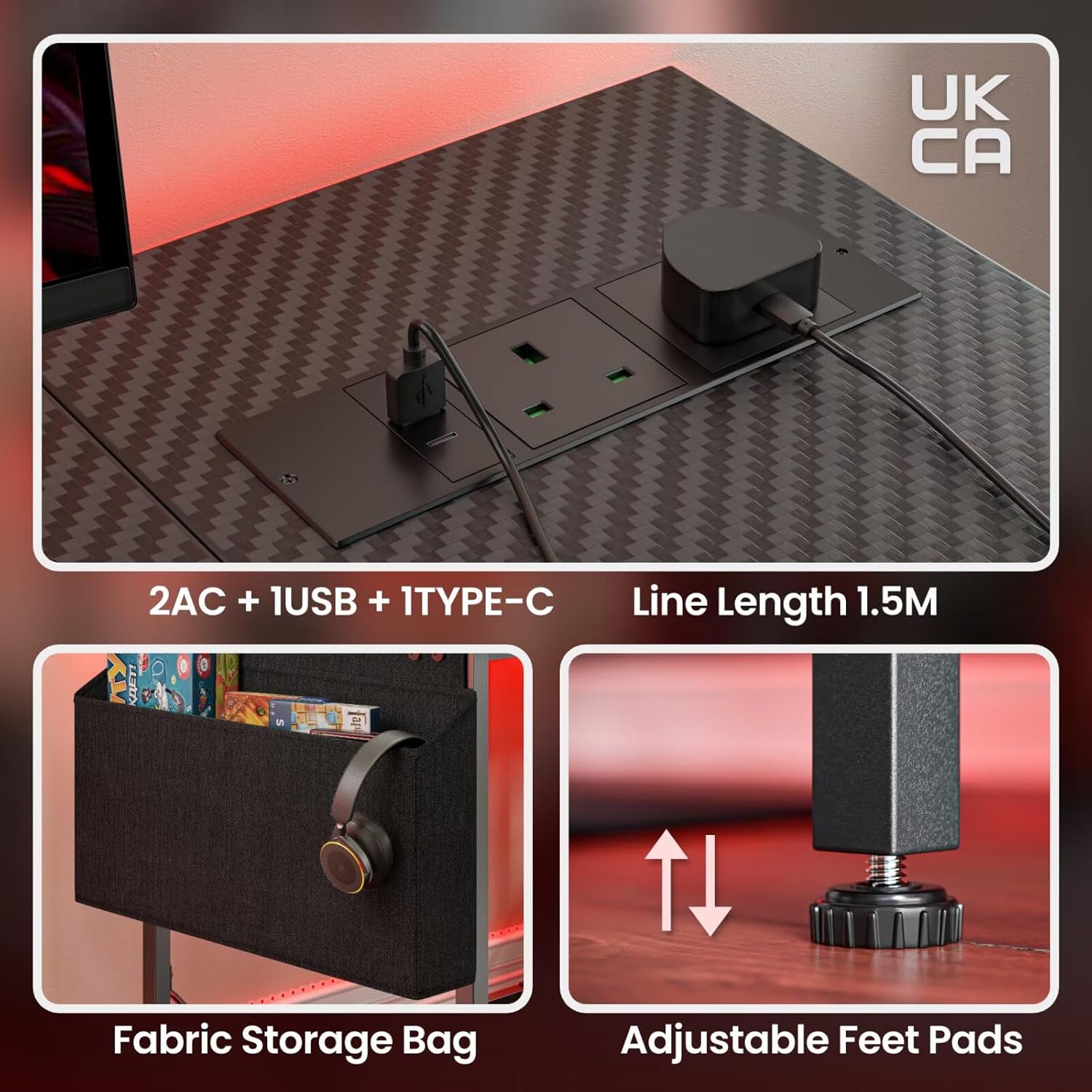
The desk includes a convenient power outlet unit with 2 AC outlets, 1 USB port, and 1 Type-C port. This allows for direct powering of the LED strip, computer, laptop, mobile phone, and other electronic devices. The power cord has a length of 1.5 meters.
5.3. Adjustable Shelves
The side shelves of the desk can be adjusted in height (up or down) to accommodate different items, such as a computer mainframe or other storage needs. They can also be installed on either the left or right side of the desk to suit your preference.


5.4. Removable Monitor Stand
The monitor stand is removable and can be placed on the side or anywhere in the front of the desk, providing flexibility for your monitor setup. It is designed to support up to 25kg (55 lbs) and can easily hold two monitors.

5.5. Storage Bag
A fabric storage bag is included for convenient storage of sundries, keeping your workspace tidy.
5.6. Multiple Mounting Options
The desk's design allows for various configurations to suit different usage scenarios and preferences.

6. Maintenance
To ensure the longevity and appearance of your desk:
- Cleaning: Use a wet rag to gently wipe desktop stains. Avoid harsh chemicals or abrasive cleaners.
- Protection: Avoid collision of the desktop with sharp objects to prevent scratches or damage.
- Stability Check: Periodically inspect all screws and connections. Re-tighten any loose fasteners to maintain desk stability.
7. Troubleshooting
If you encounter issues with your DOMSHOCT L Shaped Gaming Desk, consider the following:
7.1. Assembly Difficulties
- Missing or Confusing Instructions: If the provided instructions are unclear or seem to be for a similar but different model, refer to the product images on the retailer's website for visual guidance. Ensure all parts are correctly oriented before tightening screws.
- Loose Parts After Assembly: Double-check that all screws are fully tightened. If a part feels loose (e.g., the monitor stand), ensure it is correctly seated and consider adding padding if necessary for a snug fit.
7.2. LED Lights Not Working
- No Power: Ensure the LED strip is properly connected to the power outlet and that the outlet itself is receiving power.
- Controls Unresponsive: Check the battery in the remote (if applicable) or ensure your mobile device is correctly paired via Bluetooth for app control.
7.3. Power Outlets Not Functioning
- No Power: Verify that the desk's main power cord is securely plugged into a functional wall outlet.
- Overload: Ensure you are not exceeding the maximum power rating of the built-in outlet by plugging in too many high-power devices.
For persistent issues not covered here, please contact customer support.
8. Specifications
| Feature | Detail |
|---|---|
| Brand | DOMSHOCT |
| Model Number | GMZ012CFB40 |
| Shape | Small L Shape |
| Product Dimensions (D x W x H) | 100D x 80W x 75H Centimetres |
| Color | Carbon Fiber Black |
| Materials | Engineered Wood, Metal, Alloy Steel |
| Maximum Weight Recommendation | 80 Kilograms (176 lbs) |
| Assembly Required | Yes |
| Recommended People for Assembly | 1 |
| Tools Recommended for Assembly | Screw Driver |
| Included Components | Monitor Stand, Power Outlet, RGB Light Strip, Storage Bag |
| Special Features | Adjustable Shelves, Audio Reactive LED Strip, Built-In Power Outlets, Removable Monitor Stand, Large Storage Bag, Reversible Shelves |

9. Warranty and Support
9.1. Warranty Information
Specific warranty details for the DOMSHOCT L Shaped Gaming Desk are not provided in the product information. Please refer to your purchase documentation or contact the retailer/manufacturer directly for warranty terms and conditions.
9.2. Customer Support
For any questions, missing parts, or technical assistance, please contact DOMSHOCT customer service through the retailer's platform where you purchased the product. Have your model number (GMZ012CFB40) and purchase date ready when contacting support.