
1. Introduction
This manual provides essential information for the installation, operation, and maintenance of the WWEIFUS Automatic Washing Machine Computer Board, model XQB90/XQB100-611G. This component is designed as a replacement control motherboard for compatible automatic washing machines. Please read these instructions carefully before proceeding with installation or use to ensure proper function and safety.
2. Product Overview
The XQB90/XQB100-611G computer board is a critical control unit for automatic washing machines. It manages various washing cycles, water levels, and motor functions. This universal plate design offers compatibility with a range of full automatic washing machines, providing a durable and long-lasting performance solution for restoring or maintaining appliance functionality.
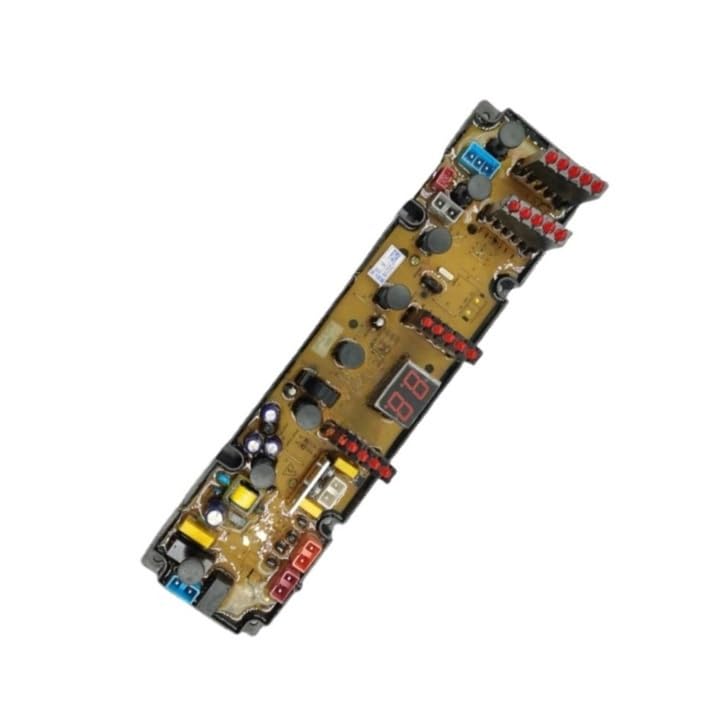
Figure 2.1: Overview of the WWEIFUS XQB90/XQB100-611G Washing Machine Computer Board.
Key Features:
- Compatible with most full automatic washing machines.
- Specifically designed for XQB90/XQB100-611G wave washer machine models.
- Universal plate design for versatile application.
- Engineered for durable and long-lasting performance.
3. Safety Information
WARNING: Risk of Electric Shock. Always disconnect power to the washing machine before attempting any installation, maintenance, or repair procedures.
- Ensure the washing machine is unplugged from the power outlet before beginning any work.
- If you are not familiar with electrical repairs or appliance servicing, it is recommended to seek assistance from a qualified technician.
- Wear appropriate personal protective equipment, such as insulated gloves, if necessary.
- Handle the computer board by its edges to avoid damaging electronic components or static discharge.
- Keep the board dry and away from liquids.
4. Setup and Installation
This section outlines the general steps for replacing a washing machine computer board. Specific steps may vary depending on your washing machine model. Refer to your washing machine's service manual for detailed instructions.
- Disconnect Power: Unplug the washing machine from the electrical outlet. Turn off the water supply to the machine.
- Access the Control Panel: Depending on your washing machine model, you may need to remove screws or clips to access the control panel where the computer board is located. This often involves removing the top panel or the entire control console.
- Document Connections: Before disconnecting any wires, take clear photographs or make a diagram of all wire connections to the old computer board. This is crucial for correct reassembly.
- Disconnect Wires: Carefully disconnect all wire harnesses and connectors from the old computer board. Note the orientation and position of each connector.
- Remove Old Board: Unscrew or unclip the old computer board from its mounting brackets.
- Install New Board: Position the new WWEIFUS XQB90/XQB100-611G computer board in the same location as the old one. Secure it with the original screws or clips.
- Reconnect Wires: Using your photographs or diagrams, carefully reconnect all wire harnesses and connectors to the new board. Ensure each connection is secure and correctly oriented.
- Reassemble: Reattach the control panel or top panel of the washing machine.
- Restore Power: Plug the washing machine back into the electrical outlet and turn on the water supply.
- Test Functionality: Run a short wash cycle to verify that the new computer board is functioning correctly and that all washing machine operations are normal.

Figure 4.1: Detail of the digital display and control button on the computer board, indicating user interface components.
5. Operating Instructions
The WWEIFUS XQB90/XQB100-611G computer board functions as the core control unit for your automatic washing machine. Once correctly installed, it restores the machine's ability to perform its programmed wash cycles. There are no direct operating instructions for the board itself, as its operation is integrated into the washing machine's user interface.
To operate your washing machine after installing this board, refer to your washing machine's original user manual for instructions on selecting wash cycles, water temperature, spin speed, and other settings. The computer board will execute these commands as programmed.
6. Maintenance
The computer board is a sealed electronic component and generally requires no routine maintenance. However, to ensure its longevity and reliable performance:
- Keep Dry: Ensure the area around the control board remains dry and free from moisture or water leaks.
- Clean Connections: If the washing machine is disassembled for other repairs, inspect the board's connectors for dust or corrosion. Clean gently with a soft, dry brush if necessary.
- Avoid Physical Damage: Protect the board from impacts or excessive vibration.
7. Troubleshooting
If your washing machine experiences issues after installing the new computer board, consider the following troubleshooting steps:
- No Power:
- Check if the washing machine is properly plugged into a working electrical outlet.
- Verify the circuit breaker for the washing machine has not tripped.
- Ensure all power connections to the computer board are secure.
- Incorrect Functionality / Error Codes:
- Double-check all wire connections to the computer board against your diagrams or photos. A loose or incorrect connection can cause malfunctions.
- Refer to your washing machine's original user manual for specific error code interpretations.
- Ensure the correct computer board model (XQB90/XQB100-611G) was installed for your washing machine.
- Partial Functionality:
- Inspect individual connectors for damage or bent pins.
- Ensure no foreign objects are obstructing connections.
If problems persist after performing these checks, it is advisable to consult a qualified appliance repair technician.
8. Specifications
| Specification | Value |
|---|---|
| Model Number | XQB90/XQB100-611G |
| Type | Automatic Washing Machine Computer Board |
| Compatibility | Most full automatic washing machines, XQB90/XQB100-611G wave washer models |
| Package Dimensions | 1.18 x 0.79 x 0.39 inches |
| Item Weight | 1.76 ounces |
| Manufacturer | hsujd (as per product data) |
9. Warranty and Support
For warranty information and specific support inquiries regarding your WWEIFUS XQB90/XQB100-611G Automatic Washing Machine Computer Board, please refer to the seller or manufacturer directly. Warranty terms typically cover manufacturing defects and may vary depending on the point of purchase.
If you require technical assistance or have questions not covered in this manual, please contact the retailer or the manufacturer's customer service department.