Introduction
The Fresh 'n Rebel Kids Wireless Headphones are designed specifically for young listeners, providing a safe, comfortable, and fun audio experience. These stylish headphones combine high-quality sound with child-friendly safety features, ensuring that kids can enjoy their favorite music, audiobooks, and educational content without any risks to their hearing. With a durable design, adjustable fit, and vibrant pink color, these headphones are perfect for kids on the go, whether for school, travel, or playtime.
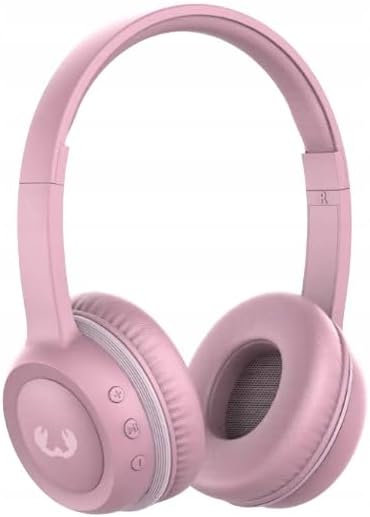
Image: Fresh 'n Rebel Kids Wireless Headphones in a vibrant pink color, showcasing the on-ear design and control buttons on the left earcup.
Setup
1. Charging the Headphones
Before first use, fully charge the headphones. Connect the provided USB charging cable to the charging port on the headphones and the other end to a USB power source (e.g., computer USB port, wall adapter). The LED indicator will show charging status.
2. Bluetooth Pairing
- Ensure the headphones are turned off.
- Press and hold the power button until the LED indicator flashes blue and red, indicating pairing mode.
- On your device (smartphone, tablet, computer), go to Bluetooth settings and turn Bluetooth on.
- Select "Fresh 'n Rebel Kids Headphones" from the list of available devices.
- Once connected, the LED indicator will turn solid blue.
Operating Instructions
Controls
- Power On/Off: Press and hold the power button.
- Play/Pause: Press the multi-function button once.
- Volume Up: Press the '+' button.
- Volume Down: Press the '-' button.
- Next Track: Press and hold the '+' button.
- Previous Track: Press and hold the '-' button.
- Answer/End Call: Press the multi-function button once.
Safe Listening Volume
The headphones feature a volume limiter that keeps the sound below 85dB, ensuring safe listening levels for kids’ sensitive ears. This feature is built-in and does not require user adjustment.
Maintenance
- Cleaning: Use a soft, dry cloth to clean the headphones. Do not use abrasive cleaners or solvents.
- Storage: Store the headphones in a cool, dry place away from direct sunlight and extreme temperatures.
- Battery Care: To prolong battery life, avoid fully discharging the battery frequently. Charge regularly, even if not in use for extended periods.
- Water Exposure: These headphones are not waterproof. Avoid exposure to water or excessive moisture.
Troubleshooting
| Problem | Solution |
|---|---|
| Headphones do not turn on. | Ensure the headphones are fully charged. Connect to a power source and check the charging indicator. |
| Cannot pair with device. |
|
| No sound or low volume. |
|
| Intermittent connection. |
|
Specifications
| Feature | Detail |
|---|---|
| Model Name | Fresh 'n Rebel Kids Wireless Headphones |
| Item Model Number | 3AHP210PP |
| Brand | Fresh ´N Rebel |
| Color | Pink |
| Ear Placement | On Ear |
| Form Factor | On Ear |
| Product Dimensions | 18 x 16 x 7 cm |
| Item Weight | 200 g |
| Manufacturer | Fresh 'N Rebel |
| Safety Feature | Volume limiter (below 85dB) |
| Connectivity | Bluetooth Wireless |
Warranty and Support
For warranty information and customer support, please refer to the official Fresh 'n Rebel website or contact their customer service directly. Keep your proof of purchase for warranty claims.
For further assistance, visit: Fresh 'n Rebel Support


