
Introduction
This manual provides detailed instructions for the installation, operation, and maintenance of your JFBEFOWI replacement motor for Broan-Nutone HVAC bathroom ventilation fans. This motor is designed to be compatible with specific Broan-Nutone models, including 86677, 763RLN, and 667RN. Please read this manual thoroughly before proceeding with installation to ensure safe and correct usage.
Important Safety Information
WARNING: Risk of Electric Shock. Disconnect power before servicing.
- Always disconnect the electrical power supply to the ventilation fan at the circuit breaker or fuse box before attempting any installation, maintenance, or repair.
- Ensure all wiring connections are secure and comply with local electrical codes. If you are unsure, consult a qualified electrician.
- Do not operate the fan with damaged wiring or if the motor appears to be faulty.
- Wear appropriate personal protective equipment (PPE), such as safety glasses and gloves, during installation.
- Keep children and pets away from the work area.
Specifications
| Attribute | Value |
|---|---|
| Brand Name | JFBEFOWI |
| Manufacturer | JFBEFOWI |
| Part Number | JFBEFOWI1824 |
| Compatible Broan-Nutone Models | 86677, 763RLN, 667RN |
| ASIN | B0DLT885Z5 |
Installation Instructions
Tools Required:
- Screwdriver (Phillips and/or Flathead, depending on fan model)
- Pliers (optional, for stubborn connections)
- Work gloves
- Safety glasses
Step-by-Step Installation:
- Disconnect Power: Before beginning, ensure the power to the ventilation fan is completely disconnected at the circuit breaker. Verify with a non-contact voltage tester if available.
- Remove Fan Cover: Carefully pull down or unclip the fan grille/cover from the ceiling. Some models may have screws holding it in place.
- Remove Old Motor Assembly:
- Locate the existing motor and fan blade assembly.
- Disconnect the electrical plug from the motor.
- Unscrew any mounting screws or release clips holding the motor assembly in place.
- Carefully remove the old motor and fan blade.
- Transfer Fan Blade: If your new motor does not come with a fan blade, you will need to transfer the old fan blade to the new motor shaft. This usually involves a retaining clip or screw. Ensure the blade is securely fastened.
- Install New Motor:
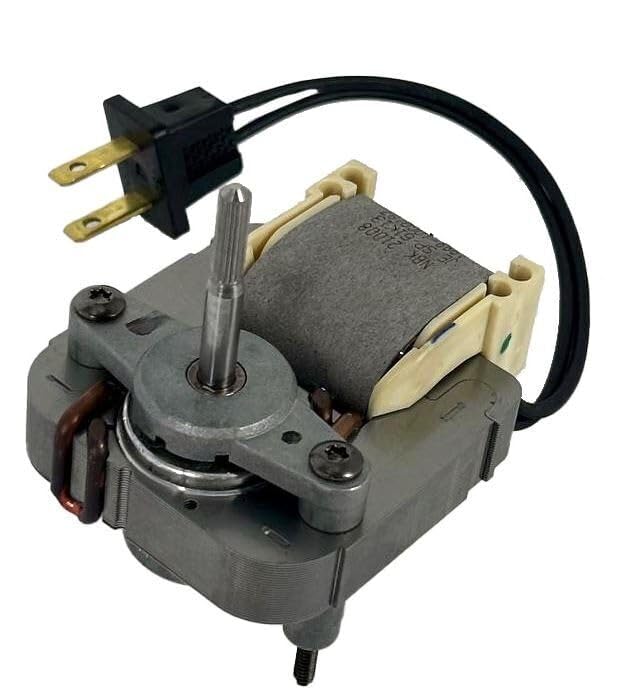
Image: The JFBEFOWI replacement motor, showing the motor housing, shaft, and attached two-prong electrical plug. This motor is ready for installation into compatible Broan-Nutone ventilation fan units.
- Position the new JFBEFOWI replacement motor into the fan housing.
- Secure it with the original mounting screws or clips. Ensure it is firmly seated and does not wobble.
- Connect the motor's electrical plug into the receptacle within the fan housing. Ensure a snug fit.
- Test Operation: Before replacing the fan cover, temporarily restore power at the circuit breaker and test the fan. Listen for smooth operation and proper airflow. If issues arise, refer to the Troubleshooting section.
- Replace Fan Cover: Once satisfied with the operation, disconnect power again, then reattach the fan grille/cover. Restore power.
Operation
After successful installation, your ventilation fan should operate as intended. The motor is designed for continuous duty in appropriate ventilation applications. Turn the fan on via its wall switch or integrated control. The fan should produce a consistent airflow and operate with minimal noise. If you notice unusual noises, vibrations, or lack of airflow, refer to the Troubleshooting section.
Maintenance
Regular maintenance helps ensure the longevity and efficient operation of your ventilation fan motor.
- Monthly/Quarterly Cleaning:
- Always disconnect power before cleaning.
- Remove the fan grille/cover and clean it with a mild detergent and water.
- Carefully wipe down the fan blade and the exterior of the motor with a damp cloth to remove dust and debris. Avoid getting moisture inside the motor housing.
- Ensure all components are dry before reassembling and restoring power.
- Annual Inspection:
- Always disconnect power before inspection.
- Inspect the motor for any signs of wear, such as loose wires or unusual discoloration.
- Check that the fan blade is securely attached to the motor shaft and is free of cracks or damage.
- Ensure the motor mounting is secure.
Troubleshooting
If your ventilation fan is not operating correctly after installing the replacement motor, consult the following table:
| Problem | Possible Cause | Solution |
|---|---|---|
| Fan does not turn on. |
|
|
| Fan runs, but with excessive noise or vibration. |
|
|
| Weak or no airflow. |
|
|
If problems persist after attempting these solutions, it may indicate a more complex issue. Consult a qualified technician or contact JFBEFOWI customer support.
Customer Support
For further assistance, technical support, or warranty inquiries, please contact JFBEFOWI customer service through the retailer where the product was purchased or visit the official JFBEFOWI website.
Please have your product model number (JFBEFOWI1824) and purchase information ready when contacting support.