
1. Introduction
Thank you for choosing the Pawfly 6W LED Aquarium Light. This light is designed to provide optimal illumination for your 1 to 5 gallon fish tank, promoting healthy plant growth and enhancing the visual appeal of your aquatic environment. It features a full spectrum of colors, dimmable settings, and a convenient built-in timer. Please read this manual thoroughly before use to ensure proper installation and operation.

Image 1.1: Pawfly 6W LED Aquarium Light in operation.
2. Product Features
- Full Spectrum Lighting: Features 6500 K white light, 450 nm blue light, 520 nm green light, and 660 nm red light. Provides LUX: 1200, PAR: 25, CRI: 91. These vivid lights accurately reproduce the natural colors of aquatic objects and significantly improve photosynthesis and growth of tank plants.
- Two Lighting Modes: Easily switch between Daytime Mode (all lights on) and Night Mode (blue light only) by short pressing the 'M' button. Hold the 'M' button for 3 seconds to turn all lights off. This simulates natural sunrise and sunset cycles, benefiting fish health and sleep patterns.
- Six Intensity Levels: In Daytime Mode, use the 'N' button to control the brightness of the blue light and the 'D' button for all other lights. In Night Mode, the 'N' button adjusts the luminance of the blue light.
- Automatic On/Off Timer: A built-in timer offers three optional lighting durations: 8 hours, 10 hours, and 12 hours. The timer operates within the initial 8, 10, or 12 hours of a 24-hour cycle, creating a consistent natural environment.
- User-Friendly Design: Optimized for 1 to 5 gallon fish tanks. Includes a 3-foot long USB cable for DC power (adapter not included). The flexible gooseneck allows for easy adjustment of the light angle.
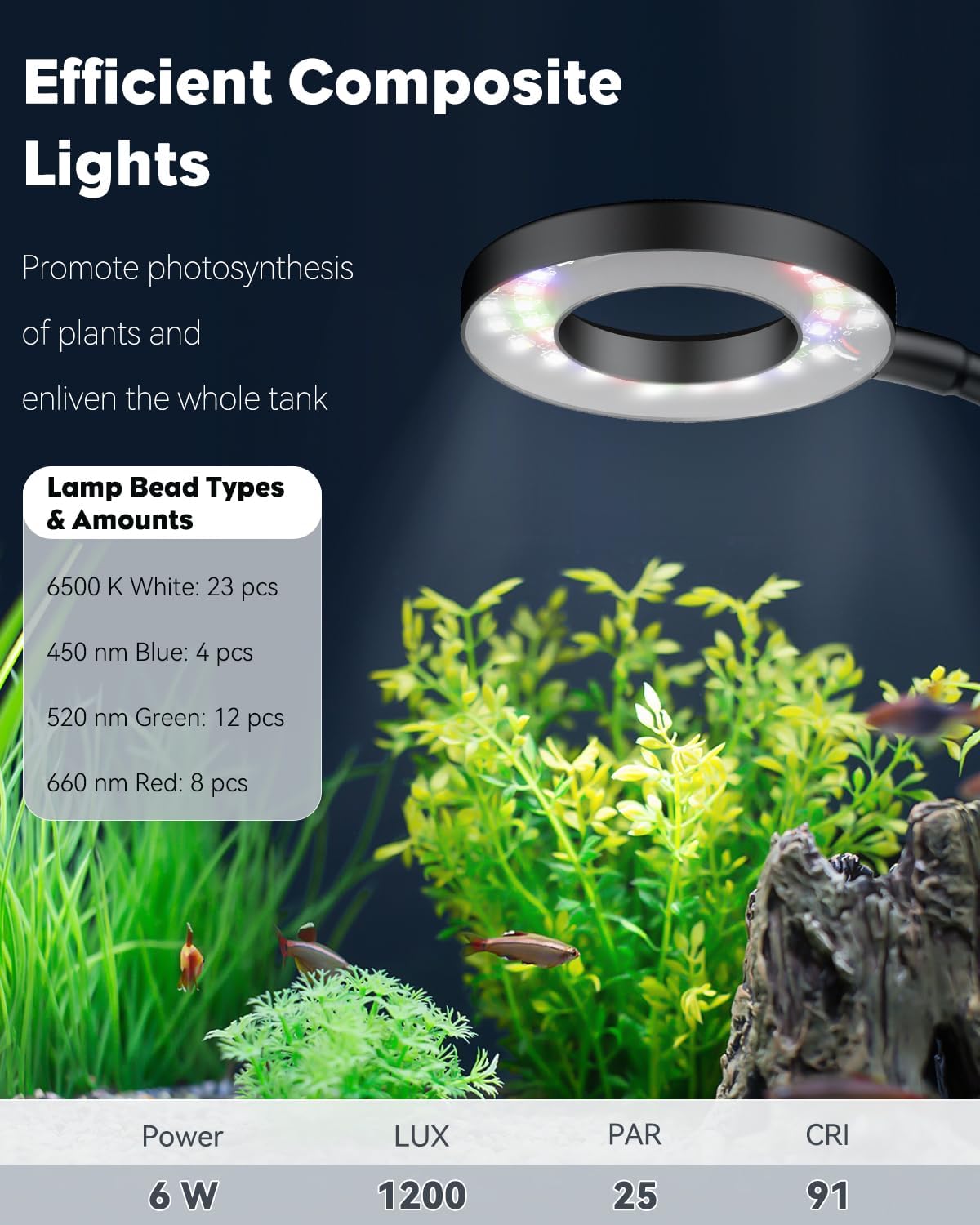
Image 2.1: Detailed breakdown of LED types and light specifications.
3. Setup Instructions
- Unpack the Light: Carefully remove all components from the packaging.
- Attach the Clip: The light features an adjustable clip. Loosen the screws on the clip to fit it over the edge of your aquarium. Ensure the clip is securely fastened to the tank wall. The clip is designed to fit tank walls with a thickness of up to 0.55 inches.
- Position the Light: Utilize the flexible gooseneck to position the light head directly over your aquarium at the desired angle and height.
- Connect Power: Plug the USB cable into a compatible USB power adapter (not included). For stable lighting, a 5V 2A adapter is recommended. A 5V 1A adapter may cause flickering at high brightness, which can be resolved by reducing the brightness.

Image 3.1: USB plug and adjustable clip details.

Image 3.2: Illustration of the heavy-duty clip installation.
Setup Video Guide
Video 3.1: This video demonstrates the installation process for a similar clip-on aquarium light, showing how to attach it to the tank.
4. Operating Instructions
The light is controlled via an inline control panel on the USB cable.

Image 4.1: Control panel for the Pawfly LED Aquarium Light.
- Power On/Off & Mode Switching (M Button):
- Short press 'M' repeatedly to switch between Daytime Mode (all lights on) and Night Mode (blue light only).
- Hold 'M' for 3 seconds to turn the light completely off.
- Brightness Adjustment (D & N Buttons):
- In Daytime Mode: Press 'D' to adjust the brightness of white, red, and green lights. Press 'N' to adjust the brightness of the blue light.
- In Night Mode: Press 'N' to adjust the luminance of the blue light.
- Timer Setting (Clock Button):
- Press the clock button to cycle through the available timer durations: 8 hours, 10 hours, and 12 hours.
- The selected timer will automatically turn the light on and off for the set duration within a 24-hour cycle.

Image 4.2: Comparison of Daytime and Night Modes.

Image 4.3: Visual representation of timer settings.
5. Maintenance
- Cleaning: Regularly wipe the light fixture with a soft, dry cloth to remove dust and water spots. Ensure the light is unplugged before cleaning. Do not use abrasive cleaners or immerse the light in water.
- Waterproof Rating: The light has an IP67 waterproof rating, meaning it is protected against temporary immersion in water. However, it should never be submerged or exposed to spraying water directly.
- Cable Inspection: Periodically check the USB cable for any signs of damage or wear. If any damage is found, discontinue use and replace the light.

Image 5.1: IP67 Waterproof Rating information.
6. Troubleshooting
- Light Flickers at High Brightness: This may occur if using a 5V 1A USB power adapter. Reduce the brightness setting using the 'D' or 'N' buttons to resolve the issue. For optimal performance, use a 5V 2A adapter.
- Light Does Not Turn On:
- Ensure the USB cable is securely plugged into both the light and the power adapter.
- Verify that the power adapter is functioning correctly and receiving power from the outlet.
- Press and hold the 'M' button for 3 seconds to ensure the light is not in the 'off' state.
- Timer Not Functioning Correctly: Ensure the timer is set to the desired duration (8H, 10H, or 12H) by pressing the clock button. The timer operates within the first set hours of a 24-hour cycle.

Image 6.1: Power adapter recommendations for stable operation.
7. Specifications
| Attribute | Detail |
|---|---|
| Brand | Pawfly |
| Model Number | Pawfly-2590 |
| Product Dimensions | 13 x 1.6 x 19 cm; 140 g |
| Light Source Type | LED |
| Power | 6W |
| Color Temperature | 6500 K (White Light) |
| Light Spectrum | 450 nm (Blue), 520 nm (Green), 660 nm (Red) |
| LUX | 1200 |
| PAR | 25 |
| CRI | 91 |
| Material | Aluminum |
| Color | Black |
| Switch Type | Push Button |
| Waterproof Rating | IP67 |
| Country of Origin | China |

Image 7.1: Product dimensions.
8. Warranty and Support
Information regarding product warranty and customer support is not provided in the available data. Please refer to the product packaging or the manufacturer's official website for details.


