
NULA F07 UH-1D
NULA YUXIANG F07 UH-1D RC Helicopter User Manual
Model: F07 UH-1D | Brand: NULA
1. Introduction
Thank you for purchasing the NULA YUXIANG F07 UH-1D RC Helicopter. This 1/34 scale model is designed for enthusiasts and beginners, featuring a realistic Bell UH-1 Huey design, advanced 6-axis gyro stabilization, 3D/6G flight modes, and optical flow positioning for precise control. Please read this manual thoroughly before operating the helicopter to ensure safe and optimal performance.
Key Features:
- Realistic 1:34 scale Bell UH-1 Huey design with cool light effects.
- High-precision optical flow positioning and barometer-based altitude hold for stable indoor and outdoor flight.
- One-button return flight function.
- Aileronless design with dual-axis coaxial motors and electronic stabilization for precise and stable flight.
- Equipped with a 6-axis gyroscope for stable, fast, and accurate flight.
- Efficient 2511 1200KV brushless main motor and 1204 brushless tail motor for low noise, high torque, and strong power.
- High-torque servos for quick response and precision, effective in moderate wind.
- Durable nylon + carbon fiber composite paddles for high strength and impact resistance.
- Long-lasting 7.4V 1200mAh Li-Poly battery with Type-C charging.
2. Safety Information
Operating an RC helicopter requires caution. Failure to follow these safety guidelines may result in injury or damage to the product.
- Age Recommendation: This product is recommended for users aged 15 years and older. Adult supervision is advised for younger users.
- Flight Environment: Fly in open areas, away from people, animals, buildings, power lines, and water. Avoid flying in strong winds or adverse weather conditions.
- Battery Safety:
- Use only the provided charger and batteries.
- Do not overcharge or over-discharge batteries.
- Do not short-circuit, puncture, or expose batteries to extreme temperatures.
- If the battery swells or shows signs of damage, discontinue use immediately.
- Always disconnect the battery from the helicopter when not in use.
- Propeller Safety: Keep hands, face, and loose clothing away from rotating propellers. They can cause serious injury.
- Interference: Ensure no other 2.4GHz devices are operating nearby to prevent signal interference.
- Pre-Flight Check: Always inspect the helicopter for any damage before each flight.
3. Setup
3.1 Package Contents
Verify that all components are present in your package:
- NULA YUXIANG F07 UH-1D RC Helicopter
- Remote Control (Transmitter)
- 7.4V 1200mAh Li-Poly Battery (Quantity may vary based on purchase)
- USB Charger
- User Manual (This document)
- Spare parts (if included)
3.2 Charging the Battery
Before first use, fully charge the helicopter's battery.
- Connect the USB charger to a suitable USB power source (e.g., computer USB port, USB wall adapter).
- Connect the helicopter battery to the USB charger.
- The charging indicator light on the charger will show the charging status (refer to charger instructions for specific light patterns).
- Charging typically takes approximately 60 minutes. Do not leave batteries unattended while charging.
- Once fully charged, disconnect the battery from the charger.
Important: Always ensure the battery is fully charged before each flight for optimal performance and safety.
3.3 Installing Batteries in the Remote Control
The remote control requires its own batteries (not included).
- Open the battery compartment on the back of the remote control.
- Insert the required number of AA batteries, ensuring correct polarity (+/-).
- Close the battery compartment securely.
3.4 Binding the Helicopter and Remote Control
The helicopter and remote control must be bound before flight.
- Ensure both the helicopter battery is charged and installed, and the remote control has fresh batteries.
- Place the helicopter on a flat, level surface.
- Turn on the helicopter's power switch. The indicator light on the helicopter will flash.
- Turn on the remote control.
- Move the throttle stick (left stick) all the way up, then all the way down.
- The indicator lights on both the helicopter and remote control should become solid, indicating a successful bind.
- If binding fails, turn off both devices and repeat the process.
4. Operating Instructions
4.1 Remote Control Overview
Familiarize yourself with the remote control layout and functions.
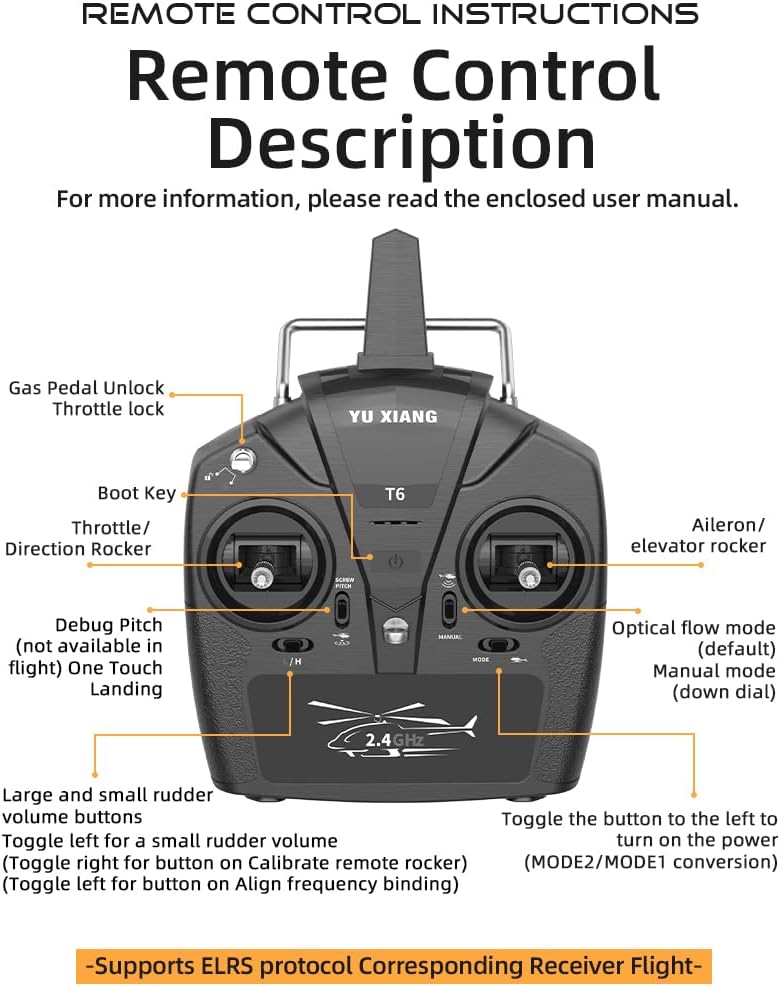
Image: Diagram of the NULA YUXIANG F07 UH-1D remote control, showing labels for Gas Pedal Unlock, Throttle lock, Boot Key, Throttle/Direction Rocker, Debug Pitch, One Touch Landing, Aileron/Elevator Rocker, Optical Flow Mode, Manual Mode, Large and Small Rudder Volume Buttons, and Power Toggle.
- Throttle/Direction Rocker (Left Stick): Controls altitude (up/down) and yaw (left/right rotation).
- Aileron/Elevator Rocker (Right Stick): Controls forward/backward movement (pitch) and left/right movement (roll).
- One-Touch Landing Button: Initiates an automatic landing sequence.
- Optical Flow Mode / Manual Mode Switch: Toggles between stabilized optical flow mode and manual flight mode.
- Large and Small Rudder Volume Buttons: Adjusts the sensitivity of rudder control.
- Boot Key / Throttle Lock: Power on/off and throttle safety lock.
4.2 Basic Flight Controls
Understand the fundamental movements of your helicopter.

Image: Diagram illustrating the helicopter's flight directions: Upwards, Downwards, Right Flight, Left Flight, Turn Right, Turn Left, Onward, and Backwards.
- Take-off: Slowly push the left throttle stick upwards to increase rotor speed and lift off.
- Landing: Gently pull the left throttle stick downwards to decrease altitude and land. Use the one-touch landing function for automated landing.
- Altitude Control: Push the left stick up to ascend, pull down to descend.
- Yaw (Rotation): Move the left stick left or right to rotate the helicopter clockwise or counter-clockwise.
- Forward/Backward (Pitch): Push the right stick up to move forward, pull down to move backward.
- Left/Right (Roll): Push the right stick left to move left, push right to move right.
4.3 Advanced Flight Modes and Features
- 6-Axis Gyro Stabilization: Provides stable and precise flight, especially beneficial for beginners.
- Optical Flow Positioning: Enhances stability and hover precision, particularly in indoor environments.
- Altitude Hold: Maintains a consistent altitude automatically, allowing you to focus on direction.
- 3D/6G Flight Modes:
- 6G Mode (Self-Stabilization): Ideal for beginners, offering stable flight and automatic leveling.
- 3D Mode (Acrobatic Flight): For experienced pilots, allowing for advanced maneuvers and inverted flight. Refer to the remote control for switching between modes.
- One-Button Return Flight: Activates a function that makes the helicopter return in the same direction as normal flight after inversion (specific to the feature bullet description, may require clarification in actual product).

Image: The NULA YUXIANG F07 UH-1D helicopter in stable flight, demonstrating its self-stabilization capabilities, suitable for beginners.
5. Maintenance
Regular maintenance ensures the longevity and optimal performance of your helicopter.
- Cleaning: After each flight, gently wipe the helicopter with a soft, dry cloth to remove dust and debris. Do not use water or chemical cleaners.
- Propeller Inspection: Regularly check propellers for cracks, bends, or damage. Replace any damaged propellers immediately to prevent unstable flight or further damage.
- Motor and Gear Inspection: Periodically check motors and gears for any obstructions or signs of wear. Ensure smooth rotation.
- Battery Care: Store batteries in a cool, dry place. Do not store fully charged or completely depleted batteries for extended periods. Charge them to about 50% for long-term storage.
- Storage: When not in use, store the helicopter and remote control in a safe, dry place, away from direct sunlight and extreme temperatures.

Image: Close-up of the helicopter's paddles, highlighting their construction from nylon and carbon fiber composite for strength and durability.
6. Troubleshooting
If you encounter issues, refer to the following common problems and solutions.
| Problem | Possible Cause | Solution |
|---|---|---|
| Helicopter does not respond to remote control. |
|
|
| Helicopter flies erratically or is unstable. |
|
|
| Short flight time. |
|
|
| Helicopter drifts in one direction. |
|
|
7. Specifications
| Feature | Detail |
|---|---|
| Brand | NULA |
| Model Name | F07 UH-1D |
| Scale | 1:34 |
| Material | Acrylonitrile Butadiene Styrene (ABS) |
| Main Motor | 2511 Brushless Motor |
| Tail Motor | 1204 Brushless Motor |
| Battery Type | LI-POLY 7.4V 1200mAh 25C |
| Charging Time | Approx. 60 minutes |
| Flight Time | 10-12 minutes |
| Remote Control Frequency | 2.4 GHz |
| Remote Control Range | Up to 120 meters |
| Flight Weight | 295 g |
| Dimensions (Length x Height) | 385 mm x 120 mm (Case Length x Height) |
| Blade Diameter | 375 mm |
| Gyroscope | 6-Axis Gyro |
| Special Features | 6G hexagonal design, 3D/6G flight, optical flow positioning, LED lights |
| Recommended Age | 15 years and up |
8. Warranty Information
NULA products are manufactured to high-quality standards. This product comes with a standard manufacturer's warranty against defects in materials and workmanship. The warranty period typically covers a specific duration from the date of purchase. Please retain your proof of purchase for warranty claims.
The warranty does not cover damage caused by:
- Accidents, misuse, abuse, or improper operation.
- Unauthorized modifications or repairs.
- Failure to follow the instructions in this manual.
- Normal wear and tear.
For specific warranty terms and conditions, please refer to the warranty card included with your product or contact customer support.
9. Customer Support
If you have any questions, require technical assistance, or need to report a problem with your NULA YUXIANG F07 UH-1D RC Helicopter, please contact our customer support team.
Please have your product model number (F07 UH-1D) and proof of purchase ready when contacting support.
Contact Information:
- Email: [Insert Manufacturer/Seller Support Email Here]
- Website: [Insert Manufacturer/Seller Support Website Here]
- Phone: [Insert Manufacturer/Seller Support Phone Number Here]
Ask a question about this manual
Ask about setup, troubleshooting, compatibility, parts, safety, or missing instructions. Manuals+ will review the question and use this page’s manual context to help answer it.