
Introduction
This manual provides essential instructions for the safe operation, setup, and maintenance of your MakerTopia LHD-881 Remote Control Boat. Please read this manual thoroughly before operating the product to ensure proper function and longevity.
The LHD-881 is a 1:390 scale 2.4G RC electric battleship model featuring a twin-engine design, suitable for use in swimming pools, rivers, lakes, and offshore waters. It offers forward, backward, left turn, right turn, and capsize reset functions, along with precision waterproofing and anti-collision protection.
Safety Precautions
- Age Recommendation: This product is recommended for users aged 16 years and up. Adult supervision is advised for younger users.
- Water Environment: Operate the boat only in suitable water bodies (swimming pools, rivers, lakes, offshore waters). Avoid areas with strong currents, marine life, or obstacles.
- Battery Safety: Use only the specified 7.4V 1500mAh Lithium Battery and USB charger. Do not overcharge or short-circuit the battery. Disconnect the battery when not in use.
- Propeller Warning: Keep fingers, hair, and loose clothing away from the propellers when the boat is powered on.
- Waterproof Integrity: Ensure all hatches and covers are securely closed before placing the boat in water to maintain its waterproof integrity.
- Remote Control Range: Maintain the boat within the specified 100m remote control distance to prevent loss of control.
Package Contents
Verify that all items are present in the package:
- LHD-881 Boat Model x 1
- Remote Controller x 1 (Pistol style or Watch style, depending on version)
- Display Stand x 1
- Decorative Accessories Package x 1
- 7.4V Lithium Battery x 1
- Battery USB Charging Cable x 1
- Instructions Manual x 1 (This document)
Setup
1. Charging the Boat Battery
- Connect the 7.4V Lithium Battery to the provided USB Charging Cable.
- Plug the USB Charging Cable into a standard USB power adapter (not included).
- The charging indicator light on the USB cable will illuminate during charging. Charging time is approximately 1.5 hours.
- Once fully charged, the indicator light may change or turn off. Disconnect the battery from the charger.
Note: A fully charged battery provides approximately 15 minutes of operation.
2. Installing Batteries in the Remote Controller
- Open the battery compartment on the back of the remote controller.
- Insert 2 AA batteries (not included) according to the polarity markings.
- Close the battery compartment securely.
3. Installing the Boat Battery
- Locate the battery compartment on the boat. This is typically accessed by removing a hatch on the deck.
- Connect the charged 7.4V Lithium Battery to the boat's power connector.
- Carefully place the battery inside the compartment and secure the hatch to ensure a watertight seal.
4. Attaching Decorative Accessories
Attach any decorative accessories from the package to the boat model as desired. Refer to the product images for typical placement.

Image Description: The LHD-881 remote control boat displayed next to its retail packaging. The boat is a grey and red battleship model. The packaging indicates "LHD-881" and "1:390 scale".
Operating Instructions
1. Powering On and Pairing
- Place the boat in water. The boat's power system is designed to activate only when in contact with water for safety.
- Turn on the remote controller.
- The remote controller and boat will automatically pair using 2.4GHz frequency. An operation prompt light on the remote controller will indicate successful pairing (e.g., a green light).
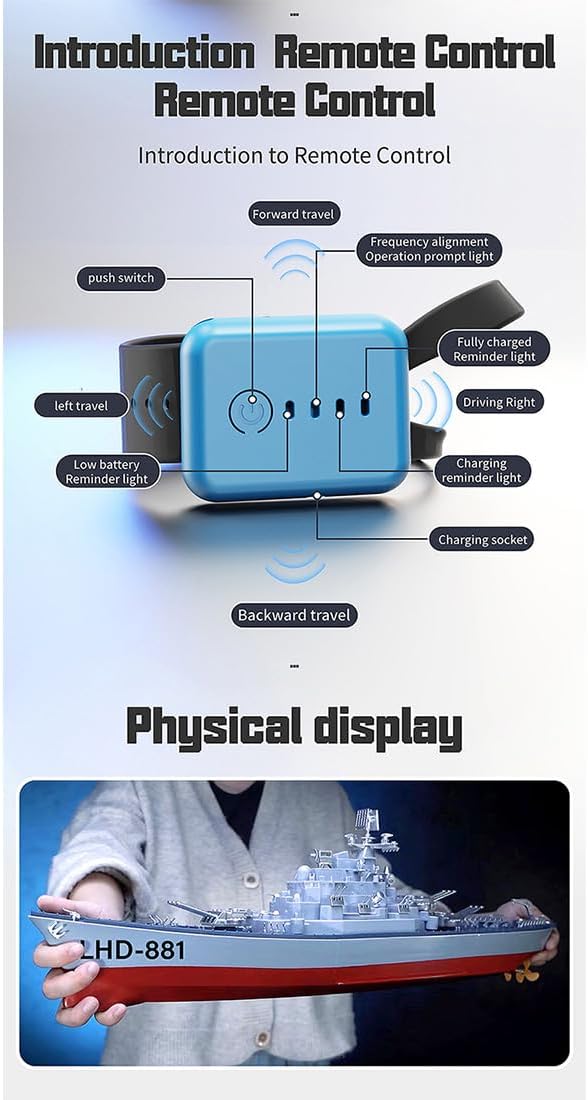
Image Description: A diagram illustrating the functions of the watch-style remote control. It shows buttons for forward, backward, left travel, right travel, push switch, frequency alignment, operation prompt light, fully charged reminder light, low battery reminder light, charging reminder light, and charging socket.
2. Basic Controls
The LHD-881 boat supports the following movements:
- Forward: Push the throttle stick/button forward.
- Backward: Pull the throttle stick/button backward.
- Turn Left: Move the steering stick/button to the left.
- Turn Right: Move the steering stick/button to the right.
- Capsize Reset: If the boat flips over, use the designated capsize reset function on the remote (if available) or specific stick movements to right the boat.

Image Description: The LHD-881 remote control boat operating in water, with a pistol-grip remote control held by a hand on the left and a watch-style remote control worn on a wrist on the right. The image highlights the 2.4GHz remote control frequency and remote control distances of 50 meters and 100 meters.
3. Low Battery Alarm
- Pistol Remote Controller: The green light will flash.
- Watch Remote Controller: The green light will remain steadily lit.
When the low battery alarm activates, return the boat to shore immediately to avoid losing power in the water.
4. Water Outage Safety Feature
The boat is equipped with an intelligent sensor that automatically powers off the hull when it leaves the water surface. This prevents accidental propeller operation out of water.

Image Description: A top-down view of the LHD-881 boat, illustrating its "Leaving water outage Safety demonstration" feature. An inset shows a hand pressing a switch icon on the deck, indicating how to manually activate or override the power-off function when out of water.
Maintenance
- After Each Use: Remove the boat from the water, disconnect the battery, and thoroughly dry the boat, especially the battery compartment and motor area, with a soft cloth.
- Battery Storage: Store the Lithium battery in a cool, dry place, away from direct sunlight and extreme temperatures. Do not store fully charged or fully discharged for extended periods.
- Cleaning: Clean the boat's hull and propellers regularly to remove any debris, algae, or salt residue (if used in saltwater). Use a damp cloth; avoid harsh chemicals.
- Propeller Inspection: Periodically check the propellers for damage or entanglement. Replace if necessary.
- Remote Controller: Keep the remote controller dry and clean. Remove AA batteries if storing for a long time.
Troubleshooting
| Problem | Possible Cause | Solution |
|---|---|---|
| Boat does not respond to remote. | 1. Boat battery low or not connected. 2. Remote controller batteries low or not installed. 3. Boat not in water. 4. Not paired. | 1. Charge/connect boat battery. 2. Replace remote controller batteries. 3. Place boat in water. 4. Ensure both are powered on and pair successfully. |
| Boat runs slowly or intermittently. | 1. Boat battery low. 2. Propellers obstructed. | 1. Recharge boat battery. 2. Check and clear propellers of debris. |
| Boat flips over frequently. | 1. Operating in rough water. 2. Excessive speed in turns. | 1. Operate in calmer waters. 2. Reduce speed when turning. Use capsize reset function. |
| Remote control range is short. | 1. Remote controller batteries low. 2. Interference from other 2.4GHz devices. | 1. Replace remote controller batteries. 2. Move to an area with less interference. |
Specifications
- Model No.: LHD-881
- Material: ABS + Electronic Components
- Sailing Speed: 8-10 km/h
- Product Battery: 7.4V 1500mAh Lithium Battery
- Charger: USB Charger
- Duration: Approximately 15 minutes
- Charging Time: Approximately 1.5 hours
- Remote Controller Batteries: AA batteries *2 (not included)
- Frequency: 2.4GHz
- RC Distance: Up to 100 meters
- Product Dimensions: 60 × 11.5 × 19 cm (23.62 x 4.53 x 19 inches)
- Product Weight: 1950g (4.3 pounds)
- Recommended Age: 16+ years

Image Description: The LHD-881 remote control boat displayed on a stand on a desk, next to a computer monitor showing an image of the same boat. This illustrates the boat's scale and detail.
Warranty and Support
For warranty information and technical support, please contact MakerTopia customer service through the retailer where the product was purchased or visit the official MakerTopia website. Please retain your proof of purchase for warranty claims.
Manufacturer: MakerTopia
Item Model Number: YH0R4K4V536T410FG172AEW8