
Himarine V3
Himarine Spectra V3 Aqua Knight LED Light User Manual
Model: V3 | Brand: Himarine
1. Introduction
The Himarine Spectra V3 Aqua Knight LED Light is an advanced lighting system designed for marine and coral reef aquariums. It features high-intensity LED chips and programmable functions to simulate natural light cycles, promoting healthy growth for corals and aquatic life. This manual provides detailed instructions for the proper setup, operation, maintenance, and troubleshooting of your new aquarium light.

Figure 1: Himarine Spectra V3 Aqua Knight LED Light with mounting bracket.
2. Setup Instructions
2.1 Unpacking
Carefully remove all components from the packaging. Verify that all items are present:
- Himarine Spectra V3 Aqua Knight LED Light fixture
- Mounting bracket and hardware
- Power adapter
2.2 Mounting the Light
The light fixture comes with an adjustable mounting bracket for secure attachment to your aquarium. Ensure the bracket is firmly secured to the tank rim, and the light fixture is positioned centrally over the aquarium for even light distribution.

Figure 2: Light fixture mounted on an aquarium.
2.3 Power Connection
Connect the power adapter to the light fixture's power input port. Then, plug the power adapter into a standard 100-240VAC electrical outlet. Ensure the connection is secure before powering on the unit.
3. Operating Instructions
3.1 Control Panel Overview
The light fixture features an intuitive control panel with an LED display and touch buttons for easy programming and adjustment.
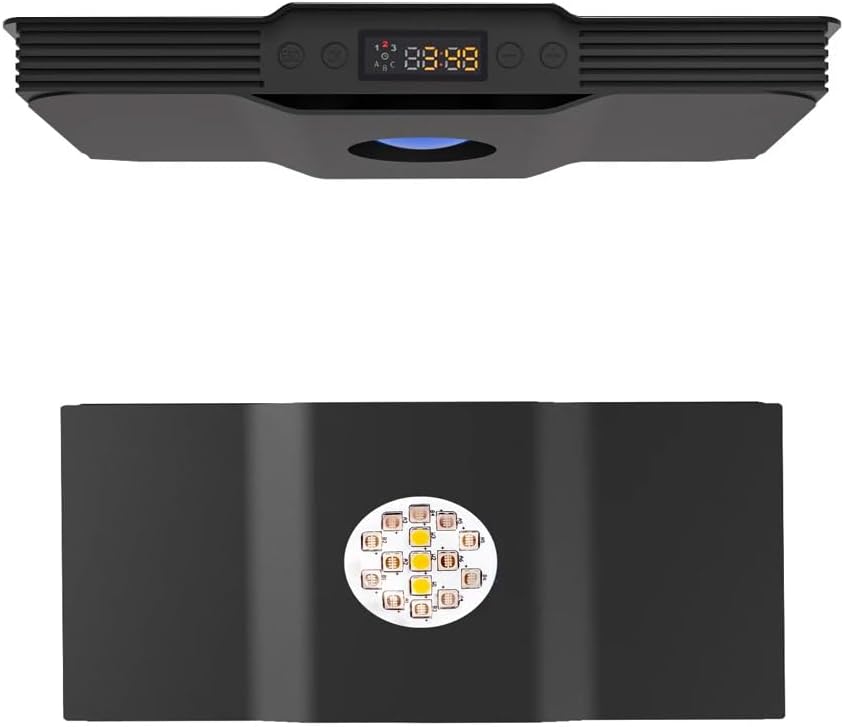
Figure 3: Control panel with button functions and LED display details.
- Save/Exit (ESC) Button: Used to save current settings or exit a menu.
- OK/Confirm Button: Used to confirm selections or enter a menu.
- Increase Button: Used to increase values or navigate up in menus.
- Decrease Button: Used to decrease values or navigate down in menus.
- LED Display: Shows current time, brightness levels, and active channels (A, B, C).
3.2 Basic Operation
To turn the light on or off, press and hold the OK/Confirm button. Short presses of the Increase/Decrease buttons will adjust the overall brightness when not in a programming menu.
3.3 Programming Modes: Sunrise and Sunset Simulation
The Spectra V3 allows for customizable programming to simulate natural sunrise and sunset cycles. This feature helps reduce stress on aquatic inhabitants by gradually increasing and decreasing light intensity.
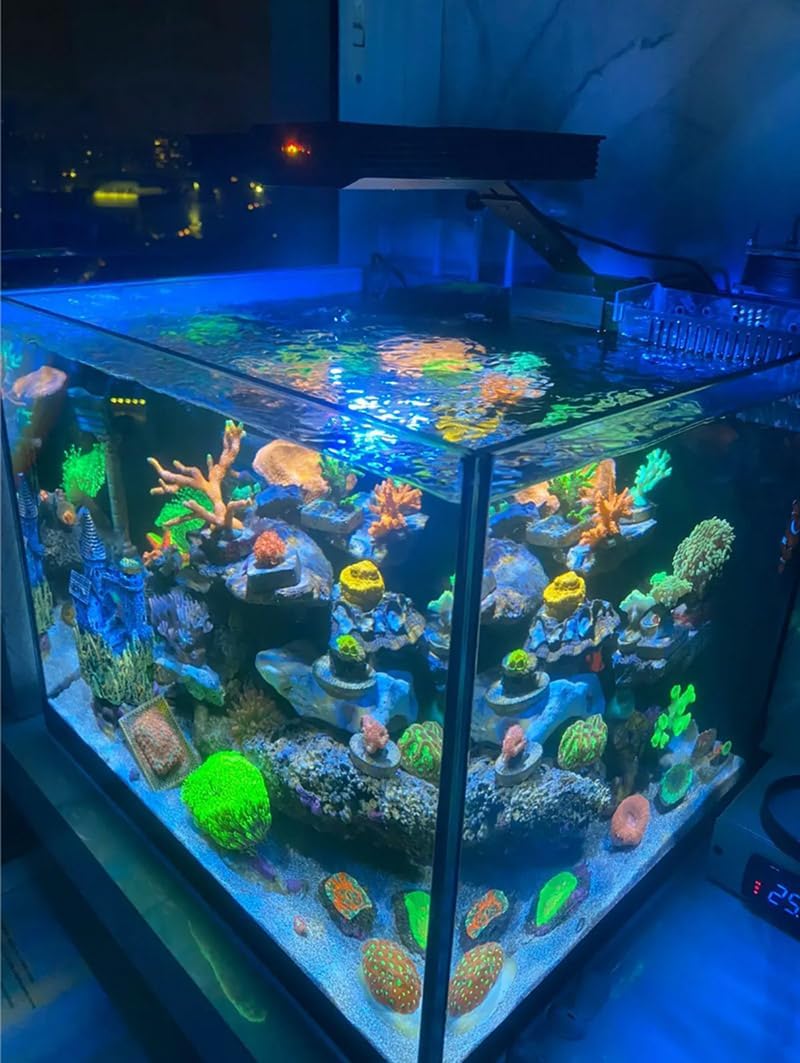
Figure 4: Customizable sunrise and sunset simulation graph.
Refer to the detailed programming section in the included quick start guide for step-by-step instructions on setting specific time periods and brightness levels for each channel.
3.4 Channel Control
The light features three independent LED channels, allowing for precise control over the light spectrum:
- Channel A: 4x Royal Blue, 2x Epileds Violet LEDs. Ideal for promoting coral fluorescence and growth.
- Channel B: 6x Blue LEDs. Enhances blue spectrum for marine environments.
- Channel C: 3x White LEDs. Provides essential full-spectrum light for overall health and visual appeal.
Each channel's intensity can be adjusted independently to achieve the desired color rendition and light penetration for your specific aquarium needs.
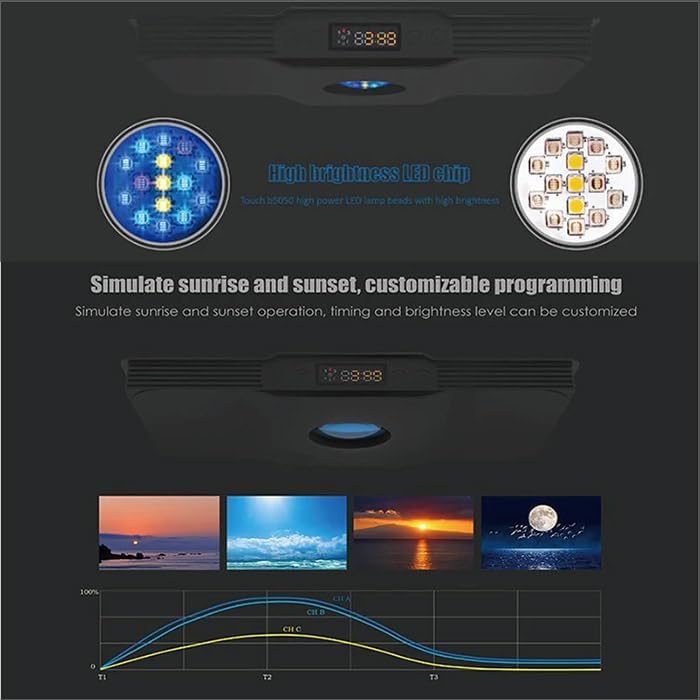
Figure 5: High brightness LED chips.
4. Maintenance
Regular maintenance ensures optimal performance and longevity of your Himarine Spectra V3 LED light.
- Cleaning: Periodically wipe the light fixture and lenses with a soft, damp cloth to remove salt creep, dust, and water spots. Ensure the unit is unplugged before cleaning.
- Ventilation: Ensure the ventilation slots on the fixture are clear of obstructions to prevent overheating.
- Power Cord Inspection: Regularly check the power cord for any signs of damage or fraying. Replace if necessary.
5. Troubleshooting
This section addresses common issues you might encounter with your LED light.
| Problem | Possible Cause | Solution |
|---|---|---|
| Light does not turn on. | No power supply; loose connection. | Check power adapter connection to light and wall outlet. Ensure outlet is functional. |
| Some LEDs are not lighting up. | Channel brightness set to zero; faulty LED. | Check individual channel brightness settings. If issue persists, contact support. |
| Programming not saving. | Settings not confirmed. | Ensure you press the 'Save/Exit' button after making changes. |
| Light flickers. | Unstable power supply; loose connection. | Check power connections. Try a different power outlet. |
6. Specifications
Detailed technical specifications for the Himarine Spectra V3 Aqua Knight LED Light:
| Feature | Detail |
|---|---|
| LED Type | Matrix chips |
| Number of LEDs | 15 pieces |
| Wattage per LED | 3W |
| Max Power | 60W |
| Voltage | 100-240VAC |
| Dimensions (L x W x H) | 230 x 120 x 32mm (9.1 x 4.7 x 1.3 inches) |
| Suitable for Aquariums | 60-80 cm (31.5 inches) long; can be combined for larger aquariums |
| Housing Color | Black |
| Item Weight | 1.5 kg (3.31 pounds) |
| LED Channels | Channel A: 4x Royal Blue, 2x Epileds Violet Channel B: 6x Blue Channel C: 3x White |
| Power Source | AC |
| Mounting Type | Surface Mount |
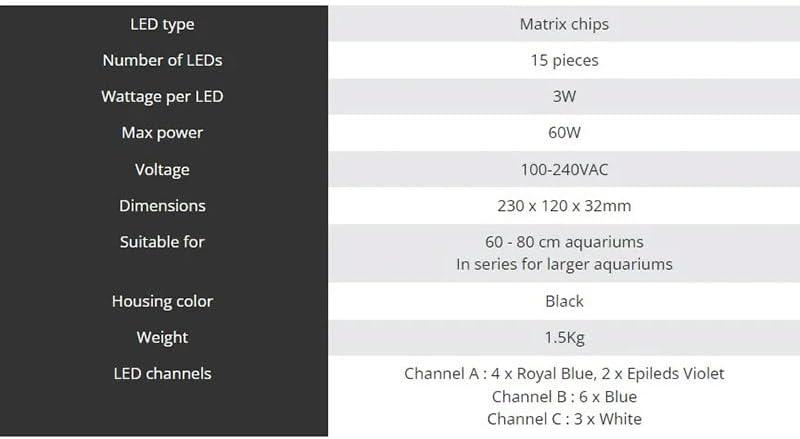
Figure 6: Product specifications.
7. Warranty and Support
This product is covered by a manufacturer's warranty against defects in materials and workmanship. For specific warranty terms and conditions, please refer to the product packaging or contact Himarine customer support.
For technical assistance, troubleshooting, or to inquire about replacement parts, please visit the official Himarine Store or contact their customer service department:
Ask a question about this manual
Ask about setup, troubleshooting, compatibility, parts, safety, or missing instructions. Manuals+ will review the question and use this page’s manual context to help answer it.