
1. Introduction
Thank you for choosing the GASLAND UC60BS 60cm Double Motor Cooker Hood. This manual provides essential information for the safe installation, operation, and maintenance of your new appliance. Please read these instructions carefully before use and keep them for future reference.
2. Safety Information
For your safety and to ensure correct operation, please observe the following precautions:
- Ensure the electrical supply matches the rating plate on the appliance.
- Installation must be carried out by a qualified person in accordance with local regulations.
- Do not flambé under the cooker hood.
- Regularly clean the grease filters to prevent fire hazards.
- Ensure adequate ventilation in the room when the cooker hood is used simultaneously with gas or other fuel-burning appliances.
- The exhaust air must not be discharged into a flue which is used for exhausting fumes from appliances burning gas or other fuels.
- Disconnect the appliance from the mains supply before any cleaning or maintenance.
3. Product Overview
3.1 Components Included
- GASLAND UC60BS Cooker Hood
- Exhaust pipe
- CF133 Carbon Filter (pre-installed or included for recirculation mode)
- Mounting hardware (screws, wall plugs)
3.2 Key Features
- Dual-Motor Design: Provides stronger suction power for efficient odor and vapor removal.
- High Airflow Capacity: Achieves 333 m³/h for a fresh and clean kitchen environment.
- Touch Control Panel: Intuitive sensor controls with 3 power levels for various cooking needs.
- LED Lighting: Two 1.5W energy-efficient LED lamps illuminate your cooking area.
- 3-Layer Aluminum Grease Filter: Removable, washable, and dishwasher-safe for easy maintenance. Includes a retention damper to prevent greasy air return.
- Versatile Ventilation: Supports both external extraction (ducted) and internal recirculation (ductless) modes.
- Sleek Design: Black metal body with a black tempered glass control panel, compatible with GASLAND induction, ceramic, or gas hobs.
3.3 Product Views and Dimensions
The following images illustrate the key features and dimensions of the cooker hood.

Image 1: The dual-motor design enhances suction power, efficiently removing cooking odors and vapors.

Image 2: Illustrates the 333 m³/h suction capacity and the three available fan speed settings for different cooking intensities.

Image 3: Detailed view of the cooker hood's dimensions (595mm width, 135mm height, 336mm depth) and the touch control panel, highlighting the power button, fan speed controls, and light function.
4. Setup and Installation
The GASLAND UC60BS cooker hood is designed for under-cabinet mounting. It supports both external extraction and internal recirculation modes.
4.1 Choosing Ventilation Mode
- External Extraction (Ducted): Air is expelled outside through an exhaust pipe. This mode requires a suitable ducting system to the exterior. The exhaust pipe is included.
- Internal Recirculation (Ductless): Air is filtered through a carbon filter (CF133, included) and then returned to the kitchen. This mode is suitable when external venting is not possible.

Image 4: Visual representation of the two ventilation modes: recirculation (Umluftbetrieb) where air is filtered and returned, and extraction (Abluftbetrieb) where air is vented outside.
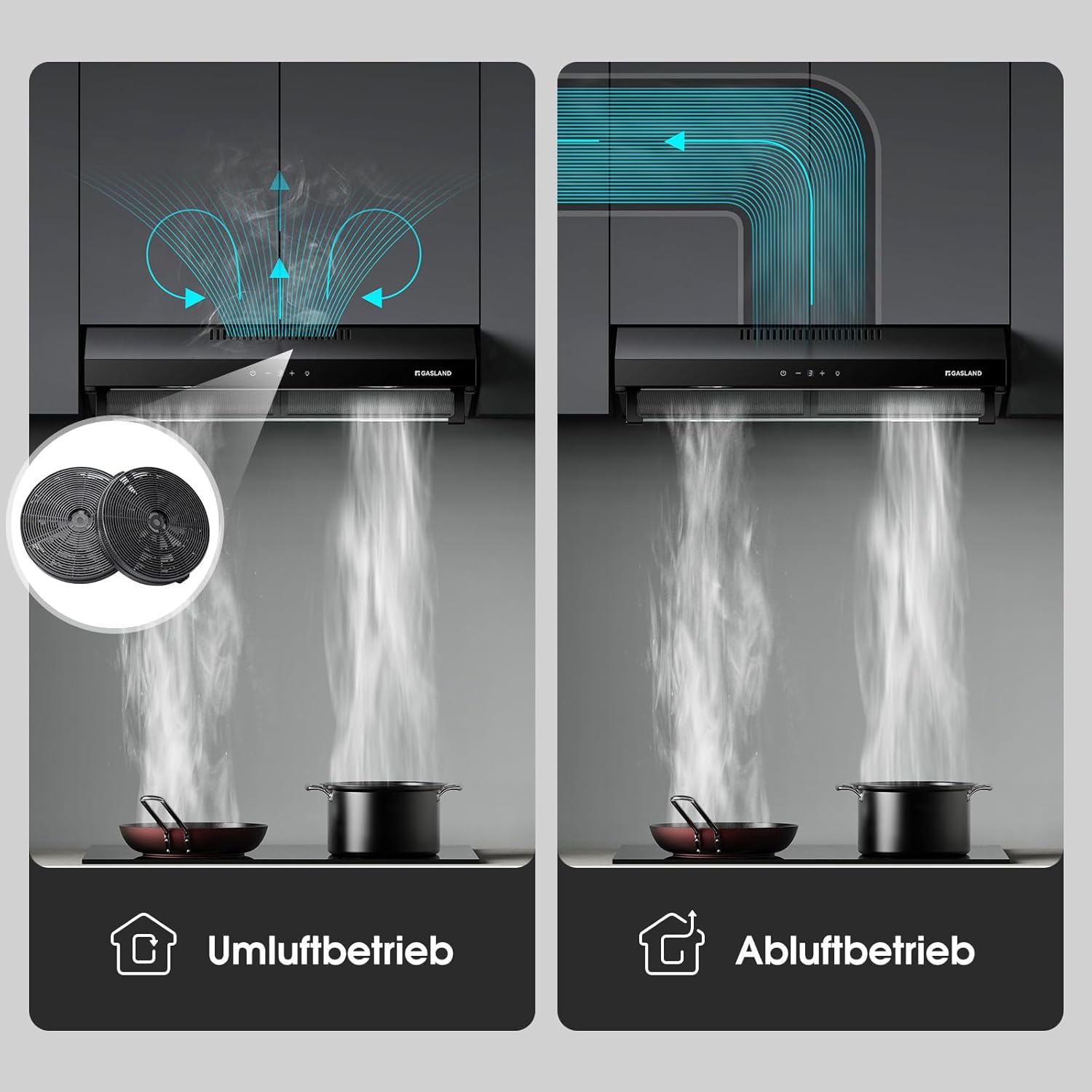
Image 5: Further illustration of recirculation mode, showing air passing through carbon filters before returning, versus extraction mode, where air is ducted out.
4.2 Installation Steps (General Guidelines)
- Preparation: Ensure the installation area is clear and that you have all necessary tools and components. Measure the mounting height above your hob according to local safety regulations (typically 65-75 cm for electric hobs, 70-80 cm for gas hobs).
- Marking: Mark the drilling points on the wall or underside of the cabinet according to the hood's mounting template.
- Drilling: Drill holes at the marked positions and insert wall plugs.
- Mounting: Secure the cooker hood to the wall or cabinet using the provided screws. Ensure it is level and securely fastened.
- Ducting (for Extraction Mode): Connect the exhaust pipe to the hood's outlet and route it to the exterior vent. Ensure all connections are sealed to prevent air leaks.
- Carbon Filter Installation (for Recirculation Mode): If not pre-installed, attach the CF133 carbon filters to the motor housing as per the instructions provided with the filters.
- Electrical Connection: Connect the cooker hood to a suitable power outlet. Ensure the power supply is off during connection.
- Testing: Turn on the power and test all functions of the cooker hood (fan speeds, lights).
For detailed installation instructions, please refer to the specific mounting template and diagrams included in your product packaging.
5. Operating Instructions
The GASLAND UC60BS cooker hood features a user-friendly touch control panel.
5.1 Control Panel Functions
Image 6: Close-up of the touch control panel, indicating the power switch, fan speed adjustment buttons (- and +), and the light/delay function button.
- Power Button (U): Press to turn the cooker hood ON or OFF.
- Fan Speed Decrease Button (-): Press to decrease the fan speed.
- Fan Speed Increase Button (+): Press to increase the fan speed. The hood has 3 speed levels.
- Light / Delay Function Button (☀): Press once to turn the LED lights ON or OFF. Press and hold to activate the delay shut-off function (e.g., 5-minute delay before turning off automatically).
5.2 General Operation
- Turn On: Press the power button to start the hood. It will typically start at the lowest speed setting.
- Adjust Fan Speed: Use the '+' and '-' buttons to select the desired fan speed (1, 2, or 3) based on the intensity of cooking fumes.
- Use Lighting: Press the light button to illuminate your cooking area.
- Delay Shut-off: After cooking, you can activate the delay shut-off function to clear residual fumes. The hood will run for a set period (e.g., 5 minutes) and then turn off automatically.
- Turn Off: Press the power button again to turn off the hood, or allow the delay function to complete.
6. Maintenance and Cleaning
Regular maintenance ensures optimal performance and extends the lifespan of your cooker hood.
6.1 Cleaning the Aluminum Grease Filters
The 3-layer aluminum grease filters should be cleaned regularly (approximately every 2-4 weeks, depending on usage) to prevent grease buildup and maintain extraction efficiency.
- Disconnect Power: Always switch off and unplug the cooker hood before cleaning.
- Remove Filters: Locate the release latches on the filters and carefully unclip them.
- Clean Filters: The filters are dishwasher-safe. Alternatively, wash them by hand in hot water with a mild detergent. Ensure all grease is removed.
- Dry and Reinstall: Allow the filters to dry completely before reinserting them into the hood. Ensure they are securely clipped in place.
6.2 Replacing the Carbon Filters (Recirculation Mode Only)
If you are using the hood in recirculation mode, the CF133 carbon filters absorb odors and must be replaced every 2-3 months, or more frequently with heavy use.
- Disconnect Power: Switch off and unplug the cooker hood.
- Remove Grease Filters: Follow the steps above to remove the aluminum grease filters.
- Remove Old Carbon Filters: The carbon filters are typically attached to the motor housing. Twist or unclip them to remove.
- Install New Carbon Filters: Attach new CF133 carbon filters (ASIN: B0C23YBFTF) by twisting or clipping them into place.
- Reinstall Grease Filters: Reinstall the aluminum grease filters.
6.3 General Cleaning
Clean the exterior surfaces of the cooker hood regularly with a soft cloth and a mild, non-abrasive cleaning agent. Avoid using harsh chemicals or abrasive pads that could damage the finish.
7. Troubleshooting
If you encounter issues with your cooker hood, refer to the following common problems and solutions:
| Problem | Possible Cause | Solution |
|---|---|---|
| Hood does not turn on | No power supply; Faulty power cable; Control panel issue | Check power connection and circuit breaker; Contact qualified technician |
| Low suction power | Clogged grease filters; Clogged carbon filters (recirculation); Obstruction in ducting (extraction); Incorrect fan speed setting | Clean grease filters; Replace carbon filters; Check ducting for blockages; Increase fan speed |
| Excessive noise | Loose components; Obstruction in fan; Incorrect installation | Check for loose parts and tighten; Remove any obstructions; Ensure correct installation |
| Lights not working | Faulty LED lamp; Electrical connection issue | Contact customer support for lamp replacement; Check electrical connections |
If the problem persists after attempting these solutions, please contact GASLAND customer support.
8. Specifications
| Feature | Specification |
|---|---|
| Brand | GASLAND |
| Model Number | UC60BS |
| Product Dimensions (D x W x H) | 53 cm x 63.5 cm x 17.5 cm |
| Product Weight | 8 kg |
| Color | Deep Black |
| Airflow Capacity | 333 m³/h |
| Number of Speeds | 3 |
| Control Type | Touch |
| Light Source Type | LED (2 x 1.5W) |
| Filter Type | 3-layer Aluminum Mesh Grease Filter |
| Ventilation Type | Ductless/Recirculating, External Extraction |
| Mounting Type | Under Cabinet Mount |
| Included Components | Exhaust pipe, CF133 Carbon Filter |
| Compliance | CE |
| Country of Origin | China |
9. Warranty and Support
For warranty information, technical support, or service inquiries, please refer to the warranty card included with your product or contact GASLAND customer service directly. Ensure you have your model number (UC60BS) and purchase details available when contacting support.