1. Product Overview
The SUXIANGVAC AU-A27 is a powerful and versatile cordless stick vacuum cleaner designed for efficient cleaning across various surfaces. It features a 500W motor, 45KPa suction, a multi-stage filtration system, and a V-shape anti-tangle brush, making it suitable for homes with pets.

Image: The SUXIANGVAC AU-A27 cordless stick vacuum cleaner displayed with its main body, extension wand, floor brush, various attachments, charging dock, and spare filter.
2. Important Safety Instructions
Please read all instructions carefully before using the appliance. Retain this manual for future reference.
- Do not use the vacuum cleaner outdoors or on wet surfaces.
- Do not allow children to operate the vacuum cleaner. Close supervision is necessary when used near children.
- Do not pick up flammable or combustible liquids, such as gasoline, or use in areas where they may be present.
- Do not pick up anything that is burning or smoking, such as cigarettes, matches, or hot ashes.
- Do not use without the dust cup and/or filters in place.
- Turn off the appliance before connecting or disconnecting the battery pack, or before performing any maintenance.
- Use only the charger supplied by the manufacturer to recharge.
- Store the vacuum cleaner indoors in a cool, dry place.
3. What's in the Box
Carefully unpack all components and check against the list below:
- Main Motor Unit
- Extension Wand
- Motorized Floor Brush with V-shape Anti-Tangle Roller
- Removable Battery Pack
- 2-in-1 Crevice Tool/Brush
- Upholstery Tool (Sofa Brush)
- Wall Mount Bracket
- Power Adapter/Charger
- User Manual
- Spare HEPA Filter

Image: A visual representation of all included accessories and main parts of the vacuum cleaner, confirming the contents of the package.
4. Assembly and Initial Setup
4.1 Assembling the Vacuum Cleaner
- Attach the Extension Wand: Insert the top end of the extension wand into the main motor unit until it clicks securely.
- Attach the Floor Brush: Insert the bottom end of the extension wand into the motorized floor brush until it clicks securely.
- Install the Battery: Align the battery pack with the slot on the main motor unit and slide it in until it locks into place.
4.2 Charging the Battery
Before first use, fully charge the battery. The battery can be charged while attached to the main unit or separately.
- Connect the power adapter to the charging port on the battery or the main unit.
- Plug the adapter into a wall outlet.
- The LED display will indicate charging status. A full charge takes approximately 4 hours.

Image: The removable lithium-ion battery pack being detached from the vacuum cleaner, illustrating its modular design and charging flexibility.
5. Operating Instructions
5.1 Powering On and Off
- Press the power button on the handle to turn the vacuum cleaner on.
- Press the power button again to turn it off.
5.2 Adjusting Suction Power
The vacuum cleaner offers three suction modes: Eco, Standard, and Turbo.
- Use the mode selection button on the LED display to cycle through the power levels.
- Eco Mode: For light cleaning and maximum runtime (up to 45 minutes).
- Standard Mode: For everyday cleaning tasks (up to 30 minutes).
- Turbo Mode: For deep cleaning and stubborn dirt (up to 15-18 minutes).

Image: The LED display provides real-time information on battery status and selected suction mode, allowing for precise control during cleaning.
5.3 Using Attachments
The SUXIANGVAC AU-A27 comes with various attachments for different cleaning needs:
- Motorized Floor Brush: Ideal for hard floors, carpets, and rugs. The integrated green LED lights illuminate hidden dust.
- 2-in-1 Crevice Tool/Brush: Use the crevice tool for narrow gaps and corners. Slide the brush down for dusting surfaces.
- Upholstery Tool: Designed for cleaning sofas, curtains, and pet hair from fabric surfaces.

Image: The vacuum cleaner being used with the upholstery tool to effectively remove pet hair from soft furnishings.

Image: Demonstrates the versatility of the vacuum cleaner with different attachments for cleaning various areas, including car interiors and hard-to-reach spots.
6. Maintenance
Regular maintenance ensures optimal performance and extends the lifespan of your vacuum cleaner.
6.1 Emptying the Dust Cup
- Press the dust cup release button to detach it from the main unit.
- Hold the dust cup over a trash bin and press the bottom release latch to empty its contents.
- Reattach the dust cup until it clicks into place.
6.2 Cleaning Filters
The vacuum cleaner features a 6-stage filtration system, including a washable HEPA filter and stainless steel filter.
- Remove the dust cup and then carefully remove the internal filters.
- Tap off loose dirt from the filters.
- Rinse the HEPA filter and stainless steel filter under cold running water. Do not use detergent.
- Allow filters to air dry completely for at least 24 hours before reinserting. Do not use a hairdryer or other heating methods.
- Replace filters every 3-6 months, or as needed, to maintain suction power.
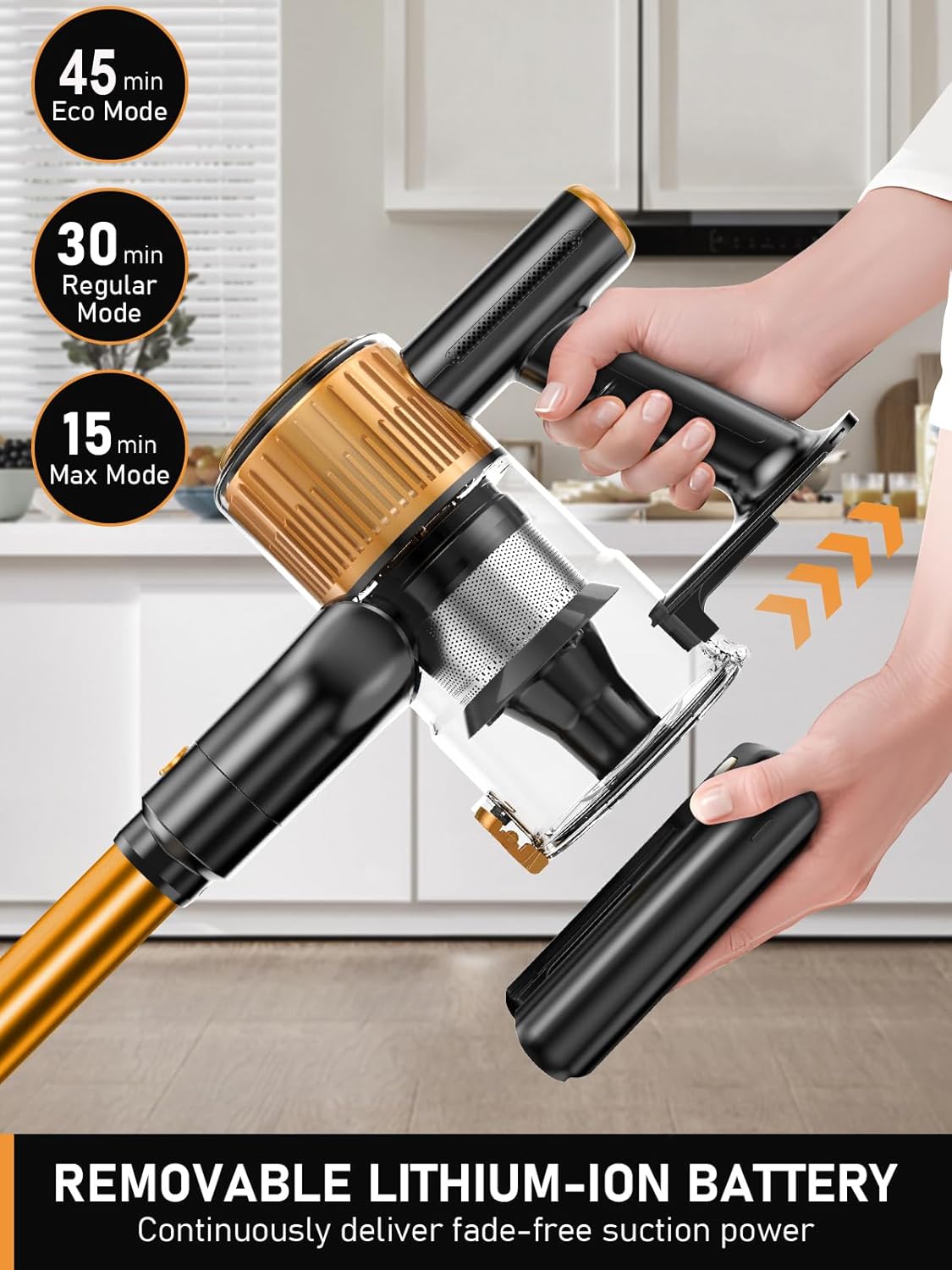
Image: A detailed diagram illustrating the multi-stage filtration system, highlighting how dust and allergens are captured.
6.3 Cleaning the Roller Brush
The V-shape anti-tangle roller brush is designed to minimize hair tangles, but occasional cleaning may be required.
- Turn off the vacuum and detach the floor brush.
- Locate the release tab on the side of the brush head and open it to remove the roller brush.
- Use scissors or the provided cleaning tool to cut and remove any tangled hair or debris from the roller.
- Reinsert the roller brush and secure the release tab.

Image: Visual comparison of the anti-tangle V-roller brush, emphasizing its design to prevent hair entanglement.
7. Troubleshooting
If you encounter issues, refer to the following table for common problems and solutions.
| Problem | Possible Cause | Solution |
|---|---|---|
| Vacuum does not turn on. | Battery is not charged or not properly installed. | Ensure battery is fully charged and securely clicked into place. |
| Low suction power. | Dust cup is full, filters are clogged, or blockage in the hose/brush. | Empty dust cup. Clean or replace filters. Check for and remove any blockages. |
| Roller brush stops spinning. | Hair or debris tangled in the brush, or blockage in the brush head. | Turn off the vacuum, remove the roller brush, and clean it thoroughly. |
| Battery runtime is short. | Battery not fully charged, or operating in Turbo mode frequently. | Ensure battery is fully charged. Use Eco or Standard mode for longer runtime. Battery degradation over time is normal. |
| LED display shows an error. | Indicates a blockage or other operational issue. | Refer to the LED display for specific error codes (if applicable) and clear any blockages. If issue persists, contact customer support. |
8. Specifications
| Feature | Detail |
|---|---|
| Model Number | AU-A27 |
| Brand | SUXIANGVAC |
| Motor Power | 500 W |
| Suction Power | Up to 45 KPa |
| Battery Type | Lithium-ion, Removable |
| Runtime | 18-45 minutes (depending on mode) |
| Charging Time | Approx. 4 hours |
| Dust Cup Capacity | 1.5 Liters |
| Filtration System | 6-stage, including washable HEPA and Stainless Steel filters |
| Weight | 3.17 Kilograms |
| Dimensions (L x W x H) | 25.4 x 17.78 x 43.18 cm (main unit) |
| Special Features | LED Display, Green Light Dust Detection, V-shape Anti-Tangle Brush, Adjustable Height (94-120 cm) |
9. Warranty and Customer Support
The SUXIANGVAC AU-A27 Cordless Stick Vacuum Cleaner comes with a 2-year warranty from the date of purchase.
For technical assistance, warranty claims, or any questions regarding your product, please contact SUXIANGVAC customer support. Our expert team is available 24/7 to provide solutions within 24 hours.
Please refer to your purchase documentation for specific contact details or visit the official SUXIANGVAC website.


