
DATOUBOSS DT4811B
DATOUBOSS 11KW Hybrid Solar Inverter User Manual
Model: DT4811B | Brand: DATOUBOSS
1. Introduction
This manual provides detailed instructions for the installation, operation, and maintenance of the DATOUBOSS 11KW Hybrid Solar Inverter. This advanced inverter is designed to convert 48V DC power from solar panels or batteries into 220/230V AC power for various applications. It features a built-in 150A MPPT solar charge controller and supports both on-grid and off-grid operations, including battery-less mode and parallel connection for increased capacity.
Please read this manual thoroughly before installation and operation to ensure safe and efficient use of the inverter.
2. Safety Instructions
Always adhere to the following safety precautions to prevent injury and damage to the inverter or connected equipment:
- Installation must be performed by qualified personnel in accordance with local electrical codes.
- Ensure all power sources are disconnected before performing any wiring or maintenance.
- Do not attempt to disassemble or repair the inverter yourself. Contact qualified service personnel.
- Keep the inverter away from water, moisture, and flammable materials.
- Ensure proper ventilation around the inverter to prevent overheating.
- This inverter is equipped with multiple protection functions including short-circuit, overcurrent, overvoltage, undervoltage, overtemperature, and overload protection. However, proper system design and installation are crucial.

Image: Overview of the inverter's comprehensive 360-degree protection features, including short circuit, overcurrent, overvoltage, undervoltage, overload, over-temperature, and backfill protection.
3. Product Overview
The DATOUBOSS 11KW Hybrid Solar Inverter is a versatile power solution combining the functions of an inverter, solar charger, and battery charger. It provides uninterruptible power supply and features a pure sine wave output to protect sensitive electronics.
Key Features:
- 11KW Pure Sine Wave Hybrid Inverter (48V DC to 230V AC).
- Built-in 2 MPPT, bidirectional MPPT module with a maximum PV open circuit voltage of 500VDC.
- Supports parallel operation of up to 9 units for increased power capacity.
- LCD display for real-time system data and operating status.
- Configurable input voltage range and AC/solar charger priority via LCD settings.
- Supports power statistics and analysis, even without Wi-Fi connection.
- Three priority modes: Grid priority, Solar priority, and Battery priority.
- Multi-function protection: Short-circuit, overcurrent, overvoltage, undervoltage, overtemperature, overload.
- Integrated parallel lines and current balancing lines for dynamic monitoring.
- Lithium battery activation function.
- Fuse reverse connection protection.
- Two output ports: one common output and one backup output.
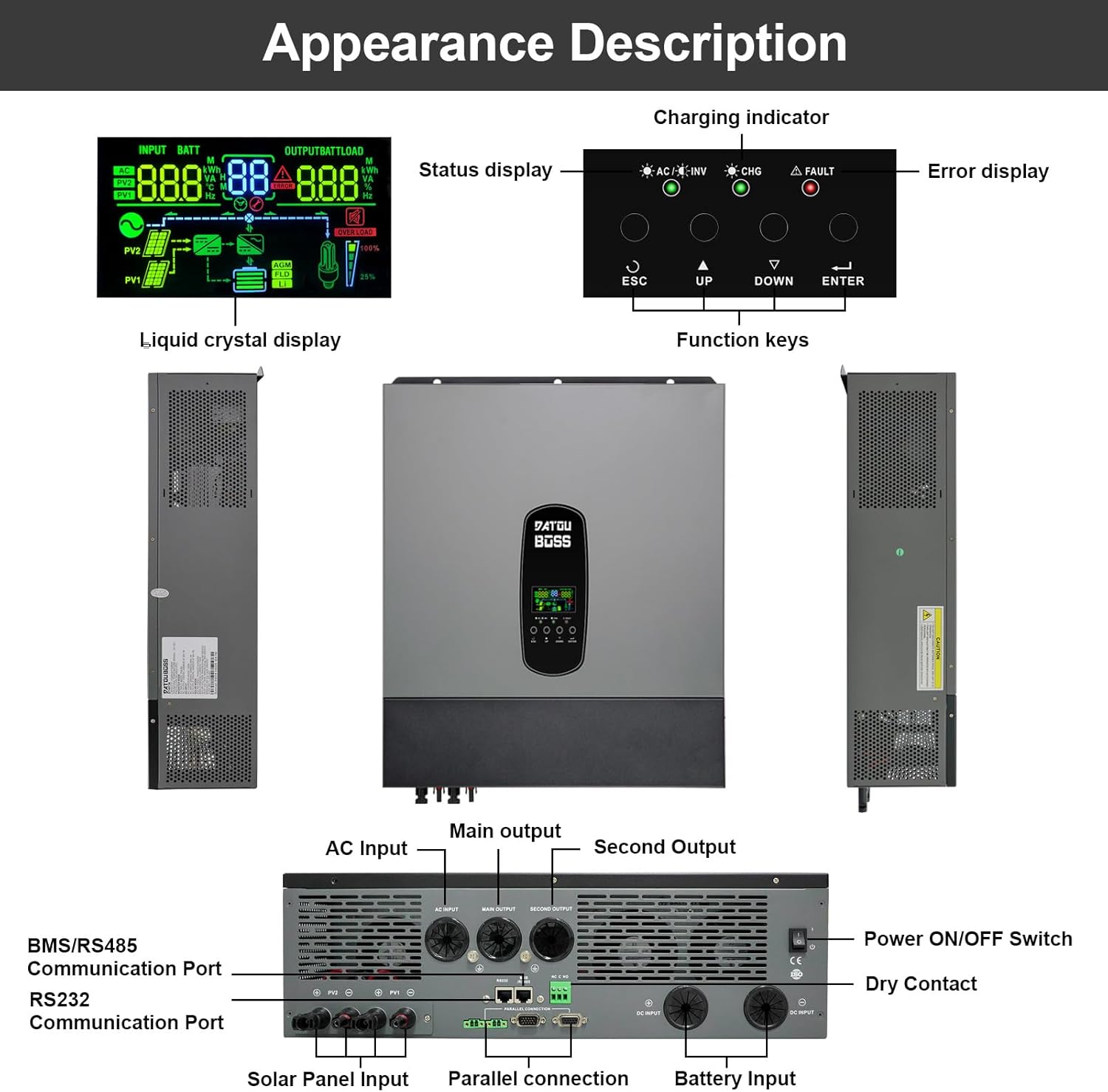
Image: Front, side, and rear views of the DATOUBOSS 11KW Hybrid Solar Inverter, highlighting the LCD display, function keys, charging indicator, error display, and various connection ports including AC input/output, solar panel input, battery input, parallel connection, BMS/RS485, RS232 communication ports, and power switch.

Image: Detailed labeled diagram of the inverter's ports and controls. Key components include: 1. LCD display, 2. Status display, 3. Charging indicator, 4. Error display, 5. Function keys, 6. AC Input, 7. Main Output, 8. Second Output, 9. BMS/RS485 Communication Port, 10. RS232 Communication Port, 11. Solar Panel Input, 12. Parallel connection, 13. Dry Contact, 14. Battery Input, 15. Power ON/OFF Switch.
4. Setup
4.1 Installation Environment
Install the inverter in a clean, dry, and well-ventilated area. Avoid direct sunlight, high temperatures, and excessive humidity. Ensure sufficient clearance around the unit for proper airflow.
4.2 Wiring Connections
Refer to the port diagram in Section 3 for connection points. Ensure all connections are secure and correctly polarized. Use appropriate cable gauges for all connections to prevent overheating and power loss.
- Battery Connection: Connect the 48V battery bank to the Battery Input terminals. Observe correct polarity (+ to + and - to -).
- Solar Panel Input: Connect your solar array to the Solar Panel Input terminals. Ensure the total open circuit voltage of the PV array does not exceed 500VDC.
- AC Input/Output: Connect the grid AC power to the AC Input and your loads to the Main Output and Second Output terminals.
- Parallel Connection: For parallel operation (up to 9 units), connect the parallel communication cables and power balancing lines between the inverters.

Image: Diagrams illustrating parallel operation configurations for two and three DATOUBOSS 48V 11KW Hybrid Inverters, showing connections for solar panels, batteries, grid, and load, along with communication connections between units.
4.3 Communication Interface
The inverter features RS232 and BMS/RS485 communication ports.
- RS232 Port: Can be connected to a Wi-Fi module for wireless communication and monitoring of inverter data. Note: The Wi-Fi module provides remote viewing but does not support remote modification of parameters or remote control.
- BMS/RS485 Port: Used for communication with compatible batteries. Ensure correct pin mapping (1 to 485B, 2 to 485A) when connecting to the battery's communication pins.

Image: Detailed view of the RS232 and BMS/RS485 communication ports, with instructions for connecting to a Wi-Fi module and battery BMS, including RJ45 pinout for RS485 communication.
4.4 Battery-less Operation
This inverter supports battery-less operation, allowing it to directly power loads from photovoltaic (PV) modules. In this mode, the inverter converts DC power from PV directly to AC power for homes or other loads. If PV generation is insufficient, the system can draw energy from the grid to ensure continuous power supply.

Image: Explanation of battery-free operation, detailing how the inverter can supply power without connecting batteries, directly converting DC power from PV modules to AC power for loads, and integrating with the grid when PV power is insufficient.

Image: Table outlining the advantages (reduced initial costs, improved system flexibility, reduced battery loss, flexible upgrade) and limitations (no power supply at night, impact of PV generation fluctuations) of battery-less operation, along with applicable scenarios.
5. Operating
5.1 LCD Display and Function Keys
The LCD display provides real-time system data, including input/output voltage, battery status, power statistics, and operating mode. Use the function keys (ESC, UP, DOWN, ENTER) to navigate menus and configure settings.

Image: Close-up of the inverter's LCD display, showing various real-time data points such as input voltage (AC, PV1, PV2), battery status, output load, and indicators for AC/Inverter, Charging, and Fault. The display also shows the system's energy flow.
5.2 Charging Modes
The inverter supports four charging modes:
- Priority of the Mains Power Supply: If no mains power is available, the battery is charged using solar energy.
- Solar Priority: Charging with solar energy has priority. If no solar power is available, the battery is charged via the power grid.
- Mixed Loading: Solar and mains power can charge the battery at the same time.
- Solar Only: The battery can only be recharged using solar energy.
5.3 Charge Output Working Modes
The inverter offers three charge output working modes:
- Netz (Utility Priority - Default): The mains current has priority over the load.
- Solar: Solar power has priority, then battery, then grid for power consumption.
- SBU (Solar-Battery-Utility): Solar power has priority, then battery, then utility (grid) in order of priority.

Image: Visual representation of the four charging modes (Priority of Mains Power Supply, Solar Priority, Mixed Loading, Solar Only) and three charge output working modes (Netz/Utility, Solar, SBU), illustrating the power flow and priority settings for each mode.
6. Maintenance
Regular maintenance ensures the longevity and optimal performance of your DATOUBOSS Hybrid Solar Inverter.
- Cleaning: Periodically clean the inverter's exterior with a dry cloth. Ensure ventilation openings are free from dust and debris.
- Connections: Annually check all electrical connections for tightness and signs of corrosion. Loose connections can lead to overheating and poor performance.
- Environment: Ensure the installation environment remains within the specified temperature and humidity ranges.
- Firmware Updates: Check the manufacturer's website for any available firmware updates to improve performance or address issues.
- Battery Health: If using batteries, monitor their health and charge/discharge cycles regularly to extend their lifespan. The inverter can be configured for regular charging and discharging to prolong battery life.
7. Troubleshooting
If you encounter issues with your inverter, refer to the following common troubleshooting steps. For persistent problems, contact customer support.
| Problem | Possible Cause | Solution |
|---|---|---|
| Inverter not turning on | No DC input from battery/solar; Power switch off; Blown fuse. | Check battery connections and voltage; Ensure solar input is present; Turn on power switch; Check and replace fuses if necessary. |
| No AC output | Overload; Short circuit; Over-temperature; Input voltage out of range. | Reduce load; Check for short circuits in wiring; Allow inverter to cool down; Verify input voltage is within specifications. |
| Error code on LCD | Specific system fault. | Refer to the inverter's detailed error code list (not provided in this manual, consult full product manual or manufacturer). |
| Poor charging performance | Insufficient solar input; Battery issues; Incorrect charging settings. | Check solar panel output; Inspect battery health; Adjust charging current/priority settings via LCD. |
8. Specifications
The following table outlines the key technical specifications for the DATOUBOSS 11KW Hybrid Solar Inverter (Model DT4811B).
| Parameter | Value |
|---|---|
| Model Number | DT4811B |
| Capacity | 11000VA / 11000W |
| Operating Temperature Range | -10 to 50 ℃ |
| Protection Degree | IP21 |
| DC Input (Inverter Mode) | 48VDC |
| AC Output (Inverter Mode) | 230VAC, 50/60Hz, 47.8A, 1Φ |
| AC Charger | 54VDC, 150A |
| AC Input (AC Mode) | 230VAC, 50/60Hz, 60A, 1Φ |
| AC Output (AC Mode) | 230VAC, 50/60Hz, 47.8A, 1Φ |
| Solar Panel Power | 2 x 5500W |
| Max Charging Current | 150A |
| Solar Voltage Range (Vmp) | 300-400VDC |
| Best Voltage Range (Vmp) | 300-400VDC |
| Max Solar Voltage | 500VDC |
| Product Dimensions | 70.8 x 57 x 24.1 cm |
| Product Weight | 19.19 Kilograms |
| Serial Number | 20241020 0476 |

Image: A close-up of the product label on the DATOUBOSS 11KW Hybrid Solar Inverter, displaying detailed technical specifications such as capacity, operating temperature, protection degree, inverter mode parameters, AC charger details, solar mode parameters, and the serial number.
9. Warranty and Support
DATOUBOSS is committed to product quality and customer satisfaction.
- Warranty: This product comes with a 5-year warranty.
- Customer Service: Professional 24-hour customer service is available to assist with any product-related questions or issues.
- Contact: For support, please refer to the contact information provided with your purchase or visit the official DATOUBOSS website.

Image: Icons representing key aspects of DATOUBOSS customer support: 10 Years Lifespan (product design target), 5 Years Guarantee (warranty period), 24 Hrs Response (customer service availability), and Local Warehouses (for distribution and service).
Related documentsDT4811B


Ask a question about this manual
Ask about setup, troubleshooting, compatibility, parts, safety, or missing instructions. Manuals+ will review the question and use this page’s manual context to help answer it.