Introduction
Thank you for choosing the ATOTOEXCEL A5L 2 DIN Android Car Stereo. This device integrates advanced features such as a 7-inch display, Android operating system, wireless CarPlay and Android Auto, a 1080P DVR front camera, and a powerful audio system with DSP. This manual provides detailed instructions for installation, operation, maintenance, and troubleshooting to ensure optimal performance and user experience.

Figure 1: ATOTOEXCEL A5L Multi-function Android Car Stereo overview.
Setup
Package Contents
Verify that all items are present in the package:
- Car Stereo
- DVR Front Camera
- Power Cable
- Rear Camera Input Cable
- RCA Connector
- USB External Storage Cable
- GPS Antenna
- Double-DIN Brackets
- Mounting Brackets
- Mounting Screws
- Online Resources Quick Guide
- ISO Connector (A/B)
- Installation Frame x 2
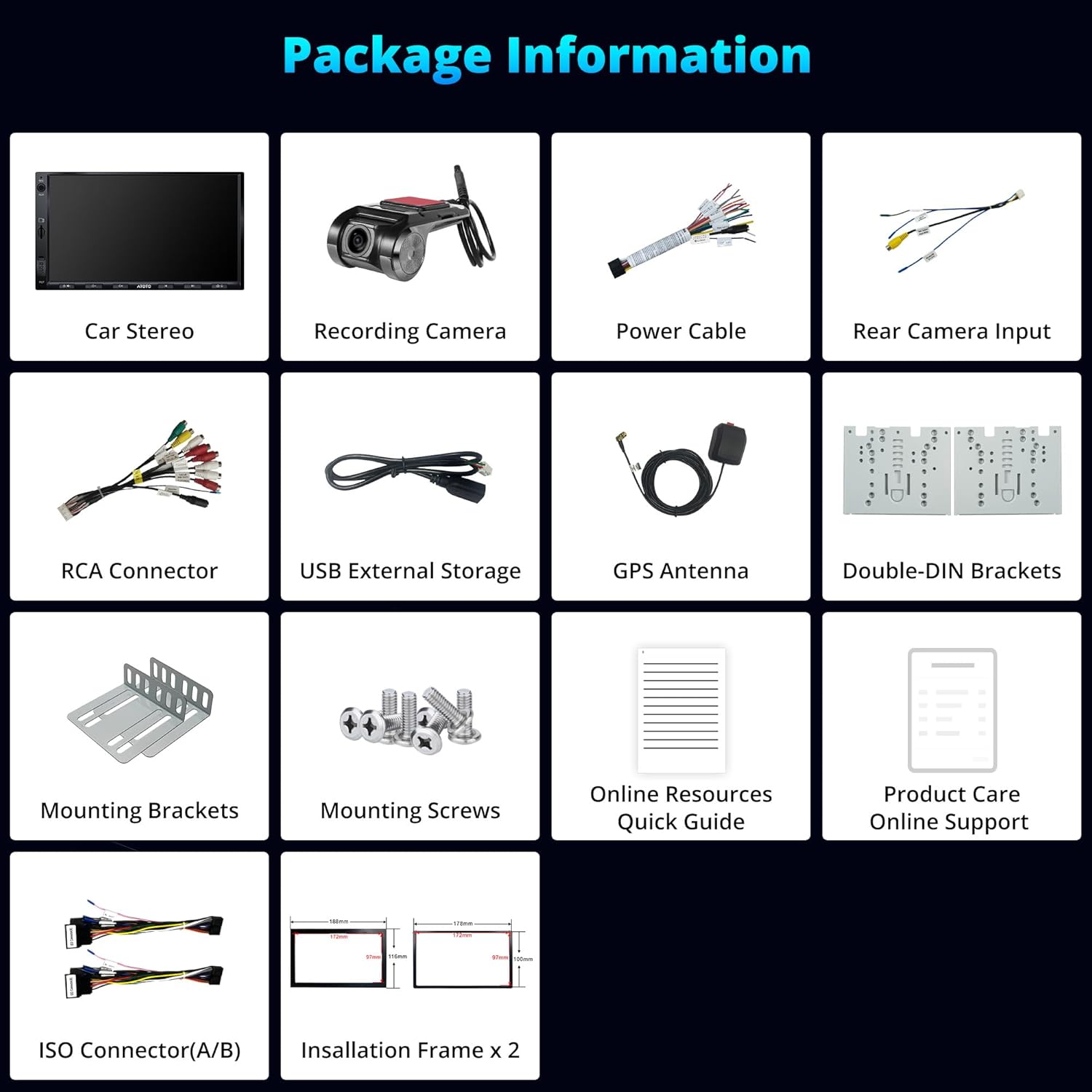
Figure 2: Included components in the product package.
Installation
The A5L car stereo is designed for standard 2 DIN slots. Professional installation is recommended. Ensure the vehicle's power is disconnected before beginning installation.
- Mounting: Use the provided double-DIN and mounting brackets to secure the head unit into your vehicle's dashboard.
- Wiring: Connect the power cable, speaker wires, and other accessory cables (e.g., rear camera, USB, GPS antenna) according to the wiring diagram.
- External Devices: Connect the DVR front camera and GPS antenna to their respective ports.
- Power On: Reconnect the vehicle's power and turn on the car stereo to test functionality.

Figure 3: Wiring diagram for connecting the A5L car stereo.

Figure 4: Physical dimensions of the A5L head unit for installation reference.
Operating Instructions
Android System
The A5L operates on an Android system, providing access to a wide range of applications via the Google Play Store. Regular Over-The-Air (OTA) updates are available for new features and system improvements.
- App Installation: Connect to the internet and access the Google Play Store to download and install desired applications.
- System Updates: Check for and install OTA updates through the system settings to ensure your device has the latest software.

Figure 5: Accessing the Google Play Store for app downloads.
Internet Connectivity
The A5L offers three methods for internet access:
- Wi-Fi Hotspot: Connect to a mobile hotspot or home Wi-Fi network.
- Bluetooth Tethering: Share your phone's internet connection via Bluetooth.
- USB Tethering: Connect your phone via USB to share its internet connection.
Internet access enables navigation, music streaming, internet radio, and vehicle tracking via the TrackHU app.

Figure 6: Internet access options for the A5L car stereo.
Wireless CarPlay & Android Auto
Connect your smartphone wirelessly via Bluetooth and Wi-Fi, or via USB, to access CarPlay or Android Auto. This allows seamless integration of your phone's music, navigation maps, messages, and calls.
- Connection: Enable Bluetooth and Wi-Fi on your phone and the car stereo. Follow the on-screen prompts to pair and connect.
- Voice Control: Utilize Siri or Google Assistant for hands-free operation.

Figure 7: Wireless CarPlay and Android Auto functionality.

Figure 8: Navigation and connectivity options with CarPlay and Android Auto.
DriveChat (GenAI Co-Pilot)
DriveChat, powered by ChatGPT, offers interactive conversations and personalized advice through specialized chatbots. You can set custom activation words for convenience.
- Access: Launch the DriveChat application from the main menu.
- Interaction: Engage in conversations or ask for advice on various topics.
- Customization: Configure activation words in the DriveChat settings.

Figure 9: DriveChat GenAI Co-Pilot for interactive assistance.

Figure 10: DriveChat AI offering intelligent voice management and specialized chatbots.
1080P DVR Front Camera
The A5L includes a 1080P DVR front camera (AC-44P2) that records automatically in a loop. This ensures timely recording of collisions or key events.
- Automatic Recording: The camera starts recording when the vehicle is powered on.
- Loop Recording: Older footage is overwritten by new recordings once the storage is full.
- Video Lock: Important footage can be manually or automatically locked to prevent overwriting.

Figure 11: Live view from the 1080P AHD DVR front camera.

Figure 12: Automatic loop recording ensures continuous coverage.
Audio System
The A5L features an integrated amplifier and Digital Signal Processor (DSP) for enhanced audio quality. It supports 9 bands with presets for sound customization.
- Equalizer (EQ): Adjust sound frequencies using the 24-band EQ to match your preferences and musical genres.
- Bluetooth Audio: Stream music wirelessly from your connected devices.
- FM Radio: Tune into FM stations with personalized radio selection and RDS information.
- AUX Input: Connect external audio devices via the AUX port for true stereo output.

Figure 13: Digital Signal Processor (DSP) and equalizer settings for audio customization.

Figure 14: Essential audio functionalities including Bluetooth, AUX, and FM radio.

Figure 15: Integrated amplifier and DSP for clear and deep audio.
Multifunctional Bluetooth
The A5L's Bluetooth system allows connection to third-party devices, such as diagnostic scanners (e.g., OBD scanner AC-4450), without interrupting music or calls. It also includes a screen lock function for privacy when away from the vehicle.
- Device Pairing: Pair compatible Bluetooth devices through the Bluetooth settings menu.
- Screen Lock: Activate the screen lock feature to protect your online profiles when the car is off.

Figure 16: Connecting other devices via Bluetooth and screen lock function.
GPS Tracking (TrackHU)
The TrackHU app provides real-time vehicle updates, travel data management, and precise positioning using GPS, GLONASS, Galileo, and Beidou satellite systems.
- Real-time Tracking: Monitor your vehicle's location and status in real-time.
- Route Playback: Review past routes with speed management.
- Instant Alerts: Receive notifications for geofence breaches and online/offline status changes.

Figure 17: TrackHU app for powered driving and real-time information.
Display
The A5L features a 7-inch IPS display with a resolution of 1280x720 pixels, offering a wide 178° viewing angle and excellent clarity.
- High Resolution: Enjoy clear and sharp visuals for navigation and media.
- Wide Viewing Angle: The 178° IPS display ensures consistent image quality from various seating positions.

Figure 18: IPS display features for optimal viewing.
Maintenance
To ensure the longevity and optimal performance of your ATOTOEXCEL A5L car stereo, follow these maintenance guidelines:
- Cleaning: Use a soft, dry cloth to clean the screen and exterior. Avoid abrasive cleaners or solvents.
- Software Updates: Regularly check for and install OTA software updates to benefit from new features and bug fixes.
- Environmental Conditions: Avoid exposing the unit to extreme temperatures, direct sunlight for prolonged periods, or excessive moisture.
Troubleshooting
If you encounter issues with your A5L car stereo, refer to the following common solutions:
- No Power: Check all power connections and the vehicle's fuse box. Ensure the ignition wire is correctly connected.
- No Sound: Verify speaker connections, volume settings, and EQ settings. Check if the mute function is active.
- Bluetooth/Wi-Fi Connectivity Issues: Ensure Bluetooth and Wi-Fi are enabled on both the stereo and your device. Try restarting both devices.
- CarPlay/Android Auto Not Connecting: Ensure your phone's operating system is up to date. Try connecting with a different USB cable if using a wired connection. For wireless, ensure Bluetooth and Wi-Fi are active and properly paired.
- Screen Unresponsive: Perform a soft reset by pressing and holding the power button for 10 seconds. If the issue persists, consult customer support.
- GPS Signal Loss: Ensure the GPS antenna is properly installed and has a clear view of the sky.
For persistent issues, please contact ATOTOEXCEL customer support.
Specifications
| Feature | Detail |
|---|---|
| Brand | ATOTOEXCEL |
| Model | A5L |
| Display Size | 7 inches |
| Display Resolution | 1280x720 IPS |
| Operating System | Android |
| Processor | Quad-core Cortex (2GB RAM + 32GB ROM) |
| Connectivity | 2.4G/5Ghz Wi-Fi, Bluetooth, USB |
| Car Integration | Wireless CarPlay, Wireless Android Auto |
| Audio Features | 24-band EQ (DSP), Integrated Amplifier (4x45W Peak, 4x24W RMS), Stereo Output |
| DVR Camera | 1080P Front DVR Camera (AC-44P2 included) with Loop Recording |
| GPS Tracking | TrackHU App, GPS, GLONASS, Galileo, Beidou |
| Additional Features | DriveChat (GenAI Co-Pilot), Split-screen, MirrorLink, Multifunctional Bluetooth |
| Compatible Peripherals | Speaker, Amplifier, Smartphone |
| Weight | 1.39 Kilograms |
| Dimensions | 22.6 x 14.7 x 14.5 cm |
Warranty & Support
Product Care
Your ATOTOEXCEL A5L comes with 12 months of product care, with an additional 6 months available upon contacting customer support. Our expert customer service team is generally responsive within one business day.

Figure 19: 18 Months of Product Care.
OTA Updates
We are committed to providing high-quality car audio systems with regular firmware updates via OTA. These updates not only resolve potential bugs but also introduce new functionalities.

Figure 20: Regular OTA Updates for enhanced functionality.
Contact Support
For assistance, please contact us through your order center, eproductcare, or email support@atotoglobal.com.

Figure 21: Support contact information.