
1. Introduction
The imagitarium Planted Aquarium LED Clip-on Light is designed to provide optimal lighting for planted aquariums. Its full-spectrum LED array supports plant growth, while the flexible gooseneck and dynamic controller offer customizable performance. This manual provides essential information for the safe and effective use of your new aquarium light.
2. Product Features
- Full-spectrum LED lighting: Designed for both framed and frameless planted aquariums.
- Enhanced Plant Growth: Utilizes red, green, blue, and white LEDs to aid in plant development.
- Dynamic Controller: Features adjustable Lumens, Kelvin, and Timer functions for precise light control.
- Flexible Gooseneck: Allows for precise positioning and focusing of light anywhere in your aquarium.
- Aquarium Size: Ideal for aquariums up to 15 gallons.
- Extended Cord: Includes a 7-foot electrical cord for convenient placement.
3. What's in the Box
- imagitarium Planted Aquarium LED Clip-on Light with Gooseneck
- Power Cable with Dynamic Controller
4. Setup Instructions
- Unpack the Light: Carefully remove all components from the packaging. Inspect for any signs of damage.
- Attach to Aquarium: Position the clip-on base of the light onto the rim of your aquarium. Ensure the clip is securely fastened to the tank wall. The adjustable knob on the clip can be tightened to secure the light in place.
- Position the Light: Adjust the flexible gooseneck to direct the light over your desired area in the aquarium.
- Connect Power: Plug the power cable into a suitable electrical outlet. Ensure your hands are dry before handling the power cord.

Image: Close-up view of the clip mechanism, showing how it attaches to the aquarium rim. The knob is used to tighten the grip.

Image: The imagitarium LED light is shown clipped onto the side of an aquarium, with its flexible gooseneck positioned over the water.
5. Operating Instructions
The imagitarium Planted Aquarium LED Clip-on Light features an inline dynamic controller for easy operation and customization.

Image: The inline dynamic controller with clearly visible buttons for power (M/C), mode (light bulb icon), brightness (sun icon), and timer (clock icon).
- Power On/Off: Press the M/C button to turn the light on or off.
- Adjust Light Mode (Kelvin): Press the light bulb icon button to cycle through different light spectrums (Kelvin settings). This allows you to select the optimal color temperature for your plants and aesthetic preference.
- Adjust Brightness (Lumens): Press the sun icon button to adjust the brightness (Lumens) of the light. Multiple levels of brightness are available.
- Set Timer: Press the clock icon button to set the operating duration. Available timer settings typically include 8-hour or 10-hour daytime modes, followed by a blue light night mode. Refer to the product packaging for specific timer cycle details.
Note: The timer function typically cycles through a full spectrum for the set duration (e.g., 8 or 10 hours), then transitions to a blue light for night mode, and finally turns off. This cycle repeats automatically every 24 hours from the time it was initially set.
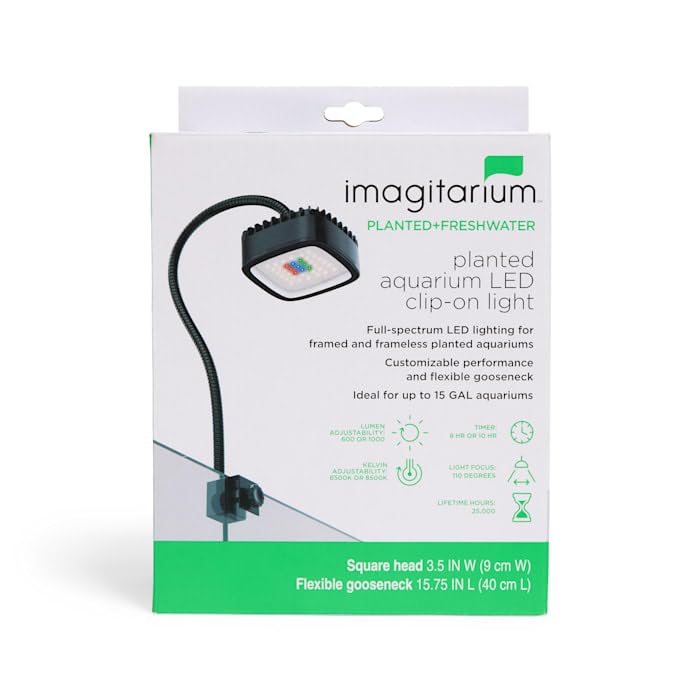
Image: The back of the product packaging, illustrating the light's features including daylight and night modes, Kelvin and Lumen adjustability, and timer functions with spectral charts.
6. Maintenance
Regular maintenance ensures the longevity and optimal performance of your LED light.
- Cleaning: Always disconnect the power supply before cleaning. Wipe the light fixture and gooseneck with a soft, damp cloth. Do not use abrasive cleaners or solvents.
- Inspection: Periodically inspect the power cord and light fixture for any signs of damage, such as fraying, cracks, or loose connections. If any damage is found, discontinue use and replace the unit.
7. Troubleshooting
- Light Does Not Turn On:
- Ensure the power cord is securely plugged into a working electrical outlet.
- Check if the power button on the inline controller has been pressed.
- Verify there is power to the outlet by testing with another device.
- Light Flickers or Dims Unexpectedly:
- Check for loose connections in the power cord or at the light fixture.
- Ensure the light is not exposed to excessive moisture beyond its waterproof rating.
- Timer Not Functioning Correctly:
- Re-set the timer by pressing the clock icon button.
- Ensure the light has been on for a full cycle to allow the timer to reset.
If issues persist after attempting these troubleshooting steps, please contact customer support.
8. Specifications
| Feature | Specification |
|---|---|
| Brand Name | imagitarium |
| Model Number (ASIN) | B0DLLLMNHB |
| UPC/GTIN | 800443683903 |
| Lamp Type | LED |
| Light Source Type | LED |
| Number of Light Sources | 4 |
| Wattage | 17 watts |
| Power Source | Corded Electric |
| Mounting Type | Clip On |
| Item Weight | 1.6 Pounds |
| Base Material | Plastic |
| Shade Material | Plastic |
| Material Type | Plastic And Metal |
| Color | White |
| Is Waterproof | True |
| Indoor Outdoor Usage | Indoor |
| Included Components | Gooseneck, Power Cable |
9. Safety Information
- Electrical Safety: Always disconnect the power supply before performing any maintenance or handling the light. Do not submerge the light fixture in water.
- Placement: Ensure the light is securely clipped to the aquarium to prevent it from falling into the water.
- Children and Pets: Keep out of reach of children and pets.
- Damage: If the power cord or light fixture becomes damaged, discontinue use immediately and replace the product.
10. Warranty and Support
For warranty information or technical support, please refer to the product packaging or contact imagitarium customer service. Keep your purchase receipt for warranty claims.