
Introduction
The imagitarium Freshwater Aquarium LED Clip-on Light is designed to provide brilliant freshwater LED lighting for framed and frameless aquariums. This light features a flexible gooseneck design and a dynamic controller for customizable performance.
Safety Information
- Always unplug the power supply before performing any maintenance or cleaning.
- Inspect the light regularly for any signs of damage. Replace immediately if any part is damaged.
- Ensure hands are dry before handling the power cord or any electrical components.
- Do not submerge the light or power cord in water.
- Keep out of reach of children.
Package Contents
Verify that all items are present in the package:
- Freshwater Aquarium LED Clip-on Light with Gooseneck
- Power Cable
- Remote Control (integrated into power cable)
Setup
- Mounting the Light:
Position the clip-on base securely onto the rim of your aquarium. The light is suitable for both framed and frameless aquariums up to 15 gallons. Tighten the adjustment knob on the clip until the light is firmly attached.

Image: The imagitarium LED Clip-on Light with its gooseneck arm and clip base, securely mounted on the edge of a glass aquarium.

Image: A close-up view of the black clip mechanism, showing the adjustment knob used to secure the light to the aquarium rim.
- Positioning the Light:
Utilize the flexible gooseneck to adjust the light head. Direct the light to focus on specific areas within your aquarium as desired.
- Connecting Power:
Plug the 7-foot electrical cord into a standard power outlet. Ensure the connection is secure.
Operating Instructions
The light features a dynamic controller integrated into the power cable, allowing for adjustments to lumens, Kelvin temperature, and timer functions.
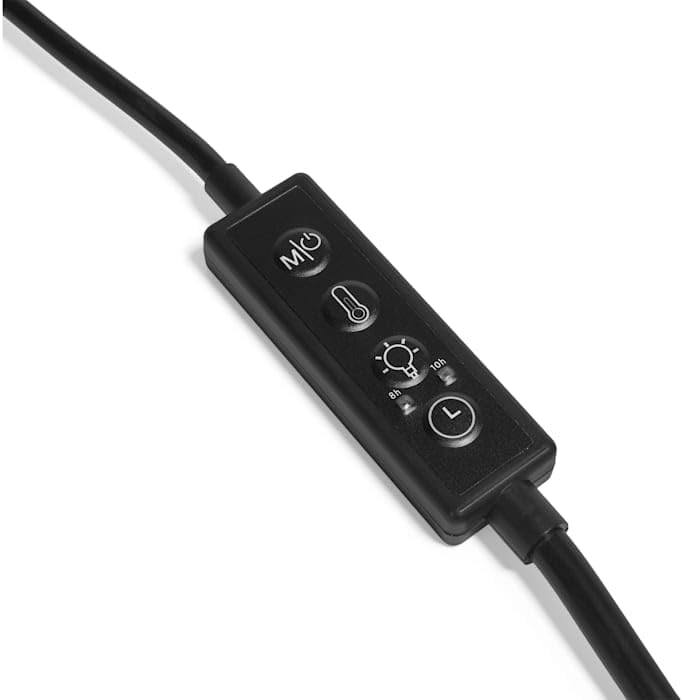
Image: A close-up of the inline controller for the imagitarium LED light, showing buttons for power/mode, temperature adjustment, brightness/timer, and a timer cycle button.
- Power/Mode Button: Use this button to turn the light on or off and cycle through different lighting modes (e.g., full spectrum, blue only). The light spectrum is achieved using red, blue, and white LEDs.
- Kelvin Adjustment: Adjust the color temperature of the light to suit your freshwater aquarium's needs.
- Lumen Adjustment: Control the brightness (lumens) of the light output.
- Timer Functions: The timer can be set for either an 8-hour or 10-hour daytime duration.
- 8-Hour Option: The blue LEDs will illuminate for the first 2 hours, followed by full spectrum for 6 hours, then blue for 2 more hours. This cycle repeats every 24 hours.
- 10-Hour Option: The full spectrum LEDs will be on for 10 hours. This cycle repeats every 24 hours. The 10-hour cycle also features blue lights before and after the full spectrum, each for 1 hour.
Maintenance
Regular maintenance ensures optimal performance and longevity of your LED light.
- Cleaning: Unplug the light from the power supply. Use a soft, damp cloth to wipe down the light fixture and gooseneck. Avoid using harsh chemicals or abrasive materials. Ensure the light is completely dry before reconnecting power.
- Inspection: Periodically inspect the power cord, controller, and light fixture for any signs of wear, fraying, or damage.
Troubleshooting
- Light Not Turning On:
- Check if the power cable is securely plugged into both the light and the electrical outlet.
- Ensure the outlet is functional by testing it with another device.
- Press the power button on the inline controller.
- Light Appears Too Bright/Too Dim:
- Use the lumen adjustment button on the controller to increase or decrease brightness.
- Consider the size of your aquarium; this light is ideal for up to 15-gallon tanks.
- Excessive Algae Growth:
- If you observe excessive algae, the light may be too strong or on for too long. Adjust the lumen settings or reduce the timer duration (e.g., from 10 hours to 8 hours).
- Ensure proper aquarium maintenance, including water changes and nutrient control.
Specifications
| Feature | Specification |
|---|---|
| Brand | imagitarium |
| Model Number | B0DLLK69LV |
| Mounting Type | Clip On |
| Light Source Type | LED (Red, Blue, White) |
| Wattage | 17 watts |
| Power Source | Corded Electric |
| Cord Length | 7 feet |
| Switch Type | Remote (Inline Controller) |
| Ideal Aquarium Size | Up to 15 gallons |
| Material | Plastic |
| Color | Black |
| Item Weight | 1.6 Pounds |
Warranty Information
Specific warranty details for this product are not provided in the available information. Please refer to the product packaging or contact the manufacturer directly for warranty terms and conditions.
Customer Support
For further assistance, technical support, or inquiries regarding your imagitarium Freshwater Aquarium LED Clip-on Light, please contact imagitarium customer service. Contact information can typically be found on the product packaging or the official imagitarium website.