
1. Introduction
Thank you for purchasing the Aiwa SP-03-BL Bluetooth Speaker. This portable speaker is designed to deliver clear, balanced sound with enhanced bass, dynamic RGB lighting, and multiple connectivity options. Its IPX4 splash resistance makes it suitable for various environments. Please read this manual carefully before using the product to ensure proper operation and to maximize your listening experience.

Image: Aiwa SP-03-BL Bluetooth Speaker, showcasing its compact design and carrying handle.
2. Safety Information
- Do not expose the speaker to extreme temperatures, direct sunlight, or high humidity.
- Avoid dropping or subjecting the speaker to strong impacts.
- Keep the speaker away from water sources, despite its IPX4 rating, to prevent damage.
- Do not attempt to disassemble, repair, or modify the speaker yourself. Contact qualified service personnel.
- Use only the provided USB-C cable for charging.
- Keep out of reach of children.
3. Package Contents
Ensure all items are present in the package:
- 1 x Aiwa SP-03-BL Bluetooth Speaker
- 1 x USB-C Charging Cable
- 1 x Instruction Manual
4. Product Features
- Powerful Audio: 15W RMS output for clear and balanced sound.
- Enhanced Bass: Passive radiator technology for deeper and more impactful bass.
- Long Battery Life: Up to 12 hours of continuous playback on a single charge.
- Splash Resistant: IPX4 certified for protection against liquid splashes.
- True Wireless Sound (TWS): Connect two SP-03-BL speakers for an immersive stereo experience.
- Bluetooth 5.3: Stable, efficient, and low-power wireless connectivity.
- Dynamic RGB Lights: Three multi-colored light modes to enhance your music.
- Multiple Connectivity: Supports Micro SD card, USB drive, and USB-C for charging.
- Portable Design: Compact and lightweight with a convenient carrying handle.
- App Control: Adjust equalization, DJ effects, and light intensity via the AIWA Brazil app.
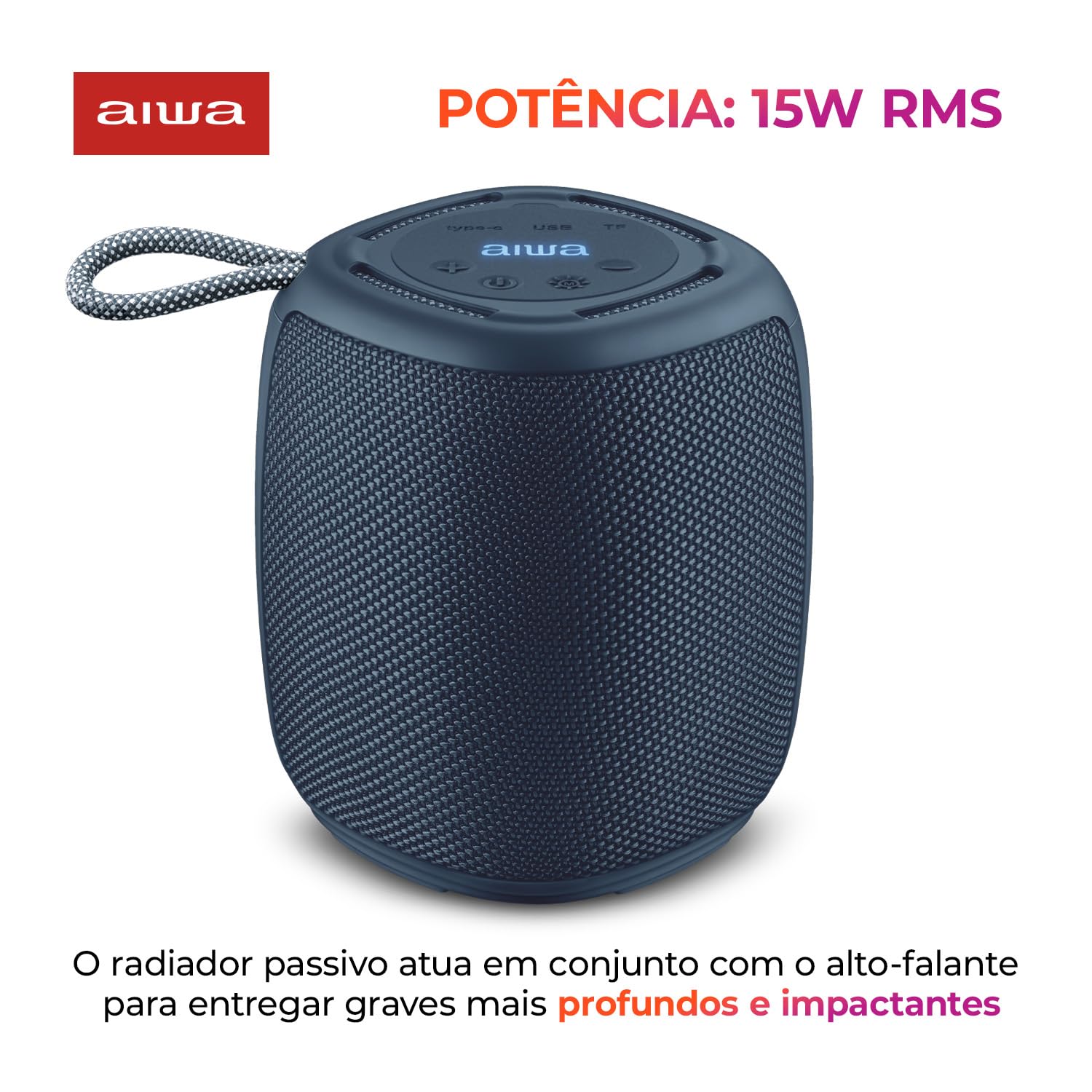
Image: The Aiwa SP-03-BL speaker, emphasizing its 15W RMS power output.

Image: The Aiwa SP-03-BL speaker, illustrating its IPX4 splash resistance.
5. Setup and Initial Use
5.1 Charging the Speaker
Before first use, fully charge the speaker. Connect the provided USB-C cable to the speaker's USB-C port and the other end to a USB power adapter (not included) or a computer's USB port. The LED indicator will show charging status and turn off when fully charged. A full charge takes approximately 3 hours.
5.2 Powering On/Off
- To Power On: Press and hold the Power button for a few seconds until you hear an audible prompt and the LED lights illuminate.
- To Power Off: Press and hold the Power button again for a few seconds until you hear an audible prompt and the LED lights turn off.
5.3 Bluetooth Pairing
- Ensure the speaker is powered on and in Bluetooth pairing mode (the LED indicator will flash).
- On your mobile device, enable Bluetooth and search for available devices.
- Select "Aiwa SP-03-BL" from the list of devices.
- Once paired, the speaker will emit an audible confirmation, and the LED indicator will stop flashing.

Image: The Aiwa SP-03-BL speaker, indicating its Bluetooth 5.3 connectivity.
5.4 True Wireless Sound (TWS) Pairing
To connect two Aiwa SP-03-BL speakers for stereo sound:
- Ensure both speakers are powered on and not connected to any Bluetooth device.
- On one speaker (this will be the primary speaker), press and hold the TWS button (usually indicated by a chain link or TWS icon) for a few seconds.
- The primary speaker will search for the secondary speaker. Once connected, both speakers will emit an audible confirmation.
- Now, pair your mobile device to the primary speaker via Bluetooth as described in section 5.3.

Image: Two Aiwa SP-03-BL speakers demonstrating True Wireless Sound (TWS) connection for stereo audio.
5.5 Using Micro SD Card or USB Drive
Insert a Micro SD card or USB drive (with supported audio files) into the respective port on the speaker. The speaker will automatically detect the storage device and begin playing music. Use the speaker's control buttons to navigate tracks.

Image: Close-up of the Aiwa SP-03-BL speaker's top panel, highlighting the Micro SD, USB, and USB-C ports for various connections.
6. Operating the Speaker
6.1 Basic Controls
| Button/Function | Action |
|---|---|
| Power Button | Press and hold to Power On/Off. |
| Play/Pause Button | Press to Play or Pause music. |
| Volume Up (+) | Short press to increase volume. Long press for next track. |
| Volume Down (-) | Short press to decrease volume. Long press for previous track. |
| Mode Button | Press to switch between Bluetooth, Micro SD, and USB modes. |
| Light Button | Press to cycle through RGB light modes or turn lights off. |
| TWS Button | Press and hold to initiate TWS pairing. |
6.2 RGB Light Modes
The speaker features dynamic RGB LED lights. Press the Light button to cycle through the available light modes. There are three distinct multi-colored effects. Pressing the button again will turn the lights off.

Image: The Aiwa SP-03-BL speaker displaying its vibrant RGB color lights.
6.3 Using the AIWA Brazil App
For enhanced control, download the AIWA Brazil app from your smartphone's app store. The app allows you to:
- Adjust equalization settings (Bass, Mid, Treble).
- Control DJ effects.
- Change playback modes.
- Adjust the intensity of the portable speaker lights.
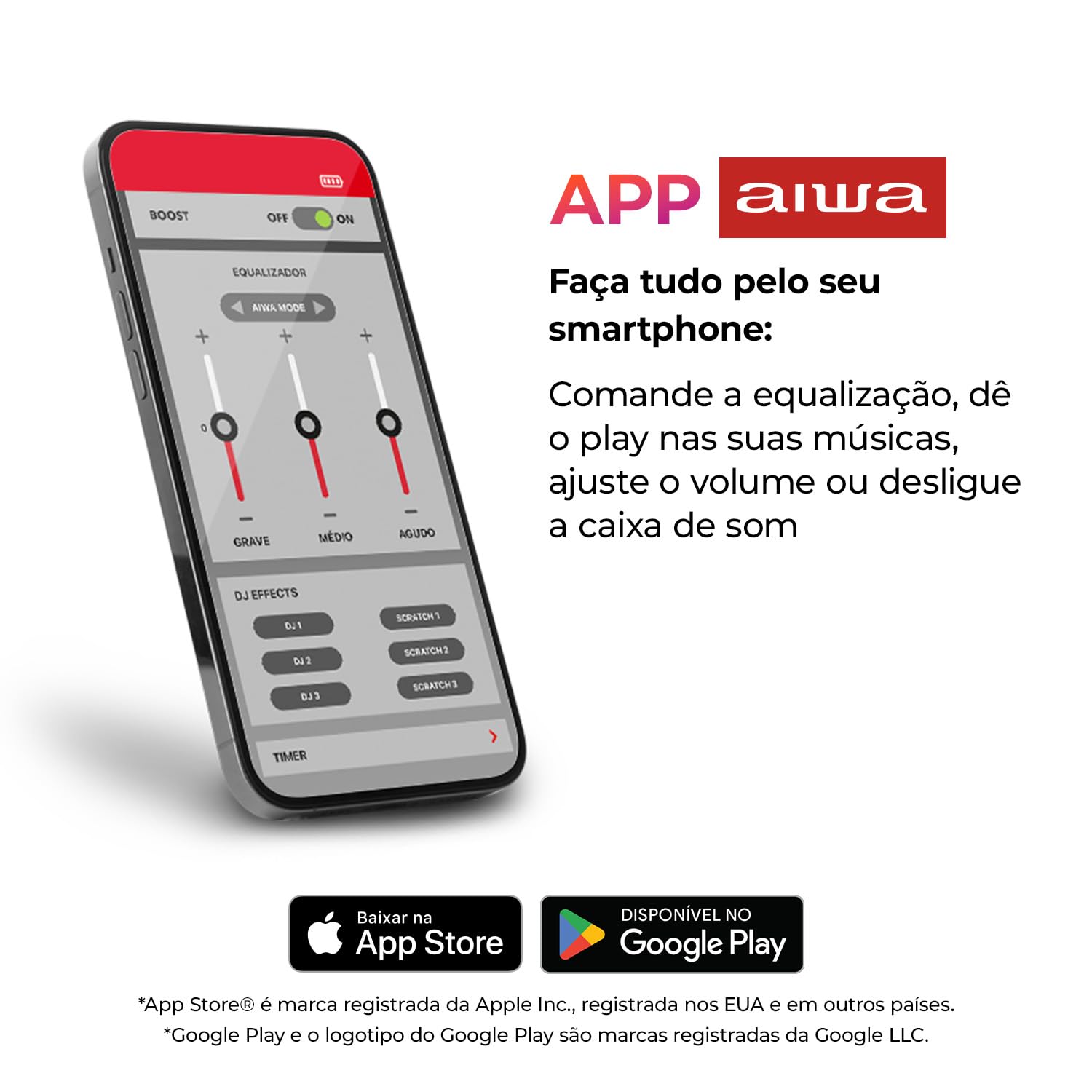
Image: A smartphone screen displaying the AIWA app interface with equalization and DJ effects controls.
7. Maintenance
7.1 Cleaning
Wipe the speaker with a soft, dry, or slightly damp cloth. Do not use abrasive cleaners, alcohol, or chemical solvents, as these may damage the surface.
7.2 Storage
When not in use for extended periods, store the speaker in a cool, dry place away from direct sunlight and extreme temperatures. It is recommended to charge the battery at least once every three months to maintain its lifespan.
7.3 Battery Care
To prolong battery life, avoid fully discharging the speaker frequently. Charge the speaker when the low battery indicator appears.
8. Troubleshooting
| Problem | Possible Solution |
|---|---|
| Speaker does not power on. | Ensure the battery is charged. Connect to a power source and try again. |
| Cannot pair via Bluetooth. | Ensure the speaker is in pairing mode. Turn off and on your device's Bluetooth. Move closer to the speaker. Forget previous pairings on your device. |
| No sound or low volume. | Increase volume on both the speaker and your connected device. Ensure the speaker is not muted. Check if the correct input mode (Bluetooth, SD, USB) is selected. |
| TWS pairing fails. | Ensure both speakers are powered on and not connected to any other Bluetooth device. Try resetting both speakers and repeating the TWS pairing process. |
| Speaker not charging. | Check the USB-C cable and power adapter. Ensure connections are secure. Try a different cable or power source. |
9. Specifications
| Feature | Detail |
|---|---|
| Brand | Aiwa |
| Model Number | AWS-SP-03-BL |
| Speaker Maximum Output Power | 15 Watts RMS |
| Connectivity Technology | Bluetooth 5.3 |
| Water Resistance Rating | IPX4 (Splash Resistant) |
| Battery Type | Rechargeable Lithium-ion |
| Battery Capacity | 2000 mAh |
| Battery Average Life | Up to 12 Hours |
| Battery Charge Time | Approximately 3 Hours |
| Control Method | Touch Buttons, AIWA App |
| Item Dimensions (D x W x H) | 13.3 x 11.6 x 11.3 Centimeters |
| Item Weight | 0.54 Kilograms |
| Compatible Devices | Laptop, Smartphone, Tablet, Television |
| Input Ports | Micro SD, USB, USB-C (Charging) |

Image: The Aiwa SP-03-BL speaker, illustrating its physical dimensions and weight.
10. Warranty and Support
For warranty information or technical support, please refer to the warranty card included in your package or visit the official Aiwa website. You may also contact Aiwa customer service through the contact details provided on their website.
Aiwa Official Website: Visit the Aiwa Store on Amazon