
Logicom 800W flexible
Logicom Energy Solar Kit 800W Flexible - Instruction Manual
Model: 800W flexible
1. Introduction
This manual provides essential instructions for the safe and efficient installation, operation, and maintenance of your Logicom Energy Solar Kit 800W Flexible. Please read this manual thoroughly before beginning installation or operation to ensure optimal performance and longevity of your solar kit.
The Logicom Energy Solar Kit 800W Flexible is a plug-and-play system designed for easy installation, featuring four 200W flexible solar panels and an 800W micro-inverter. It includes universal mounting supports and fixation tools for vertical attachment on fences and balconies.
2. Kit Components
The Logicom Energy Solar Kit 800W Flexible includes the following components:
- 4 x Flexible Solar Panels (200W each)
- 1 x 800W Micro-inverter
- Universal Mounting Supports
- Fixation Tools
- Connector Cables (MC4)
- AC Cable (10m)

Image: Overview of the Logicom Energy Solar Kit components, including solar panels, micro-inverter, cables, and mounting hardware.
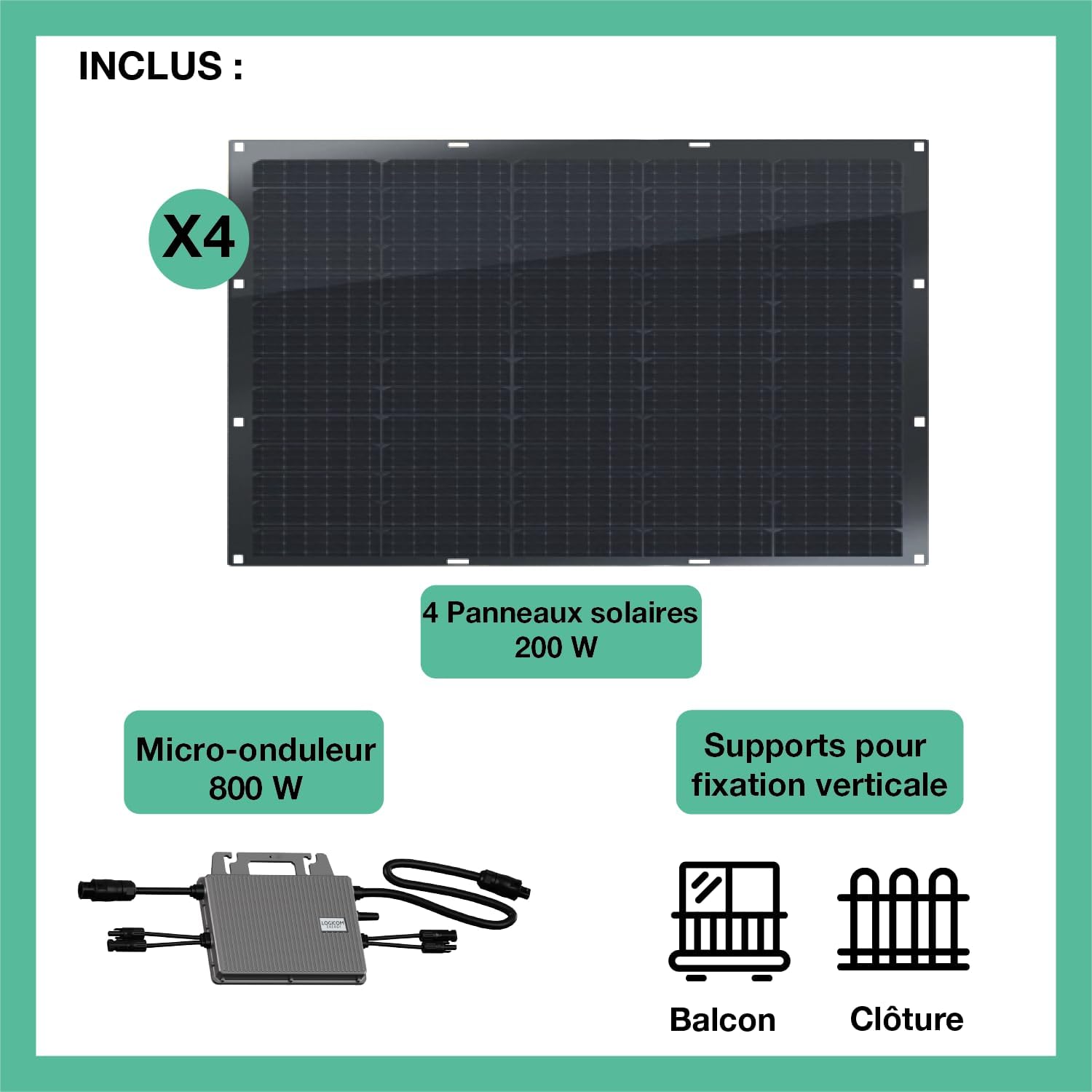
Image: Diagram illustrating the included components: four 200W solar panels, an 800W micro-inverter, and vertical fixation supports for balcony or fence.
3. Setup and Installation
The Logicom Energy Solar Kit is designed for straightforward installation. Follow these steps for proper setup.
3.1. Mounting the Solar Panels
The kit includes universal fixation supports for vertical mounting on fences or balconies. Ensure the chosen location receives maximum sunlight throughout the day and is structurally sound to support the panels.
Video: This video demonstrates the assembly of the mounting supports and the installation of the solar panel onto the support structure. It also shows examples of balcony and wall mounting. Note: While the video mentions 'rigid' kits, the installation steps are generally applicable to the flexible panels in this kit.
Balcony Installation: Use the provided clamps to secure the panel supports to your balcony railing. Adjust the angle for optimal sun exposure.

Image: A flexible solar panel mounted on a balcony railing, demonstrating a typical installation scenario.
Ground Installation: The supports can also be configured for ground placement, allowing the panels to be angled towards the sun.

Image: Multiple flexible solar panels arranged on a wooden deck, illustrating a ground-level installation.
3.2. Connecting the Micro-inverter
Connect the solar panels to the 800W micro-inverter using the provided MC4 connector cables. Ensure all connections are secure and properly sealed to prevent moisture ingress. The micro-inverter has an IP67 rating for outdoor use.
Once the panels are connected to the micro-inverter, plug the micro-inverter's AC cable directly into a standard electrical outlet. The system is designed for plug-and-play operation.
4. Operation
After successful installation and connection to a power outlet, your Logicom Energy Solar Kit will begin generating electricity. The micro-inverter converts the DC power from the solar panels into AC power suitable for your home's electrical grid.
4.1. Energy Monitoring with TSUN SMART App
The micro-inverter features integrated Wi-Fi 5 (2.4 GHz) connectivity, allowing you to monitor your energy production in real-time via the TSUN SMART mobile application. Download the app from your device's app store.

Image: Screenshot of the TSUN SMART mobile application displaying real-time energy production data from the solar kit.

Image: Detailed view within the TSUN SMART app, showing daily, monthly, and annual energy production, along with CO2 reduction and equivalent trees planted.
Follow the app's instructions to connect your micro-inverter and begin monitoring your solar energy generation.
5. Maintenance
Regular maintenance ensures the optimal performance and longevity of your solar kit.
- Cleaning: Periodically clean the surface of the solar panels to remove dust, dirt, leaves, or other debris that may reduce efficiency. Use a soft cloth and water. Avoid abrasive cleaners or harsh chemicals.
- Inspection: Regularly inspect all cables and connections for any signs of wear, damage, or loose connections. Ensure the mounting hardware remains secure.
- Environmental Durability: The solar panels and micro-inverter are designed to withstand various environmental conditions, including rain and snow. The micro-inverter has an IP67 rating.
6. Troubleshooting
If you experience issues with your Logicom Energy Solar Kit, consider the following common checks:
- No Power Output:
- Check if the AC cable is securely plugged into the outlet.
- Verify that the circuit breaker for the outlet is not tripped.
- Ensure all MC4 connections between the panels and micro-inverter are firm.
- Confirm that the solar panels are receiving adequate sunlight and are not obstructed.
- App Connectivity Issues:
- Ensure your Wi-Fi network is active and the micro-inverter is within range.
- Restart your router and the micro-inverter (by unplugging and replugging).
- Check for updates to the TSUN SMART app.
For persistent issues or complex problems, please contact Logicom customer support.
7. Technical Specifications
| Feature | Detail |
|---|---|
| Brand | Logicom |
| Model Number | 800W flexible |
| Solar Panel Quantity | 4 |
| Solar Panel Power (each) | 200W |
| Total Solar Panel Power | 800W |
| Solar Panel Voltage | 21.2V |
| Micro-inverter Power | 800W |
| Micro-inverter Voltage | 60V |
| Micro-inverter Efficiency (max) | 96.70% |
| Micro-inverter DC Max Current | 20A |
| Micro-inverter Input Max Current | 14A |
| Wi-Fi | Wi-Fi 5, 2.4 GHz |
| IP Rating | IP67 |
| Estimated Annual Energy Production | 820 KWh |
| Panel Efficiency | 16.2% (PERC technology) |
| Panel Dimensions (each) | 1405 x 875 x 2 mm |
| Panel Weight (each) | 11.6 kg (total kit weight) |
| Material | Polycrystalline Silicon |
| Connector Type | MC4 |
| AC Cable Length | 10m |
| Operating Temperature Range | Up to 85 Degrees Celsius |
8. Warranty and Support
The Logicom Energy Solar Kit 800W Flexible comes with a 12-year warranty covering both the solar panels and the micro-inverter.
For any questions, technical assistance, or warranty claims, please contact Logicom's specialized customer support. Refer to your purchase documentation for contact details.
Related Documents - 800W flexible
 |
LOGICOM AERO Smartphone Quick Start Guide Quick start guide for the LOGICOM AERO smartphone, covering setup, SIM card insertion, battery charging, and safety precautions. |
 |
Logicom Sense Smartphone Quick Start Guide A comprehensive guide to setting up and using the Logicom Sense smartphone, covering installation, operation, safety precautions, and technical specifications. |
 |
LOGICOM EZY Smartphone: Quick Start Guide and User Manual Comprehensive guide for the LOGICOM EZY smartphone, covering setup, features, safety precautions, technical specifications, and warranty information. Includes instructions for SIM and SD card insertion, charging, reset procedures, and regulatory compliance. |
 |
Logicom EZY Smartphone Quick Start Guide A quick start guide for the Logicom EZY smartphone, covering setup, SIM card insertion, battery charging, and safety precautions. |
 |
Logicom Smart Pro Quick Start Guide This document provides a quick start guide for the Logicom Smart Pro smartphone, covering setup, features, and safety precautions. |
 |
Manuel d'utilisation Logicom POSH 405 : Caractéristiques, Sécurité et Spécifications Manuel d'utilisation complet pour le téléphone mobile Logicom POSH 405. Couvre l'installation, les fonctionnalités, les précautions de sécurité, la charge de la batterie, les codes de sécurité, le recyclage, les spécifications techniques et les informations de garantie. |
Ask a question about this manual
Ask about setup, troubleshooting, compatibility, parts, safety, or missing instructions. Manuals+ will review the question and use this page’s manual context to help answer it.