
Synergy Digital BRR-2P4S-5200D
Synergy Digital Vacuum Cleaner Battery User Manual
Model: BRR-2P4S-5200D
Product Overview
The Synergy Digital Vacuum Cleaner Battery is a high-capacity Li-ion replacement battery designed for compatibility with Roborock AED03HRR Vacuum Cleaners and the Xiaomi BRR-2P4S-5200D battery model. It provides reliable power for your vacuum cleaner, ensuring extended cleaning sessions.
Key features of this battery include:
- Rechargeable Battery Compatible with Xiaomi BRR-2P4S-5200D
- Works for Roborock AED03HRR Vacuum Cleaner and many other models
- Li-ion, 14.4V, 5200mAh specifications
- Made with high quality Japanese cells, designed to meet or exceed original battery performance
- Long Lasting, Ultra Hi-Capacity Battery

Image: The Synergy Digital Vacuum Cleaner Battery, showing its compact orange casing and connector wires.
Safety Information
Please read and understand all safety warnings before using this battery. Failure to follow these instructions may result in fire, electric shock, or serious injury.
- CAUTION! WARRANTY VOID IF LABEL IS REMOVED.
- DO NOT ATTEMPT TO DISASSEMBLE, OPEN OR SERVICE THE BATTERY PACK.
- REPLACE ONLY WITH THE BATTERY PACK DESIGNATED FOR THIS PRODUCT.
- DO NOT CRUSH, PUNCTURE, SHORT EXTERNAL CONTACTS OR DISPOSE OF IN FIRE OR WATER.
- DO NOT STORE ABOVE 60°C (140°F).
- ATTENTION! NEW BATTERY PACK MUST BE FULLY CHARGED BEFORE USE.
- TO REDUCE RISK OF FIRE OR BURNS, READ INSTRUCTIONS IN OPERATING GUIDE BEFORE USING THE BATTERY.

Image: Top view of the battery showing important safety and warranty labels.
Setup and Installation
Follow these steps to safely install your new Synergy Digital Vacuum Cleaner Battery:
- Power Off: Ensure your vacuum cleaner is completely powered off and unplugged from any power source.
- Locate Battery Compartment: Refer to your vacuum cleaner's original manual to locate and open the battery compartment. This is typically found on the underside or rear of the unit.
- Remove Old Battery: Carefully disconnect and remove the old battery. Note the orientation and connection type.
- Connect New Battery: Align the connector of the new Synergy Digital battery with the corresponding port in the vacuum cleaner. Gently push until it clicks securely into place. Do not force the connection.
- Secure Battery: Place the new battery into the compartment, ensuring it fits snugly and is properly seated.
- Close Compartment: Close the battery compartment cover securely.
- Initial Charge: For optimal performance and battery longevity, fully charge the new battery before its first use.
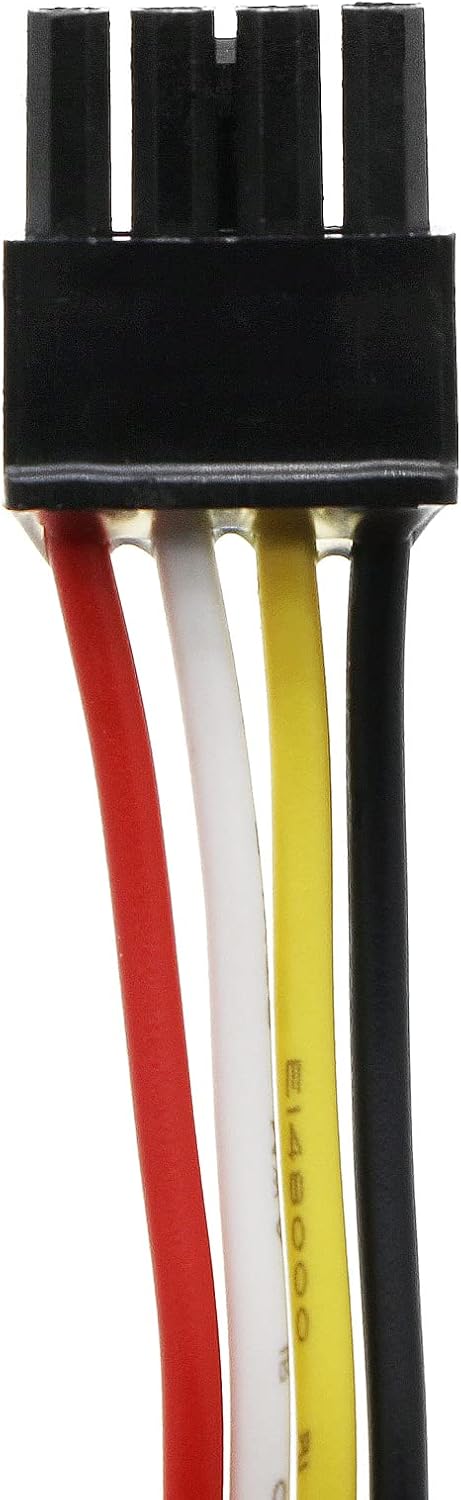

Images: Close-up views of the battery's electrical connector, showing the pins and wiring for proper installation.
Operating Instructions
Once installed, operate your vacuum cleaner as usual. The new battery will provide power for cleaning tasks. Observe the following for best performance:
- Full Charge Before Use: Always ensure the battery is fully charged before starting a cleaning cycle, especially after initial installation or prolonged storage.
- Regular Charging: Recharge the battery as needed. Avoid completely draining the battery frequently, as this can reduce its overall lifespan.
- Temperature Considerations: Operate and charge the battery within recommended temperature ranges (typically room temperature) to prevent damage and ensure efficient performance.
Maintenance
Proper maintenance can extend the life of your battery:
- Storage: If storing the vacuum cleaner or battery for an extended period, store the battery in a cool, dry place, ideally with a partial charge (around 50%). Avoid extreme temperatures.
- Cleaning Contacts: Periodically inspect the battery contacts and the vacuum cleaner's charging contacts for dust or debris. Clean them gently with a dry cloth if necessary to ensure good electrical connection.
- Avoid Over-Discharge: Do not leave the battery in a fully discharged state for long periods. Recharge it promptly after use.
Troubleshooting
If you encounter issues with your battery, refer to the table below for common problems and solutions:
| Problem | Possible Cause | Solution |
|---|---|---|
| Battery not charging | Loose connection; Faulty charger/dock; Extreme temperature; Battery fault | Ensure battery is properly seated and connected. Check charger/dock. Move to room temperature. If problem persists, contact support. |
| Short run time after full charge | Battery degradation; High power mode usage; Vacuum cleaner issue | Ensure battery is fully charged. Reduce power mode if possible. Check vacuum cleaner for blockages or motor issues. |
| Vacuum cleaner not turning on | Battery not installed correctly; Battery fully discharged; Vacuum cleaner fault | Re-install battery. Charge battery fully. Test vacuum cleaner with another power source if possible. |
Specifications
Detailed specifications for the Synergy Digital Vacuum Cleaner Battery:
- Battery Chemistry: Li-ion (Lithium Ion)
- Voltage: 14.4V
- Capacity: 5200mAh
- Compatible with: Xiaomi BRR-2P4S-5200D Battery
- Works for: Roborock AED03HRR Vacuum Cleaner and many more models
- Product Dimensions: 5.6 x 1.73 x 1.75 inches
- Item Weight: 15.3 ounces
- Manufacturer: Synergy Digital
Warranty Information
For specific warranty terms and conditions, please refer to the official warranty policy provided by Synergy Digital or the retailer at the time of purchase. Please note that the warranty may be void if the product's original labels are removed or if the battery is disassembled or serviced by unauthorized personnel.
Customer Support
If you have any questions, require technical assistance, or need further support regarding your Synergy Digital Vacuum Cleaner Battery, please contact the manufacturer or your point of purchase. Have your product model number (BRR-2P4S-5200D) and purchase details ready when contacting support.
Ask a question about this manual
Ask about setup, troubleshooting, compatibility, parts, safety, or missing instructions. Manuals+ will review the question and use this page’s manual context to help answer it.