
Introduction
Thank you for choosing the QODJN 300W Multi USB C Charger. This high-performance charging station is designed to power multiple devices simultaneously, including laptops, smartphones, and tablets, with advanced GaN IV technology for efficient and safe charging. This manual provides essential information on setting up, operating, and maintaining your charger, along with important safety guidelines.
Product Overview
Key Features
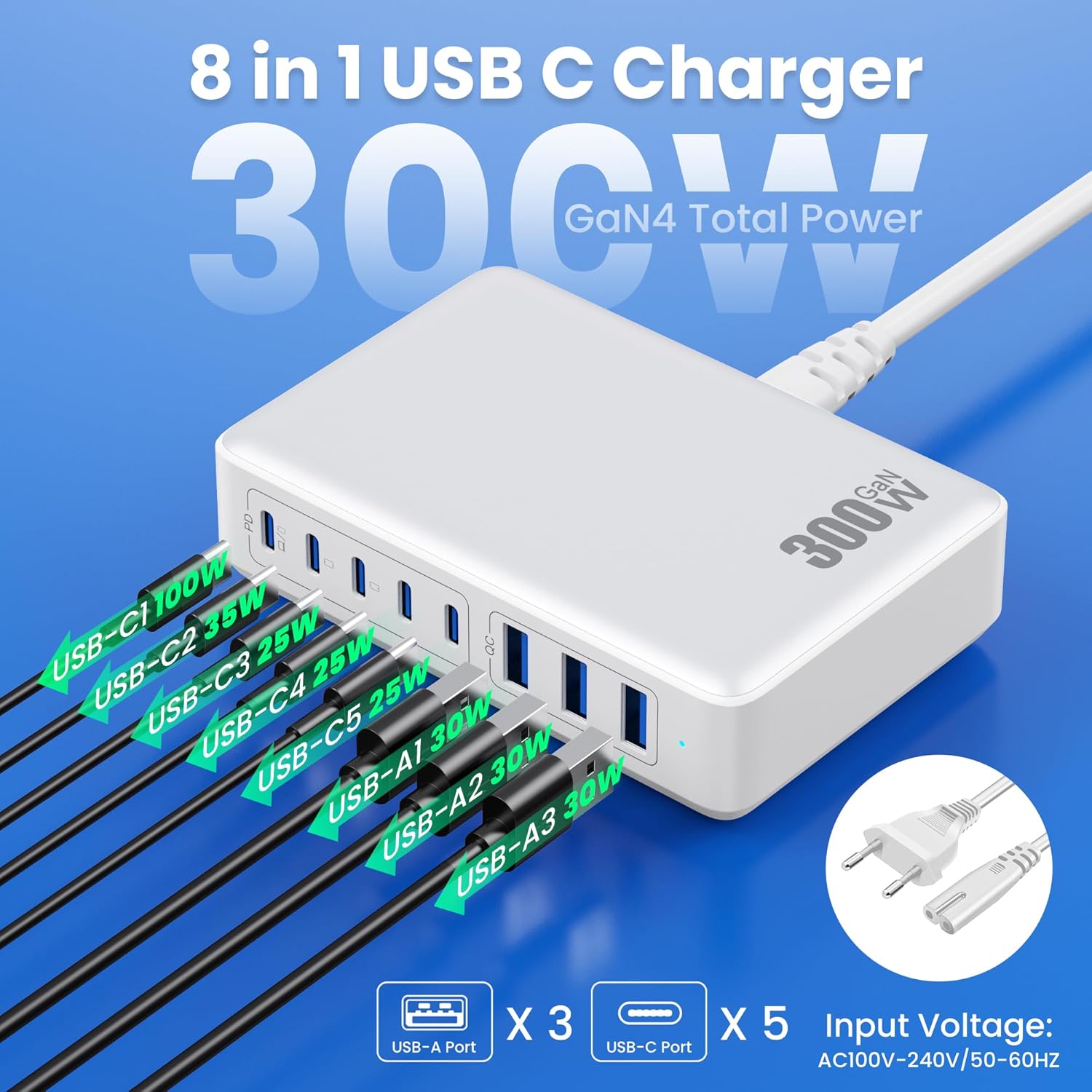
- 8-in-1 Charging Solution: Equipped with 5 USB-C ports and 3 USB-A ports, allowing simultaneous charging of up to 8 devices.
- High Power Output: Delivers a total of 300W, with individual USB-C ports supporting up to 100W Power Delivery (PD) for laptops.
- Advanced GaN IV Technology: Utilizes Gallium Nitride (GaN) for a compact design, higher energy efficiency, and improved heat dissipation.
- Fast Charging Protocols: Supports Power Delivery (PD), Quick Charge (QC), and Programmable Power Supply (PPS) for optimized charging speeds.
- Multi-Protection System: Integrated with premium microchips for comprehensive safety, including over-charge, over-voltage, over-current, over-temperature, overload, short circuit, and surge protection.
Components
- QODJN 300W Multi USB C Charger Unit
- Power Cable
- User Manual
Product Images



Setup
- Unpack the Charger: Carefully remove the charger unit and power cable from its packaging.
- Connect Power Cable: Insert the detachable power cable firmly into the power input port on the back of the charger.
- Plug into Wall Outlet: Connect the other end of the power cable to a standard AC wall outlet (100-240V). The charger is now ready for use.
- Connect Devices: Use appropriate USB-C or USB-A charging cables to connect your devices to the corresponding ports on the charger.
Operating Instructions
The QODJN 300W Multi USB C Charger is designed for ease of use with intelligent power distribution. Once connected to a power source and your devices, it will automatically begin charging.
- Automatic Device Detection: The charger automatically detects the connected device's power requirements and delivers the optimal charging current and voltage.
- Simultaneous Charging: You can charge multiple devices at once. The charger intelligently distributes the total 300W power across all active ports. For example, if a 100W laptop is connected to a high-power USB-C port, the remaining power will be distributed among other connected devices.
- Fast Charging: For devices supporting PD, QC, or PPS, ensure you use compatible cables to achieve maximum charging speeds. The USB-C1 port is ideal for high-power devices like laptops, offering up to 100W.

Specifications
| Attribute | Value |
|---|---|
| Brand | QODJN |
| Color | White |
| Operating System Compatibility | macOS, iOS, Android |
| Total USB Ports | 8 (5 USB-C, 3 USB-A) |
| Compatible Devices | Laptops, smartphones, tablets |
| Item Model Number | HX-P23 |
| Manufacturer | Dongguan Yuanhaoxun Technology Co., Ltd |
| Included Components | 1 x 300W USB C charger, 1 x user manual, 1 x 24-month warranty, Power Cable |
| Input Voltage | 120 Volts (AC100-240V) |
| Output Current | 5 Amperes (Max) |
| Output Voltage | 20 Volts (Max) |
| Number of Units | 1 |
Troubleshooting
If you encounter issues with your QODJN 300W Multi USB C Charger, please refer to the following common problems and solutions:
- Device Not Charging:
- Ensure the charger's power cable is securely plugged into both the charger and a live wall outlet.
- Verify that the charging cable connecting your device to the charger is fully inserted and not damaged.
- Try using a different port on the charger or a different charging cable.
- Confirm your device is compatible with USB-C or USB-A charging.
- Slow Charging:
- Ensure your charging cable supports fast charging protocols (PD, QC, PPS) if your device requires them.
- Check if your device supports fast charging.
- If multiple high-power devices are connected, the total power is distributed. Disconnecting less critical devices might increase charging speed for others.
- Use the designated high-power USB-C1 port for laptops and other devices requiring up to 100W.
- Charger Overheating:
- It is normal for the charger to become warm during operation, especially under heavy load.
- If it feels excessively hot, disconnect all devices and the power cable, and allow it to cool down.
- Ensure the charger is placed in a well-ventilated area and not covered.
- If overheating persists, discontinue use and contact customer support.
Safety Information
Please read and follow these safety precautions to prevent damage to the product or injury to yourself:
- Do not expose the charger to water, moisture, or extreme temperatures.
- Do not disassemble, modify, or attempt to repair the charger. This will void the warranty and may cause electric shock or fire.
- Avoid dropping or subjecting the charger to strong impacts.
- Use only the provided power cable or a certified replacement.
- Ensure the charger is used in a well-ventilated environment. Do not cover it with blankets or other materials.
- Keep out of reach of children.
- Disconnect the charger from the power outlet during lightning storms or when unused for long periods.
- The charger features 10 Multiple Protection systems, including over-charge, over-voltage, over-current, over-temperature, overload, short circuit, and surge protection, to ensure safe operation.
Warranty and Support
Your QODJN 300W Multi USB C Charger comes with a 24-month warranty from the date of purchase. This warranty covers manufacturing defects and workmanship under normal use.
The warranty does not cover:
- Damage caused by accident, abuse, misuse, flood, fire, earthquake, or other external causes.
- Damage caused by operating the product outside the permitted or intended uses described in this manual.
- Damage caused by service performed by anyone who is not an authorized representative of QODJN.
For warranty claims or technical support, please contact the seller or QODJN customer service through the platform where you purchased the product. Please have your order number and product model (HX-P23) ready when contacting support.