
1. Introduction
Thank you for choosing the TROZK RGB Power Strip 65W USB C GaN Surge Protector. This device is designed to provide multiple power outlets and USB charging ports with advanced GaN technology and surge protection, suitable for various electronic devices in home or office environments. Please read this manual thoroughly before use to ensure proper operation and safety.

Image 1.1: Overview of the TROZK RGB Power Strip.
2. Safety Information
To prevent fire, electric shock, or injury, always follow basic safety precautions when using this product:
- Do not exceed the maximum power rating of 1625W (13A at 125V).
- This product is for indoor use only. Do not expose to moisture or use in wet conditions.
- Do not disassemble, modify, or attempt to repair the device. Refer servicing to qualified personnel.
- Keep away from children and pets.
- Ensure the power cord is fully inserted into a grounded wall outlet.
- Avoid placing the power strip near heat sources or in direct sunlight.
- Do not use with aquariums or other water-related products.
- Unplug the power strip from the wall outlet when not in use for extended periods.
The device includes multiple protection features:
- SPD Surge Protection: Protects against power surges and spikes.
- High Power Reminder and Protection: Alerts and protects against overload.
- Electrostatic Protection: Guards against electrostatic discharge.
- Overcurrent Protection: Prevents damage from excessive current.
- Overvoltage Protection: Shields devices from high voltage.
- Short Circuit Protection: Automatically cuts power in case of a short circuit.

Image 2.1: Integrated safety protection features.
3. Product Features
3.1 GaN Technology
The TROZK power strip incorporates Gallium Nitride (GaN) technology, which enhances charging efficiency and reduces energy loss. When a device is connected to a USB port, the 'GaN' icon on the digital display will illuminate and animate, indicating the charging process. Once charging is complete, the 'GaN' word will light up steadily.

Image 3.1: Advanced GaN technology for efficient charging.
3.2 LCD Digital Display
A 1.65-inch LCD digital display provides real-time monitoring of the power strip's operational status. Key electrical information such as current, voltage, and power consumption is displayed, offering insights into connected devices.

Image 3.2: Digital display showing real-time electrical information.
3.3 RGB Colorful Lighting
The power strip features integrated RGB lighting effects, allowing for customization of the device's aesthetic to match your environment or preference.
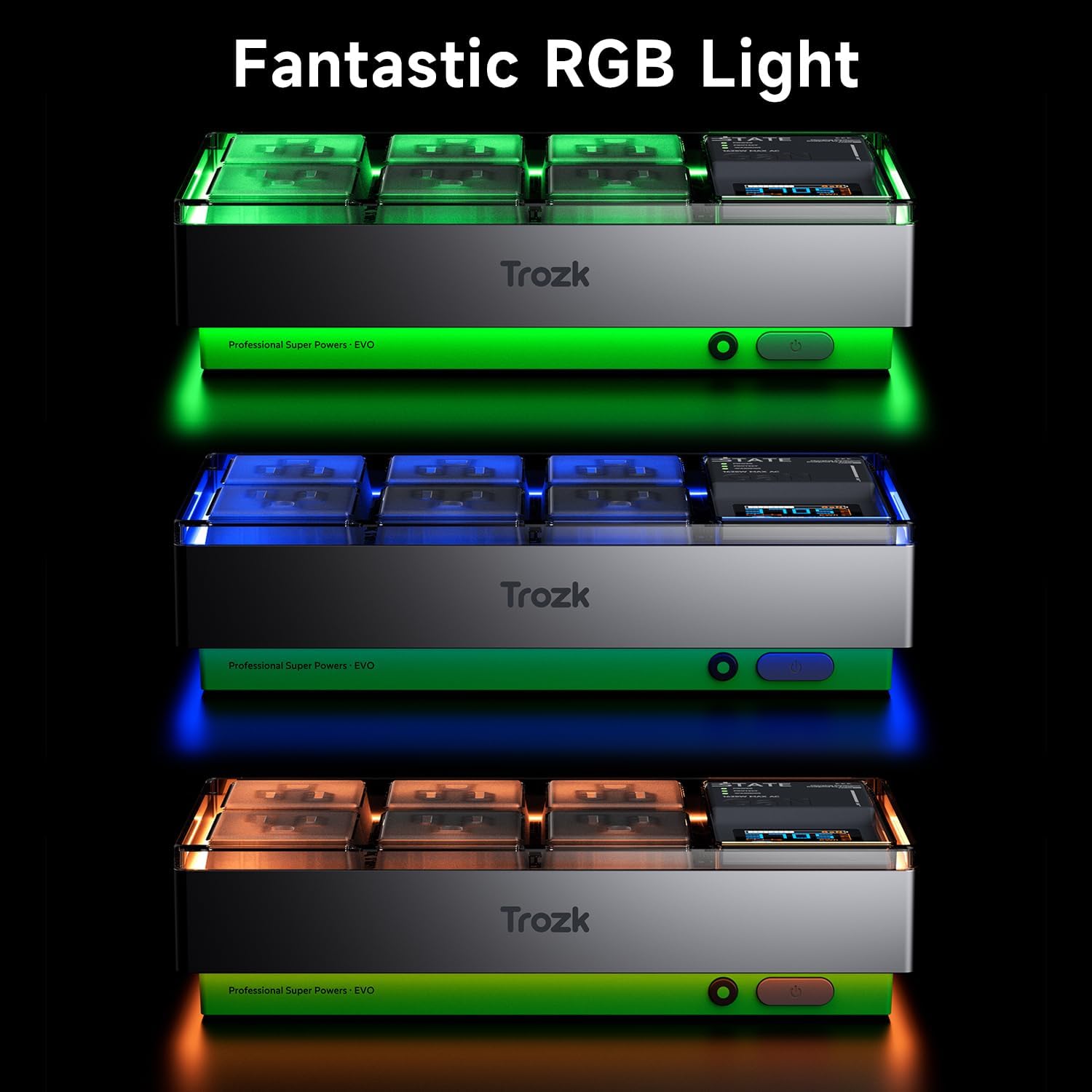
Image 3.3: Examples of RGB lighting effects.
3.4 Multiple Sockets and Ports
The power strip is equipped with 6 standard AC outlets, 2 USB-A ports, and 2 USB-C ports, providing versatile connectivity for a wide range of devices, including PCs, gaming consoles, and mobile devices.

Image 3.4: Overview of available outlets and ports.
4. Setup
- Unpack: Carefully remove the power strip from its packaging.
- Placement: Place the power strip on a stable, dry surface, away from direct sunlight, heat sources, and moisture. Ensure adequate ventilation around the unit.
- Connect to Power: Plug the power strip's integrated 5ft extension cord into a standard, grounded 110V-125V AC wall outlet.
- Power On: Press the power button located on the side of the unit to turn it on. The digital display and RGB lighting will activate.
- Connect Devices: Plug your electronic devices into the available AC outlets, USB-A ports, or USB-C ports.
5. Operating Instructions
5.1 Using AC Outlets
Insert the power plugs of your devices into any of the 6 AC outlets. Ensure the plugs are fully inserted. The outlets provide surge protection for connected equipment.
5.2 Using USB Charging Ports
Connect your USB-powered devices to the 2 USB-A ports or 2 USB-C ports using appropriate charging cables. The USB-C ports support 65W fast charging. The digital display will show charging status and power delivery information.

Image 5.1: Power strip connected to various devices.
5.3 Interpreting the Digital Display
The 1.65-inch LCD screen provides real-time data:
- Voltage (V): Displays the current input voltage.
- Current (A): Shows the total current drawn by connected devices.
- Power (W): Indicates the total power consumption of connected devices.
- GaN Indicator: Illuminates when GaN fast charging is active.
- Protection Status: Icons may indicate active surge protection or other safety features.
5.4 RGB Lighting Control
The RGB lighting can typically be controlled via a dedicated button or switch on the unit, allowing you to cycle through different colors or turn the lighting on/off. Refer to the physical unit for the exact control mechanism.
6. Maintenance
- Cleaning: Disconnect the power strip from the wall outlet before cleaning. Use a soft, dry cloth to wipe the surface. Do not use liquid cleaners or abrasive materials.
- Inspection: Periodically inspect the power cord and the unit for any signs of damage, such as frayed wires or cracks. If damage is found, discontinue use and contact customer support.
- Storage: When not in use, store the power strip in a cool, dry place, away from extreme temperatures and humidity.
7. Troubleshooting
- No Power/Display Off:
Solution: Ensure the power strip is securely plugged into a working wall outlet. Check if the power button on the unit is pressed. Verify the wall outlet is functional by plugging in another device. - Devices Not Charging/Powering On:
Solution: Check if the power strip is on. Ensure devices are properly plugged into the outlets/ports. Test the device directly in a wall outlet to confirm it is functional. If using USB, ensure the cable is not damaged and is compatible with the device. - Overload Indication:
Solution: If the power strip indicates an overload (e.g., via the digital display or an audible alert), immediately unplug some devices to reduce the load. The power strip may have an internal circuit breaker that needs to be reset (if applicable, check the unit for a reset button). Do not exceed the maximum power rating. - RGB Lights Not Working:
Solution: Check if the power strip is on. Locate the RGB control button/switch and ensure it is activated or cycle through the modes.
8. Specifications
| Feature | Specification |
|---|---|
| Product Dimensions | 7.23 x 3.69 x 0.1 inches |
| Item Weight | 1.43 pounds |
| Brand | Trozk |
| Color | Green/ Silver |
| Total Power Outlets | 6 AC Outlets |
| USB Ports | 2 USB-A, 2 USB-C |
| USB-C Fast Charging | 65W Type-C (GaN PD3.0) |
| Voltage | 110 Volts |
| Special Features | RGB LED strip, 1.65-inch Color Digital Screen Display, Compact, Fireproof Shell |
| Extension Cord Length | 5 feet |
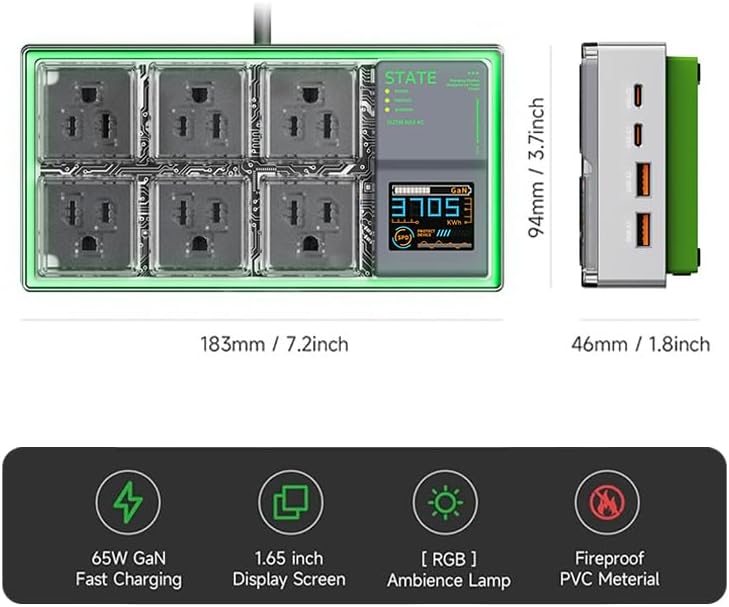
Image 8.1: Product dimensions and key features summary.
9. Warranty and Support
This TROZK product comes with a 2-Year Warranty from the date of purchase. This warranty covers manufacturing defects and workmanship under normal use.
The warranty does not cover:
- Damage caused by misuse, abuse, accident, or neglect.
- Unauthorized repair or modification.
- Normal wear and tear.
For warranty claims or technical support, please contact TROZK customer service through the retailer where the product was purchased or visit the official TROZK website for contact information.