
1. Introduction
Thank you for choosing the Daakro ZK-302T Bluetooth 5.3 Amplifier Board. This compact 2.0 channel audio amplifier is designed for DIY wireless speaker projects, offering 30W+30W output, precise treble and bass control, and versatile input options including Bluetooth 5.3, USB, and AUX. This manual will guide you through the installation, operation, and maintenance of your amplifier board to ensure optimal performance and longevity.
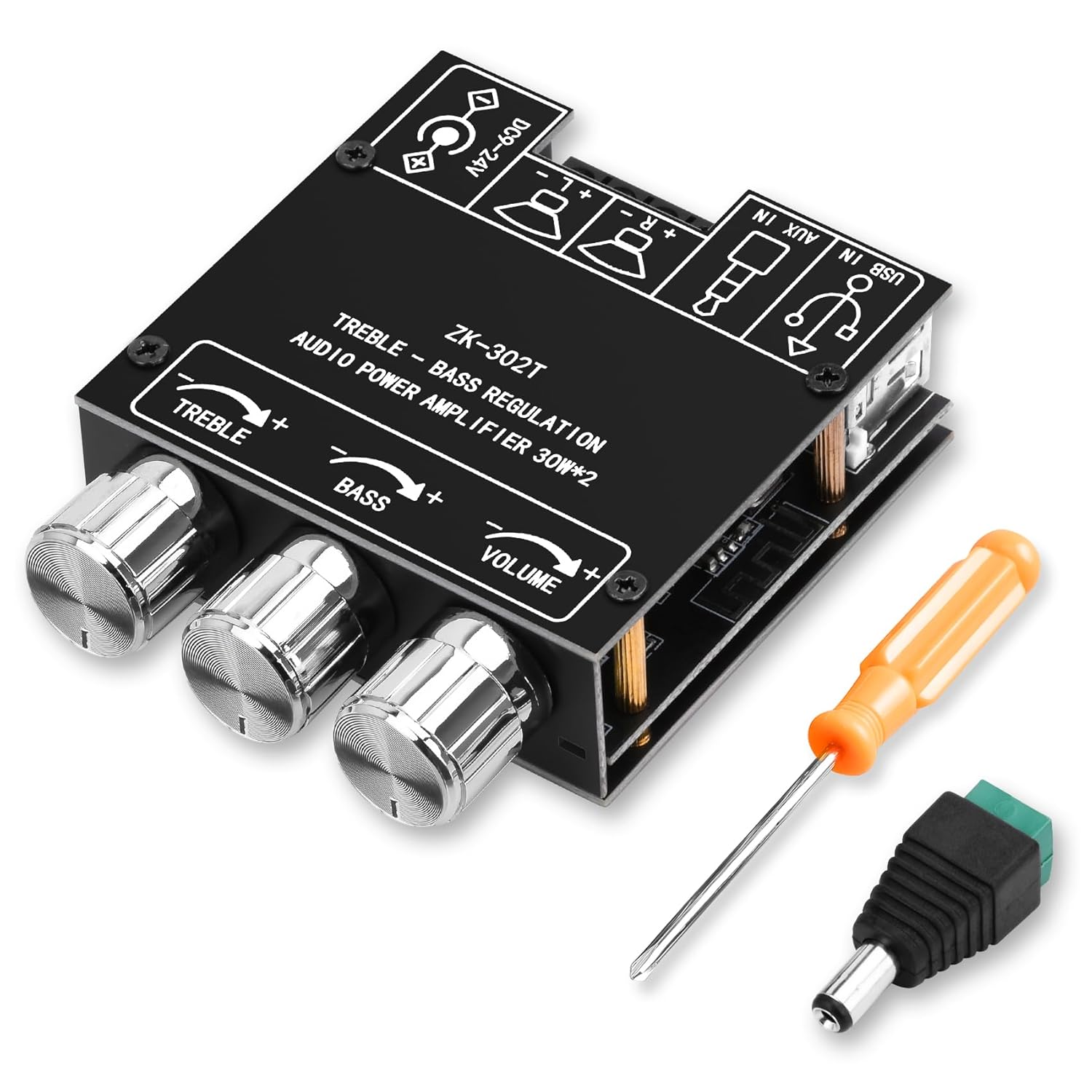
Figure 1: Daakro ZK-302T Bluetooth 5.3 Amplifier Board. This image shows the compact amplifier board with its three control knobs for treble, bass, and volume, along with the various input and output terminals.
2. Safety Information
Please read and understand all safety instructions before using this product. Failure to follow these instructions may result in electric shock, fire, or other hazards.
- Ensure the power supply voltage is within the specified range of DC 9-24V.
- Do not expose the amplifier board to moisture, water, or extreme temperatures.
- Avoid short-circuiting the output terminals.
- Disconnect power before making any connections or disconnections.
- Keep out of reach of children.
- Do not attempt to disassemble or modify the board. Refer all servicing to qualified personnel.
- Ensure proper ventilation to prevent overheating.
- This product is designed for indoor use only.
3. Setup and Connections
Follow these steps to correctly set up your Daakro ZK-302T amplifier board.
3.1 Package Contents
Verify that all items are present in your package:
- Daakro ZK-302T Bluetooth Amplifier Board
- Power adapter cable (if included)
- Screwdriver
- Mounting hardware (standoffs, screws)
- Heat sink (if not pre-installed)

Figure 2: What's in the Box. This image displays the amplifier board along with included accessories such as a screwdriver, power adapter cable, and mounting hardware.
3.2 Component Identification
Familiarize yourself with the various ports and controls on the amplifier board.

Figure 3: Component Identification. This diagram highlights key components including the power input, USB input, AUX input, left and right channel outputs, and the treble, bass, and volume control knobs.
- Power Input (DC 9-24V): Connect your DC power supply here.
- USB Input: For audio input from a USB source.
- AUX Input (3.5mm Jack): For wired audio input from devices like phones or PCs.
- Left Channel Output (L+ L-): Connect to your left speaker.
- Right Channel Output (R+ R-): Connect to your right speaker.
- Treble Control: Rotate to adjust high-frequency audio.
- Bass Control: Rotate to adjust low-frequency audio.
- Volume Control: Rotate to adjust overall audio output level.
3.3 Connecting Speakers
- Ensure the amplifier board is powered off.
- Connect your speakers (4-8Ω, 20-200W) to the corresponding Left (L+ L-) and Right (R+ R-) channel output terminals. Ensure correct polarity (+ to + and - to -).
- Tighten the terminal screws to secure the speaker wires.
3.4 Power Connection
- Connect a DC power supply (9-24V) to the power input terminal.
- Ensure the power supply provides sufficient current for your speakers. Refer to the "Power Output Comparison Table" in Section 4.3 for optimal power matching.
4. Operating Instructions
4.1 Powering On and Input Selection
- Once speakers and power are connected, turn on the power supply. The amplifier board will automatically enter Bluetooth pairing mode.
- The board supports three audio input modes: Bluetooth, USB, and AUX. The board will automatically switch to the last active input or prioritize a newly connected input.

Figure 4: Multiple Audio Input Modes. This image illustrates the three input options: Bluetooth, 3.5mm AUX, and USB, and shows compatible devices like mobile phones, tablets, and computers.
4.2 Bluetooth Pairing
- Ensure the amplifier board is powered on and in Bluetooth mode.
- On your mobile device (phone, tablet, etc.), enable Bluetooth and search for available devices.
- Select "ZK-302T" from the list of devices to pair. No password is required.
- Once paired, you will hear a confirmation tone, and the Bluetooth indicator light (if present) will stabilize.
- The Bluetooth connection range is approximately 16.4 feet (5 meters).

Figure 5: Bluetooth Connection. This image shows a smartphone connected via Bluetooth to the ZK-302T amplifier board, indicating a wireless range of up to 16.4 feet (5 meters).
4.3 Adjusting Audio
- Volume Control: Rotate the VOLUME knob to increase or decrease the overall sound level.
- Treble Control: Rotate the TREBLE knob to adjust the high-frequency response. Turn clockwise for more treble, counter-clockwise for less.
- Bass Control: Rotate the BASS knob to adjust the low-frequency response. Turn clockwise for more bass, counter-clockwise for less.
4.4 Power Output Considerations
Optimal audio output requires a suitable power supply and speaker impedance. The table below illustrates the approximate output power based on input voltage and speaker impedance.

Figure 6: Power Output Comparison Table. This table details the R&L channel output power at 1KHz for various input voltages (12V, 15V, 19V, 24V) and speaker impedances (4Ω, 8Ω).
Important Note: There must be enough voltage and current input to achieve the rated power output. Higher voltage and current generally result in higher power. For the same conditions, a smaller speaker impedance will yield greater power.
5. Maintenance
- Cleaning: Use a soft, dry cloth to clean the amplifier board. Do not use liquid cleaners or solvents.
- Storage: Store the device in a cool, dry place away from direct sunlight and extreme temperatures.
- Ventilation: Ensure the board has adequate airflow to prevent overheating, especially during prolonged use at high volumes.
- Connections: Periodically check all connections for tightness and ensure no wires are frayed or exposed.
6. Troubleshooting
If you encounter issues with your Daakro ZK-302T amplifier board, refer to the following common problems and solutions.
| Problem | Possible Cause | Solution |
|---|---|---|
| No sound output |
|
|
| Distorted sound |
|
|
| Bluetooth connection issues |
|
|
| Overheating |
|
|
7. Specifications
| Feature | Detail |
|---|---|
| Model Number | ZK-302T |
| Output Power | 30W + 30W (2.0 Channel) |
| Amplifier Chip | Dual TPA3110D2 HiFi Chip |
| Bluetooth Version | 5.3 |
| Input Voltage | DC 9-24V |
| Audio Inputs | Bluetooth, USB, AUX (3.5mm) |
| Speaker Impedance | 4-8Ω |
| Recommended Speaker Power | 20-200W |
| Product Dimensions (L x W x H) | 4.33 x 2.76 x 1.97 inches |
| Weight | 3.53 ounces |
| Protection Mechanisms | Over-voltage, Under-voltage, Over-temperature, Short-circuit, Reverse connection |
8. Warranty and Support
The Daakro ZK-302T Bluetooth 5.3 Amplifier Board comes with a 30-day return/replacement policy from the date of purchase. This warranty covers manufacturing defects and issues arising from normal use. It does not cover damage caused by misuse, accidents, unauthorized modifications, or improper installation.
For technical support, warranty claims, or any questions regarding your product, please contact Daakro customer service through the platform where you purchased the product. Please have your purchase details and model number (ZK-302T) ready.
