
Daakro ZK-502MT
ZK-502MT Bluetooth Amplifier Board User Manual
Model: ZK-502MT | Brand: Daakro
1. Introduction
The Daakro ZK-502MT Bluetooth Amplifier Board is a versatile 2.0 channel audio amplifier designed for DIY home audio projects. It features dual HiFi amplifier chips, providing clear and high-fidelity sound. With support for both Bluetooth 5.0 and AUX inputs, it offers flexible connectivity options for various audio sources. This manual provides detailed instructions for setup, operation, and maintenance of your ZK-502MT amplifier board.
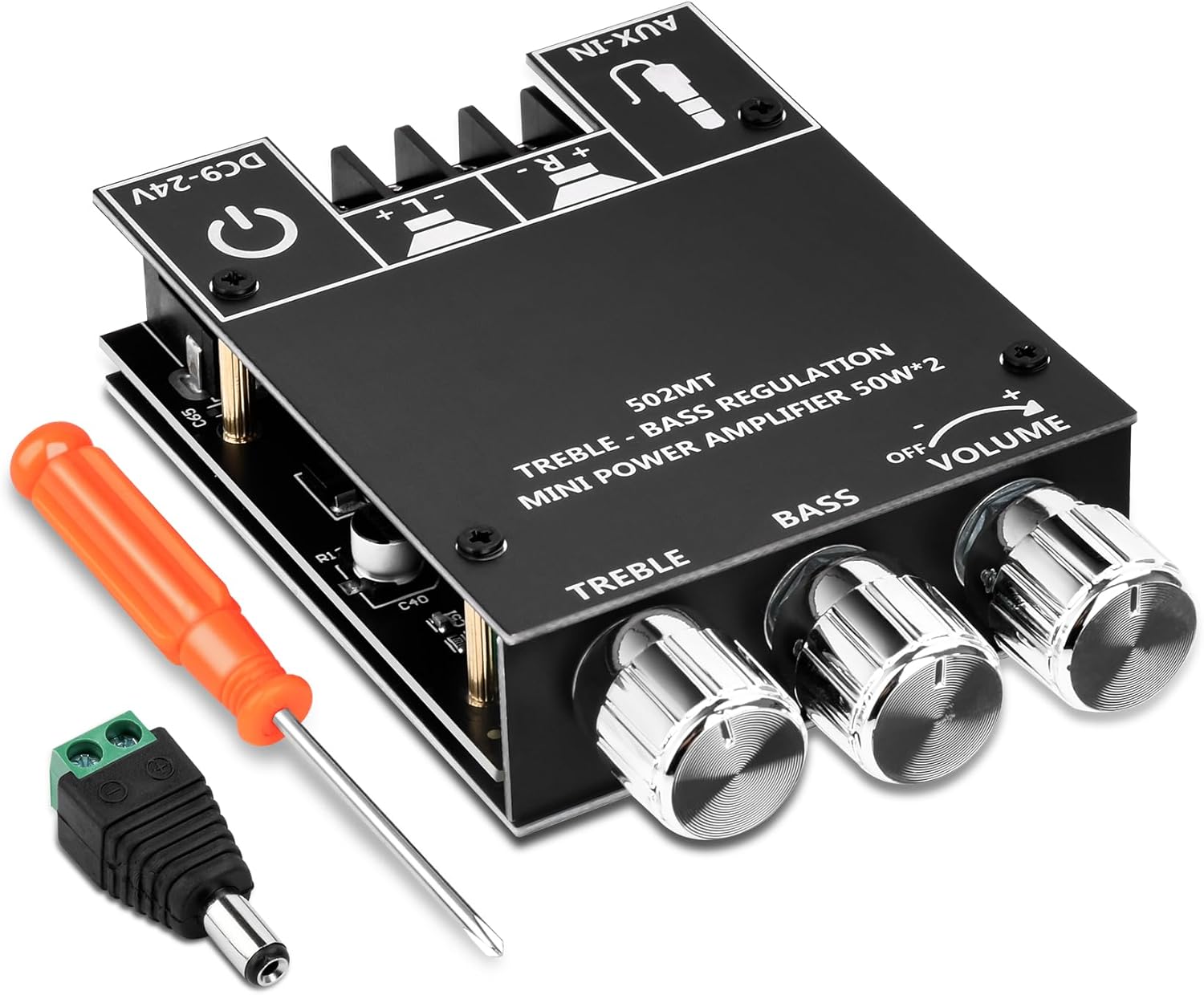
Image 1.1: The ZK-502MT Bluetooth Amplifier Board, including a screwdriver and a DC power adapter.
2. Key Features
- Dual HiFi Amplifier Chip: Utilizes two HiFi amplifier chips with PurePath technology for ultra-high resolution, low distortion, and high-fidelity sound.
- 2.0 Channel Configuration: Supports left and right channel output, each providing 50W output power for an immersive sound experience.
- Dual Audio Input Modes: Seamlessly switch between Bluetooth 5.0 for wireless connectivity and traditional AUX input for wired audio sources.
- Wide Application: Compatible with a wide input voltage range from 9V to 24V DC and suitable for 20-200W, 4-8Ω speakers.
- Comprehensive Protection: Built-in protection mechanisms include over-voltage, under-voltage, over-temperature, short-circuit, and reverse connection protection.
- Treble and Bass Control: Independent knobs for adjusting treble and bass to customize your audio output.
3. What's in the Box
Upon opening the package, please verify that all the following components are included:
- ZK-502MT Bluetooth Amplifier Board
- Top Plate with Control Labels
- Bottom Plate
- Screwdriver
- DC Power Adapter Connector
- Heat Sink
- Mounting Hardware (Screws, Standoffs)
- Control Knobs (Volume, Treble, Bass)

Image 3.1: All components included in the ZK-502MT package.
4. Setup Guide
Follow these steps to properly set up your ZK-502MT Bluetooth Amplifier Board.
4.1 Component Assembly
- Attach Heat Sink: Secure the provided heat sink to the main amplifier chip on the board. Ensure good contact for optimal heat dissipation.
- Assemble Casing: Use the provided standoffs and screws to attach the top and bottom plates to the amplifier board. The top plate has labels for controls and ports.
- Install Knobs: Place the three control knobs onto their respective shafts for Volume, Bass, and Treble.


Image 4.1: Proper installation of the heat sink and control knobs.
4.2 Speaker Connection
Connect your speakers to the amplifier board using the screw terminals. The board supports 2.0 channel output (Left and Right). Ensure correct polarity (+ and -) for each speaker.
- Connect the positive (+) terminal of your left speaker to the 'L+' terminal on the board.
- Connect the negative (-) terminal of your left speaker to the 'L-' terminal on the board.
- Connect the positive (+) terminal of your right speaker to the 'R+' terminal on the board.
- Connect the negative (-) terminal of your right speaker to the 'R-' terminal on the board.
The amplifier board is suitable for 20-200W, 4-8Ω speakers.

Image 4.2: Connection points for speakers, power, and AUX input.
4.3 Power Connection
Connect a DC power supply (9V-24V) to the power input terminal. The board includes a DC power adapter connector for convenience.
- Ensure your power supply voltage is within the 9V to 24V DC range.
- Connect the power supply to the DC-IN port on the amplifier board.
- The board has built-in reverse connection protection, but always double-check polarity before powering on.

Image 4.3: Detail of the power input and speaker terminals.
5. Operating Instructions
This section details how to operate your ZK-502MT amplifier board.
5.1 Power On/Off
- To power on, ensure all connections are secure, then connect the power supply to a power outlet. The power indicator LED will illuminate.
- To power off, disconnect the power supply from the outlet.
5.2 Volume, Treble, and Bass Control
The amplifier board features three rotary knobs for audio adjustment:
- Volume: Rotate the "VOLUME" knob clockwise to increase volume and counter-clockwise to decrease.
- Bass: Rotate the "BASS" knob clockwise to increase bass frequencies and counter-clockwise to decrease.
- Treble: Rotate the "TREBLE" knob clockwise to increase treble frequencies and counter-clockwise to decrease.
5.3 Audio Input Modes
The ZK-502MT supports two audio input modes: Bluetooth and AUX.

Image 5.1: The amplifier board supports both Bluetooth and AUX input modes.
5.3.1 Bluetooth Mode
- Ensure the amplifier board is powered on.
- The board will automatically enter Bluetooth pairing mode. A voice prompt or indicator light may confirm this.
- On your audio source device (e.g., smartphone, tablet, computer), enable Bluetooth and search for available devices.
- Select "ZK-502MT" from the list of devices to pair. No password is required.
- Once paired, a confirmation sound will be heard, and you can begin playing audio wirelessly.

Image 5.2: Bluetooth connectivity range of the ZK-502MT.
5.3.2 AUX Input Mode
- Connect a 3.5mm audio cable from your audio source device (e.g., MP3 player, TV, laptop) to the "AUX-IN" port on the amplifier board.
- The amplifier board will automatically switch to AUX input mode when a cable is detected.
- Begin playing audio from your source device.
6. Technical Specifications
| Feature | Specification |
|---|---|
| Model Number | ZK-502MT |
| Brand | Daakro |
| Number of Channels | 2.0 (Stereo) |
| Output Power | 50W + 50W (Total 100W) |
| Input Voltage Range | DC 9V - 24V |
| Speaker Impedance | 4-8Ω |
| Speaker Power Compatibility | 20W - 200W |
| Bluetooth Version | 5.0 |
| Audio Inputs | Bluetooth, AUX (3.5mm) |
| Dimensions (L x W x H) | 3.54 x 2.36 x 0.83 inches (9 x 6 x 2.1 cm) |
| Item Weight | 4.2 ounces (119 grams) |

Image 6.1: Physical dimensions of the ZK-502MT amplifier board.

Image 6.2: Power Output Comparison Table for different input voltages and speaker impedances.
7. Troubleshooting
| Problem | Possible Cause | Solution |
|---|---|---|
| No sound output |
|
|
| Bluetooth not connecting |
|
|
| Sound distortion or poor quality |
|
|
| Amplifier board gets hot |
|
|
8. Maintenance
To ensure the longevity and optimal performance of your ZK-502MT amplifier board, follow these simple maintenance guidelines:
- Cleaning: Gently wipe the surface of the board with a soft, dry cloth. Do not use liquid cleaners or solvents, as they may damage the electronic components.
- Dust Removal: Periodically use compressed air to remove dust from the heat sink and other components to maintain proper cooling.
- Storage: If storing the amplifier board for an extended period, disconnect it from power and store it in a cool, dry place away from direct sunlight and excessive humidity.
- Handling: Always handle the board by its edges to avoid touching sensitive components or causing static discharge.
9. Warranty and Support
Daakro is committed to providing high-quality products and excellent customer service.
- Warranty: This product comes with a 36-month warranty from the date of purchase, covering manufacturing defects. Please retain your proof of purchase for warranty claims.
- Customer Service: For any questions, technical assistance, or warranty inquiries, please contact Daakro customer support.
- Online Support: Visit the official Daakro Store on Amazon for more information and support resources: Daakro Amazon Store.

Image 9.1: Daakro After-Sales Support information.
Ask a question about this manual
Ask about setup, troubleshooting, compatibility, parts, safety, or missing instructions. Manuals+ will review the question and use this page’s manual context to help answer it.