
Introduction
This manual provides essential information for the installation, operation, and maintenance of the GTYGERIH replacement Motherboard PCBA for the Roidmi Eve Plus Robot Vacuum Cleaner Dust Collection Station. This component is designed to replace the original motherboard within the dust collection station.
It is crucial to verify that this part is compatible with your specific Roidmi Eve Plus model before proceeding with installation. Please refer to the specifications section for detailed compatibility information.
Product Overview
The Motherboard PCBA is a critical electronic component responsible for controlling various functions of the dust collection station, including power management, communication, and operational logic. Below are detailed views of the product.
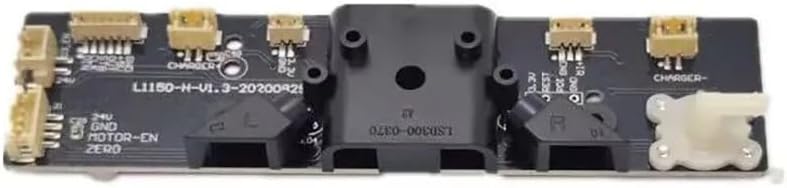
Figure 1: Top view of the Motherboard PCBA, highlighting the various connectors and primary components.

Figure 2: Bottom view of the Motherboard PCBA, showing the complex arrangement of surface-mounted components and traces.
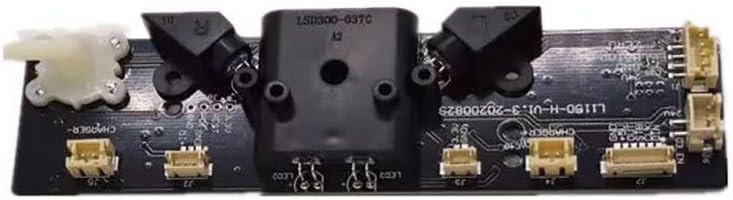
Figure 3: Angled perspective of the Motherboard PCBA, illustrating the various connection ports and structural mounting points.
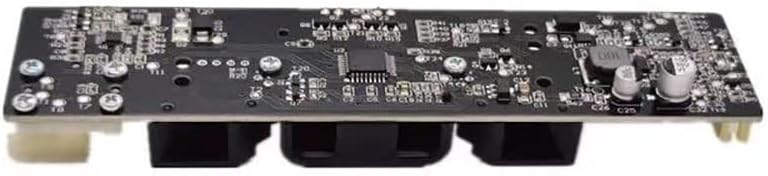
Figure 4: Side view of the Motherboard PCBA, demonstrating its compact design and component height.

Figure 5: Alternate side view of the Motherboard PCBA, providing a different perspective on the connectors and overall form factor.
Installation Guide
Installation of this replacement motherboard requires careful handling of electronic components and familiarity with the internal structure of the Roidmi Eve Plus Dust Collection Station. It is highly recommended that installation be performed by a qualified technician to avoid damage to the product or the vacuum cleaner.
- Safety First: Ensure the Roidmi Eve Plus Robot Vacuum Cleaner and its dust collection station are completely powered off and unplugged from the mains electricity before beginning any installation or repair work.
- Disassembly: Carefully disassemble the dust collection station to access the existing motherboard. Refer to the original service manual or online resources for specific disassembly instructions for your Roidmi Eve Plus model.
- Component Removal: Gently disconnect all cables and connectors from the old motherboard. Note the orientation and connection points of each cable to ensure correct reassembly. Remove any screws or fasteners securing the old motherboard.
- New Motherboard Installation: Position the new GTYGERIH Motherboard PCBA in the designated slot. Secure it with the appropriate screws or fasteners.
- Reconnection: Reconnect all cables and connectors to the new motherboard, ensuring they are firmly seated and correctly oriented. Double-check all connections before proceeding.
- Reassembly: Carefully reassemble the dust collection station, ensuring all components are properly aligned and secured.
- Initial Test: Plug the dust collection station back into the power outlet and power on the Roidmi Eve Plus Robot Vacuum Cleaner. Observe for proper functionality and any error indicators.
Note: Each product is professionally tested before leaving the factory to ensure functionality.
Operation
Once correctly installed, the Motherboard PCBA operates automatically as an integral part of the Roidmi Eve Plus Dust Collection Station. It manages the communication between the robot vacuum and the station, controls the dust collection process, and handles power distribution within the station. No direct user interaction with the motherboard itself is required for its operation.
Maintenance
The Motherboard PCBA itself requires minimal maintenance. However, to ensure its longevity and proper function, adhere to the following guidelines:
- Keep Dry: Ensure the dust collection station and its internal components, including the motherboard, remain dry. Moisture can cause severe damage to electronic circuits.
- Dust Control: Periodically clean the interior of the dust collection station to prevent excessive dust accumulation on the motherboard and other electronic parts. Use a soft, dry brush or compressed air for cleaning. Avoid using liquids or abrasive cleaners.
- Handle with Care: When performing any other maintenance on the dust collection station, always handle the motherboard and other electronic components with care to avoid physical damage or static discharge.
Troubleshooting
If you experience issues after installing the replacement Motherboard PCBA, consider the following troubleshooting steps:
- No Power/Functionality:
- Verify that the dust collection station is properly plugged into a working power outlet.
- Ensure all cables and connectors on the new motherboard are securely attached and correctly oriented.
- Check for any visible signs of damage to the cables or connectors.
- Error Indicators:
- If the Roidmi Eve Plus or the dust collection station displays an error code, consult the original Roidmi Eve Plus user manual for the meaning of the error code and recommended solutions.
- A common issue is incorrect reassembly or loose connections. Re-open the station and re-check all connections.
- Compatibility Check:
- Double-check that the model number of your Roidmi Eve Plus Dust Collection Station matches the compatibility requirements for this replacement PCBA.
If problems persist after following these steps, it is advisable to seek assistance from a professional technician or contact the seller for further support.
Specifications
| Feature | Detail |
|---|---|
| Product Type | Replacement Motherboard PCBA |
| Compatibility | For Roidmi Eve Plus Robot Vacuum Cleaner Dust Collection Station |
| Brand | GTYGERIH |
| Model Number | qibeitiancha65785 |
| Manufacturer | qibeitiancha |
| Part Number | qibeitiancha65785 |
| Item Weight | 1.76 ounces (50 Grams) |
| Package Dimensions | 1.18 x 0.79 x 0.39 inches |
| ASIN | B0DLK64Z7X |
| Date First Available | October 31, 2024 |
| Item Package Quantity | 1 |
| Number Of Pieces | 1 |
| Color | One Color |
| Size | One Size |
Warranty and Support
Specific warranty information for this replacement part is not provided in the product details. For warranty claims, technical support, or further inquiries, please contact the seller or manufacturer directly through your purchase platform.
Always ensure you have your purchase details readily available when contacting support.