
1. Introduction
Thank you for choosing the YNAK 16-in-1 Indoor Air Quality Monitor. This device is designed to provide comprehensive, real-time monitoring of various indoor air pollutants and environmental factors, ensuring a healthier living environment for you and your family. Please read this manual carefully before using the product to ensure proper operation and to maximize its lifespan.
2. Product Overview
The YNAK 16-in-1 Air Quality Monitor is an advanced device capable of detecting 16 different parameters, including Carbon Dioxide (CO2), Total Volatile Organic Compounds (TVOC), Particulate Matter (PM2.5, PM1.0, PM10), Formaldehyde (HCHO), Temperature, Humidity, Air Quality Index (AQI), and Time. It features a large 7-inch HD display for clear readings and a dual high-precision chip system for fast and accurate data updates.

Figure 2.1: The YNAK 16-in-1 Air Quality Monitor showing its comprehensive display of various air quality parameters and environmental factors.
Key Features:
- 16-in-1 Detection: Monitors CO2, TVOC, PM2.5, PM1.0, PM10, HCHO, Temperature, Humidity, AQI, and Time.
- Real-time AQI Alerts: Provides 7 distinct alert functions for key pollutants with visual and audible alarms.
- Dual High-Precision Chip: Ensures faster and more accurate air quality updates by processing sensor data and managing the interface separately.
- 7-inch HD Display: Offers clear and high-definition readings for an instant and comprehensive view of indoor air quality.
- Wireless Operation: Equipped with a 2500mAh battery for up to 8 hours of portable, cable-free use.
- Enhanced Airflow: Designed with multiple vents for more accurate air quality detection.

Figure 2.2: Internal view highlighting the precision core chip, which ensures accurate air quality tracking with 0.001 precision.
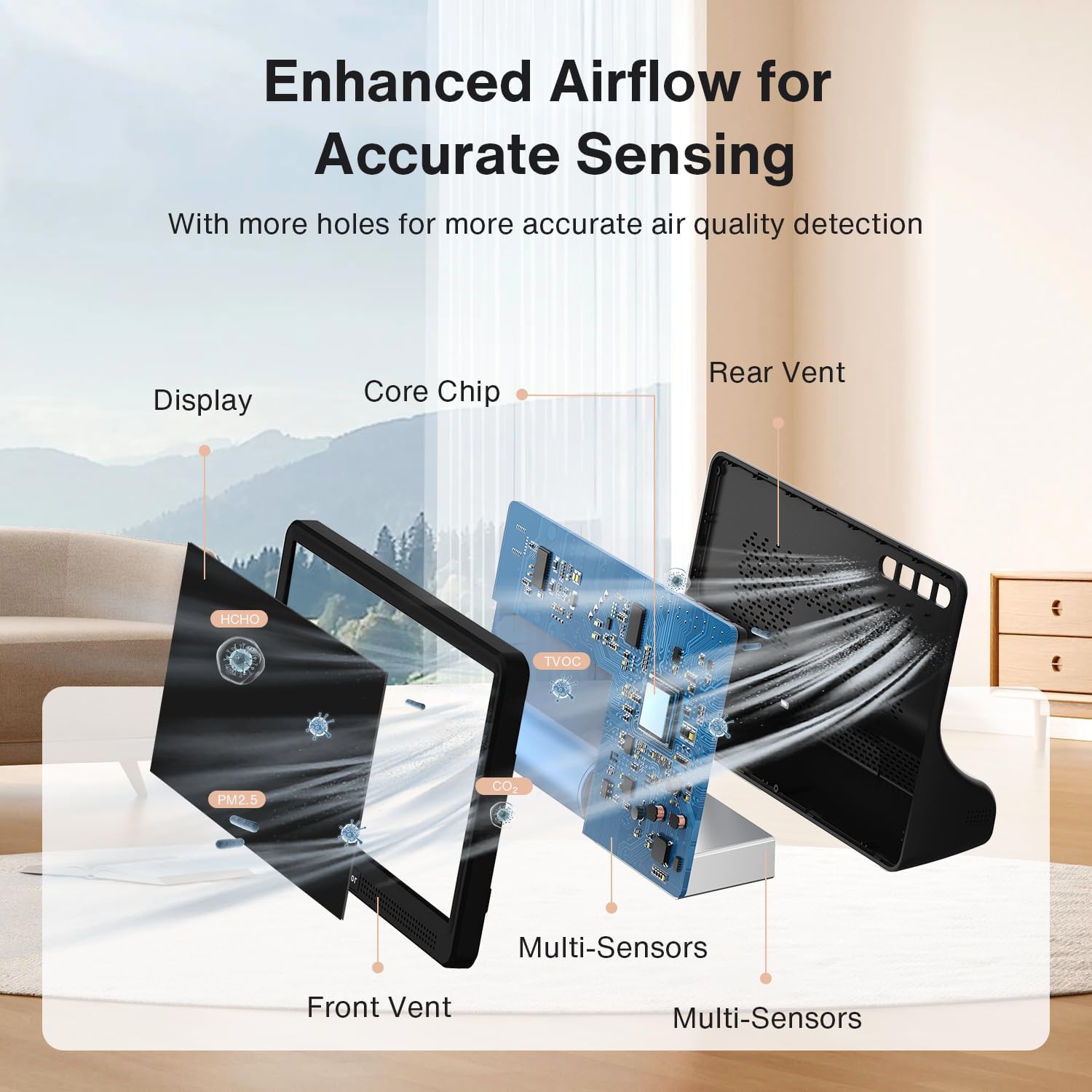
Figure 2.3: Illustration of the enhanced airflow design, featuring multiple holes and vents for more accurate air quality detection.
3. Safety Information
- Do not expose the device to extreme temperatures, direct sunlight, or high humidity.
- Avoid dropping or subjecting the device to strong impacts.
- Do not attempt to disassemble or repair the device yourself. Contact customer support for assistance.
- Keep the device away from water and other liquids.
- Ensure proper ventilation around the device for accurate readings.
- Use only the provided USB-C cable for charging.
4. Package Contents
Please check the package contents upon receipt. If any items are missing or damaged, contact customer support.
- 1 x YNAK 16-in-1 Air Quality Monitor
- 1 x USB-C Charging Cable
- 1 x User Manual
5. Setup
5.1 Initial Charging
- Connect the provided USB-C cable to the charging port on the device.
- Plug the other end of the USB-C cable into a compatible USB power adapter (not included) or a computer USB port.
- Allow the device to charge fully before first use. The battery indicator on the display will show charging status. A full charge provides up to 8 hours of wireless operation.

Figure 5.1: The air quality monitor connected to a power source via its USB-C cable for charging, indicating its rechargeable lithium battery feature.
5.2 Device Placement
For accurate readings, place the monitor in a central location within the room you wish to monitor. Avoid placing it near windows, air vents, or direct heat sources, as these can affect sensor accuracy.
6. Operating Instructions
6.1 Powering On/Off
- Power On: Press and hold the power button (usually located on the side or back) for a few seconds until the display lights up.
- Power Off: Press and hold the power button again until the display turns off.
6.2 Understanding the Display
The 7-inch HD display provides a clear overview of all monitored parameters. Readings are updated in real-time. The display typically shows:
- CO2 concentration (ppm)
- TVOC concentration (mg/m³)
- PM2.5, PM1.0, PM10 concentrations (ug/m³)
- HCHO concentration (mg/m³)
- Temperature (°C/°F)
- Humidity (% RH)
- AQI (Air Quality Index)
- Current Time

Figure 6.1: The 7-inch large display showing various air quality readings and indicating its 3-level brightness control feature.
6.3 Brightness Control
The device features a 3-level brightness control. Refer to the specific buttons on your device (usually indicated by a light bulb icon or similar) to adjust the display brightness to your preference.
6.4 Mute Function
To silence audible alarms, locate and press the mute button (often labeled 'Alarm' or with a speaker icon). This will disable the sound alerts while visual warnings remain active.
7. Understanding Readings and Alerts
The monitor provides real-time data and alerts based on predefined thresholds for various pollutants. The AQI (Air Quality Index) is a composite measure that indicates overall air quality.

Figure 7.1: The monitor's display showing a high CO2 reading and an alert, demonstrating the tri-color alarm system with audible alerts for severe pollution levels.
7.1 Alert Thresholds and Indicators
The device uses a color-coded system (Good, OK, Poor) and audible alerts to indicate air quality levels. Refer to the table below for detailed thresholds for each parameter.
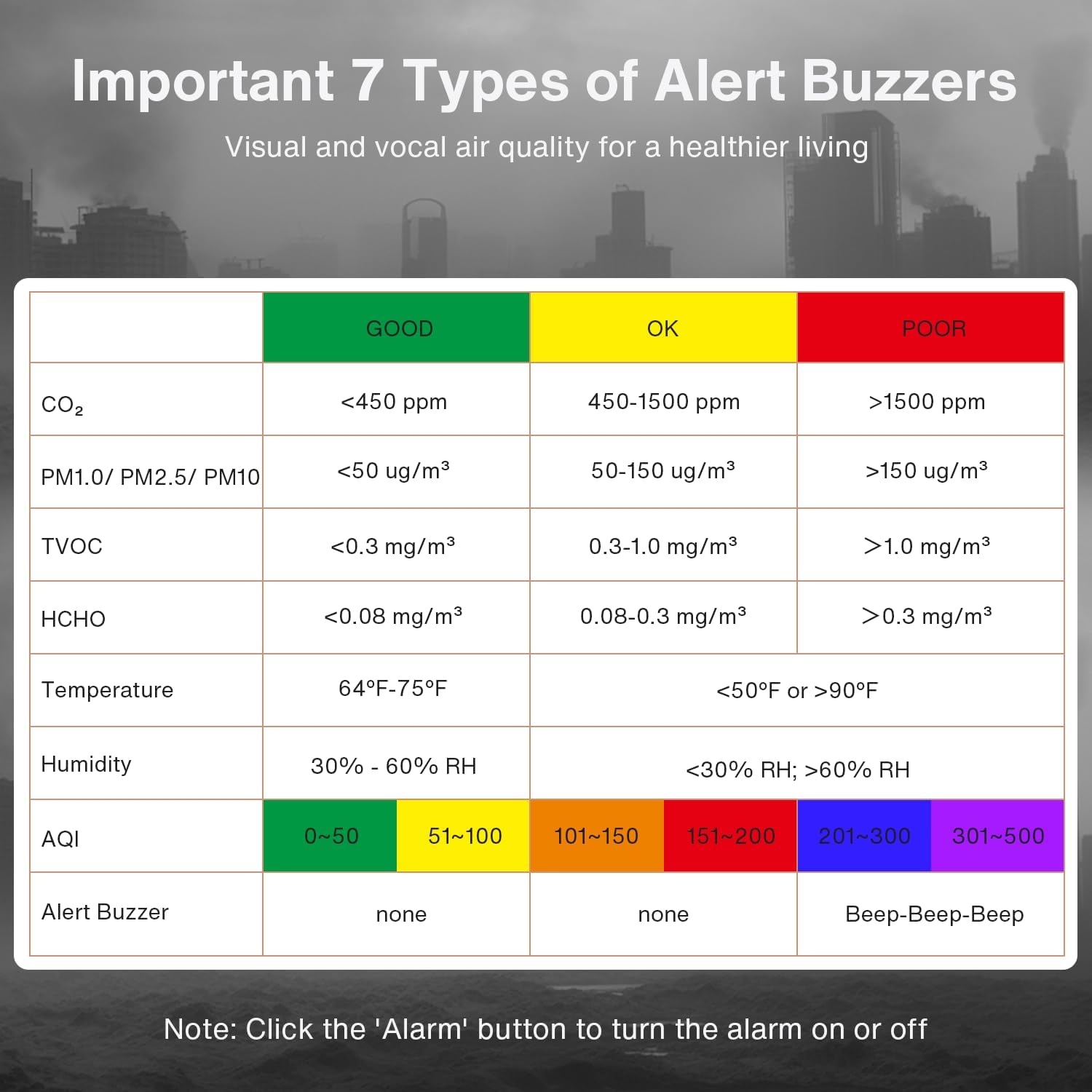
Figure 7.2: A detailed table outlining the 7 types of alert buzzers and the corresponding air quality thresholds for CO2, PM, TVOC, HCHO, Temperature, Humidity, and AQI.
| Parameter | GOOD | OK | POOR |
|---|---|---|---|
| CO2 | <450 ppm | 450-1500 ppm | >1500 ppm |
| PM1.0/ PM2.5/ PM10 | <50 ug/m³ | 50-150 ug/m³ | >150 ug/m³ |
| TVOC | <0.3 mg/m³ | 0.3-1.0 mg/m³ | >1.0 mg/m³ |
| HCHO | <0.08 mg/m³ | 0.08-0.3 mg/m³ | >0.3 mg/m³ |
| Temperature | 64°F-75°F | N/A | <50°F or >90°F |
| Humidity | 30% - 60% RH | N/A | <30% RH; >60% RH |
| AQI | 0-50 | 51-100 (Yellow), 101-150 (Orange) | 151-200 (Red), 201-300 (Purple), 301-500 (Maroon) |
| Alert Buzzer | None | None | Beep-Beep-Beep |
Note: Click the 'Alarm' button to turn the alarm on or off.
8. Maintenance
8.1 Cleaning
Wipe the device gently with a soft, dry cloth. Do not use abrasive cleaners, solvents, or harsh chemicals, as these can damage the device or affect sensor performance.
8.2 Storage
When not in use for extended periods, store the device in a cool, dry place, away from direct sunlight and extreme temperatures. Ensure the battery is partially charged before storage to maintain battery health.
9. Troubleshooting
- Device not turning on: Ensure the device is fully charged. If the issue persists, try connecting it to a power source and attempting to power on again.
- Inaccurate readings: Ensure the device is placed in an appropriate location, away from direct airflow, heat sources, or strong electromagnetic fields. Allow the device to stabilize for a few minutes after powering on.
- Display not working: Check if the device is powered on and fully charged. If the screen remains blank, contact customer support.
- Alarm not sounding: Check if the mute function is activated. Press the 'Alarm' button to toggle the sound on/off.
For further assistance, please contact YNAK customer support.
10. Specifications
| Feature | Detail |
|---|---|
| Brand | YNAK |
| Model Number | AK22A |
| Part Number | WBA01 |
| Item Weight | 363 g |
| Product Dimensions | 16.51 x 10.8 x 5.31 cm |
| Color | Black |
| Power Source Type | Battery Powered |
| Battery Type | 1 Lithium Polymer (Included) |
| Battery Capacity | 2500 mAh (Up to 8 hours usage) |
| Included Components | Air quality display, USB-C cable, User manual |
| Alarm Type | Audible, Visual |
| Number of Items | 1 |
| First Available Date | 2024 November 11 |
11. Warranty and Customer Support
YNAK is committed to providing high-quality products and excellent customer service. If you encounter any issues or have questions regarding your 16-in-1 Air Quality Monitor, please do not hesitate to contact our support team. Our dedicated support team is available to assist you within 24 hours for any inquiries.
Please refer to your purchase documentation for specific warranty details.