
IWECOLOR NEW-5W-1031
IWECOLOR Laser Engraver User Manual
Model: NEW-5W-1031
1. Introduction
Welcome to the user manual for your IWECOLOR Laser Engraver. This machine is a 5W higher accuracy DIY laser engraving and cutting device, designed for various materials including wood, metal, acrylic, and glass. It features a spacious 400x410mm working area and a precise 0.08mm laser spot for intricate designs.
This manual provides essential information for the safe and effective operation of your laser engraver, covering setup, operation, maintenance, and troubleshooting.
2. Safety Information
Operating a laser engraver involves potential hazards. Always adhere to the following safety guidelines to prevent injury or damage:
- Eye Protection: Always wear the provided protective goggles when the laser is in operation. Direct exposure to the laser beam can cause severe eye damage.
- Thermal Protection: The machine is equipped with thermal protection to prevent overheating. Ensure proper ventilation around the device during operation.
- Motion Protection: The engraver includes motion protection features to prevent unintended movement during operation.
- Offline Protection: This feature helps prevent issues during offline usage.
- Emergency Stop Button: Familiarize yourself with the location and function of the emergency stop button. Use it immediately in case of any malfunction or emergency.
- Ventilation: Ensure adequate ventilation in your workspace to dissipate fumes and smoke produced during engraving and cutting.
- Material Compatibility: Only engrave or cut materials specified as safe for laser processing. Avoid materials that produce toxic fumes or are highly flammable.
- Supervision: Never leave the machine unattended while it is operating.

Figure 2.1: The IWECOLOR laser engraver features five key safety protections: Thermal Protection, Move Protection, Offline Protection, Emergency Stop Button, and Eye Protection. These features are designed to enhance user safety during operation.
3. Setup and Installation
The IWECOLOR laser engraver is designed for easy assembly. All necessary tools and detailed guides are included to assist with installation.
3.1 Unpacking and Inspection
Carefully unpack all components. Verify that all parts listed in the packing list are present and undamaged. If any parts are missing or damaged, contact customer support immediately.
3.2 Assembly
Follow the step-by-step assembly instructions provided in the included guide. Pay close attention to the alignment of the frame and the tension of the belts. Proper assembly is crucial for accurate engraving and cutting.

Figure 3.1: The IWECOLOR Laser Engraver, shown with various items that can be engraved, including a phone case, passport cover, bracelet, wooden photo, and a wooden gear assembly. This image illustrates the versatility of the machine.
3.3 Software Installation and Connectivity
The engraver supports USB connectivity and is compatible with popular engraving software such as LaserGRBL (free for Windows) and LightBurn (paid software for Windows and Mac). Install your preferred software according to its specific instructions.
- LaserGRBL: Download and install from the official LaserGRBL website.
- LightBurn: Purchase and install from the official LightBurn website.
Connect the engraver to your computer via USB. Ensure the necessary drivers are installed for proper communication between the software and the machine.

Figure 3.2: The IWECOLOR laser engraver is compatible with multiple software platforms, including LaserGRBL (free for Windows) and LightBurn (paid software for Windows and Mac). The image displays a laptop screen with the LightBurn interface, demonstrating its design capabilities.
4. Operating Instructions
4.1 Preparing for Engraving/Cutting
- Place Material: Position your material securely within the 400x410mm working area.
- Focus the Laser: Use the included focus device or follow the software's instructions to set the correct focal length for your material. This ensures optimal engraving and cutting quality.
- Design and Settings: Create or load your design in LaserGRBL or LightBurn. Adjust laser power, speed, and number of passes according to the material type and desired outcome. The machine achieves speeds up to 10,000mm/min.

Figure 4.1: This image illustrates the high-speed performance of the IWECOLOR laser engraver, capable of reaching 10,000mm/min, significantly faster than other models typically operating at 6,000mm/min. This speed allows for more efficient and effective engraving.
4.2 Engraving and Cutting Capabilities
The IWECOLOR laser engraver utilizes advanced laser technology with a 0.08x0.08mm laser spot and an engraving accuracy of 0.01mm, allowing for precise and detailed work.
- Engraving: Suitable for various materials including wood, metal, acrylic, and glass.
- Cutting: Capable of cutting materials such as 5mm acrylic and 8mm wood. The 10W version can cut 15mm wood and 10mm acrylic in a single pass.
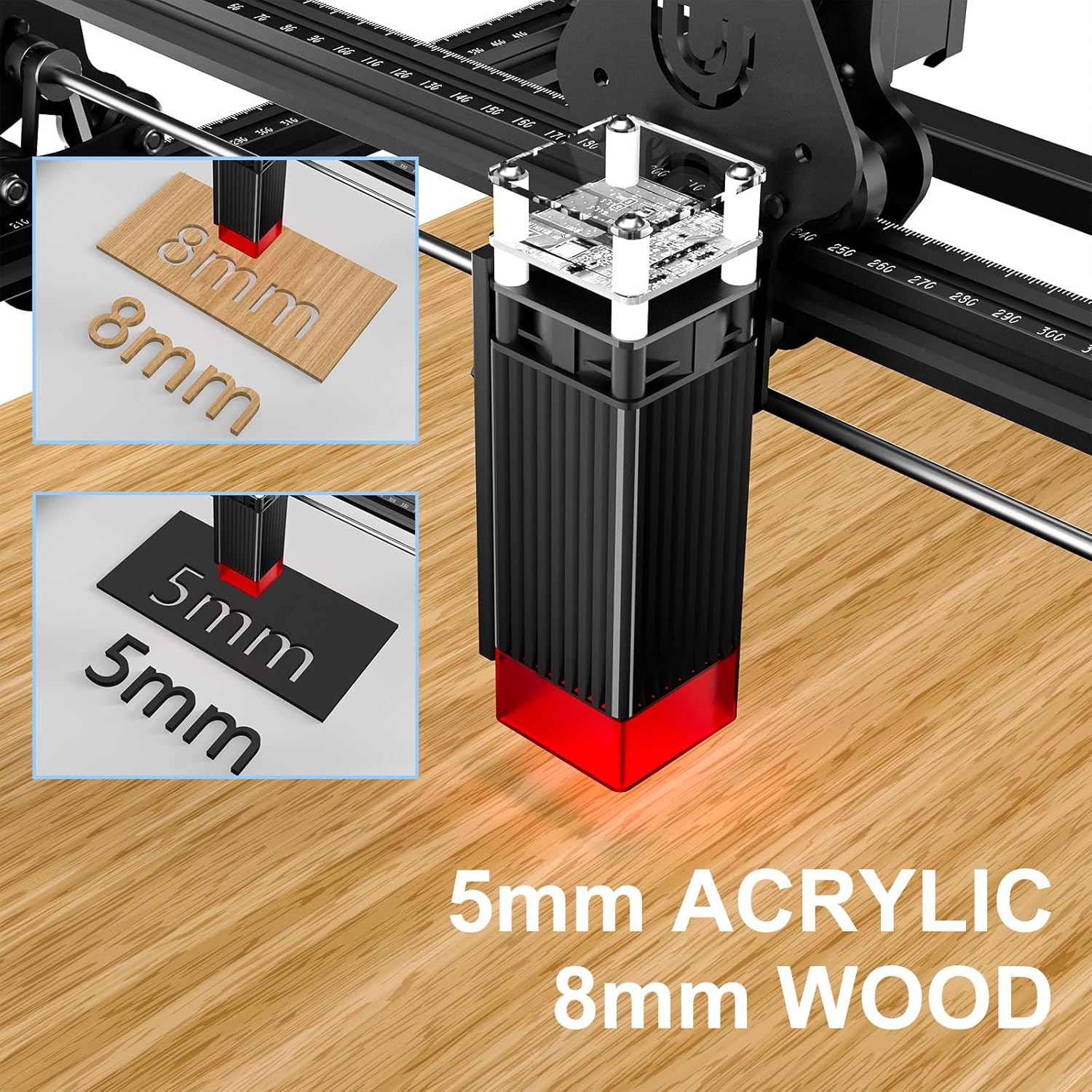
Figure 4.2: The IWECOLOR laser engraver demonstrates its cutting capabilities, shown here cutting through 5mm acrylic and 8mm wood. This highlights the machine's power and precision for various material thicknesses.

Figure 4.3: This image showcases the True IWECOLOR 10W Dual Laser Technology, emphasizing its stronger power and ultra-fine lines. It demonstrates the ability to cut 15mm wood and 10mm acrylic in a single pass, indicating high efficiency and capability for thicker materials.
5. Maintenance
Regular maintenance ensures the longevity and optimal performance of your laser engraver.
- Cleaning: Regularly clean the laser lens and the working area to remove dust and debris. Use a soft, lint-free cloth and appropriate cleaning solutions if necessary.
- Belt Tension: Periodically check the tension of the drive belts. They should be taut enough to move the laser module smoothly without slipping, but not so tight as to cause excessive wear.
- Lubrication: Apply a small amount of lubricant to the guide rails as recommended in the detailed guide to ensure smooth movement of the laser head.
- Firmware Updates: Check the manufacturer's website for any available firmware updates for your machine.
6. Troubleshooting
This section addresses common issues you might encounter. For more complex problems, refer to the detailed support resources or contact customer service.
| Problem | Possible Cause | Solution |
|---|---|---|
| Laser not firing or weak output | Incorrect focus; Dirty lens; Low power setting; Laser module issue. | Ensure laser is properly focused. Clean the laser lens. Increase power setting in software. Check connections to the laser module. |
| Machine not connecting to computer | Incorrect USB port; Missing/outdated drivers; Software configuration issue. | Try a different USB port. Install or update USB drivers. Verify COM port settings in LaserGRBL/LightBurn. Restart computer and engraver. |
| Engraving/cutting is inaccurate or distorted | Loose belts; Misaligned frame; Incorrect software settings (e.g., steps per mm). | Check and adjust belt tension. Verify frame assembly. Calibrate steps per mm in software if necessary. |
| Machine makes unusual noises or jams | Obstruction on rails; Over-tightened belts; Damaged components. | Inspect rails for debris. Adjust belt tension. Contact support if components appear damaged. |
7. Specifications
| Feature | Detail |
|---|---|
| Brand | IWECOLOR |
| Model Number | NEW-5W-1031 |
| Laser Power | 5W (10W version available with dual laser technology) |
| Laser Spot Size | 0.08 x 0.08mm |
| Engraving Accuracy | 0.01mm |
| Working Area | 400 x 410mm |
| Max Speed | 10,000mm/min |
| Connectivity | USB |
| Compatible Software | LaserGRBL, LightBurn |
| Product Dimensions | 55.88 x 55.88 x 24.89 cm |
| Item Weight | 4.2 kg |
| Color | Black |
| Manufacturer | IWECOLOR |

Figure 7.1: This image provides the key dimensions of the IWECOLOR laser engraver, highlighting its engraving area of 410x400mm, and overall dimensions of 565mm in length, 570mm in width, and 250mm in height. These measurements are crucial for planning workspace and project sizes.
8. Warranty and Support
IWECOLOR is committed to providing excellent customer service. For any assistance you need, our support team is available 24/7.
Please refer to your product packaging or the official IWECOLOR website for specific warranty details and contact information.
Related Documents - NEW-5W-1031
 |
NEJE Laser Engraver Support and Troubleshooting Guide Official support resources for NEJE laser engraving machines, including installation guides, troubleshooting, video tutorials, and community forums. Contact NEJE for assistance. |
 |
Laser Tree LT-40W-F23 User Manual: Specifications, Connection, and Maintenance Comprehensive user manual for the Laser Tree LT-40W-F23 laser module. Includes technical specifications, detailed connection instructions, driver adapter guide, cutting and engraving settings, and maintenance tips. |
 |
xTool D1 Pro 5W Engraving and Cutting Parameters Reference Comprehensive reference table detailing engraving and cutting parameters for the xTool D1 Pro 5W laser engraver. Includes settings for various materials such as wood, plywood, acrylic, and metal, covering power, speed, and pass settings for both cutting and engraving operations. |
 |
LONGER RAY5 Mini Laser Engraver Material Settings (2.5W & 3.5W) Comprehensive material parameter guide for LONGER RAY5 Mini 2.5W and 3.5W laser engravers, covering engraving and cutting settings for various materials. |
 |
Genmitsu 5.5W Compressed Spot Fixed Focus Laser Module User Manual User manual for the Genmitsu 5.5W Compressed Spot Fixed Focus Laser Module, detailing its features, compatibility with Jinsoku and Genmitsu CNC machines, installation, software setup with LaserGRBL, and focusing instructions. |
 |
LONGER RAY5 Laser Engraver Material Settings Guide A comprehensive guide to material settings for LONGER RAY5 5W and 10W laser engravers, detailing optimal power, speed, and cycle settings for engraving and cutting various materials. |
Ask a question about this manual
Ask about setup, troubleshooting, compatibility, parts, safety, or missing instructions. Manuals+ will review the question and use this page’s manual context to help answer it.