
1. Product Overview
This wall mount is designed to securely hold your Hitachi HK650049 4K 49HK6500 television, providing a clean and modern aesthetic for your living space. It features a slim profile, positioning your TV just 1.2 inches from the wall.
The mount is constructed from high-quality, heavy-duty steel, ensuring durability and stability. It is capable of supporting weights up to 1000 kg, making it suitable for a wide range of televisions within its compatibility specifications.
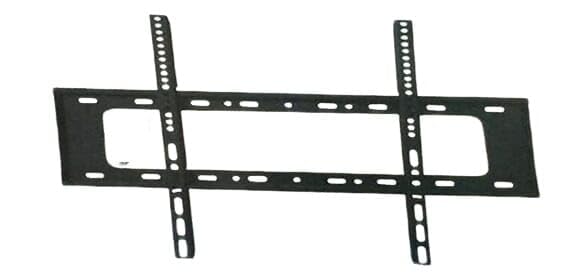
Image: The Generic Wall Mount, showing its sturdy construction and slim design.
2. Safety Information
- Read all instructions carefully before installation. If you do not understand these instructions or have doubts about the safety of the installation, consult a qualified installer.
- Ensure the wall structure can safely support the combined weight of the mount and your television.
- Do not exceed the maximum weight capacity of 1000 kg.
- Use safety locks to ensure the TV is securely attached to the wall plate.
- Keep children and pets away during installation.
- Do not install near heat sources or in areas with excessive moisture.
3. Package Contents
Verify that all components are present and undamaged before beginning installation. If any parts are missing or defective, contact customer support.
- Wall Plate
- TV Brackets (2 pieces)
- Mounting Hardware Kit (screws, anchors, washers)
- Integrated Bubble Level
- Installation Guide
4. Specifications
| Feature | Description |
|---|---|
| Mounting Type | Wall Mount |
| Movement Type | Fixed |
| Brand Name | Generic |
| Manufacturer | bnhyuu9339 |
| Maximum Weight Capacity | 1000 kg |
| Distance from Wall | 1.2 inches (approx. 3 cm) |
| Compatibility | Universal, specifically designed for Hitachi HK650049 4K 49HK6500 TV |
5. Installation Instructions (Setup)
This wall mount is designed for easy installation and includes all necessary hardware. A detailed installation guide is provided to ensure a quick and hassle-free setup. The integrated bubble level assists with precise alignment.
Tools Required (Not Included):
- Pencil
- Drill
- Stud Finder (for wood stud installation)
- Measuring Tape
- Phillips Head Screwdriver
Step-by-Step Guide:
- Determine Mounting Location: Choose a suitable location on your wall, ensuring it is structurally sound and free from electrical wires or plumbing. Use a stud finder to locate wood studs if applicable.
- Mark Drill Holes: Hold the wall plate against the wall at the desired height and use the integrated bubble level to ensure it is perfectly horizontal. Mark the drill hole locations with a pencil.
- Drill Pilot Holes: Drill pilot holes at the marked locations. The size of the drill bit will depend on your wall type (wood stud, concrete, brick) and the anchors provided.
- Attach Wall Plate: Secure the wall plate to the wall using the appropriate screws and anchors from the hardware kit. Ensure it is firmly attached.
- Attach TV Brackets to TV: Carefully lay your TV face down on a soft, clean surface. Attach the two TV brackets to the back of your television using the screws that fit your TV's VESA mounting holes. Ensure the brackets are oriented correctly and tightened securely.
- Mount TV to Wall Plate: With assistance, carefully lift the TV and hook the TV brackets onto the wall plate. Ensure both brackets are properly seated on the wall plate.
- Secure TV with Safety Locks: Locate the safety locks on the TV brackets. Engage these locks to prevent accidental detachment of the TV from the wall plate. This feature ensures your TV remains securely mounted.
6. Operation
Once installed, the wall mount provides a fixed position for your television. No further operation is required beyond ensuring the TV is securely locked into place. The slim design keeps your TV close to the wall for a sleek appearance.
7. Maintenance
- Periodically check all screws and connections to ensure they remain tight and secure.
- Dust the mount and TV with a soft, dry cloth. Avoid using harsh chemicals or abrasive cleaners.
- Do not hang anything from the mount or TV.
8. Troubleshooting
- TV not level: If the TV is not level after installation, carefully remove it from the wall plate, adjust the wall plate's position using the bubble level, and re-mount the TV.
- TV feels loose: Ensure all screws attaching the TV brackets to the TV and the wall plate to the wall are tightened securely. Verify that the safety locks are engaged.
- Missing parts: Refer to the 'Package Contents' section. If any parts are missing, contact customer support for assistance.
9. Warranty and Support
This Generic Wall Mount comes with a two-year warranty from the date of purchase. This warranty covers manufacturing defects and material flaws under normal use. It does not cover damage caused by improper installation, misuse, accidents, or unauthorized modifications.
For warranty claims or technical support, please contact the manufacturer, bnhyuu9339, through your retailer or the contact information provided with your purchase documentation.


