1. Introduction
This manual provides detailed instructions for the installation, operation, and maintenance of your TIEJUS MA3 3MP 2.4G/5G Outdoor Security Camera. Please read this manual thoroughly before using the product to ensure proper function and safety. Keep this manual for future reference.

Image 1.1: TIEJUS MA3 Outdoor Security Camera and its mobile application interface.
2. Package Contents
Verify that all items are present in your package. If any items are missing or damaged, please contact customer support.
- TIEJUS MA3 3MP Outdoor Security Camera
- Power Adapter (with 10ft USB charging cable)
- Mounting Kit (screws and wall anchors)
- User Manual
3. Camera Overview
Familiarize yourself with the various components of your TIEJUS MA3 security camera.
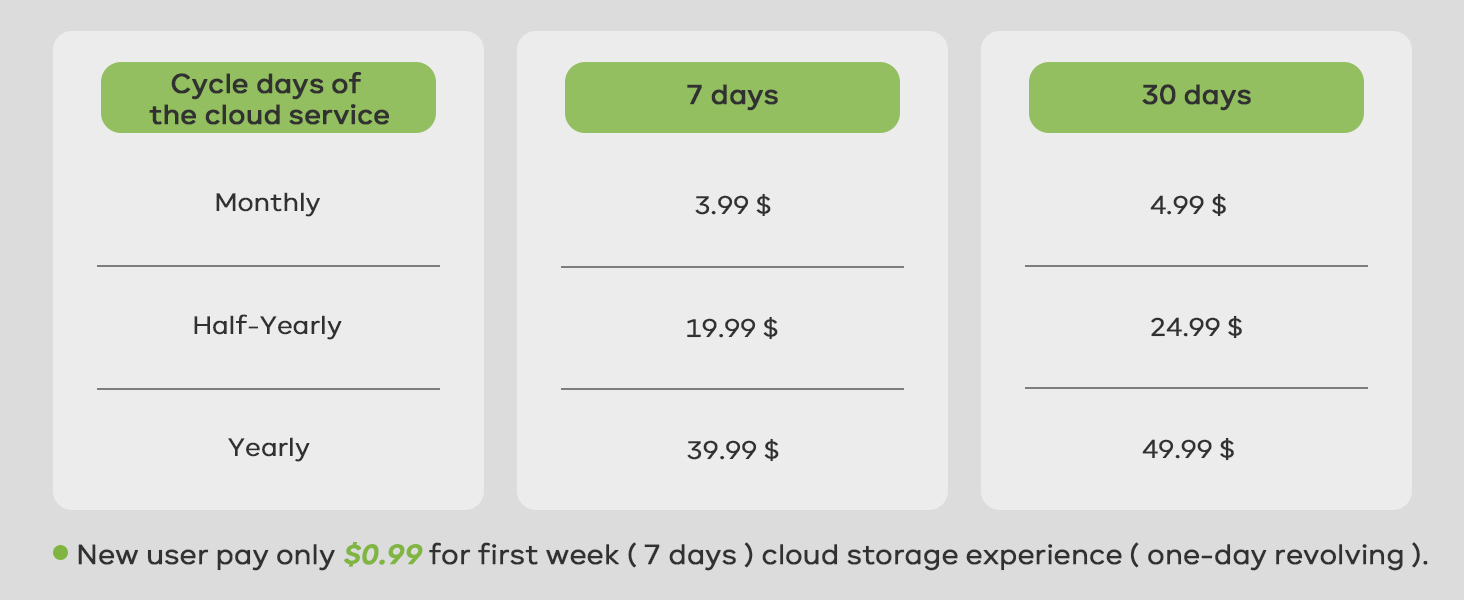
Image 3.1: Detailed diagram of the TIEJUS MA3 camera components.
- Lens: Captures video footage.
- Photosensitive Element: Detects light levels for automatic day/night mode switching.
- Microphone: Captures audio for two-way communication and recording.
- Infrared + White Light: Provides illumination for night vision (infrared for black & white, white light for color night vision).
- Speaker: Outputs audio for two-way communication and alarms.
- Reset Button: Used to reset the camera to factory settings.
- TF Card Slot: For local storage using a microSD card (16-256GB, not included).
- USB-A: Power input port.
- Bracket: For mounting the camera.
- Wi-Fi Antenna: For wireless network connectivity.
4. Setup
4.1 Physical Installation
The TIEJUS MA3 camera is designed for outdoor wall mounting. Ensure the installation location has a stable Wi-Fi signal and access to a power outlet.
- Choose a suitable mounting location that provides the desired viewing angle and is within reach of the power cable.
- Use the mounting bracket as a template to mark drill holes on the wall.
- Drill holes and insert wall anchors if necessary.
- Secure the mounting bracket to the wall using the provided screws.
- Attach the camera to the mounting bracket.
- Connect the power adapter to the camera's USB-A port and plug it into a power outlet. The camera will power on.
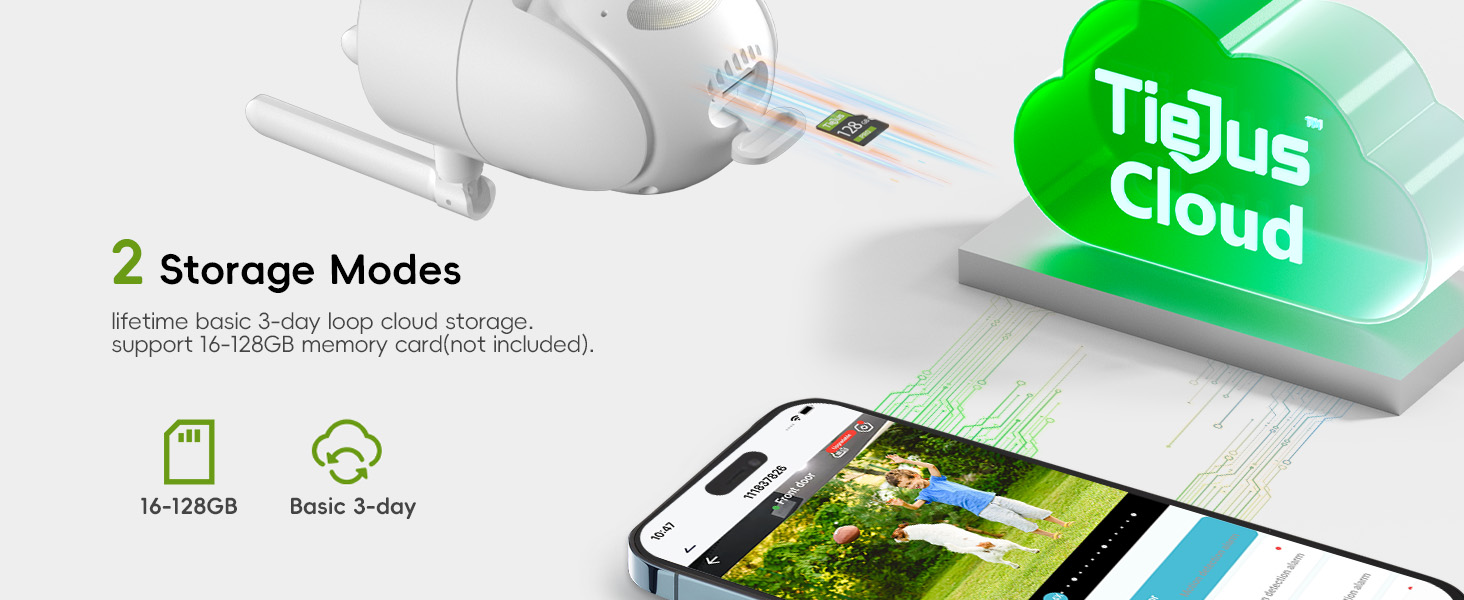
Image 4.1: Installation options for the TIEJUS MA3 camera.
4.2 App Download and Camera Pairing
The TIEJUS MA3 camera operates with a dedicated mobile application. Search for the app on your smartphone's app store (App Store for iOS, Google Play for Android).
- Download and install the companion app on your smartphone.
- Register for a new account or log in if you already have one.
- Follow the in-app instructions to add a new device. This typically involves scanning a QR code displayed on the camera or generated by the app.
- Connect the camera to your Wi-Fi network. The camera supports both 2.4GHz and 5GHz Wi-Fi bands for enhanced connectivity.
- Once connected, the camera will appear in your app's device list, and you can access the live view.

Image 4.2: Step-by-step guide for connecting the camera via the mobile application.
5. Operating Instructions
5.1 Live View and Pan/Tilt Control
Access the live video feed from your camera through the mobile app. You can remotely control the camera's viewing angle.
- From the app's main screen, select your camera to view the live feed.
- Use the on-screen controls to pan (355° horizontal) and tilt (90° vertical) the camera lens to adjust the viewing area.

Image 5.1: The camera offers a wide field of view with 355° pan and 90° tilt.
5.2 Two-Way Audio
The camera features a built-in microphone and speaker, enabling two-way communication.
- While in live view, tap the microphone icon in the app to speak through the camera's speaker.
- The camera's microphone will capture audio from the monitored area.

Image 5.2: Two-way audio allows direct communication through the camera.
5.3 Motion Detection and Tracking
The camera utilizes PIR motion detection with a "Human Detection Only" feature to minimize false alerts and can automatically track detected movement.
- Enable motion detection in the app settings.
- Activate "Human Detection Only" for more precise alerts.
- The camera can automatically track detected human movement within its 360° surveillance range.
- Receive instant alerts via the app and email when suspicious activity is detected.
- Customize detection sensitivity and set specific alarm schedules to avoid frequent notifications.
- Define custom non-detection areas to mask off unnecessary detection zones.

Image 5.3: Instant alerts and customizable alarm options.
5.4 Night Vision
The camera provides 2K HD resolution with advanced color night vision for clear visuals in low-light conditions.
- The camera automatically switches to night vision mode in low light.
- Infrared LEDs provide black and white night vision up to 33 ft.
- White light LEDs enable full-color night vision when activated or triggered by motion.

Image 5.4: Comparison of infrared and full-color night vision capabilities.
5.5 Recording and Storage
The TIEJUS MA3 supports continuous 24/7 recording and event-based recording with flexible storage options.
- MicroSD Card Storage: Insert a 16-256GB microSD card (not included) into the TF card slot for 24/7 continuous recording.
- Cloud Storage: The camera supports a loop cloud storage service for event recording. Refer to the app for subscription details.

Image 5.5: The camera supports both local microSD card and cloud storage options.
5.6 Multi-User Sharing
Share access to your camera's live feed with family and friends.
- Through the app, you can share device access with other users.
- Up to 4 users can view the live feed simultaneously.

Image 5.6: The camera supports multi-user sharing for convenient access.
5.7 Amazon Alexa Integration
Control your camera and view its feed using Amazon Alexa-enabled devices.
- Enable the TIEJUS skill in the Alexa app.
- Link your TIEJUS account with Alexa.
- Use voice commands such as "Alexa, show me the front door camera" to view the live feed on compatible devices.
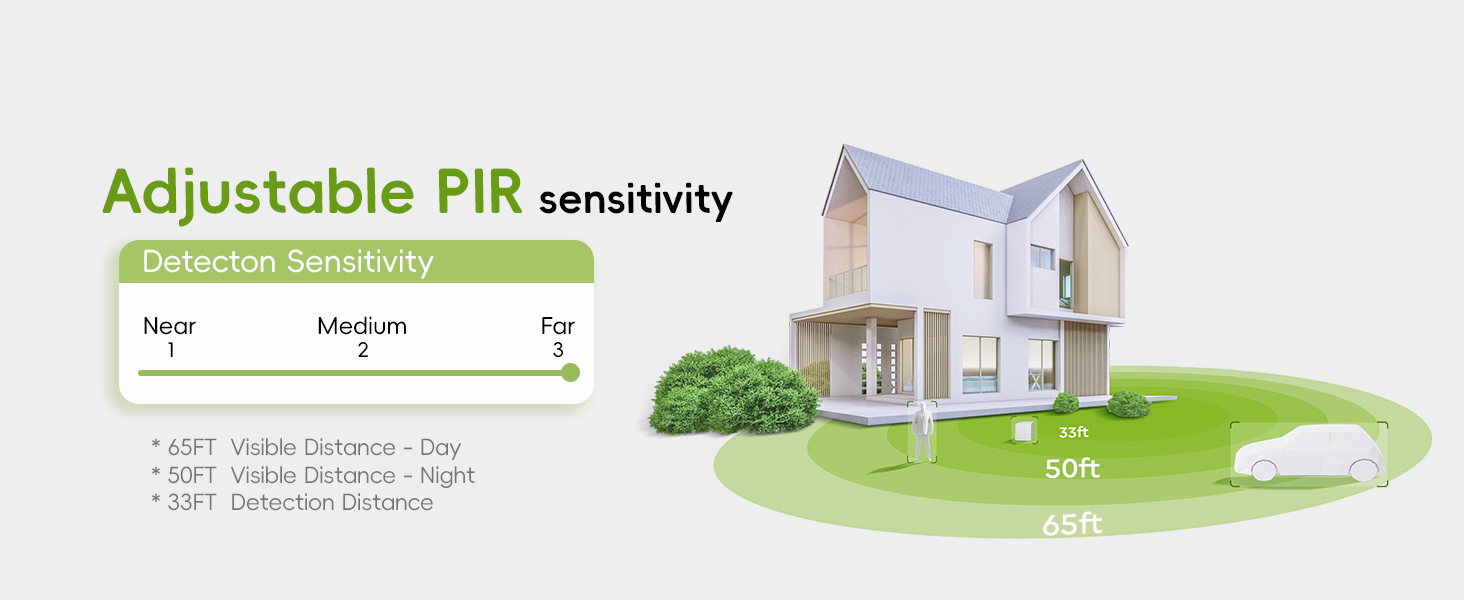
Image 5.7: The camera is compatible with Amazon Alexa for voice control and viewing.
6. Maintenance
6.1 Cleaning
- Gently wipe the camera lens with a soft, dry cloth to remove dust or smudges.
- Do not use harsh chemicals or abrasive cleaners, as they may damage the lens or camera body.
6.2 Environmental Considerations
The TIEJUS MA3 camera has an IP66 waterproof rating, ensuring effective operation in various weather conditions.
- Operating temperature range: -10°C to 55°C (14°F to 131°F).
- Ensure the power connection is protected from direct water exposure, although the camera itself is waterproof.

Image 6.1: The IP66 waterproof design ensures reliable performance in diverse weather.
7. Troubleshooting
If you encounter issues with your camera, refer to the following common problems and solutions:
| Problem | Possible Solution |
|---|---|
| Camera fails to connect to Wi-Fi | Ensure your Wi-Fi password is correct. Check if the camera is within range of your router. Try restarting the camera and your router. Verify your Wi-Fi is 2.4GHz or 5GHz compatible. |
| No live view in the app | Check your internet connection. Ensure the camera is powered on. Restart the app. If the issue persists, try re-pairing the camera. |
| Motion alerts are too frequent/infrequent | Adjust the motion detection sensitivity in the app. Enable "Human Detection Only" to reduce false alarms. Set custom detection zones or alarm schedules. |
| Night vision is unclear | Ensure the camera lens is clean. Check for obstructions blocking the infrared or white lights. Verify there are no strong light sources directly facing the camera at night. |
| SD card not recording | Ensure the SD card is inserted correctly and is between 16-256GB. Format the SD card through the app. Check if the recording settings are enabled for continuous recording. |
| Two-way audio not working | Check the microphone and speaker settings in the app. Ensure your phone's volume is up. Verify there are no physical obstructions to the camera's microphone or speaker. |
For further assistance, please contact TIEJUS customer support.
8. Specifications
| Feature | Detail |
|---|---|
| Model Number | MA3 |
| Indoor/Outdoor Usage | Outdoor |
| Video Capture Resolution | 1920p (3MP) |
| Effective Video Resolution | 2K |
| Connectivity Technology | Wired (Power), Wi-Fi (Data) |
| Wireless Communication Technology | Wi-Fi (2.4GHz/5GHz Dual-Band) |
| Power Source | Corded Electric |
| Viewing Angle | 360 Degrees (355° Horizontal, 90° Vertical) |
| Night Vision Range | 33 Feet |
| Low Light Technology | Night Color |
| International Protection Rating | IP66 (Waterproof) |
| Operating Temperature | -10°C to 55°C (14°F to 131°F) |
| Storage | MicroSD Card (16-256GB, not included), Cloud Storage |
| Controller Type | Amazon Alexa, App |
| Audio Visual Recording Capabilities | Video, Two-Way Audio |
| Alert Type | Motion Only (Human Detection) |
| Product Dimensions | 4 x 2.99 x 6 inches |
| Item Weight | 14.9 ounces |
| UPC | 768771274395 |

Image 8.1: Physical dimensions of the TIEJUS MA3 camera.
9. Warranty and Support
9.1 Warranty Information
Please refer to the product packaging or the official TIEJUS website for detailed warranty information. Keep your purchase receipt as proof of purchase for warranty claims.
9.2 Customer Support
For technical assistance, troubleshooting, or any product-related inquiries, please contact TIEJUS customer support:
- Online Chat: Available 8 AM - 11 PM EST
- Phone: (+1) 2692189888 (8 AM - 11 PM EST)
- Email: Tech@tiejus.com
Image 9.1: TIEJUS Customer Service contact information.


