
Introduction
This manual provides essential instructions for the safe and effective use of your GinoCaco Mini Pocket Handheld Kid Microscope, model inskam355. Please read this manual thoroughly before operating the device and retain it for future reference.

Figure 1: GinoCaco Mini Pocket Handheld Kid Microscope (Pink)
Setup
- Unboxing: Carefully remove all components from the packaging. Verify that all parts are present.
- Charging the Device: The microscope features a rechargeable battery. Connect the provided USB charging cable to the device's charging port and to a standard USB power adapter (not included) or a computer USB port. The charging indicator will illuminate during charging and turn off when fully charged.
- Initial Power On: Press and hold the power button (usually marked with a power symbol) for a few seconds until the screen illuminates.

Figure 2: Device overview with key features
Operating Instructions
- Power On/Off: Press and hold the power button to turn the device on or off.
- Adjusting Magnification: The microscope offers up to 500x magnification. Use the designated magnification buttons (often marked with '+' and '-' or up/down arrows) to adjust the zoom level.
- Focusing: Place the object you wish to observe directly under the microscope's lens. Adjust the focus wheel (if present) or move the device closer/further from the object until a clear image appears on the 2.0-inch IPS screen.
- Capturing Images/Videos: Press the camera button to take a still image or the video button to start/stop recording. Captured media is stored internally. The device supports storing up to 100 images.
- Connecting to a Computer: To view or transfer captured images and videos, connect the microscope to a PC or laptop using the USB cable. The device should appear as a removable storage device.

Figure 3: Super Macro Lens detail
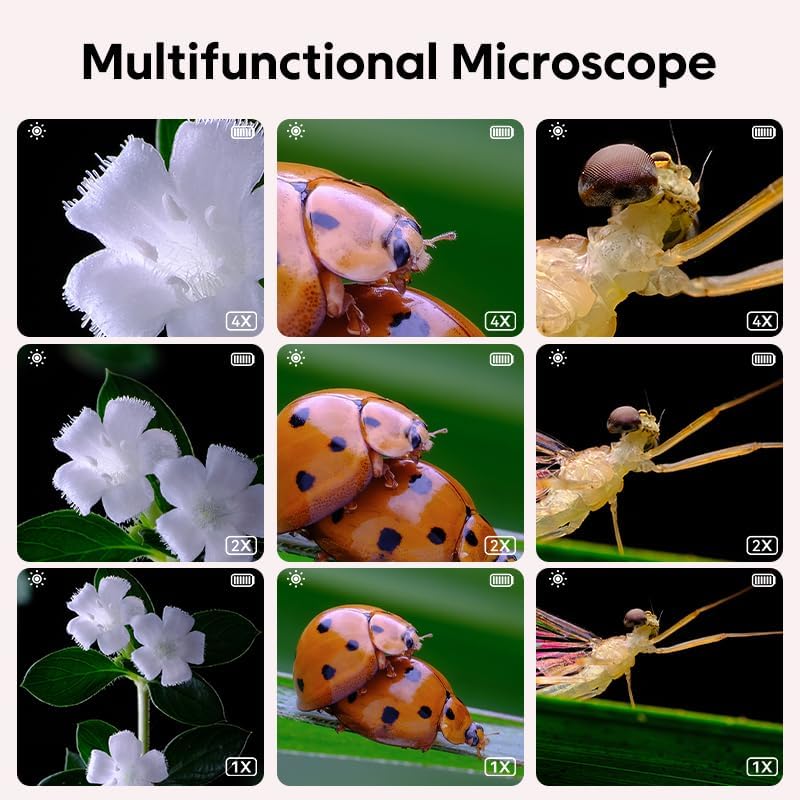
Figure 4: Magnification examples
Maintenance
- Cleaning: Use a soft, dry cloth to clean the exterior of the microscope. For the lens and screen, use a specialized lens cleaning cloth and solution to avoid scratches. Do not use abrasive cleaners or immerse the device in water.
- Storage: Store the microscope in a cool, dry place away from direct sunlight and extreme temperatures.
- Battery Care: To prolong battery life, avoid fully discharging the battery frequently. Charge the device regularly, even if not in use for extended periods.

Figure 5: Device material and design
Troubleshooting
| Problem | Possible Cause | Solution |
|---|---|---|
| Device does not power on. | Low battery; device malfunction. | Charge the device for at least 30 minutes. If it still doesn't power on, contact customer support. |
| Image is blurry or unclear. | Incorrect focus; object too far/close; dirty lens. | Adjust the focus. Ensure the object is within the optimal focal range. Clean the lens with a soft cloth. |
| Cannot connect to computer. | Faulty USB cable; incorrect port; driver issue. | Try a different USB cable or port. Ensure the device is powered on. Check computer's device manager for driver issues. |
| Screen is blank or flickering. | Software glitch; hardware issue. | Restart the device. If the problem persists, contact customer support. |
Specifications
- Brand: GinoCaco
- Model Number: inskam355
- Objective Lens Description: 500x
- Screen: 2.0-inch IPS
- Lens Pixels: 2,000,000
- Item Weight: 5 ounces
- Package Dimensions: 7.8 x 3.66 x 1.3 inches
- Date First Available: October 30, 2024
Warranty and Support
Specific warranty information for the GinoCaco Mini Pocket Handheld Kid Microscope (model inskam355) is not provided in this manual. For details regarding warranty coverage, please refer to the product packaging or contact the manufacturer directly.
For technical support or further assistance, please visit the official GinoCaco website or contact their customer service department through the contact information provided at the point of purchase.