
Introduction
This manual provides detailed instructions for the installation, operation, and maintenance of your President George FCC AM/FM/SSB CB Radio. This advanced communication device offers a wide range of features designed for reliable and clear communication, including AM/FM/SSB modes, Automatic Squelch Control (ASC), Noise Reduction Circuit (NRC), Weather Channel with alerts, and an Automatic SWR Meter.
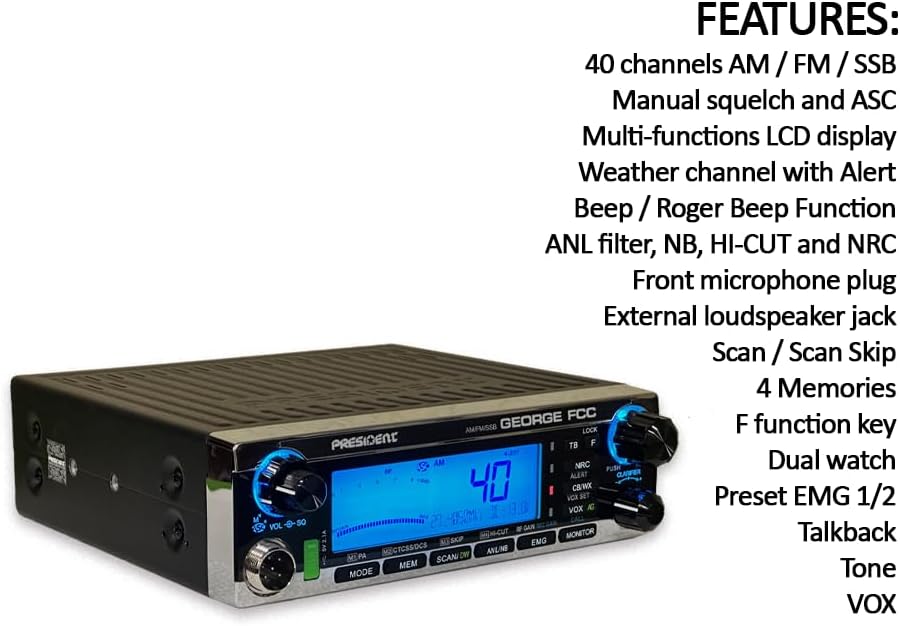
Figure 1: Front view of the President George FCC CB Radio, showing the large blue LCD display and control knobs.
What's in the Box
Verify that all components are present in the packaging:
- CB radio unit
- Power Cord with Fuse
- 1 Mounting Bracket with Fixing Screws
- Electret Microphone with Support
- Instruction Manual

Figure 2: All components included with the President George FCC CB Radio.
Setup
Proper setup is crucial for optimal performance and safety. Follow these steps for initial installation:
- Mounting the Radio: Use the provided mounting bracket and screws to securely install the CB radio in your vehicle or desired location. Ensure the location allows for proper ventilation and easy access to controls.
- Power Connection: Connect the power cord (with fuse) to a 13.2 Volt DC power source. Ensure correct polarity (red to positive, black to negative) to prevent damage to the unit. The radio includes voltage protection to safeguard against over-voltage conditions.
- Antenna Connection: Connect a suitable CB antenna to the antenna connector on the rear of the radio. For best performance, use a President antenna. The integrated Automatic SWR Meter will assist in tuning your antenna for optimal performance by providing an audible tone as you adjust.
- Microphone Connection: Plug the electret microphone into the 6-pin microphone connector on the front of the radio. This radio is compatible with various 6-pin connectors, including President Digimike and President BT Mike.
- External Speaker/PA (Optional): If desired, connect an external speaker or Public Address (PA) speaker to the respective jacks on the rear of the radio.
Operating Instructions
Familiarize yourself with the various functions and controls of your President George FCC CB Radio.

Figure 3: Detailed diagram of the radio's front and rear panel functions.
AM/FM/SSB 40 Channels Radio
The radio supports Amplitude Modulation (AM), Frequency Modulation (FM), and Single Side Band (SSB) modes across 40 channels, providing versatile communication options. Use the MODE button to switch between these modulation types.

Figure 4: Explanation of Single Side Band (SSB) mode.
CTCSS/DCS
Utilize CTCSS (Continuous Tone-Coded Squelch System) and DCS (Digitally Coded Squelch) to filter out unwanted signals, allowing you to hear only transmissions from users sharing the same code. This ensures clearer and more private communication within your group.
Large LCD Display
The radio features a large, clear, and bright 7-color LCD display. This display offers excellent readability in various lighting conditions, showing channel number, mode, signal strength, and other vital information.
Weather Channel/Alert
Access NOAA weather channels and receive important weather alerts directly on your radio. This feature keeps you informed of changing weather conditions, enhancing safety during travel or outdoor activities.
ASC (Automatic Squelch Control)
President Electronics' innovative Automatic Squelch Control (ASC) automatically adjusts the squelch level to optimize signal reception. This feature reduces background noise without manual adjustment, providing clearer audio.

Figure 5: Benefits of Automatic Squelch Control (ASC).
VOX (Voice Operated Exchange)
The built-in VOX function enables hands-free operation. The radio transmits automatically when it detects your voice, eliminating the need to press the Push-To-Talk (PTT) button.

Figure 6: Advantages of the VOX built-in feature.
Scan Skip
The Scan Skip feature allows you to scan through channels and temporarily or permanently skip unwanted channels. This helps focus on priority channels and enables faster communication by avoiding inactive or noisy frequencies.

Figure 7: How the Scan Skip function works.
USB Port
A convenient USB port is included, allowing for easy charging of various electronic devices directly from the radio unit.
NRC (Noise Reduction Circuit)
The advanced Noise Reduction Circuit (NRC) is designed to reduce or eliminate unwanted noise and interference from signals, both during transmission and reception. This results in significantly clearer audio, especially in noisy environments.

Figure 8: Explanation of the Noise Reduction Circuit (NRC).
Automatic SWR Meter
The Automatic SWR (Standing Wave Ratio) Meter simplifies antenna installation and tuning. It provides an audible tone that changes as you adjust your antenna, helping you quickly find the optimal SWR for efficient transmission and reception. The radio also includes SWR protection to safeguard against poor antenna conditions.

Figure 9: How the Automatic SWR Meter assists in antenna setup.
6-pin Microphone Connector
The 6-pin microphone connector ensures seamless compatibility with a range of microphones, including President Digimike and President BT Mike, offering flexibility for your communication needs.
Dual Watch
The Dual Watch function allows you to monitor two channels simultaneously. The radio will automatically switch to the active channel, ensuring you don't miss important communications.

Figure 10: Benefits of the Dual Watch function.
Maintenance
To ensure the longevity and optimal performance of your President George FCC CB Radio, follow these maintenance guidelines:
- Cleaning: Regularly clean the exterior of the radio with a soft, dry cloth. Avoid using abrasive cleaners or solvents that could damage the finish or display.
- Connections: Periodically check all connections (power, antenna, microphone) to ensure they are secure and free from corrosion.
- Ventilation: Ensure the radio's heat sink and ventilation slots are clear of obstructions to prevent overheating.
- Fuse Replacement: If the radio loses power, check the fuse in the power cord. Replace it with a fuse of the same type and rating if blown.
Troubleshooting
If you encounter issues with your radio, refer to the following common troubleshooting tips:
- No Power: Check power connections, ensure the fuse is intact, and verify the power source is providing 13.2 Volts.
- Poor Reception/Transmission: Verify antenna connection and SWR. Ensure the antenna is properly tuned. Check microphone connection and settings (e.g., NRC level).
- No Audio: Check volume level and squelch setting. Ensure external speakers (if used) are connected correctly.
- Display Issues: If the display is dim or not functioning correctly, ensure power is stable. If issues persist, contact support.
For more complex issues, consult a qualified technician or President Electronics support.
Specifications
Detailed technical specifications for the President George FCC CB Radio:

Figure 11: Technical specifications of the President George FCC CB Radio.
| Feature | Description |
|---|---|
| Brand | President |
| Model Number | TXUS901 |
| Number of Channels | 40 |
| Tuner Type | AM/FM/SSB |
| Frequency Range | 26.965 MHz to 27.405 MHz |
| Voltage | 13.2 Volts |
| Product Dimensions | 6.77"D x 7.28"W x 2.2"H |
| Item Weight | 2.63 Pounds |
| Special Features | Automatic Squelch, Clarifier, Digital Display, Noise Reduction, Weather Alert |
| Connectivity Protocol | USB |
| Compatible Devices | President Digimike, President BT Mike, various electronic devices via USB port, and other 6-pin microphone connector compatible devices |
Warranty and Support
Your President George FCC CB Radio comes with a 2-year standard manufacturer's warranty. This warranty can be extended to 5 years with the simultaneous purchase of a President antenna under the 2+3 years program.
For technical support, service, or warranty claims, please contact President Electronics USA, the manufacturer of this product. Refer to the contact information provided in your product packaging or visit the official President Electronics USA website for assistance.
Official Product Page: https://president-electronics.us/CB-Radios-Ham-Radios/AM-FM-SSB-transceivers/GEORGE-FCC