
InfraHHZQ T-59C3
Far Infrared Home Sauna Room
User Manual
Model: T-59C3 | Brand: InfraHHZQ
Product Overview
This Far Infrared Home Sauna Room, model T-59C3, is designed for 2-3 persons and constructed from high-quality Red Cedar wood. It features 1800W low EMF far-infrared graphene heating panels, LED reading lights, and 3 color-changing LED strips. The sauna is equipped with a user-friendly control panel and multimedia options including Bluetooth, SD card, MP3, USB, and FM radio for an enhanced experience. Its robust design ensures durability and suitability for home use.

Image: Exterior view of the InfraHHZQ Far Infrared Home Sauna Room, showcasing its wooden construction and glass door.
Important Safety Information
Please read all instructions carefully before assembly and operation. Failure to follow these instructions may result in injury or damage to the product.
- Ensure the sauna is installed on a level, stable surface.
- Connect the sauna to a properly grounded electrical outlet. Do not use extension cords.
- Do not operate the sauna if any parts are damaged or missing.
- Keep children and pets away from the sauna during operation.
- Consult a physician before using the sauna if you have any medical conditions.
- Do not use cleaning agents or chemicals inside the sauna. Use only a damp cloth for cleaning.
- The glass door is made of safety glass. The wooden door handle is designed to remain cool during operation.
Setup and Assembly
Assembly of the Far Infrared Home Sauna Room requires careful attention to detail. It is recommended to have at least two people for assembly.
Dimensions:
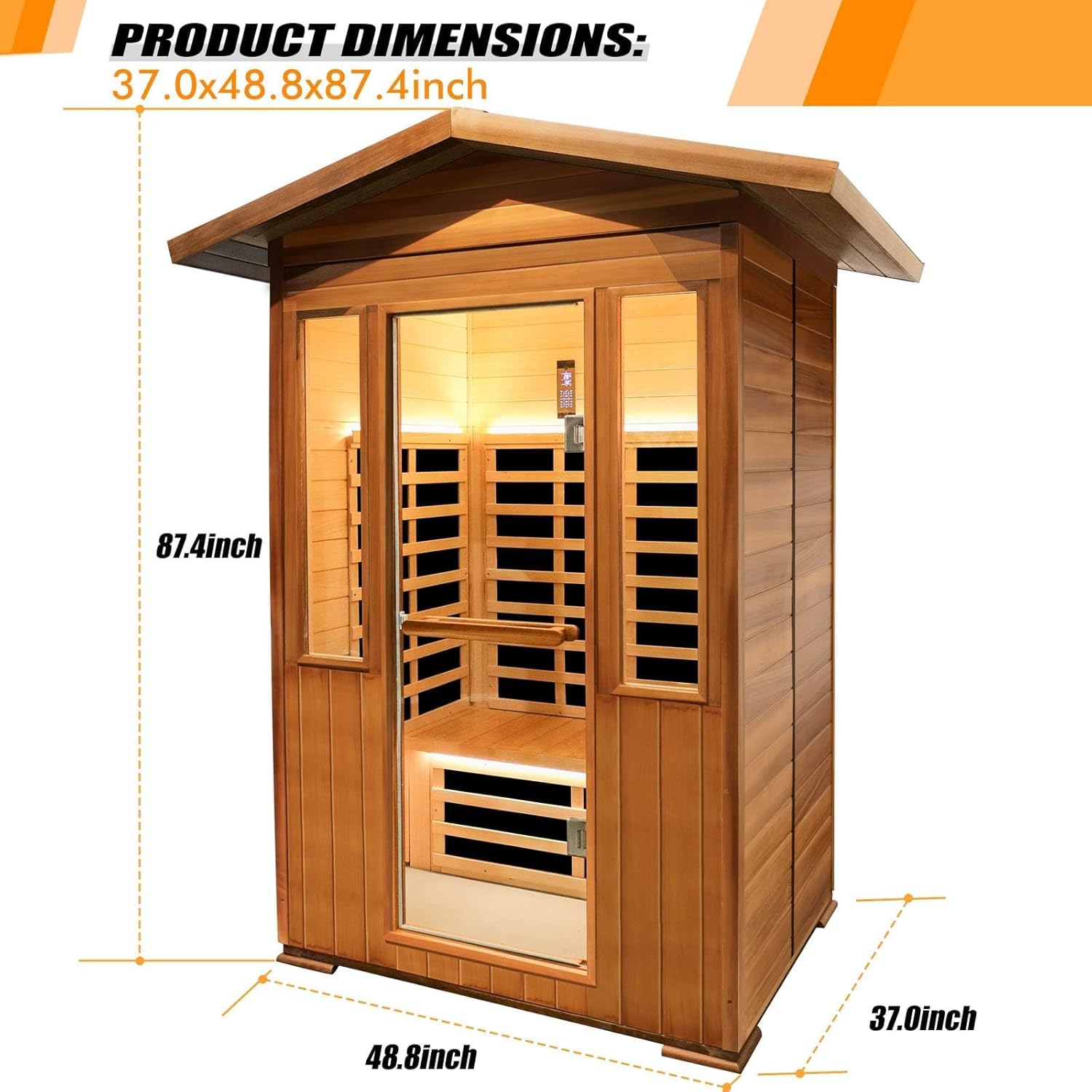
Image: Diagram illustrating the dimensions of the sauna: 48.8 inches (width) x 37 inches (depth) x 87.4 inches (height).
The sauna measures approximately 48.8 inches in width, 37 inches in depth, and 87.4 inches in height. Ensure adequate space for assembly and operation, including clearance around the unit for ventilation and access.
Assembly Steps (General Guidance):
- Unpack Components: Carefully remove all parts from the packaging and verify against the parts list provided in your physical manual.
- Base Assembly: Assemble the base frame according to the instructions.
- Wall Panel Installation: Attach the side and back wall panels to the base, ensuring secure connections.
- Front Panel and Door: Install the front panel and carefully mount the glass door. Ensure hinges are properly aligned and secured.
- Roof Assembly: Place and secure the roof panel.
- Internal Components: Install benches, heating panels, and any internal accessories.
- Electrical Connections: Connect all internal electrical components as per the wiring diagram in your physical manual. Ensure all connections are tight and secure.
- Final Inspection: Before plugging in, double-check all connections, ensure the sauna is stable, and all screws are tightened.

Image: The sauna positioned outdoors in a snowy environment, demonstrating its robust construction suitable for various settings.
Operating Instructions
Control Panel:

Image: Detailed diagram of the sauna's intelligent control panel, showing buttons for various functions and display windows for temperature and time.
The sauna is equipped with an intelligent control panel for easy operation. Refer to the diagram above for button identification:
- A: Power button - Turns the sauna on/off.
- B: Time adjustment key - Adjusts the session duration.
- C: Temperature adjustment key - Sets the desired temperature (up to 60°C / 140°F).
- D: Foot heating - Activates/deactivates foot heating elements.
- E: Colored lamp button - Controls the 3 color-changing LED strips.
- F: Lighting lamp button - Controls the LED reading lights.
- G: Volume control button - Adjusts audio volume.
- H: Music selection button - Cycles through audio sources (Bluetooth, SD card, MP3, USB, FM radio).
- I: Music and telephone button - For Bluetooth connectivity and call management.
- J: Temperature display window - Shows current and set temperature.
- K: Time display window - Shows remaining session time.
- L: Device status display window - Indicates operational status.
Temperature and Heating:
The sauna utilizes 8 pieces of 110V 1800W low EMF far-infrared graphene heating panels, providing 360° surround heating. The maximum temperature can be set to 60°C (140°F). Allow time for the sauna to preheat to your desired temperature.
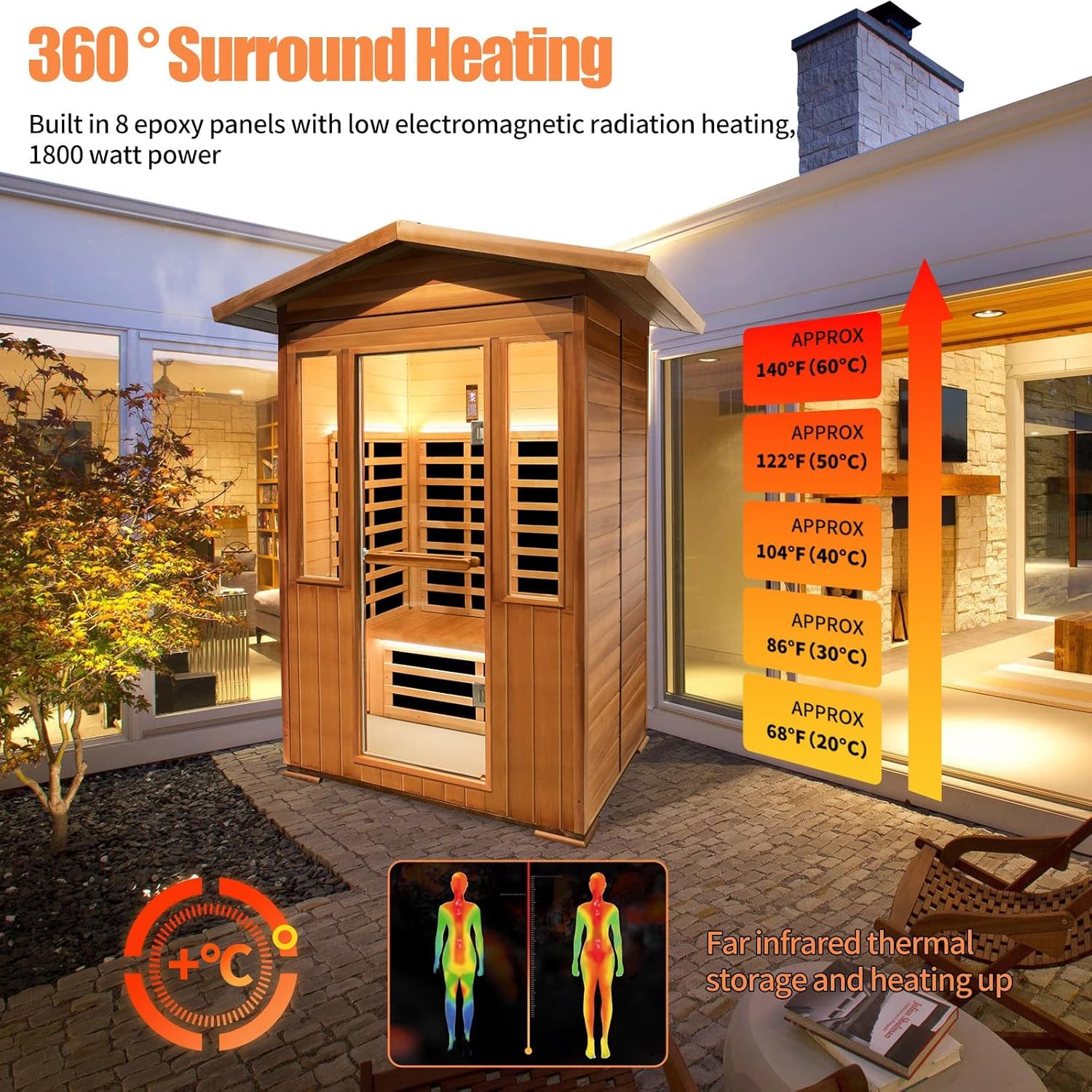
Image: Illustration of the 360° surround heating system and the temperature progression within the sauna, indicating it can reach approximately 140°F (60°C).
Multimedia Features:
Connect your device via Bluetooth to stream audio, or use the SD card, MP3, or USB inputs. The built-in FM radio also provides entertainment options. Adjust volume using the control panel.

Image: Close-up views of the integrated Bluetooth speaker and the control panel displaying options for multiple LED light colors.
Smartphone App Control:
The sauna can be controlled via a smartphone application, offering convenience for remote operation, scheduling, and monitoring. This feature is particularly useful for pre-heating the sauna or managing settings without being physically present at the control panel.

Image: Visual representation of the smartphone application's capabilities, including remote control, scheduling, and user-friendly interface for all ages.
Maintenance
Proper maintenance will ensure the longevity and optimal performance of your sauna.
- Cleaning: Wipe down the interior and exterior surfaces with a clean, damp cloth after each use. Do not use abrasive cleaners, solvents, or harsh chemicals, as these can damage the wood and electronic components.
- Wood Care: The Red Cedar wood is naturally resistant to decay and insects. Avoid excessive moisture inside the sauna. If the wood appears dry over time, consult a wood care specialist for appropriate, non-toxic treatments suitable for sauna environments.
- Ventilation: Ensure proper ventilation around the sauna to prevent moisture buildup and maintain air quality.
- Electrical Check: Periodically inspect the power cord and plug for any signs of damage. If damage is found, discontinue use and contact customer support.

Image: Illustration highlighting the sauna's construction from high-quality natural red cedar and Canadian hemlock, designed for durability and resistance to various weather conditions.
Troubleshooting
| Problem | Possible Cause | Solution |
|---|---|---|
| Sauna does not power on. | No power supply; loose connection; tripped circuit breaker. | Check power cord connection, wall outlet, and circuit breaker. Ensure the power button on the control panel is pressed. |
| Sauna not heating sufficiently. | Temperature set too low; heating elements malfunction; poor insulation. | Increase temperature setting. Ensure all heating panels are functioning. Check for any gaps in the sauna's assembly. |
| Bluetooth not connecting. | Device not in pairing mode; too far from sauna; interference. | Ensure your device's Bluetooth is on and in pairing mode. Move closer to the sauna. Restart both devices. |
| Lights not working. | Lamp button not pressed; faulty LED strip/bulb. | Press the respective lamp buttons (E or F) on the control panel. If issue persists, contact support. |
Specifications
| Feature | Detail |
|---|---|
| Model Number | T-59C3 |
| Dimensions (L x W x H) | 48.8 x 37 x 87.4 inches |
| Item Weight | 442 pounds |
| Material | Red Cedar (exterior), Hemlock (interior) |
| Heating Elements | 8 Far-Infrared Graphene Heating Panels |
| Power | 110V, 1800W |
| Maximum Temperature | 60°C (140°F) |
| Capacity | 2-3 Person |
| Features | Bluetooth Speaker, SD/MP3/USB/FM Radio, LED Reading Lights, Color-changing LED Strips, Intelligent Control Panel, Smartphone App Control |
Warranty and Support
InfraHHZQ provides a ten-year warranty for the sauna room. This warranty covers manufacturing defects and significant issues with the product under normal use conditions.
For any problems encountered after receiving the goods, or for technical assistance, troubleshooting, and warranty claims, please contact InfraHHZQ customer support. Refer to your purchase documentation for specific contact details or visit the official InfraHHZQ website.
Note: Always provide your model number (T-59C3) and purchase date when contacting support for faster service.
Ask a question about this manual
Ask about setup, troubleshooting, compatibility, parts, safety, or missing instructions. Manuals+ will review the question and use this page’s manual context to help answer it.