
Introduction
Thank you for choosing the Supfine Vibration Plate Fitness Trainer. This versatile training device is designed to help you achieve your fitness goals comfortably at home. With its advanced vibration technology, adjustable speed settings, and included accessories, it provides an effective workout for various body parts, improving strength, balance, and flexibility. Please read this manual carefully before use to ensure safe and optimal operation.

Image: The Supfine Vibration Plate, showing the main unit, remote control, power cable, and two resistance bands.
Safety Instructions
Before operating the Supfine Vibration Plate, please observe the following safety precautions:
- Consult a physician before starting any new exercise program, especially if you have pre-existing medical conditions.
- Do not use the device if you are pregnant, have a pacemaker, or suffer from severe heart disease, epilepsy, or acute thrombosis.
- Ensure the device is placed on a stable, flat surface.
- Keep children and pets away from the device during operation.
- Do not exceed the maximum weight capacity of 120 kg (264 lbs).
- Unplug the device from the power outlet when not in use or before cleaning.
- Do not expose the device to water or excessive moisture.
- Use only the provided power cable and accessories.
Package Contents
Please check the package contents upon unboxing:
- 1 x Supfine Vibration Plate
- 1 x Remote Control
- 2 x Resistance Bands
- 1 x Power Cable
- 1 x User Manual (this document)
Setup
- Unpacking: Carefully remove all components from the packaging. Retain packaging for future storage or transport.
- Placement: Place the vibration plate on a firm, level, and non-slip surface. Ensure there is enough clear space around the device for safe exercise.
- Power Connection: Insert the power cable into the power input port on the side of the vibration plate. Plug the other end into a standard 220V/60Hz (or 110V/50Hz depending on region) electrical outlet.
- Resistance Bands Attachment: If desired, attach the resistance bands to the designated attachment points on the base of the vibration plate.

Image: Dimensions of the Supfine Vibration Plate (53cm length, 32.5cm width, 12cm height) and maximum weight capacity (120kg / 264lbs).
Operating Instructions
Powering On/Off
- To turn on the device, press the power switch located on the side of the vibration plate. The LCD screen will illuminate.
- To turn off, press the power switch again.
Using the Remote Control and LCD Screen
The Supfine Vibration Plate can be controlled via the included remote control or the integrated LCD screen.

Image: A user operating the Supfine Vibration Plate with the remote control, demonstrating Bluetooth audio connectivity.
- Power Button: Turns the device on/off.
- Speed Adjustment: Use the '+' and '-' buttons to adjust the vibration speed. There are 95 adjustable speed levels.
- Mode Selection: Press the 'M' button to cycle through automatic modes. The device features an automatic mode with 5 vibration levels.
- Start/Stop: Press the play/pause button to start or stop the vibration.
- Bluetooth Audio: The device is equipped with a USB speaker. Activate Bluetooth on your mobile device and connect to "Supfine" to play music during your workout. Use the remote control for music playback (play/pause, next/previous track, volume up/down).
Exercise Positions and Benefits
The Supfine Vibration Plate supports various exercise positions to target different muscle groups and achieve diverse fitness benefits.

Image: A circular diagram illustrating that 10 minutes of exercise on the vibration plate is equivalent to longer durations of other activities like yoga, swimming, riding, jogging, sit-ups, and push-ups.
- Standing with Resistance Bands: Stand on the plate with feet shoulder-width apart. Hold the resistance bands and perform exercises like bicep curls, tricep extensions, or shoulder presses. This helps improve upper body strength and overall balance.
- Squats with Bent Knees: Stand on the plate, bend your knees as if sitting in a chair, keeping your back straight. This position targets leg and glute muscles.
- Plank with Arms on the Plate: Place your forearms on the plate and extend your legs behind you into a plank position. This strengthens core muscles.
- General Benefits: Regular use (e.g., 10-15 minutes daily) can contribute to fat burning, increased strength, improved balance, flexibility, and cellulite reduction.

Image: A visual representation of weight loss benefits, showing a person performing squats on the vibration plate.
Maintenance
Cleaning
- Always unplug the device before cleaning.
- Wipe the surface of the vibration plate with a soft, damp cloth. Do not use abrasive cleaners or solvents.
- Ensure no liquid enters the internal components.
Storage
- Store the device in a cool, dry place away from direct sunlight and extreme temperatures.
- Keep the device covered to protect it from dust.
- Its compact design allows for easy storage, such as under a sofa or bed.
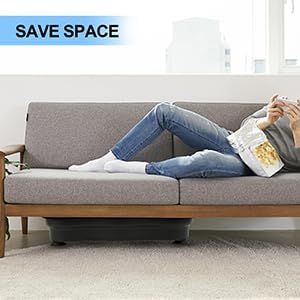
Image: The Supfine Vibration Plate discreetly stored under a sofa, demonstrating its space-saving design.
Troubleshooting
| Problem | Possible Cause | Solution |
|---|---|---|
| Device does not power on. | Power cable not properly connected or no power from outlet. | Check power cable connection. Test outlet with another device. Ensure power switch on the device is ON. |
| No vibration. | Device is on but not started, or in standby mode. | Press the Start/Play button on the remote or control panel. |
| Remote control not working. | Batteries are low or depleted. Obstruction between remote and device. | Replace remote control batteries. Ensure clear line of sight to the device's receiver. |
| Bluetooth audio not connecting. | Bluetooth on mobile device is off or already connected to another device. | Ensure Bluetooth is enabled on your mobile device. Disconnect from other Bluetooth devices. Try restarting both the vibration plate and your mobile device. |
Specifications
| Feature | Detail |
|---|---|
| Model Number | ITSZJ03 |
| Dimensions (L x W x H) | 53 x 32.5 x 12 cm (20.9 x 12.8 x 4.7 inches) |
| Weight | 8 kg (17.6 lbs) |
| Maximum Load Capacity | 120 kg (264 lbs) |
| Power | 200 W |
| Rated Voltage | 110V/50Hz, 220V/60Hz (European Plug Type) |
| Speed Levels | 95 adjustable speeds |
| Automatic Modes | 5 vibration levels |
| Control Type | Remote Control, LCD Screen |
| Display Type | LCD |
| Material | Acrylonitrile Butadiene Styrene (ABS), Plastic |
| Included Components | Vibration Plate, Remote Control, 2 Resistance Bands, Power Cable |
| UPC | 723483430835 |

Image: An internal view highlighting the powerful 200W motor of the Supfine Vibration Plate.
Warranty and Support
For warranty information or technical support, please contact your retailer or the manufacturer directly. Keep your purchase receipt as proof of purchase.
Manufacturer: Supfine