
1. Introduction
The Ninja Pro Plus Kitchen System BN805A is a versatile appliance designed for various food preparation tasks. It combines the functionality of a blender and a food processor, offering powerful performance for smoothies, frozen drinks, chopping, pureeing, and dough mixing. This manual provides essential information for safe operation, maintenance, and troubleshooting to ensure optimal performance of your kitchen system.
2. Important Safety Information
Please read all instructions carefully before using your Ninja Pro Plus Kitchen System. Failure to follow these safety guidelines may result in property damage, personal injury, or death.
- Always ensure the appliance is unplugged before assembly, disassembly, or cleaning.
- Do not immerse the motor base in water or other liquids.
- Keep hands and utensils out of the container while blending to reduce the risk of severe injury to persons or damage to the blender. A scraper may be used but only when the blender is not running.
- Blades are sharp. Handle with care.
- Do not operate any appliance with a damaged cord or plug, or after the appliance malfunctions or has been dropped or damaged in any manner.
- Do not use attachments not recommended or sold by the manufacturer.
- Do not allow the cord to hang over the edge of a table or counter or touch hot surfaces.
- Always operate the appliance on a clean, dry, level surface.
- Do not overfill containers. Observe the maximum fill lines.
- Never blend hot liquids in the single-serve cups or the food processor bowl.
3. Components and Features
Your Ninja Pro Plus Kitchen System includes several components designed for various functions:
- 1400-Watt Motor Base: The powerful base that drives all attachments.
- 72 oz. Total Crushing Pitcher: Ideal for large batches of smoothies and frozen drinks (64 oz. max liquid capacity).
- Stacked Blade Assembly: For use with the Total Crushing Pitcher.
- 64 oz. Precision Processor Bowl: For chopping, pureeing, and dough mixing.
- Chopping Blade Assembly: For use with the Precision Processor Bowl.
- Dough Blade Assembly: For use with the Precision Processor Bowl to mix dough.
- Two 32 oz. Single-Serve Cups: For individual portions of smoothies and nutrient extractions.
- Pro Extractor Blades Assembly: For use with the Single-Serve Cups.
- Spout Lids: For on-the-go convenience with single-serve cups.
- Auto-IQ Programs: Pre-set programs for specific tasks (Smoothie, Ice Crush, Extract, Chop, Dough).
Product Overview

Figure 3.1: The Ninja Pro Plus Kitchen System showing the motor base, 72 oz. blender pitcher, 64 oz. food processor bowl, and two 32 oz. single-serve cups with lids.
Detailed Component Diagram

Figure 3.2: Exploded view diagram illustrating the various parts of the Ninja Pro Plus Kitchen System, including the motor base, 72 oz. pitcher with stacked blades, food processor bowl with chopping and dough blades, and 32 oz. single-serve cup with Pro Extractor Blades.
Product Dimensions
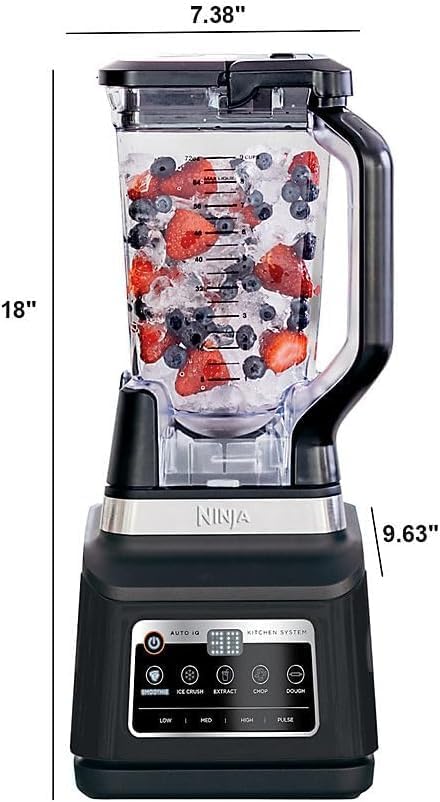
Figure 3.3: Side view of the Ninja Pro Plus Kitchen System blender pitcher with measurements indicating a height of 18 inches, a depth of 9.63 inches, and a width of 7.38 inches.
4. Setup and Assembly
Before first use, wash all components (except the motor base) in warm, soapy water, then rinse and dry thoroughly. Ensure the motor base is placed on a clean, dry, level surface.
4.1 Assembling the Total Crushing Pitcher
- Place the motor base on a flat, dry surface.
- Place the 72 oz. Total Crushing Pitcher onto the motor base, aligning the pitcher handle to the right of the base. Rotate the pitcher clockwise until it clicks into place.
- Carefully place the Stacked Blade Assembly onto the drive gear inside the pitcher.
- Add ingredients to the pitcher, ensuring not to exceed the maximum liquid capacity of 64 oz.
- Place the pitcher lid on top of the pitcher, aligning the arrow on the lid with the arrow on the pitcher handle. Press down firmly until the lid clicks into place. The handle must be fully lowered for operation.
4.2 Assembling the Precision Processor Bowl
- Place the motor base on a flat, dry surface.
- Place the 64 oz. Precision Processor Bowl onto the motor base, aligning the bowl handle to the right of the base. Rotate the bowl clockwise until it clicks into place.
- Carefully place either the Chopping Blade Assembly or the Dough Blade Assembly onto the drive gear inside the bowl.
- Add ingredients to the bowl, ensuring not to exceed the maximum fill line.
- Place the processor lid on top of the bowl, aligning the arrow on the lid with the arrow on the bowl handle. Press down firmly until the lid clicks into place. The handle must be fully lowered for operation.
4.3 Assembling the Single-Serve Cup
- Add ingredients to the 32 oz. Single-Serve Cup. Do not exceed the MAX FILL line.
- Screw the Pro Extractor Blades Assembly onto the top of the cup until a tight seal is achieved.
- Invert the cup and place it onto the motor base, aligning the tabs on the cup with the slots on the base. Rotate clockwise until it clicks into place.
5. Operating Instructions
The Ninja Pro Plus Kitchen System features Auto-IQ programs for one-touch convenience, as well as manual speed settings.
5.1 Control Panel Overview

Figure 5.1: The control panel displaying the Power button, Pulse button, and Auto-IQ programs: Smoothie, Ice Crush, Extract, Chop, and Dough. Manual speed settings (Low, Med, High) are also visible.
5.2 Using Auto-IQ Programs
Auto-IQ programs are intelligent pre-set programs that combine unique pulsing, blending, and pausing patterns to achieve optimal results for specific tasks. Simply select the desired program after assembling your ingredients.
- SMOOTHIE: For blending fresh or frozen fruits and liquids into smooth beverages.
- ICE CRUSH: Designed to crush ice into snow in seconds for frozen drinks and desserts.
- EXTRACT: For nutrient extractions from whole fruits and vegetables (use with single-serve cups).
- CHOP: For even chopping of ingredients in the food processor bowl.
- DOUGH: For mixing dough quickly and efficiently in the food processor bowl.
Press the desired Auto-IQ program button. The program will run and automatically stop when complete.
5.3 Manual Speed Settings
For manual control, use the LOW, MED, HIGH, or PULSE buttons.
- LOW: For gentle mixing and combining ingredients.
- MED: For general blending and processing.
- HIGH: For maximum power and speed, ideal for tough ingredients.
- PULSE: For short bursts of power, useful for controlled chopping or breaking down ingredients.
Press the POWER button to turn the unit on or off.
5.4 Usage Examples

Figure 5.2: Visual examples of the system's capabilities, such as preparing margaritas, berry smoothies, chocolate chip cookies (dough), and fresh salsa.
6. Care and Maintenance
Proper care and maintenance will extend the life of your Ninja Pro Plus Kitchen System.
6.1 Cleaning
- Motor Base: Unplug the motor base before cleaning. Wipe with a clean, damp cloth. Do not immerse in water.
- Containers and Lids: All containers (pitcher, processor bowl, single-serve cups) and lids are top-rack dishwasher safe. You can also wash them by hand with warm, soapy water using a non-abrasive cleaning brush.
- Blade Assemblies: Handle blade assemblies with extreme care. Wash them in warm, soapy water using a dishwashing utensil with a handle to avoid direct hand contact with blades. Rinse thoroughly.
- Stubborn Residue: For stubborn residue, fill the container with warm water and a drop of dish soap. Run the unit on a LOW setting for a few seconds, then rinse.
6.2 Storage
Store the appliance upright with the blade assemblies inside their respective containers and the lids securely fastened. Do not stack items on top of the containers.
7. Troubleshooting
If your Ninja Pro Plus Kitchen System is not functioning as expected, refer to the following common issues and solutions:
| Problem | Possible Cause | Solution |
|---|---|---|
| Unit does not turn on. | Unit is not plugged in, or container/lid is not properly assembled. | Ensure the power cord is securely plugged into an outlet. Verify that the container is rotated clockwise until it clicks, and the lid handle is fully lowered and clicked into place. |
| Ingredients are not blending or chopping evenly. | Too many ingredients, not enough liquid, or ingredients are too large. | Reduce the amount of ingredients. Add more liquid if blending. Cut ingredients into smaller, uniform pieces. Use the PULSE function for better control. |
| Motor stops during operation. | Overheating due to overloading or prolonged use. | Unplug the unit and allow it to cool for at least 15 minutes. Remove some ingredients if overloaded. Restart after cooling. |
| Lid is difficult to remove. | Lid is sealed tightly due to vacuum or pressure. | Ensure the unit is off. Press the release button on the lid and lift the handle to unlock. |
8. Specifications
- Model: BN805A
- Power: 1400 Peak Watts
- Voltage: 120 Volts
- Capacity (Blender Pitcher): 72 oz. (64 oz. max liquid)
- Capacity (Processor Bowl): 64 oz. (8 cups)
- Capacity (Single-Serve Cups): Two 32 oz. cups
- Product Dimensions: 9.63"D x 18"W x 7.63"H
- Item Weight: 17 pounds
- Container Material: Plastic
- Control Type: High Control (Auto-IQ and Manual)
- Color: Black
- Manufacturer: Ninja
9. Warranty and Support
This product comes with a Limited Warranty. For detailed warranty information, product registration, or customer support, please refer to the warranty card included with your purchase or visit the official Ninja website.
For assistance, please contact Ninja Customer Service.