
RQG 7786FRB-12V/40A
RQG 12V 4-Relay 12-Fuse Automotive Fuse Relay Box Instruction Manual
Brand: RQG | Model: 7786FRB-12V/40A
1. Introduction
This manual provides detailed instructions for the installation, operation, and maintenance of your RQG 12V Fuse Relay Box. This unit is a 12-way ATC/ATO automotive fuse block designed to accommodate up to 4 relays and 12 fuses simultaneously. It is pre-wired for simplified installation and features a protective plastic cover and a flame-retardant nylon base for enhanced safety and durability. The front-mounting, waterproof design makes it suitable for various applications including cars, trucks, motorcycles, and marine boats.

Figure 1: RQG 12V Fuse Relay Box Overview
2. Product Features
- Integrated Design: Combines a 12-way ATC/ATO automotive fuse block with capacity for 4 relays and 12 fuses.
- High Current Relays: Equipped with 4 pieces of 4-pin 40A relays for wider and safer applications.
- Comprehensive Fuse Set: Includes 12 ATC/ATO blade fuses (3 x 10A, 3 x 20A, 3 x 25A, and 3 x 30A).
- Pre-Wired for Convenience: Simplifies installation with pre-wired connections.
- Durable Construction: Features a plastic cover for protection and a flame-retardant nylon base for enhanced safety and longevity.
- Waterproof Design: Designed to be waterproof, suitable for various vehicle types.
- Front Mounting: Convenient front mounting design for ease of installation.
3. Package Contents
The package includes the following items:
- 1 x 12V Fuse Relay Box
- 4 x 4-pin 40A Relays
- 12 x ATC/ATO Fuses (3x10A, 3x20A, 3x25A, 3x30A)
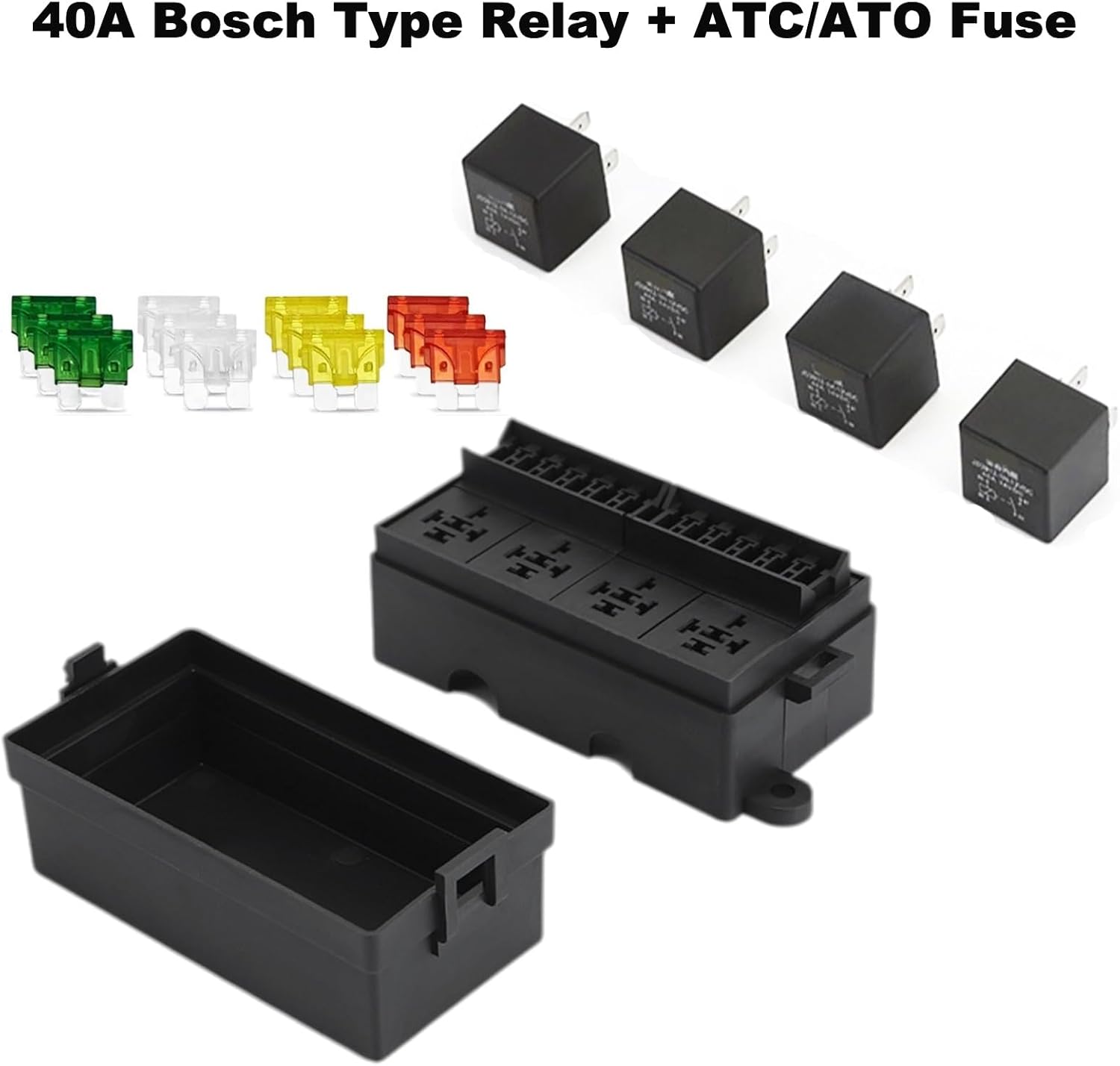
Figure 2: Included Relays and Fuses
4. Specifications
| Attribute | Value |
|---|---|
| Brand | RQG |
| Model Number | 7786FRB-12V/40A |
| Voltage | 12V (DC) |
| Relay Type | 4-pin 40A Bosch Type Relay (4 pcs) |
| Fuse Type | ATC & ATO Blade Fuses (12 pcs) |
| Current Rating | 40 Amps (Relays) |
| Connector Type | Plug-In |
| Contact Material | Copper |
| Mounting Type | Panel Mount (Front Mounting Design) |
| Item Weight | 1.3 pounds |
| Package Dimensions | 6.5 x 3.3 x 2.8 inches |
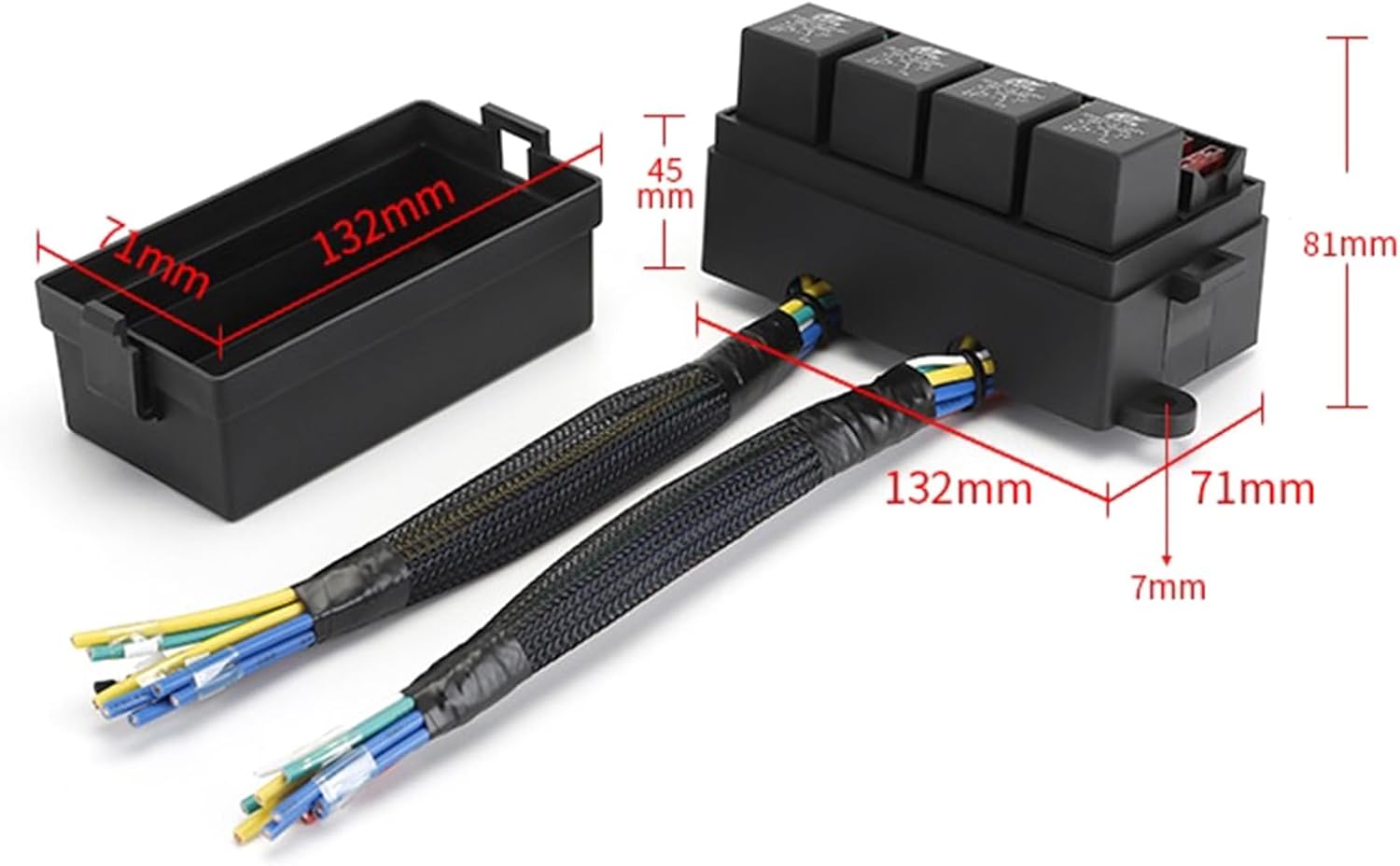
Figure 3: Product Dimensions
5. Installation Guide
The RQG 12V Fuse Relay Box is designed for straightforward installation due to its pre-wired configuration. Always ensure the vehicle's battery is disconnected before beginning any electrical work to prevent short circuits or injury.
5.1 Safety Precautions
- Disconnect the vehicle's battery before installation.
- Wear appropriate personal protective equipment (PPE), including safety glasses and gloves.
- Ensure all connections are secure and properly insulated.
- Do not exceed the maximum current ratings for fuses and relays.
- While the unit is waterproof, avoid complete immersion in water.
5.2 Wiring Overview
The fuse relay box comes pre-wired, simplifying the connection process. Refer to the wiring diagram for specific connections. Each relay and fuse slot is clearly marked.

Figure 4: Wiring Diagram
The diagram illustrates connections for positive and negative battery leads, relay outputs to devices, relay coil to switches, and extra fuse connections. Ensure correct polarity and secure connections for optimal performance and safety.
5.3 Mounting
The unit features a front mounting design. Select a secure, easily accessible location in your vehicle, such as the engine bay, away from excessive heat or moving parts. Use appropriate fasteners to secure the box firmly.

Figure 5: Example Installation in Engine Bay
The waterproof design provides protection against splashes and moisture, making it suitable for engine bay environments. However, direct submersion should be avoided.

Figure 6: Waterproof Design
6. Operating Instructions
Once properly installed and wired, the fuse relay box operates automatically based on the connected circuits and switches. Relays are activated by a control signal (e.g., from a switch) to switch higher current loads, while fuses protect the circuits from overcurrents.
- Ensure all devices connected to the fuse relay box are within the specified current limits of the installed fuses and relays.
- Verify that the control switches for each relay are functioning correctly.
- Regularly check for any loose connections or signs of wear.
7. Maintenance
7.1 Fuse Replacement
If a connected device stops working, check the corresponding fuse in the fuse relay box. A blown fuse will have a broken metal strip inside. To replace a fuse:
- Disconnect power to the fuse box.
- Carefully pull out the blown fuse using a fuse puller or small pliers.
- Insert a new fuse of the exact same amperage rating into the slot. Using a fuse with a higher rating can lead to circuit damage or fire.
- Restore power and test the device.
7.2 General Inspection
- Periodically inspect the fuse relay box for any signs of physical damage, corrosion, or loose wiring.
- Ensure the protective cover is securely in place to prevent dust and moisture ingress.
- Clean the exterior of the box with a damp cloth if necessary. Do not use harsh chemicals.
8. Troubleshooting
| Problem | Possible Cause | Solution |
|---|---|---|
| Device not receiving power | Blown fuse | Identify and replace the blown fuse with one of the correct amperage. Investigate the cause of the fuse blowing (e.g., short circuit, overload). |
| Relay not activating | Faulty relay, incorrect wiring, no control signal | Check relay connections, test the relay with a multimeter, verify the control signal (e.g., from a switch) is present. Replace relay if faulty. |
| Intermittent power supply | Loose connections, corroded terminals | Inspect all wiring connections for tightness. Clean any corroded terminals. |
| Overheating of wires/box | Overloaded circuit, incorrect wire gauge | Ensure total current draw does not exceed the box's capacity. Verify appropriate wire gauges are used for the current load. Consult a professional if unsure. |
9. Warranty and Support
RQG products are manufactured to high-quality standards. For warranty information, technical support, or service inquiries, please refer to the contact details provided with your purchase or visit the official RQG website. Keep your proof of purchase for warranty claims.
10. Product Media
10.1 Additional Product Images

10.2 Official Product Videos
Ask a question about this manual
Ask about setup, troubleshooting, compatibility, parts, safety, or missing instructions. Manuals+ will review the question and use this page’s manual context to help answer it.