
1. Introduction
This manual provides instructions for the safe installation, operation, and maintenance of your ZAGO 24 Inch LED Indoor Linear Wall Sconces. Please read these instructions thoroughly before installation and retain them for future reference.
Safety Information
- Always turn off the power at the circuit breaker before beginning installation or performing any maintenance.
- Consult a qualified electrician if you are unsure about the installation process.
- Ensure all electrical connections are made in accordance with local codes and ordinances.
- Do not attempt to modify the fixture. Any modifications may void the warranty and create a safety hazard.
- This fixture is rated for damp locations. Do not immerse in water.
2. Package Contents
Verify that all components are present before beginning installation:
- ZAGO 24 Inch LED Linear Wall Sconce (2 units)
- Mounting Hardware (screws, wire nuts, mounting bracket)
- Instruction Manual
3. Specifications
| Brand | ZAGO |
| Model Name | LED-LIWL24IN-RD |
| Item Model Number | ZG-LIWL |
| Product Dimensions | 24"L x 4.5"W x 3.5"H |
| Wattage | 14 Watts |
| Brightness | 900 Lumens |
| Voltage | 120-277VAC |
| Color Temperature | 3000K / 4000K / 5000K (Switchable) |
| Dimming | TRIAC/ELV Dimmable (10%-100%) |
| Material | Acrylic, Metal |
| Finish Type | Matte Black |
| Installation Type | Surface Mount, Hardwired |
| Indoor/Outdoor Usage | Indoor |
| Certifications | ETL Certified, Damp Location Rated |
4. Setup and Installation
Before You Begin
- Turn off power at the circuit breaker or fuse box.
- Ensure the mounting surface is clean, dry, and structurally sound.
- Gather necessary tools: screwdriver, wire strippers, electrical tape, safety glasses.
Installation Steps
- Prepare the Mounting Bracket: Attach the mounting bracket to the junction box using the provided screws. Ensure the bracket is securely fastened.
- Connect Wiring: Connect the fixture's wires to the corresponding house wires (black to black, white to white, ground to ground) using wire nuts. Ensure all connections are secure.
- Select Color Temperature: Before mounting the fixture completely, locate the 3CCT dip switch on the fixture. Select your desired color temperature (3000K, 4000K, or 5000K).
- Mount the Fixture: Carefully align the fixture with the mounting bracket and secure it with the provided screws. Ensure no wires are pinched during this step.
- Restore Power: Turn the power back on at the circuit breaker.

Image: The ZAGO LED Linear Wall Sconce can be installed both vertically and horizontally to suit various aesthetic and functional requirements.

Image: The ZAGO LED Linear Wall Sconce is designed for compatibility with most standard 3-inch or 4-inch junction boxes, facilitating straightforward installation.
5. Operating Instructions
Powering On/Off
The sconce is controlled by a standard wall switch connected to its hardwired installation. Flip the wall switch to turn the light fixture on or off.
Color Temperature Selection (3CCT)
Your ZAGO LED Linear Wall Sconce features a built-in multi-CCT (Correlated Color Temperature) switch, allowing you to choose between three distinct light colors: 3000K (Warm White), 4000K (Neutral White), and 5000K (Daylight White). This switch is located on the fixture itself and should be set during installation. Once set, the fixture will operate at the chosen color temperature.
Dimming Functionality
This fixture is compatible with TRIAC/ELV dimmers, allowing for smooth brightness adjustment from 10% to 100%. Ensure you use a compatible dimmer switch for optimal performance. Refer to your dimmer switch's instructions for proper operation.
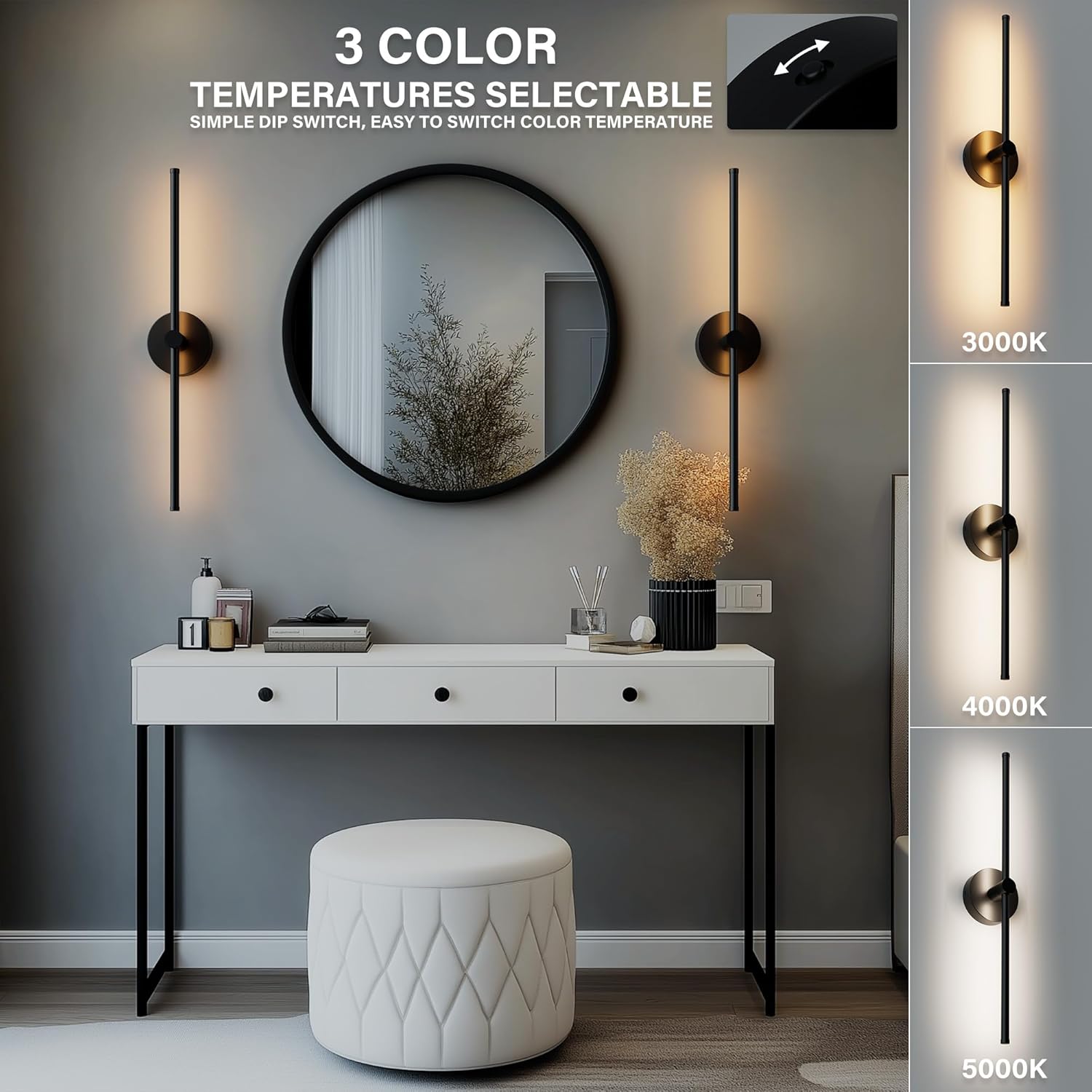
Image: The ZAGO LED Linear Wall Sconce offers three selectable color temperatures (3000K, 4000K, 5000K) via a simple dip switch, allowing customization of ambient lighting.
6. Maintenance
The ZAGO LED Linear Wall Sconce requires minimal maintenance.
- Cleaning: To clean the fixture, ensure the power is off. Wipe with a soft, dry, or slightly damp cloth. Do not use abrasive cleaners or solvents, as these may damage the finish or acrylic components.
- Bulb Replacement: The LED light source is integrated and not user-replaceable. The fixture is designed for long-term operation.
7. Troubleshooting
If you encounter issues with your ZAGO LED Linear Wall Sconce, refer to the table below for common problems and solutions.
| Problem | Possible Cause | Solution |
|---|---|---|
| Light does not turn on | No power to the fixture; Loose wiring connection; Faulty wall switch | Check circuit breaker; Verify all wire connections are secure; Test or replace wall switch. |
| Light flickers or dims inconsistently | Incompatible dimmer switch; Loose wiring; Overloaded circuit | Ensure a TRIAC/ELV compatible dimmer is used; Check wiring connections; Consult an electrician to check circuit load. |
| Incorrect color temperature | 3CCT switch set incorrectly | Turn off power, access the fixture's 3CCT switch, and adjust to the desired setting. |
If the problem persists after attempting these solutions, please contact customer support.
8. Warranty Information
ZAGO products are manufactured to high-quality standards. For specific warranty details regarding your ZAGO 24 Inch LED Indoor Linear Wall Sconces, please refer to the warranty information provided with your purchase packaging or contact ZAGO customer support directly. The warranty typically covers defects in materials and workmanship under normal use.
9. Customer Support
For technical assistance, product inquiries, or warranty claims, please contact ZAGO customer service. Our team is available to help you with any questions or concerns you may have.
Contact information can typically be found on the ZAGO official website or on your product packaging.

Image: ZAGO customer service representatives are available to provide support and answer product-related questions.