
1. Introduction
The Golon RX-333BT portable multi-band radio is a versatile audio companion designed for both outdoor adventures and home use. This multi-wave radio receives FM, AM, and Shortwave (SW1-2) frequencies, ensuring you can tune into your favorite stations wherever you are. Its robust and compact design makes it ideal for camping trips, beach days, or simply enjoying tunes in your backyard. The X-Bass feature enhances low frequencies for a rich, immersive sound experience. With its long-lasting battery and easy-to-use controls, this portable radio provides reliable entertainment on the go or at home. Enjoy the charm of analog radio with the Golon RX-333BT.
2. Safety Information
- Do not expose the unit to rain or moisture to prevent fire or electric shock.
- Do not disassemble the unit. Refer all servicing to qualified personnel.
- Avoid extreme temperatures, direct sunlight, and dusty environments.
- Use only the specified power source and charging cable.
- Keep out of reach of children.
- Dispose of batteries responsibly according to local regulations.
3. Package Contents
Please check that all items are present:
- Golon RX-333BT Portable Radio Unit
- Charging Cable
- User Manual (this document)
4. Product Overview
4.1 Controls and Features
Familiarize yourself with the main controls and features of your Golon RX-333BT radio.
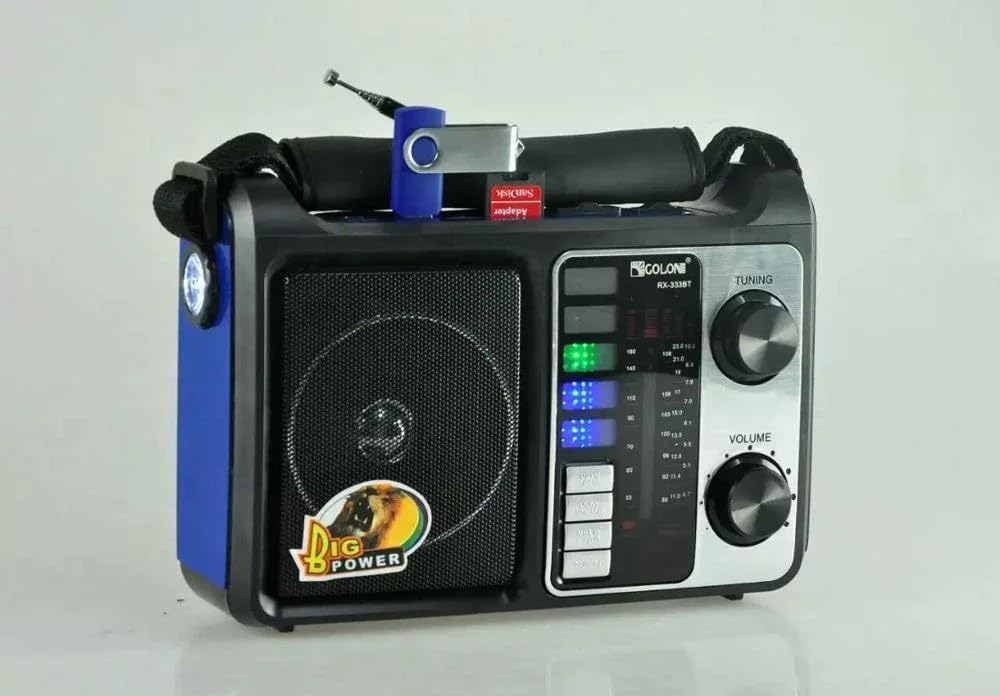
Image 1: Front view of the Golon RX-333BT portable radio in blue, showing the speaker, tuning dial, volume knob, and band selection buttons.

Image 2: Top-down view of the Golon RX-333BT portable radio (red variant), highlighting the USB port and SD card slot, along with the antenna and LED torch.
- Tuning Knob: Adjusts radio frequency.
- Volume Knob: Controls audio output level.
- Band Selector: Switches between FM, AM, SW1, and SW2 bands.
- USB Port: For playing audio from USB flash drives.
- SD Card Slot: For playing audio from SD memory cards.
- Bluetooth Connectivity: For wireless audio streaming from compatible devices.
- AUX Input: For connecting external audio sources via a 3.5mm cable.
- LED Torch: Integrated light for illumination.
- Telescopic Antenna: For improved radio signal reception.
- X-Bass Feature: Enhances bass frequencies for richer sound.
5. Setup
5.1 Powering the Radio
The RX-333BT can be powered by its internal rechargeable battery or via AC power (if an adapter is included or purchased separately). Batteries are not included with the unit.
- Battery Installation: Open the battery compartment (usually on the back or bottom) and insert the required batteries (e.g., UM-1 x 4pcs, not included) ensuring correct polarity.
- Charging: Connect the provided charging cable to the radio's charging port and to a suitable power source. The charging indicator light will illuminate.
5.2 Initial Use
- Extend the telescopic antenna fully for optimal radio reception.
- Turn the volume knob to a low setting before powering on.
6. Operating Instructions
6.1 Radio Operation (FM/AM/SW)
- Turn the radio ON using the power switch/volume knob.
- Select the desired band (FM, AM, SW1, or SW2) using the band selector switch.
- Rotate the Tuning Knob to scan for stations. The frequency display will show the current frequency.
- Adjust the Volume Knob to your preferred listening level.
- For better FM/SW reception, extend and adjust the telescopic antenna. For AM reception, rotate the unit for best signal.
6.2 Bluetooth Operation
- Switch the radio to Bluetooth mode (usually indicated by a "BT" or Bluetooth icon on the display/switch).
- The radio will enter pairing mode, indicated by a flashing light or an audible prompt.
- On your mobile device (smartphone, tablet), enable Bluetooth and search for available devices.
- Select "RX-333BT" (or similar name) from the list to pair.
- Once paired, you can play audio from your device through the radio.
6.3 USB/SD Card Playback
- Insert a USB flash drive or an SD card (pre-loaded with MP3 audio files) into the respective slot.
- The radio should automatically switch to USB/SD playback mode. If not, select the appropriate mode using the mode button.
- Use the playback controls (e.g., Play/Pause, Next/Previous Track) on the radio to manage your music.
6.4 AUX Input
- Connect one end of a 3.5mm audio cable (not included) to the AUX input port on the radio.
- Connect the other end to the headphone jack or audio output of your external device (e.g., MP3 player, laptop).
- Switch the radio to AUX mode.
- Play audio from your external device. The volume can be controlled via both the radio and the external device.
6.5 LED Torch
To activate the integrated LED torch, locate the dedicated switch or button (often on the side of the unit) and press/slide it to the ON position. Turn it OFF when not in use to conserve battery.
7. Maintenance
- Cleaning: Wipe the radio with a soft, dry cloth. Do not use abrasive cleaners or solvents.
- Battery Care: If the radio will not be used for an extended period, remove the batteries to prevent leakage. Recharge the internal battery regularly to maintain its lifespan.
- Storage: Store the radio in a cool, dry place away from direct sunlight and extreme temperatures.
8. Troubleshooting
| Problem | Possible Cause | Solution |
|---|---|---|
| No power | Low battery or incorrect battery installation. | Check battery polarity, replace batteries, or charge the internal battery. |
| Poor radio reception | Antenna not extended, weak signal, or interference. | Extend the telescopic antenna fully. Try repositioning the radio. For AM, rotate the unit. |
| Bluetooth not pairing | Radio not in pairing mode, device too far, or already connected to another device. | Ensure radio is in Bluetooth pairing mode. Move device closer. Disconnect from other devices. |
| USB/SD playback not working | Incorrect file format, corrupted media, or media not inserted correctly. | Ensure files are MP3 format. Reinsert USB/SD card. Try a different USB/SD card. |
9. Specifications
- Brand: Golon
- Model: RX-333BT
- Color: Blue (for this variant)
- Special Features: Portable
- Connectivity Technology: Auxiliary, Bluetooth
- Product Dimensions (L x W x H): 24 x 10 x 17 cm
- Tuner Technology: FM Waves (also AM, SW1, SW2)
- Style: Classic
- Power Source: Battery Powered
- Radio Bands Supported: 4-Band (FM/AM/SW1/SW2)
- Included Components: Cable
- Compatible Devices: Smartphone, Tablet, Laptop, MP3 Player, Speaker, Earphone
- Display Type: LCD
- Hardware Interface: Radio Frequency
- Water Resistance Level: Not Water Resistant
- Material: Plastic
- Recommended Uses: Home, Outdoor
- Manufacturer: Golon
- Item Weight: 900 grams
10. Warranty and Support
10.1 Warranty Information
This Golon RX-333BT radio comes with a standard manufacturer's warranty. Please retain your proof of purchase for any warranty claims. For specific warranty terms and conditions, refer to the warranty card included with your product or contact your retailer.
10.2 Customer Support
If you encounter any issues not covered in the troubleshooting section or require further assistance, please contact your retailer or the manufacturer's customer support. Contact details can usually be found on the product packaging or the manufacturer's official website.