
Introduction
Thank you for choosing the GOLON RX-BT455 Portable Radio. This device is designed to provide a versatile audio experience, featuring AM, FM, and SW3 radio bands, Bluetooth connectivity, and multiple media playback options. Its user-friendly design, including large buttons and a clear display, makes it suitable for all users. This manual will guide you through the setup, operation, and maintenance of your new radio.
Product Overview
The GOLON RX-BT455 is a compact and lightweight portable radio equipped with a powerful speaker for clear and rich sound. It supports various audio sources including USB drives, SD cards, and Bluetooth-enabled devices. The radio also features a built-in rechargeable battery for portability and can be powered via AC or external batteries.
Key Features:
- Multi-band radio: Supports AM, FM, and SW3 frequencies.
- Bluetooth Connectivity: Wirelessly stream audio from compatible devices.
- Media Playback: USB and SD card support for MP3 playback.
- AUX Input: Connect external audio sources via a 3.5mm jack.
- Rechargeable Battery: Provides portable power for on-the-go use.
- Compact Design: Easy to carry and use anywhere.
Controls and Components:
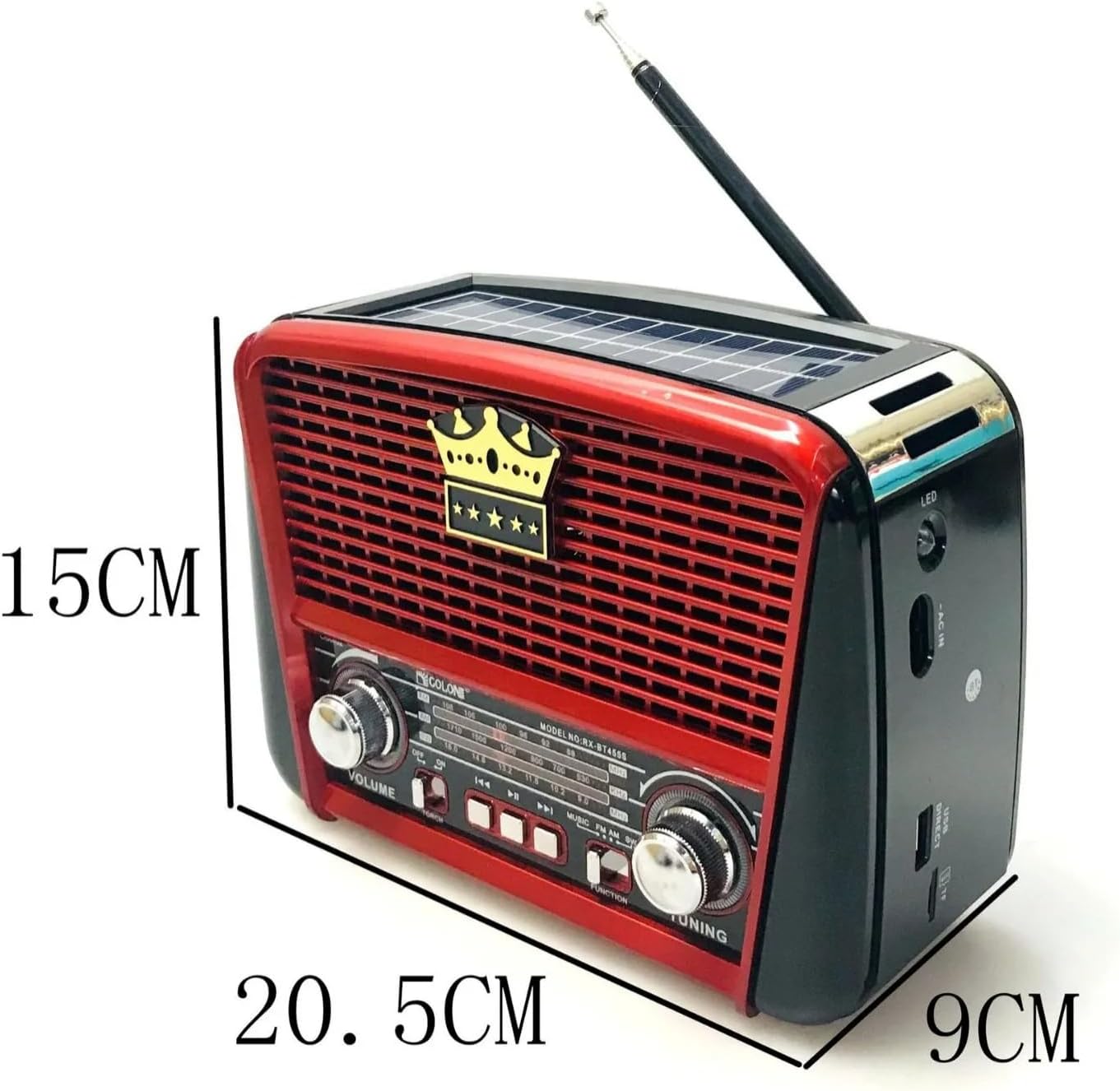
Image 1: Front view of the GOLON RX-BT455 Portable Radio. This image displays the front panel with the speaker grille, volume and tuning knobs, mode selection buttons, and the integrated solar panel on top. The dimensions are indicated as approximately 15cm (height), 20.5cm (width), and 9cm (depth).
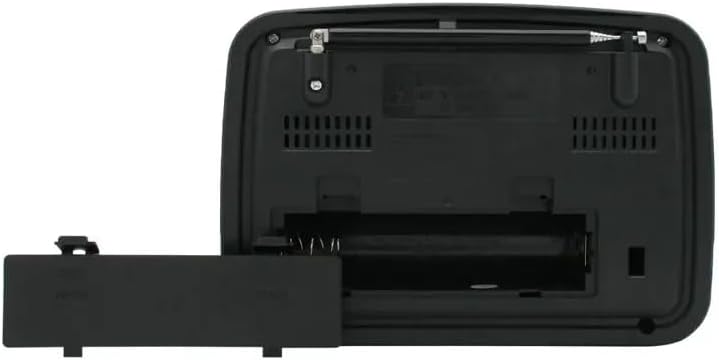
Image 2: Rear view of the GOLON RX-BT455 Portable Radio with the battery compartment open. This shows the slots for two external batteries (not included) and the overall back panel design.
- Antenna: Extendable telescopic antenna for improved radio reception.
- Solar Panel: Located on the top for solar charging.
- Volume Knob: Rotate to adjust the audio output level.
- Tuning Knob: Rotate to select radio frequencies.
- Mode Buttons: Buttons for selecting AM, FM, SW3, Bluetooth, USB/SD, and AUX modes.
- Media Control Buttons: Play/Pause, Next/Previous track for USB/SD/Bluetooth modes.
- USB Port: For connecting USB flash drives.
- SD Card Slot: For inserting SD memory cards.
- AUX Input: 3.5mm jack for connecting external audio devices.
- AC Input: For connecting the power cable for charging and operation.
- Battery Compartment: Located at the rear for optional external batteries.
Setup
Powering the Radio:
The GOLON RX-BT455 can be powered in three ways:
- Internal Rechargeable Battery: The radio has a built-in rechargeable battery. To charge, connect the provided AC power cable to the radio's AC input and plug it into a wall outlet. The LED indicator will show charging status.
- Solar Charging: Place the radio in direct sunlight to utilize the integrated solar panel for charging the internal battery.
- External Batteries: For extended use or as a backup, open the battery compartment on the rear of the radio (refer to Image 2) and insert two compatible batteries (e.g., D-cell, not included) according to the polarity markings.
Initial Setup:
- Ensure the radio is adequately charged or has external batteries installed.
- Extend the telescopic antenna for optimal radio reception.
Operating Instructions
Power On/Off:
Locate the power switch, usually integrated with the volume knob or a dedicated button. Turn it to the 'ON' position to power on the radio. Turn it to 'OFF' to power off.
Radio Operation (AM/FM/SW3):
- Press the corresponding mode button (AM, FM, or SW3) to select your desired radio band.
- Extend the telescopic antenna fully for best reception.
- Rotate the Tuning Knob to scan for available radio stations.
- Adjust the Volume Knob to your preferred listening level.
Bluetooth Mode:
- Press the Bluetooth Mode Button. The radio will enter pairing mode, indicated by an audible prompt or flashing LED.
- On your smartphone or Bluetooth-enabled device, search for available Bluetooth devices.
- Select "GOLON RX-BT455" (or similar name) from the list to pair.
- Once paired, you can stream audio from your device to the radio. Use the media control buttons on the radio or your device to control playback.
USB/SD Card Playback:
- Insert a USB flash drive into the USB Port or an SD card into the SD Card Slot.
- Press the USB/SD Mode Button (if separate, otherwise it may auto-detect).
- The radio will automatically begin playing audio files (e.g., MP3) from the inserted media.
- Use the media control buttons (Play/Pause, Next/Previous) to manage playback.
AUX Input Mode:
- Connect an external audio device (e.g., MP3 player, phone) to the AUX Input using a 3.5mm audio cable (not included).
- Press the AUX Mode Button.
- Control playback directly from your connected external device.
Maintenance
Cleaning:
- Wipe the radio's exterior with a soft, dry cloth.
- Do not use abrasive cleaners, waxes, or solvents as they may damage the finish.
Battery Care:
- If using external batteries, remove them if the radio will not be used for an extended period to prevent leakage.
- Regularly charge the internal rechargeable battery to maintain its lifespan. Avoid fully discharging it frequently.
Storage:
- Store the radio in a cool, dry place away from direct sunlight and extreme temperatures.
- Keep it away from dust and moisture.
Troubleshooting
| Problem | Possible Cause | Solution |
|---|---|---|
| Radio does not power on. | Low battery; AC power not connected; External batteries incorrectly installed or depleted. | Charge the internal battery; Connect to AC power; Check external battery installation and replace if necessary. |
| Poor radio reception. | Antenna not extended; Weak signal; Interference. | Fully extend the telescopic antenna; Reposition the radio; Try tuning to a different station. |
| Bluetooth device not pairing. | Radio not in pairing mode; Device too far; Bluetooth off on external device. | Ensure radio is in Bluetooth pairing mode; Move device closer to radio; Enable Bluetooth on your device. |
| No sound from USB/SD. | Incorrect mode selected; No supported audio files; Media not inserted correctly. | Select USB/SD mode; Ensure media contains MP3 files; Reinsert USB drive/SD card. |
Specifications
- Model Number: RX-BT455
- Brand: GOLON
- Radio Bands: AM, FM, SW3
- Connectivity: Bluetooth, USB, SD Card, AUX Input
- Power Source: Internal Rechargeable Battery, AC Power, External Batteries (not included)
- Dimensions (approx.): 20.5 cm (Width) x 15 cm (Height) x 9 cm (Depth)
- Weight (approx.): 867 grams
- Country of Origin: China
Warranty and Support
For warranty information and customer support, please refer to the documentation provided with your purchase or contact your retailer. Keep your proof of purchase for any warranty claims.