
NEOCADE PB3216
NEOCADE Portable Charger with Handheld Game Console User Manual
Model: PB3216
Introduction
The NEOCADE Portable Charger with Handheld Game Console (Model PB3216) is a versatile device designed to provide both portable power for your mobile devices and entertainment through its built-in game console. This manual provides essential information for setting up, operating, maintaining, and troubleshooting your device to ensure optimal performance and longevity.

Image: Front and back view of the NEOCADE Portable Charger with Handheld Game Console, highlighting its dual functionality as a gaming device and a 5000mAh power bank.
Package Contents and Setup
What's in the Box
- NEOCADE Gaming Power Bank (Portable Charger with Handheld Game Console)
- User Manual
- USB-C Charging Cable

Image: The NEOCADE Portable Charger with Handheld Game Console, its user manual, and the included USB-C charging cable.
Initial Setup and Charging
- Unpacking: Carefully remove all items from the packaging.
- Initial Charge: Before first use, fully charge the NEOCADE device. Connect the provided USB-C cable to the device's charging port and the other end to a compatible USB power adapter (not included) or a computer USB port.
- Charging Indicator: The 4-level LED power indicator will show the charging progress. All four LEDs will be solid when fully charged.
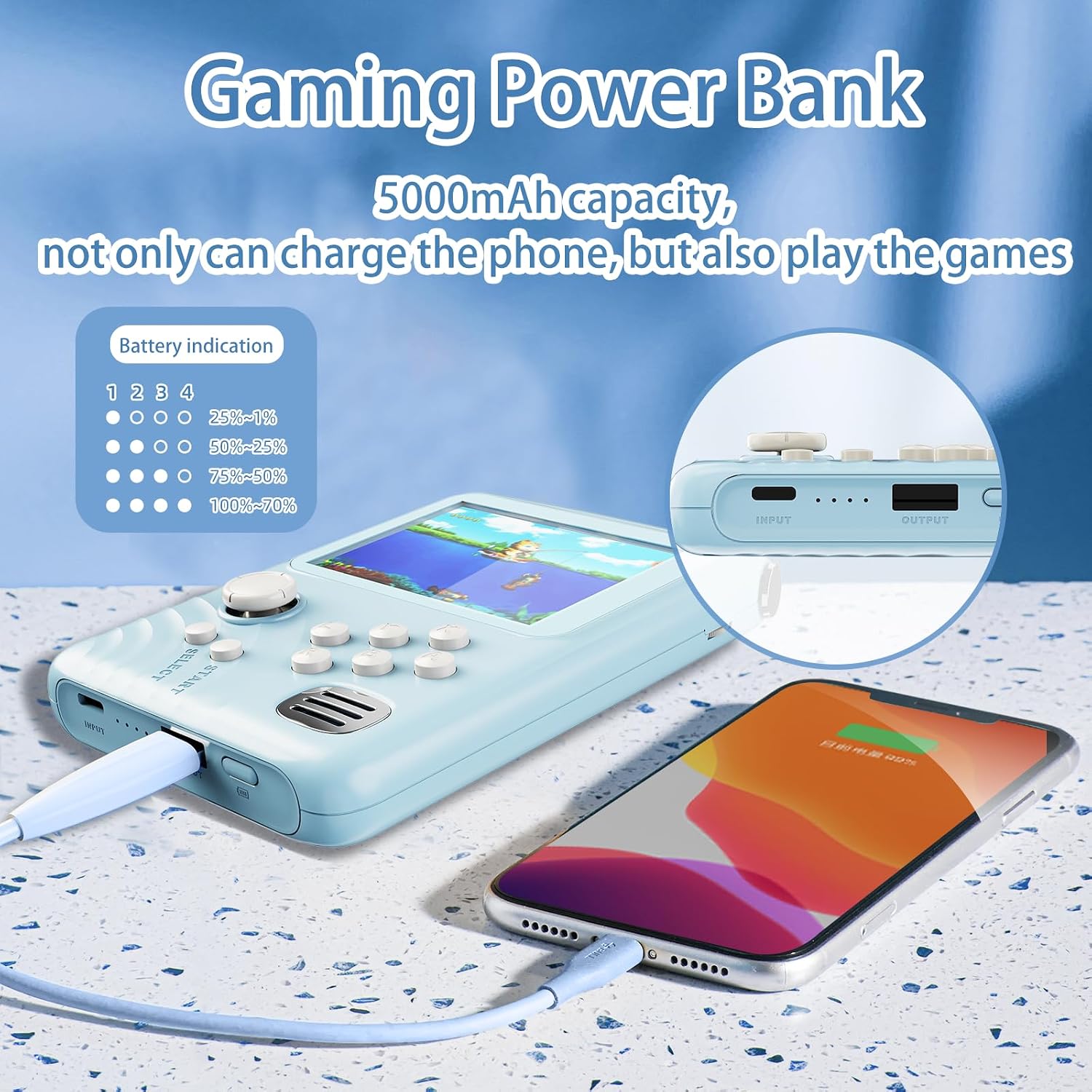
Image: The NEOCADE device charging a smartphone, illustrating the battery level indicators on the power bank.
Operating Instructions
Power Bank Functionality
- Charging External Devices: Connect your smartphone or other compatible device to the NEOCADE power bank using your device's charging cable. The power bank will automatically begin charging.
- Battery Level Check: The 4-level LED indicator displays the remaining power:
- 1 LED: 0-25%
- 2 LEDs: 25-50%
- 3 LEDs: 50-75%
- 4 LEDs: 75-100%
Handheld Game Console Functionality
- Power On/Off: Locate the power switch on the device and slide it to the "ON" position to power on the game console. Slide to "OFF" to power off.
- Game Selection: Use the 360° joystick and control buttons to navigate through the built-in game library. The device includes 300 games across various categories such as casual, classic, and shooting games.
- Playing Games: Once a game is selected, press the appropriate button (e.g., "START" or "A") to begin playing.
- Exiting a Game: To exit a game and return to the main menu, press and hold the "SELECT" and "START" buttons simultaneously.
- Volume Adjustment: Use the volume wheel/buttons to adjust the audio output from the built-in speaker.

Image: Detailed view of the NEOCADE game console's interface, showing the joystick, buttons, screen, and speaker for an enhanced gaming experience.

Image: A selection of games available on the NEOCADE handheld console, demonstrating the variety of built-in entertainment.
Maintenance
- Cleaning: Use a soft, dry cloth to clean the exterior of the device. Do not use liquid cleaners or aerosols.
- Storage: Store the device in a cool, dry place away from direct sunlight and extreme temperatures.
- Battery Care: To prolong battery life, avoid fully discharging the device frequently. Recharge the device regularly, even if not in use, to maintain battery health.
- Safety: The device is designed with multiple safety protections including overvoltage, overcharge, over-discharge, overcurrent, overload, and short-circuit protection.

Image: Visual representation of the comprehensive safety features integrated into the NEOCADE device, ensuring safe operation.
Troubleshooting
| Problem | Possible Cause | Solution |
|---|---|---|
| Device does not turn on. | Battery is depleted. | Charge the device fully using the provided USB-C cable. |
| Cannot charge external device. | Power bank battery is low or cable is faulty. | Ensure the power bank is charged. Try a different USB cable. |
| Game freezes or crashes. | Temporary software glitch. | Press and hold "SELECT" and "START" simultaneously to exit the game. If issue persists, power off and restart the device. |
| No sound from game console. | Volume is too low or muted. | Adjust the volume using the volume control. |
Specifications
| Feature | Detail |
|---|---|
| Model Number | PB3216 |
| Brand | NEOCADE |
| Battery Capacity | 5000mAh |
| Screen Size | 3.2 Inches |
| Controller Type | Button Control, 360° Joystick |
| Built-in Games | 300 (Casual, Classic, Shooting, Puzzle) |
| Power Source | Battery Powered (1 AAA battery required, included) |
| Display Type | LCD |
| Material | Plastic |
| Product Dimensions | 5 x 3.5 x 0.74 inches |
| Item Weight | 11.3 ounces |
| Safety Certifications | CE, FCC, UL, PSE |
Warranty and Support
NEOCADE products are manufactured with high standards of quality and safety. This device has passed CE, FCC, UL, and PSE certifications to ensure safe usage.
For any questions, concerns, or technical assistance regarding your NEOCADE Portable Charger with Handheld Game Console, please contact NEOCADE customer support through the retailer's platform or the official NEOCADE website.
Please retain your purchase receipt as proof of purchase for any warranty claims.
Ask a question about this manual
Ask about setup, troubleshooting, compatibility, parts, safety, or missing instructions. Manuals+ will review the question and use this page’s manual context to help answer it.