
1. Product Overview
The Pawlytek Smart Interactive Cat Toy Ball is designed to provide engaging and stimulating play for indoor cats. It features automatic movement, obstacle avoidance, and multiple interaction modes to keep your feline companion entertained.

2. Package Contents
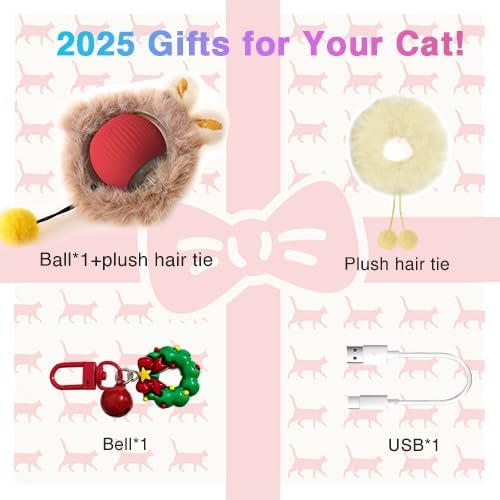
Please verify that all items are present in your package:
- 1 x Smart Interactive Cat Toy Ball
- 1 x USB Charging Cable
- 1 x Bell Attachment
- 2 x Plush Hair Ties (accessories for the ball)
3. Setup
3.1 Charging the Toy Ball
Before first use, fully charge the toy ball. The device uses a Type-C USB charging port.
- Locate the Type-C charging port on the toy ball.
- Connect the provided USB charging cable to the toy ball and a suitable USB power source (e.g., computer, wall adapter).
- A full charge typically takes approximately 0.5 hours.
- Once fully charged, the toy provides up to 1.5 hours of playtime.
3.2 Attaching Accessories
The toy ball comes with a bell and plush hair ties that can be attached for added interaction.
- To attach the bell, clip it onto the designated loop on the toy ball's outer shell.
- The plush hair ties can be used to customize the toy's appearance or provide different textures for your cat to interact with.

4. Operating Instructions
4.1 Powering On/Off and Mode Selection
The toy ball features an automatic on/off function and multiple interaction modes.
- To activate the toy, press the power button located on the ball.
- Each press of the power button cycles through the available interaction modes, indicated by different LED light colors.
4.2 Interaction Modes
The toy ball offers three distinct interaction modes:
- Fast Mode (Blue Light): Provides fast rolling motion, ideal for active and energetic cats.
- Slow Mode (Purple Light): Offers a slow to fast rolling motion, suitable for timid cats.
- Interactive Mode (Yellow Light): Features fast shaking and rolling, designed for curious cats.

4.3 Automatic Obstacle Avoidance
The toy ball is equipped with an intelligent obstacle avoidance system, allowing it to navigate various surfaces and avoid getting stuck.

4.4 Play/Rest Balance
To prevent overstimulation and conserve battery, each mode will enter a rest mode after running for 5 minutes. The toy will reactivate upon touch, encouraging intermittent play.

5. Maintenance
5.1 Cleaning the Toy Ball
The toy ball features a detachable structure for easy cleaning, especially for removing accumulated cat hair.
- To detach the outer shell, use a small tool (e.g., a thin plastic pry tool or a fingernail) to gently pry open the buckle on the transparent ring.
- Once the buckle is open, carefully remove the buckle ring.
- Separate the inner ball from the outer shell.
- Clean any hair or debris from both parts using a soft cloth. Do not immerse the electronic components in water.
- Reassemble the toy by aligning the inner ball with the outer shell and snapping the buckle ring back into place.

6. Troubleshooting
If you encounter issues with your Pawlytek Smart Interactive Cat Toy Ball, please refer to the following common solutions:
- Toy not turning on: Ensure the toy is fully charged. Connect it to the USB charging cable and allow it to charge for at least 30 minutes.
- Toy not moving or moving erratically: Check for any obstructions (e.g., cat hair, debris) in the moving parts. Clean the toy as described in Section 5.1. Ensure it is on a relatively flat surface.
- Short battery life: Ensure the toy is fully charged before use. Battery performance can vary based on usage patterns and environmental factors.
- Toy not reactivating after rest mode: Gently tap or nudge the toy to trigger its motion sensor and reactivate it.
If the problem persists, please contact customer support.
7. Specifications
| Feature | Detail |
|---|---|
| Model Name | P01 |
| Item Weight | 2.89 ounces |
| Item Dimensions (LxWxH) | 2.14 x 2.53 x 3.12 inches |
| Battery Type | 1 Nonstandard Battery (included) |
| Charging Time | Approx. 0.5 hours |
| Playtime per Charge | Up to 1.5 hours |
| Color | Red |
| Specific Uses | Indoor |
8. Warranty and Support
8.1 Warranty Information
This product is covered by a 30-day free return policy. Please refer to your purchase documentation for specific terms and conditions.
8.2 Customer Support
For further assistance, technical support, or warranty claims, please contact your retailer or the manufacturer directly through their official channels.