
1. Important Safety Information
Please read all instructions carefully before using the THERUN Walking Pad. Keep this manual for future reference.
- Always ensure the red safety lock is secured before operation to prevent E07 error codes and ensure proper function.
- Place the treadmill on a flat, stable surface.
- Keep children and pets away from the treadmill during operation.
- Do not operate if the power cord is damaged.
- Wear appropriate athletic footwear.
- Maximum user weight: 265 Pounds.
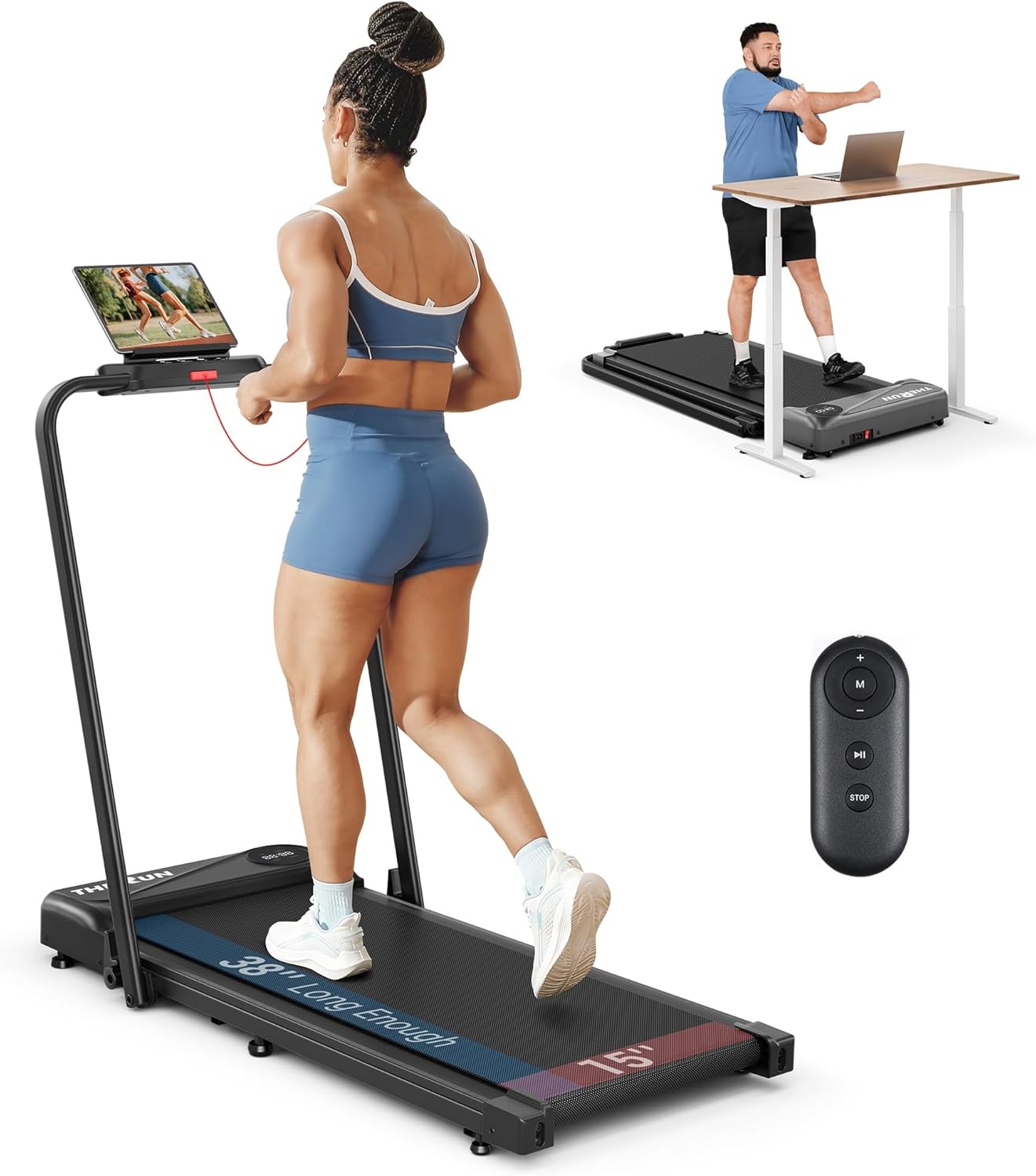
Figure 1.1: The THERUN Walking Pad in its upright position, showcasing its compact design and included remote control.
2. Product Overview
The THERUN Walking Pad is a versatile 2-in-1 fitness machine designed for both walking and running, suitable for home and office use. Its foldable design allows for easy storage.
Key Features:
- 2-in-1 Design: Functions as a walking pad (0.6-3.8 mph) with the handle folded, and a treadmill (up to 6.2 mph) with the handle raised.
- Powerful & Quiet Motor: Equipped with a 2.5 HP motor for stable performance and near-silent operation (approx. 45dB).
- Spacious Running Belt: Features a 38" x 15" non-slip, 5-layer rubber belt for comfortable and safe workouts.
- Dual Control: Adjust speed and settings via the LED touch screen or the convenient remote control.
- Premium Shock Reduction: 6 shock-absorption absorbers provide joint protection and a stable running experience.
- Metrics Display: LED screen shows speed, distance, time, and calories burned.

Figure 2.1: Illustrates the two modes of operation: walking pad (0.6-3 mph) and treadmill (3-6.2 mph).

Figure 2.2: The 38-inch long running belt provides ample space for a comfortable stride.
3. Setup
The THERUN Walking Pad requires no complex assembly. It is designed for quick and easy setup.
Unpacking and Initial Setup:
- Remove the treadmill from its packaging.
- Place the treadmill on a level surface.
- To raise the handle: Push the quick-release key and lift the armrest to the upright position.
- Fasten the quick-release wrench to secure the handle.
- Secure the red safety lock onto the designated slot on the console. The treadmill will not operate without this safety key in place (E07 error code will appear).
- Plug the power cord into a grounded electrical outlet.

Figure 3.1: Follow these steps to quickly set up the handle and engage the safety lock.
4. Operating Instructions
Starting Your Workout:
- Ensure the safety lock is properly attached.
- Step onto the treadmill belt.
- Press the 'Start/Stop' button on the console or the remote control to begin. The treadmill will start at a low speed.
Adjusting Speed:
- Use the '+' and '-' buttons on the console or the remote control to increase or decrease speed.
- In walking pad mode (handle folded), speeds range from 0.6 to 3.8 mph.
- In treadmill mode (handle raised), speeds range from 0.6 to 6.2 mph.

Figure 4.1: The treadmill offers convenient control via its integrated touch screen and a dedicated remote control.
Monitoring Progress:
The LED display on the running board provides real-time feedback on your workout:
- Time: Duration of your workout.
- Distance: Total distance covered.
- Speed: Current speed in miles per hour.
- Calories: Estimated calories burned.
Ending Your Workout:
Press the 'Stop' button on the console or remote control to gradually slow down and stop the treadmill. For immediate stop, pull the red safety lock.

Figure 4.2: The treadmill operates quietly, making it suitable for various environments without causing disturbance.
5. Maintenance
Regular maintenance ensures the longevity and optimal performance of your THERUN Walking Pad.
- Cleaning: Wipe down the treadmill with a damp cloth after each use. Avoid harsh chemicals.
- Belt Lubrication: Refer to the included user manual for specific lubrication instructions and frequency. Proper lubrication is crucial for belt health.
- Belt Alignment: If the running belt shifts to one side, adjust it according to the instructions in the full user manual to prevent wear and tear.
- Storage: When not in use, fold the treadmill and store it in a dry, cool place. Its compact design allows for vertical storage or under furniture.

Figure 5.1: The treadmill's design facilitates easy movement and compact storage, saving space in your home.
6. Troubleshooting
If you encounter any issues with your THERUN Walking Pad, please refer to the common problems and solutions below:
- E07 Error Code: This code typically indicates that the red safety lock is not properly secured. Ensure the safety key is fully inserted into its slot on the console.
- Treadmill Not Starting: Check if the power cord is securely plugged into both the treadmill and the wall outlet. Verify the safety lock is in place.
- Unusual Noises: Inspect the running belt for any debris or misalignment. Lubricate the belt if necessary. If noises persist, contact customer support.
- Belt Slipping: The running belt may need tension adjustment. Refer to the detailed instructions in the full user manual for proper belt tensioning.
For issues not listed here or if problems persist, please contact THERUN customer support.
7. Specifications
| Feature | Specification |
|---|---|
| Brand | THERUN |
| Model Name | THERUN 2 in 1 Treadmill |
| Model Number | XBD400 |
| Color | Carbon Black |
| Product Dimensions (D x W x H) | 44"D x 22"W x 4.5"H |
| Item Weight | 43.43 Pounds |
| Material | Alloy Steel |
| Maximum Speed | 6.2 Miles per Hour |
| Maximum Horsepower | 2.5 Horsepower |
| Maximum Weight Recommendation | 265 Pounds |
| Assembly Required | No |
| Power Source | Corded Electric |
| Metrics Measured | Speed, Distance, Time, Calories Burned |
| UPC | 840325633350 |
8. Warranty and Support
The THERUN Walking Pad comes with a 1-year warranty from the date of purchase, covering manufacturing defects. Please retain your proof of purchase for warranty claims.
For customer support, technical assistance, or to inquire about replacement parts, please visit the official THERUN store or contact their customer service team.

Figure 8.1: THERUN offers comprehensive after-sales support, including accessories and training guides.
For more information, visit the Official THERUN Store.


