
Introduction
This manual provides detailed instructions for the installation, operation, and maintenance of your PRIMSOPH Automatic Motion Sensor Touchless Bathroom Sink Faucet, model PM001#. Please read this manual thoroughly before installation and use to ensure proper function and longevity of the product. This faucet is designed for non-potable applications, including automatic hand-washing in public restrooms and commercial cleaning systems. It is not intended for kitchen drinking faucets, direct drinking water outlets, or infant formula preparation areas.

Image: PRIMSOPH Automatic Motion Sensor Touchless Bathroom Sink Faucet (Chrome finish)
Safety Information
- Ensure all water supply lines are turned off before beginning installation.
- If you are unsure about any part of the installation process, consult a qualified plumber.
- Do not use abrasive cleaners or harsh chemicals on the faucet's surface, as this may damage the finish.
- Verify that the power source (battery or plug-in) is correctly installed and secured.
- This faucet is designed for non-potable water use only.
Product Overview & Components
The PRIMSOPH Automatic Motion Sensor Faucet features durable brass construction and intelligent sensor technology for hands-free operation. It includes a temperature mixer for adjustable water temperature.
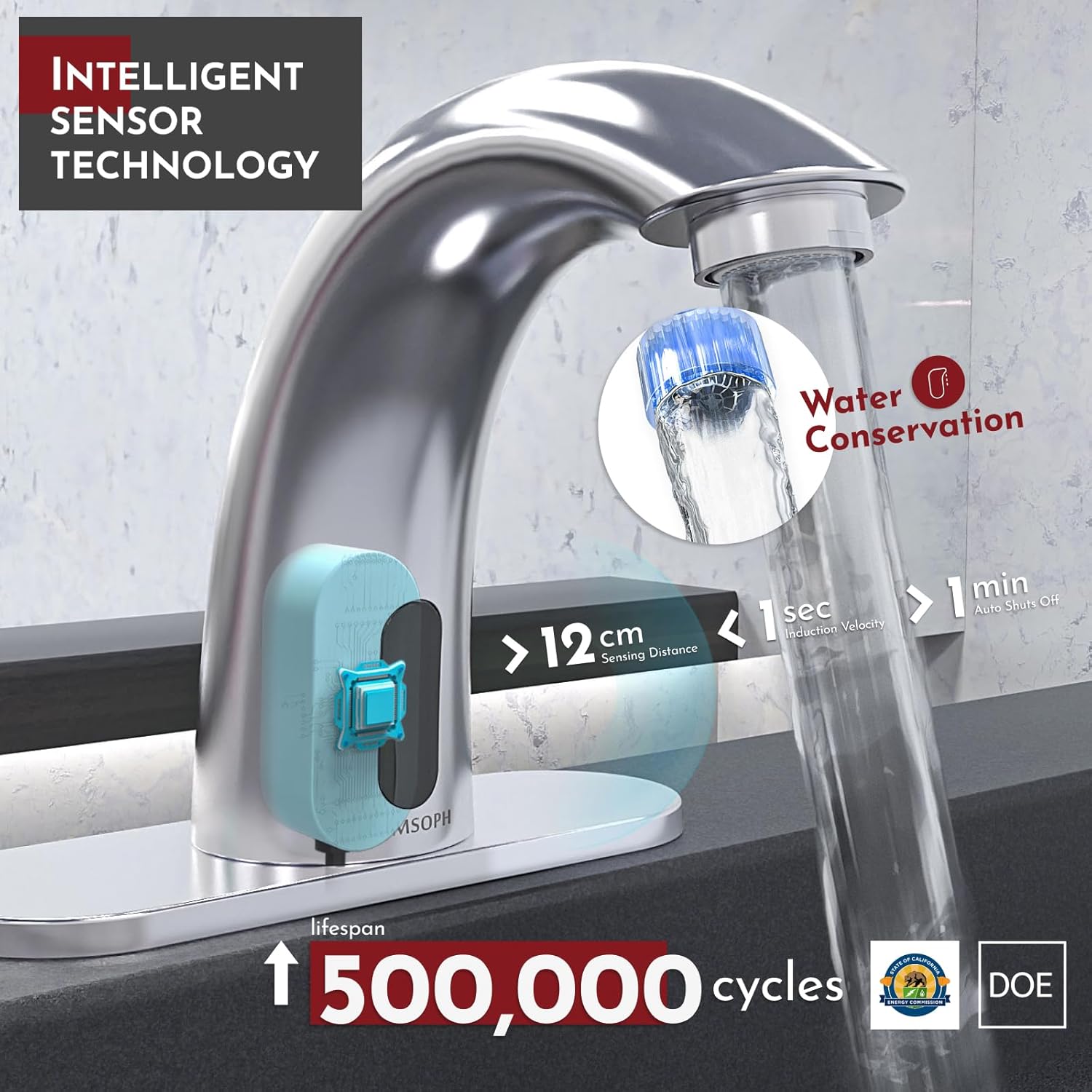
Image: Faucet with intelligent sensor technology, highlighting water conservation features (12cm sensing distance, 1 sec induction velocity, 1 min auto shut-off).

Image: Cross-section view illustrating faucet durability with crystal plating, hand-polished finish, and brass base material.
Package Contents:

Image: All products in package, including faucet, battery box, temperature mixer, hoses, screws, and gaskets.
- 1x Faucet
- 1x Battery Box
- 1x Temperature Mixer
- 2x Screws
- 2x Expansion Screws
- 2x Rubber Gaskets (one spare)
- 1x Water Hose (shorter, for connecting water outlet)
- 2x Water Hoses (longer, for connecting hot/cold water to mixer)
Specifications
| Feature | Detail |
|---|---|
| Brand | PRIMSOPH |
| Model Name | USHJBLF001001 (Style: PM001#) |
| Recommended Use | Bathroom (non-potable applications) |
| Mounting Type | Deck Mount |
| Finish Type | Chrome |
| Material | Brass |
| Number of Handles | 1 (for temperature mixer) |
| Hole Count | 1 |
| Special Features | Easy to Install, Touchless |
| Product Dimensions | 5.25 x 6 x 5.13 inches |
| Item Weight | 4.4 pounds |
| Certifications | CUPC, California CEC |
| Power Options | Battery or Plug-in (Batteries not included) |

Image: Detailed dimensions of the faucet and required hole sizes for installation.
Setup & Installation
Follow these steps for proper installation of your PRIMSOPH touchless faucet. Ensure water supply is turned off before starting.
- Prepare the Sink: This installation is suitable for under-counter basins and semi-recessed basins. Ensure the mounting surface is clean and ready.
- Attach Temperature Mixer: Screw the temperature mixer onto the appropriate connection point.
- Connect Hot/Cold Water Hoses: Screw the hot water hose and cold water hose to the temperature mixer.
- Connect Water Outlet Hose: Connect the shorter water outlet hose from the faucet to the main water supply.
- Connect Wiring: Connect the necessary electrical wires from the faucet to the battery box or plug-in power source.
- Install Batteries: If using battery power, please use alkaline batteries (not included).

Image: Visual guide for installation steps 1-3, showing sink preparation, attaching the temperature mixer, and connecting hot/cold water hoses.

Image: Visual guide for installation steps 4-6, showing connection of water outlet hose, wiring, and battery installation.
Important Installation Notes:
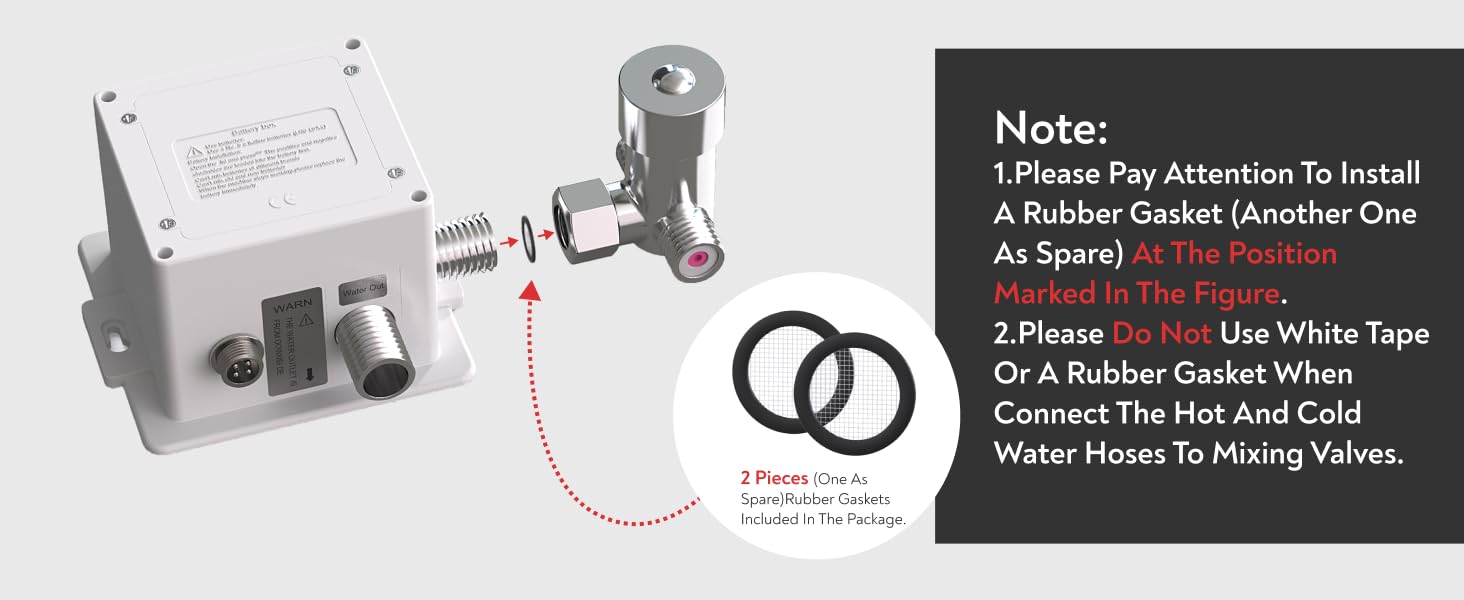
Image: Diagram showing the correct placement of a rubber gasket and warning against using white tape or additional gaskets when connecting hoses to mixing valves.
- Always install a rubber gasket at the position marked in the figure (one spare gasket is included).
- Do not use white tape or an additional rubber gasket when connecting the hot and cold water hoses to the mixing valves.
Operating Instructions
The PRIMSOPH faucet operates with an infrared motion sensor, providing hands-free water flow.
- Automatic Activation: Place your hands within the sensing area of the faucet. The infrared sensor will detect your hands and automatically activate water flow.
- Automatic Shut-off: Remove your hands from the sensing area. The water flow will automatically stop after a short delay (approximately 1 minute if hands remain in sensing area, otherwise immediately upon removal).
- Temperature Adjustment: Use the included temperature mixer to set your desired water temperature. This is typically a manual adjustment made during installation or maintenance, not during each use.
Video: Demonstration of the PRIMSOPH Sensor Faucet in operation, showing hands-free water activation and shut-off.

Image: A child washing hands using the touchless faucet, demonstrating ease of use.
Maintenance
- Cleaning: Clean the faucet regularly with a soft cloth and mild soap. Avoid abrasive cleaners, scouring pads, or chemicals containing ammonia, bleach, or alcohol, as these can damage the chrome finish.
- Sensor Care: Keep the infrared sensor window clean and free from obstructions to ensure optimal performance.
- Battery Replacement: If the faucet's response becomes sluggish or stops working, replace the batteries in the battery box. Ensure correct polarity when inserting new batteries.
- Aerator Cleaning: Periodically unscrew and clean the aerator to remove any mineral buildup or debris that may affect water flow.
Troubleshooting
| Problem | Possible Cause | Solution |
|---|---|---|
| No water flow | No power (dead batteries/unplugged), water supply off, clogged aerator, sensor obstructed. | Check/replace batteries or power connection. Ensure water supply valves are open. Clean aerator. Clear sensor path. |
| Water flow is weak | Clogged aerator, low water pressure. | Clean or replace aerator. Check household water pressure. |
| Faucet continuously runs | Sensor obstruction, sensor malfunction. | Remove any objects from the sensor's field of view. If problem persists, contact support. |
| Incorrect water temperature | Temperature mixer setting, hot/cold water supply issues. | Adjust the temperature mixer. Check hot and cold water supply lines for proper function. |
Warranty & Support
The PRIMSOPH Automatic Motion Sensor Touchless Bathroom Sink Faucet comes with a limited warranty. For specific details regarding your warranty coverage, please refer to the documentation included with your purchase or contact customer support.



Images: Certifications including cUPC, California CEC, and US Patented Design.
Customer Support:
For any questions, technical assistance, or warranty claims, please contact PRIMSOPH customer support. Our team is available to assist you.

Image: PRIMSOPH customer support is available 24/7.