
Douddy B0DL4LG7CS
Douddy 32-Bit Handheld Gaming Console User Manual
Model: B0DL4LG7CS
Brand: Douddy
1. Introduction
Welcome to the user manual for your new Douddy 32-Bit Handheld Gaming Console. This manual provides essential information for setting up, operating, and maintaining your device. Please read it thoroughly to ensure safe and optimal use of your gaming console.
2. Safety Information
WARNING:
- Not suitable for children under 4 years old.
- Adult supervision is recommended during use.
- Do not expose the device to extreme temperatures, direct sunlight, or moisture.
- Avoid dropping or subjecting the device to strong impacts.
- Do not attempt to disassemble or repair the device yourself. Contact customer support for assistance.
- Use only the provided charging cable.
3. What's in the Box
Your Douddy Handheld Gaming Console package includes the following items:
- 1 x Handheld Game Console
- 1 x USB-C Cable
- 1 x User Manual
- 1 x Rechargeable Lithium Battery (pre-installed)
4. Product Overview
The Douddy 32-Bit Handheld Gaming Console is designed for portable entertainment, featuring a vibrant display and a wide selection of preloaded games. Its ergonomic design ensures comfortable use for extended periods.
Key Features:
- 139 Preloaded 32-Bit Games: A diverse collection across Casual, Puzzle, Shooting, and Sports categories.
- 3.0" IPS Display: Offers vibrant graphics and sharp images with a 178-degree viewing angle for an immersive experience.
- Ergonomic Design: Compact and lightweight, designed for small hands with an arcade-style joystick for precise control.
- Rechargeable Battery: Equipped with a long-lasting lithium polymer battery, easily rechargeable via USB-C.
Console Layout:

Figure 1: Front view of the Douddy Handheld Gaming Console, showing the 3.0" IPS screen, D-pad, action buttons (A, B, X, Y), joystick, and Select/Start buttons.
- IPS Screen: Main display for games.
- D-Pad (Directional Pad): For directional movement in games.
- Joystick: Alternative for directional control, offering arcade-style precision.
- Action Buttons (A, B, X, Y): Used for in-game actions.
- Select Button: Used for menu navigation and selections.
- Start Button: Used to start games or pause gameplay.
- Volume Control: Located on the side for adjusting audio output.
- USB-C Port: For charging the device.
- Power Switch: To turn the console on or off.
5. Setup
5.1 Initial Charging
Before first use, fully charge your gaming console. The device comes with a pre-installed rechargeable lithium battery.
- Connect the provided USB-C cable to the charging port on the console.
- Plug the other end of the USB-C cable into a compatible USB power adapter (not included) or a computer's USB port.
- The charging indicator light will illuminate. Allow approximately 1 hour for a full charge, which provides up to 5 hours of gameplay.
- Once fully charged, disconnect the USB-C cable.

Figure 2: The handheld console connected to a USB-C charging cable. The device charges quickly, providing extended playtime.
5.2 Powering On/Off
- To turn on the console, slide the Power Switch to the "ON" position.
- To turn off the console, slide the Power Switch to the "OFF" position.
6. Operating Instructions
6.1 Main Menu Navigation
Upon powering on, the console will display the main menu with game categories:
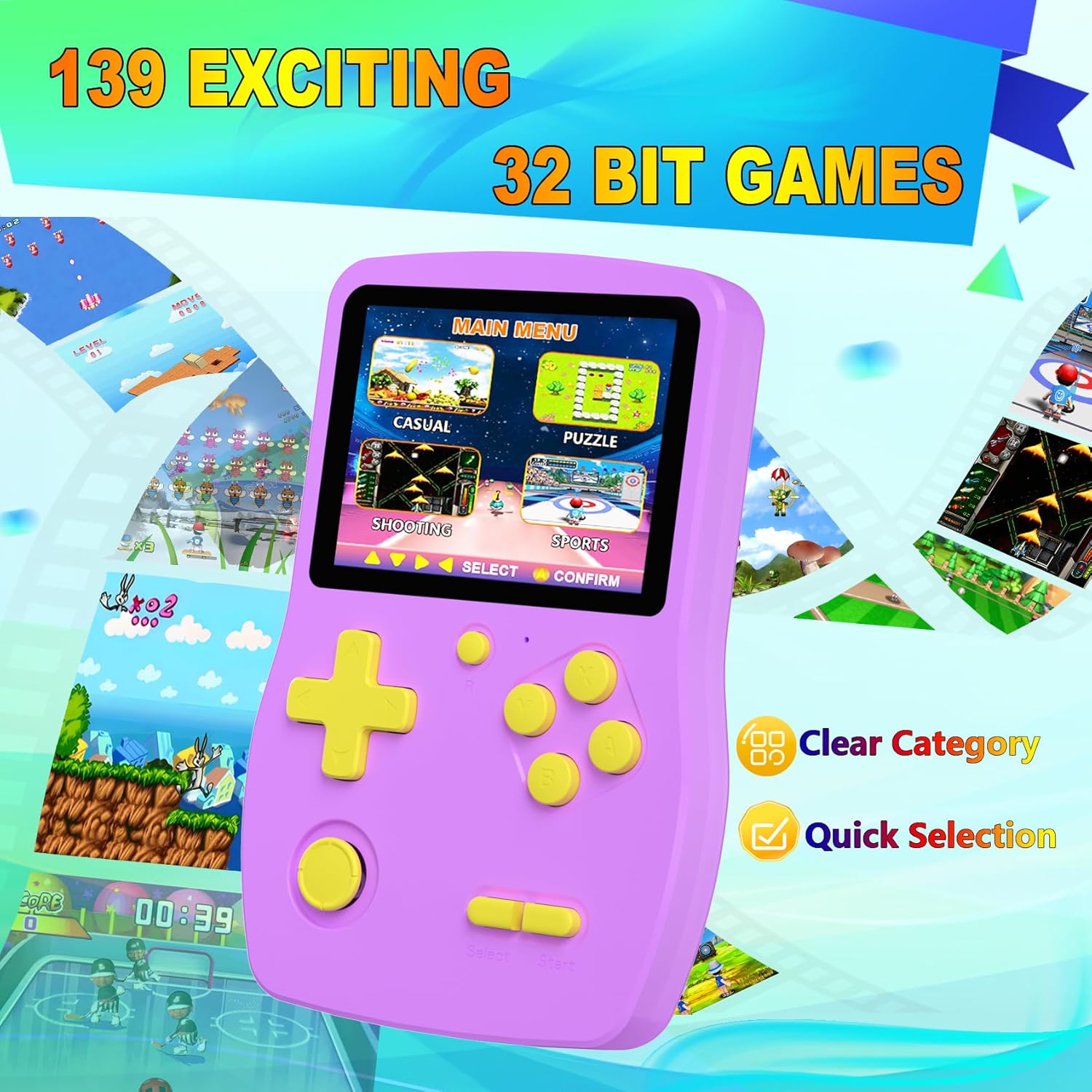
Figure 3: The main menu interface, categorized into Casual, Puzzle, Shooting, and Sports games, allowing for quick selection.
- Use the D-Pad or Joystick to navigate between game categories.
- Press the A Button (Confirm) to select a category.
- Within a category, use the D-Pad or Joystick to scroll through the list of games.
- Press the A Button (Confirm) to choose a game.
- Press the B Button (Back) to return to the previous menu.
6.2 Gameplay
Once a game is selected, it will load automatically.
- Use the D-Pad or Joystick for character movement or directional input.
- Utilize the Action Buttons (A, B, X, Y) for specific in-game actions such as jumping, shooting, or interacting.
- Press the Start Button to pause or resume gameplay.
- Press the Select Button for in-game options or to exit a game (functionality may vary per game).

Figure 4: A child comfortably holding and playing the handheld console, highlighting its ergonomic design and user-friendly controls.
6.3 Volume Adjustment
Adjust the volume using the dedicated volume control switch located on the side of the console.
7. Game Guide
A detailed game guide is included in this user manual. This guide provides information on how to master each game, including controls and objectives. Refer to the relevant sections for specific game instructions.
8. Maintenance
- Cleaning: Use a soft, dry cloth to clean the console. Do not use liquid cleaners or abrasive materials.
- Storage: Store the console in a cool, dry place away from direct sunlight when not in use.
- Battery Care: To prolong battery life, avoid fully discharging the battery frequently. Charge the device regularly, even if not in use for extended periods.
9. Troubleshooting
| Problem | Possible Cause | Solution |
|---|---|---|
| Console does not turn on. | Low battery or power switch is off. | Ensure the power switch is in the "ON" position. Charge the console fully using the provided USB-C cable. |
| Screen is dim or unresponsive. | Low battery. | Charge the console. Screen brightness may decrease when the battery is low. |
| No sound or low volume. | Volume is too low or muted. | Adjust the volume control switch on the side of the console. |
| Game freezes or crashes. | Temporary software glitch. | Turn the console off and then on again. If the issue persists, try resetting the device (refer to the manual for reset instructions if available, or contact support). |
10. Specifications
| Feature | Detail |
|---|---|
| Product Dimensions | 5.3"L x 3.46"W x 0.7"H |
| Controller Type | Button Control |
| Screen Size | 3 Inches |
| Display Type | IPS |
| Power Source | Battery Powered |
| Battery Type | 1 Lithium Polymer battery (included) |
| Battery Life | Up to 5 Hours |
| Hardware Interface | USB (USB-C for charging) |
| Material | Plastic |
| Item Weight | 5.6 ounces |
| Recommended Age | 4 - 13 years |
11. Official Product Videos
Watch these official videos for additional information and demonstrations of the Douddy Handheld Gaming Console.
Douddy Handheld Game Console Overview
Video Description: An unboxing and review of the handheld retro video game console, highlighting its features and ease of use.
Game Console 32 Bit With a Vibrant Screen And Great Games
Video Description: A detailed look at the console's vibrant screen and a demonstration of various games, emphasizing the quality of the display and diverse game selection.
Throwback to a Simpler Time! Game System w/out Distraction
Video Description: This video highlights the console as a distraction-free gaming option, perfect for travel and keeping kids entertained without internet access.
12. Warranty and Support
For warranty information or technical support, please refer to the contact details provided on the product packaging or visit the official Douddy website. Keep your purchase receipt as proof of purchase.
no relevant documents
Ask a question about this manual
Ask about setup, troubleshooting, compatibility, parts, safety, or missing instructions. Manuals+ will review the question and use this page’s manual context to help answer it.