
Introduction
Thank you for choosing the Buinblu Foldable Full Size 88 Key Digital Piano. This manual provides essential information for the proper setup, operation, and maintenance of your instrument. Please read it thoroughly before use to ensure optimal performance and longevity.
What's in the Box
Verify that all components are present upon unboxing:
- Buinblu 88-Key Digital Piano
- Power Adapter
- Sustain Pedal
- Sheet Music Stand
- Sticker (for key labeling)
- Carrying Bag
- Type-C Adapter Cable

Image: All included accessories with the Buinblu 88-Key Digital Piano, neatly laid out.
Setup
Unfolding the Piano
- Place the folded piano on a flat, stable surface.
- Locate the folding mechanism latch, typically on the underside or side of the hinge.
- Carefully release the latch and unfold the two sections of the keyboard until they are fully extended and locked into place. Ensure the locking mechanism is secure to prevent accidental folding during use.

Image: Detail of the piano's folding hinge and latch mechanism.
Power Connection
- Connect the provided power adapter to the Type-C Power Port on the back of the piano.
- Plug the adapter into a standard electrical outlet.
- Alternatively, the piano has a built-in 1200mAh battery for portable use, offering approximately 7 hours of play time.
Connecting the Sustain Pedal
- Locate the Sustain Pedal Port on the rear panel of the piano.
- Insert the pedal's plug firmly into this port.

Image: Overview of the piano's connectivity ports.
Attaching the Sheet Music Stand
- Insert the sheet music stand into the designated slots on the top panel of the piano.
- Ensure it is securely seated.
Operating Instructions
Basic Functions
- Power On/Off: Press the power button to turn the piano on or off.
- Volume Control: Use the dedicated volume buttons or knob to adjust the output level of the built-in speakers or connected headphones.
- Tone Selection: The piano features 200 different tones. Use the "TONE" button and the +/- buttons to cycle through and select desired instrument sounds.
- Rhythm Selection: Access 200 rhythms using the "RHYTHM" button and the +/- buttons.
- Demo Songs: The piano includes 80 demo songs. Press "DEMO ONE" to play a single demo or "DEMO ALL" to play all demos consecutively.
- Metronome: Activate the metronome function to assist with timing and rhythm practice.
- Transposition: Adjust the pitch of the keyboard up or down.
- Portamento: Glide smoothly between notes.
- Chords: Utilize the chord function for automatic chord accompaniment.

Image: Close-up of the piano's control panel with various function buttons.
Advanced Features
- Recording Function: Use the recording feature to capture your performances. Refer to the digital display for recording status.
- Dual Keyboard Mode: This mode allows two players to use the keyboard simultaneously, splitting it into two identical pitch ranges.
- Teaching Function: Engage the teaching mode for guided practice.
- Headphone Use: Connect headphones to the 3.5mm Headphone Jack for private practice without disturbing others.

Image: User practicing with headphones connected to the digital piano.
Seller Video: Buinblu 88 Key Piano Overview
Video: An official seller video demonstrating the features and functionality of the Buinblu 88 Key Digital Piano.
Maintenance
- Cleaning: Use a soft, dry cloth to wipe the surface of the piano. Avoid abrasive cleaners, solvents, or waxes, as these can damage the finish.
- Storage: When not in use, fold the piano and store it in the provided carrying bag to protect it from dust and damage. Store in a cool, dry place away from direct sunlight and extreme temperatures.
- Battery Care: For optimal battery life, avoid fully discharging the battery frequently. Charge the piano regularly, even if not in constant use.
- Handling: Always handle the piano carefully, especially when folding or unfolding, to prevent damage to the keys or internal components.
Troubleshooting
| Problem | Possible Cause | Solution |
|---|---|---|
| No sound |
|
|
| Keys not responding |
|
|
| Unusual sounds or distortion |
|
|
| Piano does not fold/unfold smoothly |
|
|
If you encounter issues not listed here or if solutions do not resolve the problem, please contact customer support.
Specifications
| Brand | Buinblu |
| Model Name | P-887 |
| Number of Keys | 88 |
| Skill Level | Beginner |
| Special Features | Recording, Dual Keyboard, 200 Tones/Rhythms, 80 Demos, Metronome, Transposition, Portamento, Teaching Function, Chords |
| Connectivity Technology | Auxiliary, 3.5mm Jack (Headphones, Mic, Audio In) |
| Power Source | Battery Powered (1200mAh built-in battery), Power Adapter (Type-C) |
| Battery Life | Approximately 7 hours |
| Item Weight | 7.7 pounds |
| Unfolded Dimensions (D x W x H) | 8.8"D x 50.4"W x 2.2"H (approx. 22.4cm D x 128cm W x 5.6cm H) |
| Folded Dimensions (D x W x H) | 8.8"D x 25.2"W x 4.4"H (approx. 22.4cm D x 64cm W x 11.2cm H) |
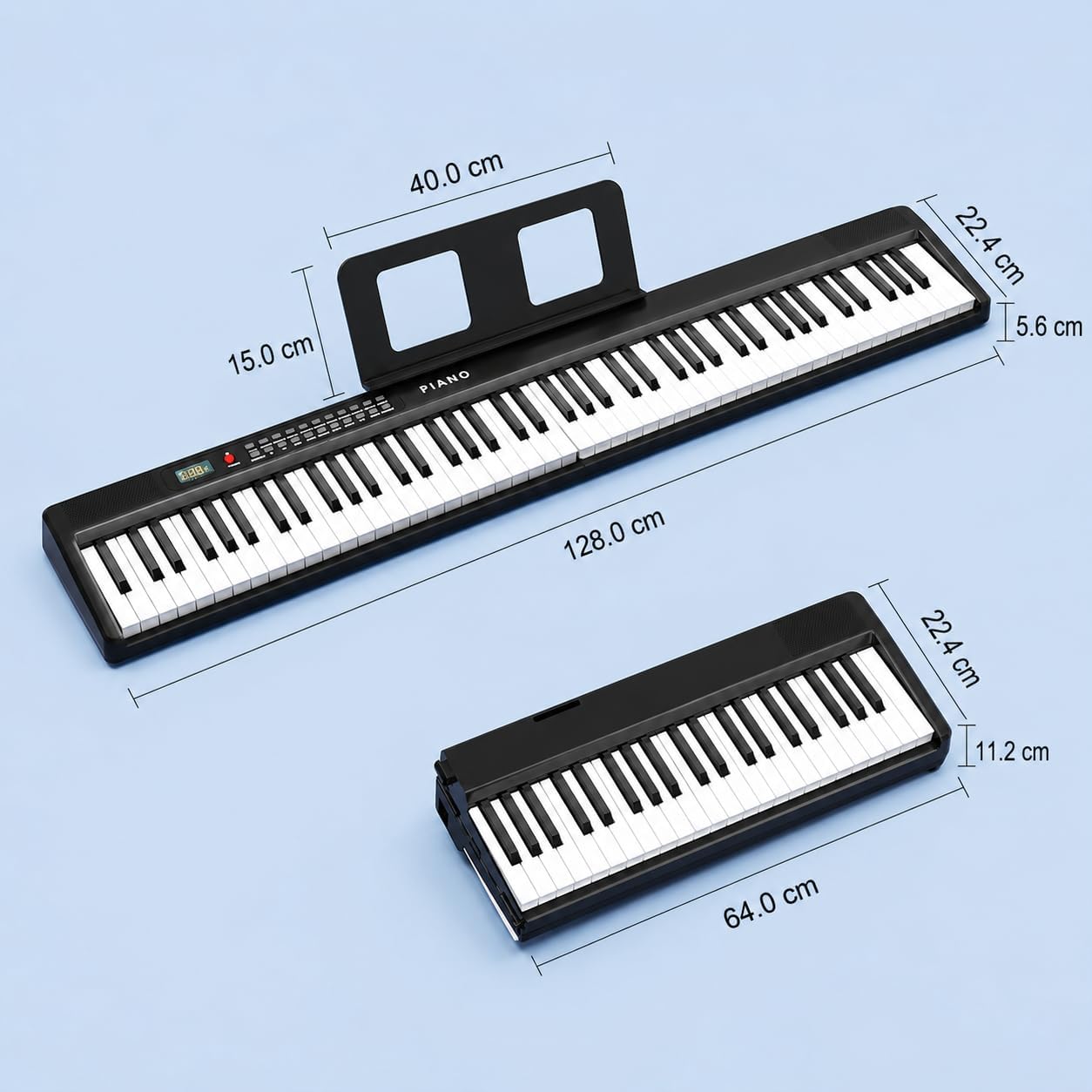
Image: Dimensional diagram of the piano in both unfolded and folded states.
Warranty Information
This Buinblu Digital Piano comes with a 2-year warranty from the date of purchase. This warranty covers manufacturing defects and malfunctions under normal use. Please retain your proof of purchase for warranty claims. The warranty does not cover damage caused by misuse, accidents, unauthorized modifications, or normal wear and tear.
Customer Support
For any questions, technical assistance, or warranty claims, please contact Buinblu customer service. Refer to the product packaging or the retailer's website for the most current contact information. We offer 7*24-hour online service.
You can also visit the official Buinblu store on Amazon for more information: Buinblu Amazon Store