
1. Introduction
Thank you for choosing the Wolff Mount Extreme Wall Mount. This product is designed to securely hold 75-100 inch televisions weighing up to 100 kg. This manual provides essential information for safe installation, operation, and maintenance of your wall mount. Please read these instructions carefully before installation and keep them for future reference.

Image: The Wolff Mount Extreme Wall Mount, showing its robust frame designed for large televisions.
2. Safety Information
WARNING: Failure to read and follow these instructions can result in serious personal injury, property damage, or voiding your warranty. If you have any questions, please contact customer support.
- Ensure the mounting surface can safely support the combined weight of the mount and your TV.
- Do not exceed the maximum weight capacity of 100 kg (220 lbs).
- This product is designed for installation on solid concrete walls, brick walls, or wood stud walls. Do not install on drywall alone.
- Always use a stud finder to locate wood studs accurately.
- Use appropriate tools and wear safety gear (e.g., safety glasses, gloves) during installation.
- Ensure all screws are tightened securely, but do not overtighten.
- Keep children and pets away during installation.
- Check the mount periodically for any signs of wear or damage.
3. Package Contents
Please verify that all components are present and undamaged before beginning installation. If any parts are missing or damaged, do not proceed with installation and contact customer support.
| Part | Description | Quantity |
|---|---|---|
| Wall Plate | Main bracket that attaches to the wall. | 1 |
| TV Brackets | Vertical bars that attach to the back of your TV. | 2 |
| Mounting Hardware Kit | Includes various screws, washers, and anchors for wall and TV attachment. | 1 set |
| Quick Release Cords | Cords for easy TV removal from the mount. | 2 |
4. Setup & Installation
Tools Required: Pencil, Drill, Level, Stud Finder (for wood studs), Phillips Head Screwdriver, Socket Wrench, Measuring Tape.
4.1. Prepare the TV Brackets
- Carefully place your TV face down on a soft, clean surface to prevent screen damage.
- Identify the VESA mounting holes on the back of your TV.
- Select the appropriate screws, washers, and spacers from the hardware kit that fit your TV's mounting holes.
- Attach the two TV brackets to the back of your TV, ensuring they are centered and level. The quick release cords should hang freely at the bottom. Do not overtighten.
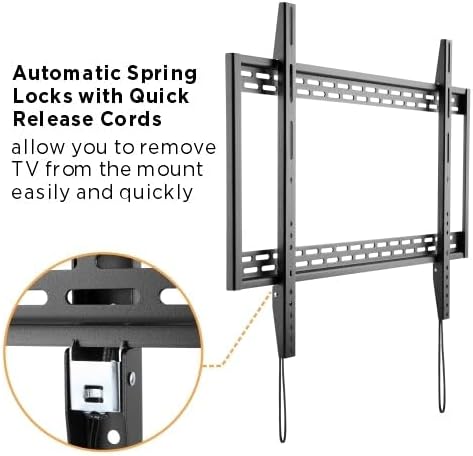
Image: Close-up of the TV brackets showing the automatic spring locks and quick release cords, which allow for easy removal of the TV from the mount.
4.2. Prepare the Wall
- Determine the desired height for your TV. Mark the center point on the wall.
- For Wood Stud Walls: Use a stud finder to locate the edges of two adjacent wood studs. Mark the center of each stud. The wall plate must be mounted to at least two studs.
- For Concrete/Brick Walls: Ensure the wall is solid.
- Hold the wall plate against the wall at the desired height and center point. Use a level to ensure it is perfectly horizontal.
- Mark the drilling locations through the holes on the wall plate.
4.3. Mount the Wall Plate
- Drill pilot holes at the marked locations.
- For wood studs: Use a 5.5mm (7/32 inch) drill bit.
- For concrete/brick: Use a 10mm (3/8 inch) masonry drill bit. Insert wall anchors into the drilled holes until flush with the wall.
- Align the wall plate with the drilled holes.
- Secure the wall plate to the wall using the lag bolts and washers provided. Tighten all bolts firmly with a socket wrench until the wall plate is securely fastened. Do not overtighten.

Image: A sleek, flat wall mount securely attached to a wall, demonstrating its low-profile design.
4.4. Hang the TV
- With assistance, carefully lift the TV (with attached TV brackets) and hook the TV brackets onto the top edge of the wall plate.
- Gently lower the TV until the TV brackets engage with the wall plate. You should hear a click as the automatic spring locks engage.
- Pull the quick release cords downwards to ensure the TV is securely locked into place. Release the cords.
- Visually inspect that the TV is level and securely mounted.

Image: A large television securely mounted on the Wolff Mount Extreme bracket, showcasing a clean installation.
5. Operation
This Wolff Mount is a fixed wall mount designed for a secure, low-profile installation. Once installed, your TV will remain in a fixed position against the wall.
5.1. Removing the TV from the Mount
To remove the TV from the wall mount for maintenance or repositioning:
- Ensure the TV is powered off and all cables are disconnected.
- Locate the quick release cords hanging below the TV.
- With assistance, pull both quick release cords downwards simultaneously to disengage the spring locks.
- Carefully lift the TV upwards and away from the wall plate.
- Place the TV face down on a soft, clean surface.
6. Maintenance
- Periodically check all screws and bolts to ensure they remain tight.
- Inspect the mount for any signs of wear, corrosion, or damage. If any issues are found, contact customer support.
- Clean the mount with a soft, dry cloth. Avoid using abrasive cleaners or solvents.
7. Troubleshooting
| Problem | Possible Cause | Solution |
|---|---|---|
| TV is not level | Wall plate or TV brackets not level during installation. | Remove TV, adjust wall plate or TV brackets, re-mount TV. Use a level during all steps. |
| TV does not lock onto wall plate | TV not properly seated; quick release cords are pulled. | Ensure TV brackets are fully engaged with the wall plate. Release quick release cords if they are being held. |
| Mount feels unstable | Improper installation; loose screws; unsuitable wall type. | Immediately remove TV. Re-check all mounting points and screw tightness. Ensure wall type is appropriate and anchors are correctly installed. If unsure, consult a professional. |
8. Specifications
- Brand: Wolff Mount
- Model: Extreme Wall Mount
- Material: Steel
- Color: Black
- Mounting Type: Wall Mount
- Movement Type: Fixed (Note: Product specifications mention "Swiveling", but primary images and design indicate a fixed mount with quick release for removal.)
- Compatible TV Sizes: 75 - 100 inches
- Maximum Weight Capacity: 100 kg (220 lbs)
- GTIN: 08720726078306
- ASIN: B0DKY77WG8

Image: Side view of the Wolff Mount Extreme Wall Mount, highlighting its slim profile when installed.
9. Warranty & Support
Warranty: Wolff Mount provides a 10-year manufacturer's warranty from the date of purchase. This warranty covers defects in materials and workmanship under normal use. Please retain your proof of purchase for warranty claims.
Customer Support: If you have any questions regarding the installation, operation, or maintenance of your Wolff Mount Extreme Wall Mount, please contact our customer support team. Refer to the contact information provided with your purchase or visit the official Wolff Mount website.