
Introduction
This instruction manual provides essential information for the safe and effective use of your yiqungo USB Magnetic Charging Cable. This cable is designed for charging DEKELIFE C29, C20, and C21pro smartwatches. Please read this manual thoroughly before use and retain it for future reference.
Product Overview
The yiqungo USB Magnetic Charging Cable offers a convenient and secure way to charge your compatible smartwatch. It features a magnetic connector for easy attachment and a built-in chip for device protection during charging.
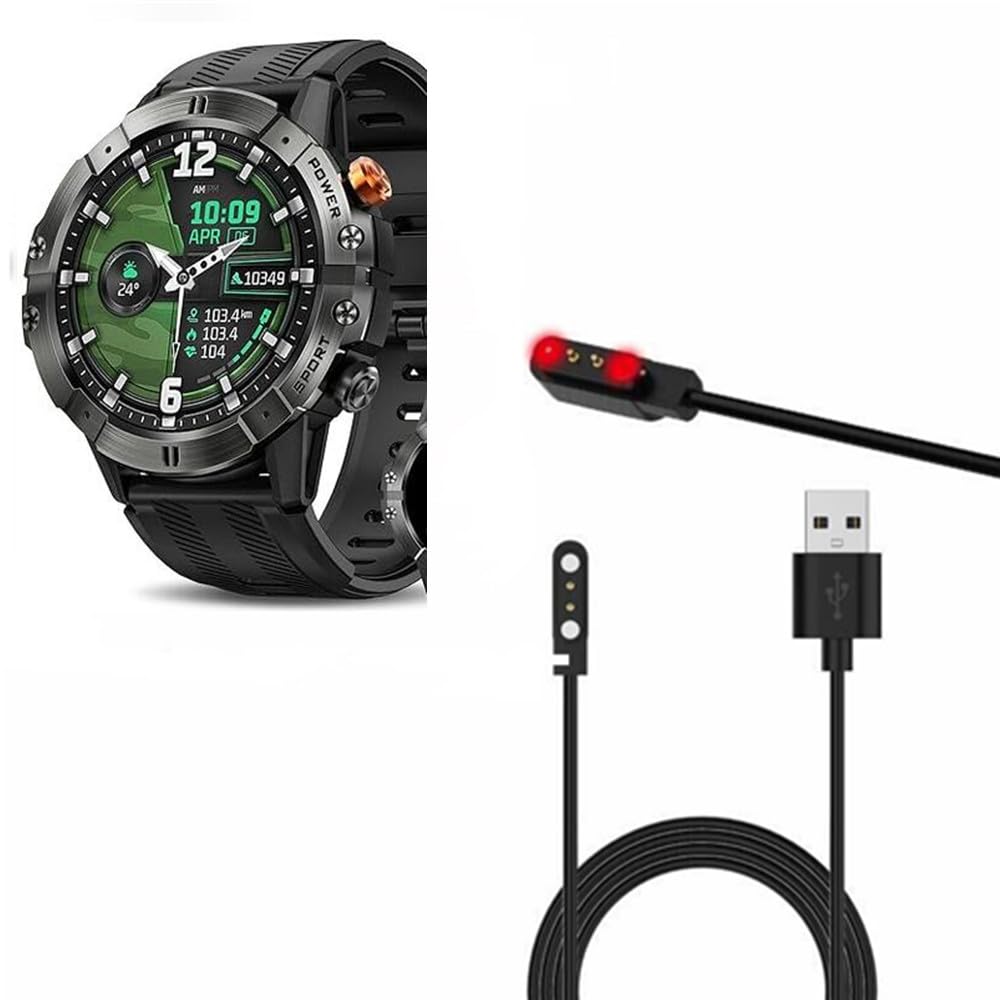
Image 1: DEKELIFE C29 Smartwatch, compatible with this charging cable.

Image 2: The yiqungo USB Magnetic Charging Cable, featuring a magnetic charging head and a standard USB-A connector.
Key Features:
- Magnetic Charging: Ensures a secure and easy connection to your smartwatch.
- Fast Charging: Achieves a full charge in approximately 2 hours, providing 7-10 days of smartwatch usage.
- Smart Protection: Integrated chip protects the smartwatch from overcharging and power fluctuations, extending its lifespan.
- Portable Design: Compact and lightweight, making it convenient for travel, home, and office use.
- Compatibility: Specifically designed for DEKELIFE C29, C20, and C21pro Smart Watches.
Setup
Before charging your smartwatch, ensure you have a compatible USB power source (e.g., a computer USB port, a USB wall adapter, or a power bank).
- Unpack the yiqungo USB Magnetic Charging Cable from its packaging.
- Connect the USB-A end of the cable to a powered USB port.
- Ensure the magnetic charging pins on the cable are clean and free from debris.

Image 3: Close-up of the magnetic charging pins on the cable. Ensure these are clean for optimal connection.
Operating Instructions (Charging Your Smartwatch)
Follow these steps to charge your DEKELIFE C29, C20, or C21pro smartwatch:
- With the USB end of the cable connected to a power source, align the magnetic charging head with the charging contacts on the back of your smartwatch.
- The magnetic connection will automatically snap into place, securing the cable to the smartwatch.
- Confirm that the smartwatch display indicates it is charging. If not, adjust the magnetic head until a charging indicator appears.
- Allow approximately 2 hours for a full charge. The smartwatch battery indicator will show when charging is complete.
- Once fully charged, gently detach the magnetic charging head from the smartwatch.
Note: The built-in protection chip prevents overcharging, but it is recommended to disconnect the cable once the smartwatch is fully charged.
Maintenance
- Keep the charging cable and its magnetic contacts clean and dry. Use a soft, dry cloth to wipe away any dust or debris.
- Avoid bending or kinking the cable excessively, as this can damage the internal wires.
- Store the cable in a cool, dry place away from direct sunlight and extreme temperatures.
- Do not expose the cable to water or other liquids.
- Do not attempt to disassemble or repair the cable yourself. Contact customer support if the cable is damaged or not functioning correctly.
Troubleshooting
- Smartwatch is not charging:
- Ensure the USB power source is active and providing power. Try a different USB port or wall adapter.
- Verify that the magnetic charging head is correctly aligned and securely attached to the smartwatch's charging contacts.
- Check for any debris or obstruction on the charging pins of both the cable and the smartwatch. Clean if necessary.
- Ensure the smartwatch itself is powered on or has enough residual battery to display a charging icon.
- Slow charging:
- Ensure you are using a standard USB power source (e.g., 5V/1A or 5V/2A adapter). Low-power USB ports may charge slower.
- Avoid using the smartwatch extensively while it is charging.
- Cable appears damaged:
- Discontinue use immediately. Contact customer support for assistance.
Specifications
| Feature | Detail |
|---|---|
| Brand | yiqungo |
| Model Compatibility | DEKELIFE C29, C20, C21pro Smart Watches |
| Connector Type (Smartwatch) | 2-pin Magnetic |
| Connector Type (Power Source) | USB-A |
| Cable Type | USB |
| Special Feature | Fast Charging, Built-in Protection Chip |
| Maximum Voltage | 5 Volts (DC) |
| Item Weight | 13 Grams (approx. 0.459 ounces) |
| Indoor/Outdoor Usage | Indoor |
| Package Dimensions | 4.09 x 2.75 x 0.47 inches |
Warranty Information
This product is covered by a standard manufacturer's warranty. For specific details regarding warranty coverage, duration, and terms, please refer to the product packaging or contact yiqungo customer support. Keep your proof of purchase for warranty claims.
Customer Support
If you encounter any issues or have questions not addressed in this manual, please contact yiqungo customer support through the retailer's platform where the product was purchased. Provide your product model number (C29 compatible cable) and a detailed description of the issue for efficient assistance.