
PDS ENTERPRISES N80ULTRANEW
PDS ENTERPRISES N80 5G Ultra Android Smart Watch User Manual
Model: N80ULTRANEW
1. Introduction
This user manual provides essential information for the safe and effective use of your PDS ENTERPRISES N80 5G Ultra Android Smart Watch. Please read this manual thoroughly before operating the device to ensure proper functionality and to avoid damage.
The N80 5G Ultra Smart Watch is a versatile wearable device featuring a complete Android OS, 5G cellular connectivity, and a vibrant AMOLED display. It is designed to integrate seamlessly with your daily life, offering communication, entertainment, and utility features directly from your wrist.
2. Package Contents
Upon opening the package, verify that all items listed below are present and in good condition:
- 1 x PDS ENTERPRISES N80 5G Ultra Android Smart Watch
- 1 x Charging Cable
- 1 x User Manual (this document)
- Additional Watch Bands (may vary by package)

Image: Contents of the PDS ENTERPRISES N80 5G Ultra Smart Watch package, including the watch, charging cable, and additional watch bands.
3. Product Overview
Familiarize yourself with the various components of your N80 5G Ultra Smart Watch.

Image: Front view of the N80 5G Ultra Smart Watch, highlighting the display with various app icons and the visible SIM card tray on the side.
Key Components:
- AMOLED Display: High-resolution touchscreen for interaction.
- SIM Card Slot: Located on the side for Micro SIM card insertion.
- Microphone: For voice calls and commands.
- Speaker: For audio output during calls, media playback, and notifications.
- Power Button/Crown: Typically on the side, used for power on/off, screen wake/sleep, and navigation.
- Sensors: Located on the back for health monitoring (if applicable, not explicitly stated but common for smartwatches).
4. Setup
4.1. Charging the Device
Before first use, fully charge your N80 5G Ultra Smart Watch. Connect the provided charging cable to the charging port on the watch and plug the other end into a standard USB power adapter (not included) or a computer's USB port.
- A full charge typically takes approximately 2-3 hours.
- The battery indicator on the screen will show charging progress.
4.2. SIM Card Installation
The N80 5G Ultra Smart Watch supports a Micro SIM card for cellular connectivity (5G). Follow these steps to install the SIM card:
- Locate the SIM card tray on the side of the watch.
- Gently pull out the SIM tray. You may need a SIM ejector tool (not included) or a small, pointed object.
- Place the Micro SIM card into the tray with the gold contacts facing down, ensuring it is correctly oriented.
- Carefully push the SIM tray back into the watch until it clicks into place.
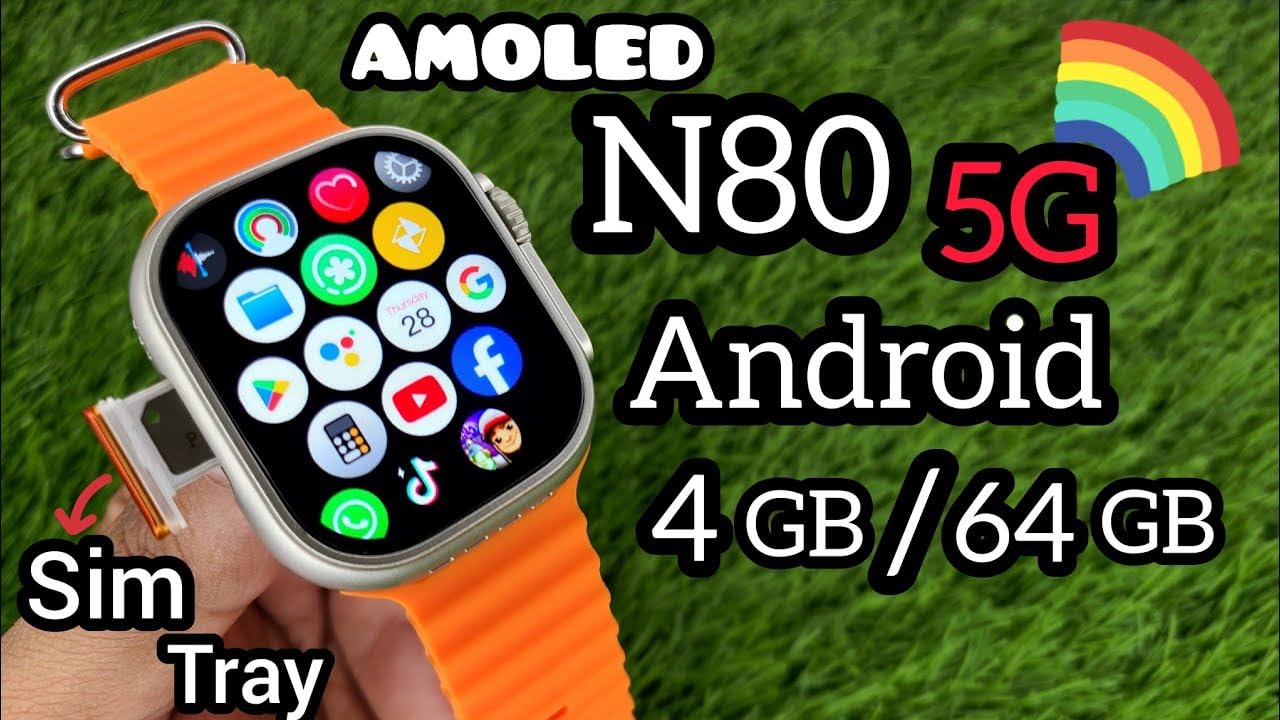
Image: A detailed view of the N80 5G Ultra Smart Watch showing the SIM card tray partially ejected, illustrating the process of SIM card insertion.
4.3. Initial Power On and Setup
- Press and hold the Power button (usually on the side) until the screen lights up.
- Follow the on-screen prompts to select your language, connect to Wi-Fi (if desired), and set up your Google account.
- The watch runs on Android OS, allowing for complete menu customization and pre-installed apps.
5. Operating Instructions
5.1. Basic Navigation
- Touchscreen: Swipe left, right, up, or down to navigate through menus and screens. Tap to select items.
- Power Button: Press once to wake/sleep the screen. Press and hold to power on/off or restart.
- Home Screen: Displays time, date, and quick access to frequently used apps.
- App Drawer: Swipe up or press the crown/button to access all installed applications.
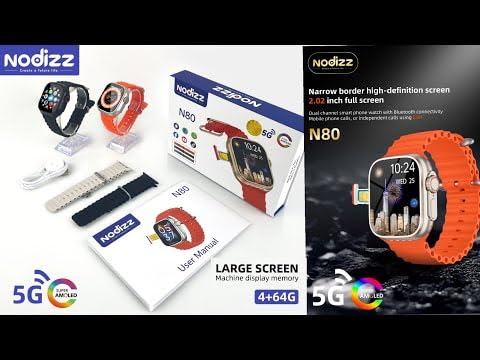
Image: A close-up of the N80 5G Ultra Smart Watch's AMOLED display, showing a grid of various application icons, including phone, messages, settings, and social media apps.
5.2. Making Calls and Sending Messages
With a Micro SIM card installed and active, you can make and receive calls and send/receive SMS messages directly from your watch.
- Calls: Open the "Phone" app, dial a number or select from contacts, and tap the call icon.
- Messages: Open the "Messages" app to compose new messages or reply to existing conversations.
5.3. Using Applications
The N80 5G Ultra Smart Watch comes with pre-installed applications and supports downloading more from the Google Play Store (if available on the device). Common pre-installed apps include:
- Phone, Messages, Settings
- Google Maps, Amazon, WhatsApp, Facebook
- Twitter, TikTok, YouTube, Play Store
- Alarm Clock (as a special feature)
Tap on an app icon to launch it. Navigate within apps using touch gestures.
6. Maintenance
6.1. Cleaning Your Smart Watch
- Wipe the screen and body with a soft, lint-free cloth.
- For stubborn smudges, slightly dampen the cloth with water. Avoid using harsh chemicals or abrasive materials.
- Ensure the charging port is clean and free of debris.
6.2. Battery Care
- Avoid extreme temperatures, which can degrade battery life.
- Do not leave the watch fully discharged for extended periods.
- Use only the provided charging cable.
6.3. Storage
When not in use for extended periods, store the watch in a cool, dry place, ideally with the battery charged to around 50%.
7. Troubleshooting
| Problem | Possible Cause | Solution |
|---|---|---|
| Watch does not power on. | Low battery; device crash. | Charge the watch for at least 30 minutes. If still unresponsive, perform a forced restart by holding the power button for 10-15 seconds. |
| Cannot make/receive calls. | SIM card not installed correctly; no network signal; SIM not activated. | Ensure SIM card is properly inserted. Check network signal strength. Contact your mobile carrier to verify SIM activation. |
| Touchscreen unresponsive. | Software glitch; screen damage. | Restart the watch. If the issue persists, consider a factory reset (data will be lost). If physical damage is apparent, contact support. |
| Battery drains quickly. | Too many apps running in background; high screen brightness; frequent network usage. | Close unused apps. Reduce screen brightness. Limit background data usage. Disable unnecessary features like Wi-Fi/Bluetooth when not in use. |
8. Specifications
Detailed technical specifications for the PDS ENTERPRISES N80 5G Ultra Android Smart Watch:
| Feature | Specification |
|---|---|
| Model | N80ULTRANEW |
| Operating System | Android Wear 5.0 (Android OS with pre-installed apps) |
| RAM | 4 GB |
| Internal Storage | 64 GB (No memory card option) |
| Display Type | AMOLED |
| Resolution | 320x286px |
| Screen Size | Approximately 2.02 inches (based on common N80 models, original data was 49 Angstrom which is incorrect) |
| Cellular Technology | 5G |
| SIM Card Type | Micro SIM |
| Battery Capacity | 350 mAh (converted from 350 Amp Hours, which is incorrect) |
| Compatible Devices | Smartphone |
| Special Features | Alarm Clock, Complete menu customization |
| Item Weight | 150 g |
| Package Dimensions | 11 x 5 x 4 cm |
9. Warranty and Support
For warranty information and customer support, please refer to the documentation provided with your purchase or contact PDS ENTERPRISES directly through their official channels. Keep your purchase receipt as proof of purchase.
No official product videos from the seller were available for embedding in this manual.
Ask a question about this manual
Ask about setup, troubleshooting, compatibility, parts, safety, or missing instructions. Manuals+ will review the question and use this page’s manual context to help answer it.