
Introduction
The Nicefeel FC1599 Water Dental Flosser is designed to enhance your daily oral hygiene routine. Utilizing advanced micro-bubble water flow technology, this cordless oral irrigator effectively cleans between teeth and below the gumline, removing food particles and plaque. Its portable design, multiple pressure settings, and specialized tips provide a customizable and thorough cleaning experience.

Figure 1: Nicefeel Water Dental Flosser
Product Features
- Exclusive Micro Bubble Water Flow Technology: Generates micro-bubbles for effective and gentle cleaning, removing up to 99.9% of food buildup.
- 3 Pressure Settings: Offers Normal, Soft, and Pulse modes to suit various sensitivity levels and cleaning needs.
- 5 Functional Tips: Includes Standard, Periodontal, Orthodontic, Plaque Removal, and Tongue Scraper tips for comprehensive oral care.
- Fast Charge: Achieves a full charge in approximately 30 minutes, providing up to 40 days of constant flossing on a single charge.
- 300ml Extra-Large Water Tank: Designed with an exclusive internal leakproof drainage system for efficient and uninterrupted flossing.
- Gentle 3-Second Gradual Pressure Build-Up: Gradually increases water pressure to ensure a comfortable and thorough cleaning experience.
- IPX7 Waterproof & Ergonomic Grip: Safe for use in the shower and features a textured handle for secure handling.
- Tonsil Stone Removal: The Soft pressure with Pulse mode can gently dislodge tonsil stones.

Figure 2: Illustration of the three flossing modes: Normal, Soft, and Pulse.
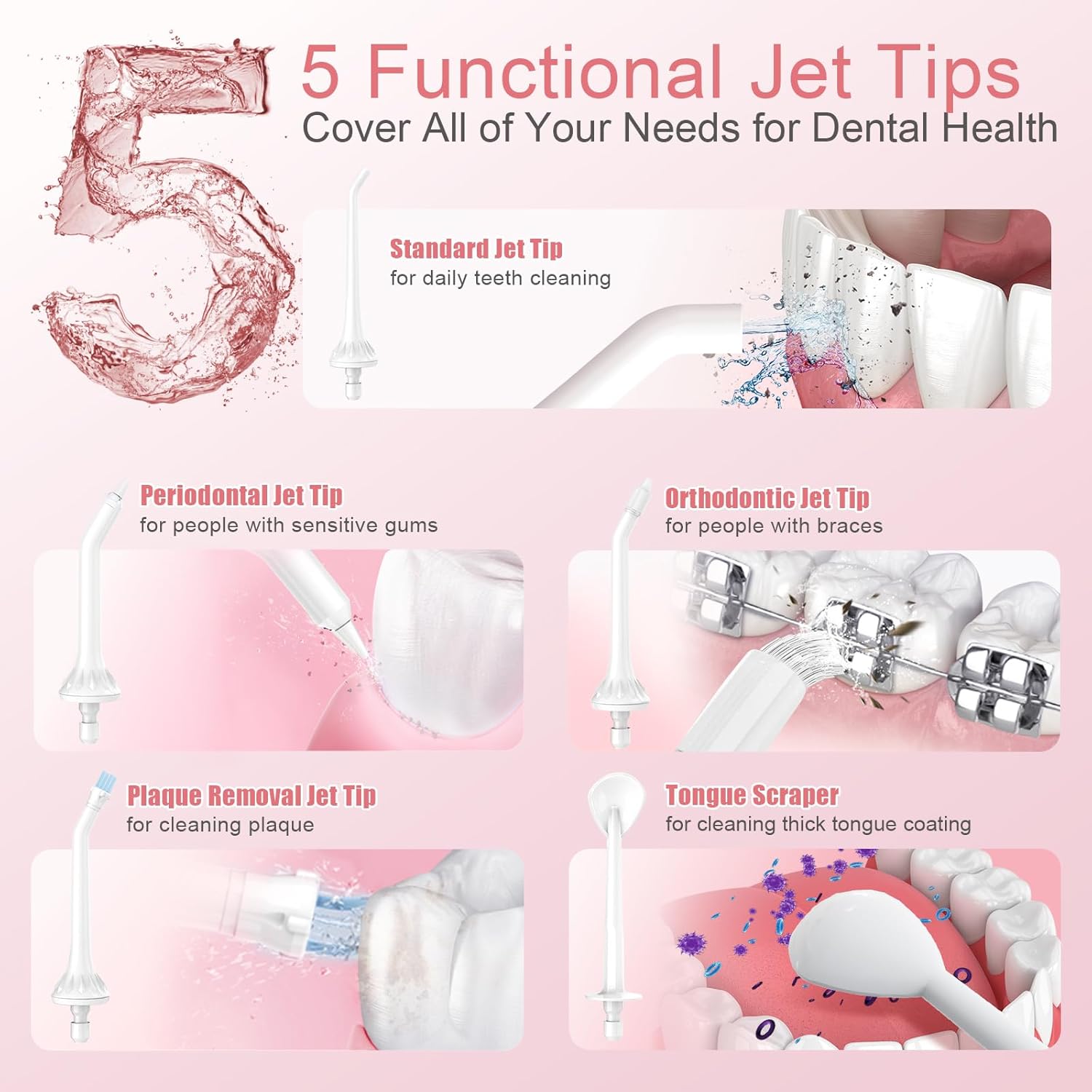
Figure 3: Overview of the five functional jet tips included for various dental needs.
What's in the Box
Your Nicefeel FC1599 Water Dental Flosser package includes the following items:
- Nicefeel FC1599 Water Dental Flosser Unit
- 5 Interchangeable Nozzle Tips (Standard, Periodontal, Orthodontic, Plaque Removal, Tongue Scraper)
- USB-C Charging Cable
- Instruction Manual

Figure 4: Contents of the Nicefeel Water Dental Flosser package.
Setup
1. Charging the Device
- Before first use, fully charge the device.
- Locate the USB-C charging port on the device.
- Connect the provided USB-C cable to the flosser and a suitable USB power adapter (not included).
- The charging indicator will illuminate. A full charge typically takes 30 minutes.

Figure 5: The fast charging port and indicator on the device.
2. Attaching a Nozzle Tip
- Select the desired nozzle tip for your cleaning needs.
- Insert the tip into the opening at the top of the flosser handle until it clicks into place.
- To remove, press the tip release button (usually located near the tip base) and pull the tip out.
3. Filling the Water Tank
- Twist and detach the water tank from the main body of the flosser.
- Fill the tank with lukewarm water. You may add mouthwash if desired.
- Reattach the water tank securely to prevent leaks.

Figure 6: Detachable 300ml water tank for easy filling and cleaning.
Operating Instructions
1. Powering On/Off
- Press the 'On/Off' button to turn the device on or off.
2. Selecting a Mode
- Press the 'Mode' button to cycle through the three pressure settings: Normal, Soft, and Pulse.
- It is recommended to start with the 'Soft' mode, especially for new users or those with sensitive gums, and gradually increase as comfortable.
3. Proper Flossing Technique
- Lean over a sink and place the nozzle tip into your mouth, aiming it at the gumline at a 90-degree angle.
- Close your lips slightly to prevent splashing, but allow water to flow from your mouth into the sink.
- Turn on the device and guide the water stream along the gumline, pausing briefly between teeth.
- Clean both the inside and outside surfaces of your teeth.
- For tonsil stone removal, use the 'Soft' pressure with 'Pulse' mode and gently direct the stream towards the affected area.
- Continue until all areas are cleaned or the water tank is empty.
Video 1: Demonstration of using the Cordless Dental Water Flosser for daily oral hygiene.
Maintenance
1. Cleaning the Water Tank
- After each use, empty any remaining water from the tank.
- Detach the tank and rinse it thoroughly with clean water.
- Allow the tank to air dry before reattaching or storing.
2. Cleaning Nozzle Tips
- Rinse nozzle tips under running water after each use.
- For deeper cleaning, tips can be soaked in a solution of 2 parts water to 1 part white vinegar for 5-10 minutes, then rinsed.
3. Storage
- Store the flosser and tips in a clean, dry place away from direct sunlight.
- Ensure the device is fully charged before long-term storage to maintain battery health.

Figure 7: The compact design makes the flosser easy to store and carry.
Troubleshooting
| Problem | Possible Cause | Solution |
|---|---|---|
| Device does not turn on | Low battery; Device not charged | Charge the device fully using the provided USB-C cable. |
| Weak water stream | Low battery; Water tank empty; Nozzle tip clogged | Charge the device; Refill water tank; Clean or replace nozzle tip. |
| Water leakage | Water tank not securely attached; Seal damaged | Ensure water tank is twisted on tightly; Contact customer support if seal is damaged. |
| Device stops during use | Low battery; Water tank empty | Charge the device; Refill water tank. |
Specifications
- Model Number: FC1599
- Package Dimensions: 10.28 x 4.45 x 3.74 inches
- Weight: 1.28 Pounds
- Battery: 1 A battery (included)
- Power Source: Battery Powered
- Water Tank Capacity: 300ml
- Waterproof Rating: IPX7
- Special Features: Cordless, Multiple Operation Modes, Multiple Tips, Non-Slip Grip, Quick Charge
- Product Benefits: Gum Health, Prevents Bad Breath, Removes Plaque
Warranty and Support
For warranty information or technical support, please refer to the contact details provided on the product packaging or visit the official Nicefeel website. Keep your purchase receipt for warranty claims.