
HPFIX HP-PG001
HPFIX Mini Electric Precision Screwdriver Set HP-PG001 User Manual
Model: HP-PG001
1. Introduction
This manual provides detailed instructions for the safe and effective use of your HPFIX Mini Electric Precision Screwdriver Set, Model HP-PG001. Please read this manual thoroughly before operating the device and retain it for future reference. This precision tool is designed for delicate electronic repairs and assembly tasks.
2. Package Contents
Verify that all items listed below are present in your package. If any items are missing or damaged, please contact customer support.

Image: Overview of all components included in the HPFIX Mini Electric Precision Screwdriver Set, showing the screwdriver, bit set, magnetic mat, charging cable, and other accessories.
- 1x Electric Screwdriver
- 1x Storage Case
- 64x Precision S2 Steel Bits (48x H4x28mm, 16x H4x45mm)
- 1x Magnetic Pad
- 1x USB Type-C Charging Cable
- 1x Pointed Tweezers
- 1x Metal Spudger
- 1x Magnetizer/Demagnetizer Tool (Integrated with the case)
- 1x Instructions Manual (this document)
3. Product Overview
Familiarize yourself with the main components of the HPFIX Mini Electric Precision Screwdriver.

Image: Detailed diagram illustrating the various parts of the electric screwdriver, including the Type-C charging port, battery & torque indicator, multi-functional button, unscrew button, screw button, and 4 LED worklights.
- Type-C Charging Port: For charging the internal battery.
- Battery & Torque Indicator: Displays battery status and current torque setting. Double-click to check battery status.
- Multi-Functional Button: Used for various functions, including adjusting torque. Long press until the indicator flashes, then press again to adjust torque.
- Unscrew Button: Activates counter-clockwise rotation for loosening screws.
- Screw Button: Activates clockwise rotation for tightening screws.
- 4 LED Worklights: Illuminates the work area. One click on the multi-functional button to switch on/off LED lights.
4. Setup
4.1 Initial Charging
Before first use, fully charge the screwdriver. Connect the provided USB Type-C charging cable to the charging port (1) on the screwdriver and to a compatible USB power source. The battery indicator lights (2) will show charging progress. A full charge typically takes less than 60 minutes.

Image: The electric screwdriver being charged via its Type-C port, connected to a laptop. The indicator lights show charging status.
4.2 Bit Installation
Select the appropriate S2 steel bit for your task. Insert the bit firmly into the magnetic chuck at the tip of the screwdriver. The magnetic chuck will hold the bit securely in place.
5. Operating Instructions
5.1 Power On/Off and LED Lights
The screwdriver does not have a dedicated power on/off button. It activates when a screw or unscrew button is pressed. To turn on/off the 4 LED worklights, press the multi-functional button (3) once.

Image: The screwdriver's four LED lights illuminating a circuit board during a repair task, demonstrating their utility in low-light conditions.
5.2 Adjusting Torque Settings
The screwdriver features 5 adjustable torque settings in electric mode, ranging from 0.15 N·m to 0.35 N·m. To adjust the torque:
- Long press the multi-functional button (3) until the indicator lights (2) begin to flash.
- While the lights are flashing, press the multi-functional button (3) repeatedly to cycle through the 5 torque levels. The number of illuminated indicator lights corresponds to the selected torque level (e.g., 1 light for Torque 1, 5 lights for Torque 5).
- Release the button to set the desired torque.

Image: The electric screwdriver being used on different items (a robot, a smartphone, and eyeglasses) to illustrate the application of various torque settings for different precision tasks.
5.3 Electric Mode Operation
Once the bit is installed and torque is set:
- For tightening screws, press and hold the Screw Button (5).
- For loosening screws, press and hold the Unscrew Button (4).
The screwdriver will operate at 200 RPM. Release the button to stop rotation.
5.4 Manual Mode Operation
For tasks requiring higher torque or precise manual control, the screwdriver can be used in manual mode. Simply use it as a traditional manual screwdriver. The maximum manual torque is 7 N·m.

Image: The electric screwdriver in use, showing its application on a delicate circuit board with a specific torque setting, and also demonstrating its use in manual mode for a wooden object.
6. Bit Selection and Usage
The set includes 64 S2 magnetic bits of various types and sizes, suitable for a wide range of precision applications. Refer to the bit chart below to select the correct bit for your task.

Image: A comprehensive chart detailing the 64 S2 alloy steel precision bits, categorized by head style (Hex, Torx Security, Phillips, Flathead, Tri-Wing, Pentalobe, Square, Triangle, U-Type, MID, SIM) and their respective sizes, including both 28mm and 45mm lengths.
6.1 Magnetic Features
The screwdriver bits are magnetic, which helps in holding small screws. The storage case includes an integrated magnetizer/demagnetizer tool. Use the "U+" slot to magnetize a bit and the "U-" slot to demagnetize it, as needed for specific tasks.
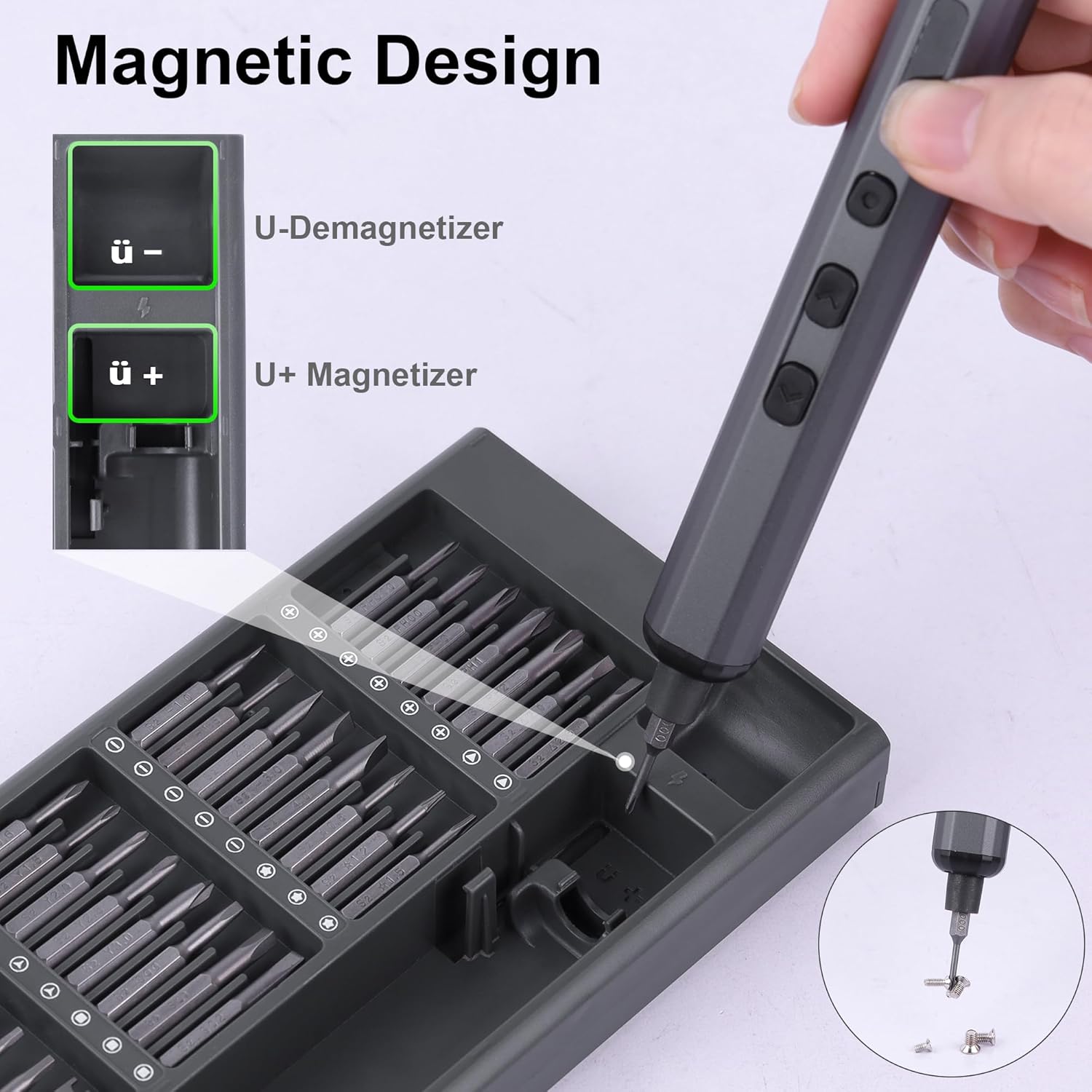
Image: A close-up view of the screwdriver bit being magnetized by inserting it into the "U+" slot of the integrated magnetizer/demagnetizer tool within the storage case.
6.2 Auxiliary Tools
The set also includes a magnetic mat, pointed tweezers, and a metal spudger to assist with handling small components and prying open electronic devices safely.

Image: The magnetic mat for organizing small screws and parts, precision tweezers for handling delicate components, and a metal spudger for safely opening electronic casings.
7. Maintenance
7.1 Cleaning
Wipe the screwdriver and bits with a clean, dry cloth after each use. Do not use abrasive cleaners or solvents. Ensure no dust or debris accumulates in the bit chuck or charging port.
7.2 Battery Care
To prolong battery life, avoid fully discharging the battery frequently. Recharge the screwdriver when the battery indicator shows low power. Store the device in a cool, dry place when not in use for extended periods. The 350mAh battery is designed to drive over 500 screws on a single charge.

Image: Visual representation of checking the battery level by double-clicking, showing the indicator lights for charging, fully charged, and full power status, highlighting the 350mAh battery capacity.
7.3 Storage
Store the screwdriver and all bits in the provided compact magnetic storage case to keep them organized and protected from damage or loss. The case is designed for portability.

Image: The electric screwdriver and its array of precision bits neatly organized within the compact magnetic storage case, demonstrating its efficient design for storage and transport.
8. Troubleshooting
| Problem | Possible Cause | Solution |
|---|---|---|
| Screwdriver does not turn on or operate. | Low battery. | Charge the screwdriver fully using the Type-C cable. |
| Screwdriver operates but lacks power/torque. | Incorrect torque setting or low battery. | Adjust to a higher torque setting. Ensure the battery is fully charged. Use manual mode for higher torque requirements. |
| Bit slips or does not engage screw. | Incorrect bit size/type or worn bit. | Ensure the correct bit is selected and fully inserted. Replace worn bits. |
| LED lights do not turn on. | Not activated or battery low. | Press the multi-functional button once to activate. Charge the battery. |
9. Specifications
| Feature | Detail |
|---|---|
| Model Name | HP-PG001 |
| Brand | HPFIX |
| Number of Items | 69 (Screwdriver + 64 bits + accessories) |
| Material | Tool Steel (Bits) |
| Electric Torque | 5 levels, 0.15 - 0.35 N·m |
| Manual Torque | Max. 7 N·m |
| Speed | 200 RPM (unloaded) |
| Battery Capacity | 350mAh |
| Charging Time | Approx. 60 minutes (Type-C) |
| Voltage | 3.7 Volts (Operating), 4.5-6.5V (Charging) |
| Special Features | Electric, Ergonomic, 4 LED Lights, Magnetic Bits, Magnetizer/Demagnetizer |
| Item Weight | 1.39 pounds |
| Package Dimensions | 9.45 x 4.09 x 1.34 inches |
10. Warranty and Support
The HPFIX Mini Electric Precision Screwdriver Set comes with a lifetime warranty and a 30-day money-back guarantee. For any product inquiries, technical support, or warranty claims, please contact the seller directly through your purchase platform. Ensure you have your purchase details readily available.
For further assistance, you may visit the HPFIX Store on Amazon: HPFIX Store
Ask a question about this manual
Ask about setup, troubleshooting, compatibility, parts, safety, or missing instructions. Manuals+ will review the question and use this page’s manual context to help answer it.