
1. Introduction
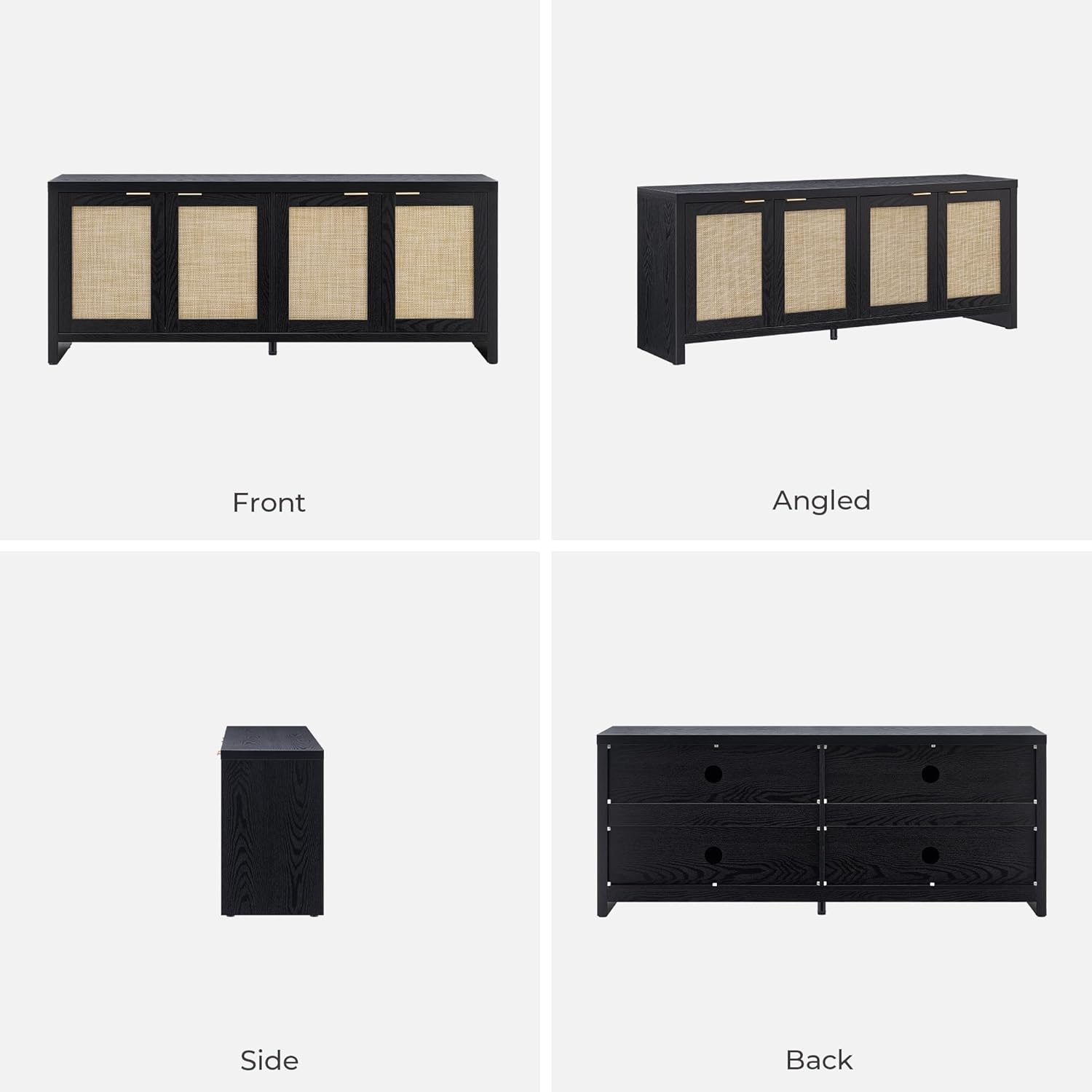
This manual provides detailed instructions for the assembly, operation, and maintenance of your SICOTAS TV Stand Model TV005. Please read all instructions carefully before beginning assembly and retain this manual for future reference. This TV stand is designed to accommodate televisions up to 65 inches and offers ample storage with its four rattan-paneled cabinets.
2. Safety Information
- Weight Limits: Do not exceed the maximum weight limits. The top surface supports up to 165 lbs (75 kg), and each interior shelf supports up to 33 lbs (15 kg).
- Stability: Ensure proper installation and assembly to prevent tipping. If possible, secure the unit to a wall using anti-tip hardware (not explicitly mentioned as included, but good practice for furniture).
- Heat Sources: Keep the TV stand away from direct heat sources, open flames, and excessive moisture to prevent damage to the material.
- Children: Keep small parts and assembly hardware out of reach of children.
- Ventilation: Ensure adequate ventilation around electronic devices placed within the cabinets to prevent overheating.
3. Package Contents
Before assembly, verify that all components and hardware are present. This TV stand comes with detailed instructions and all necessary hardware for assembly. If any parts are missing or damaged, please contact customer service.
4. Assembly Instructions
Assembly of the SICOTAS TV Stand is designed to be straightforward. Follow the included step-by-step instructions carefully. It is recommended to have two people for assembly to ensure stability and ease of handling larger components.
- Unpack Components: Carefully unpack all parts and hardware. Lay them out on a clean, soft surface to prevent scratches.
- Identify Parts: Refer to the parts list in your instruction booklet to identify each component.
- Follow Steps: Assemble the frame, panels, and shelves according to the numbered steps in the provided manual. Pay close attention to the orientation of each piece.
- Attach Doors: When attaching the cabinet doors, ensure they are properly aligned. If doors do not align perfectly, minor adjustments can often be made to the hinges as per the troubleshooting section in your detailed manual. The doors feature soft-close capabilities.
- Final Check: Once assembled, ensure all screws are tightened, and the stand is stable before placing any items on it.

5. Operating Instructions
The SICOTAS TV Stand is designed for versatile use and organization.
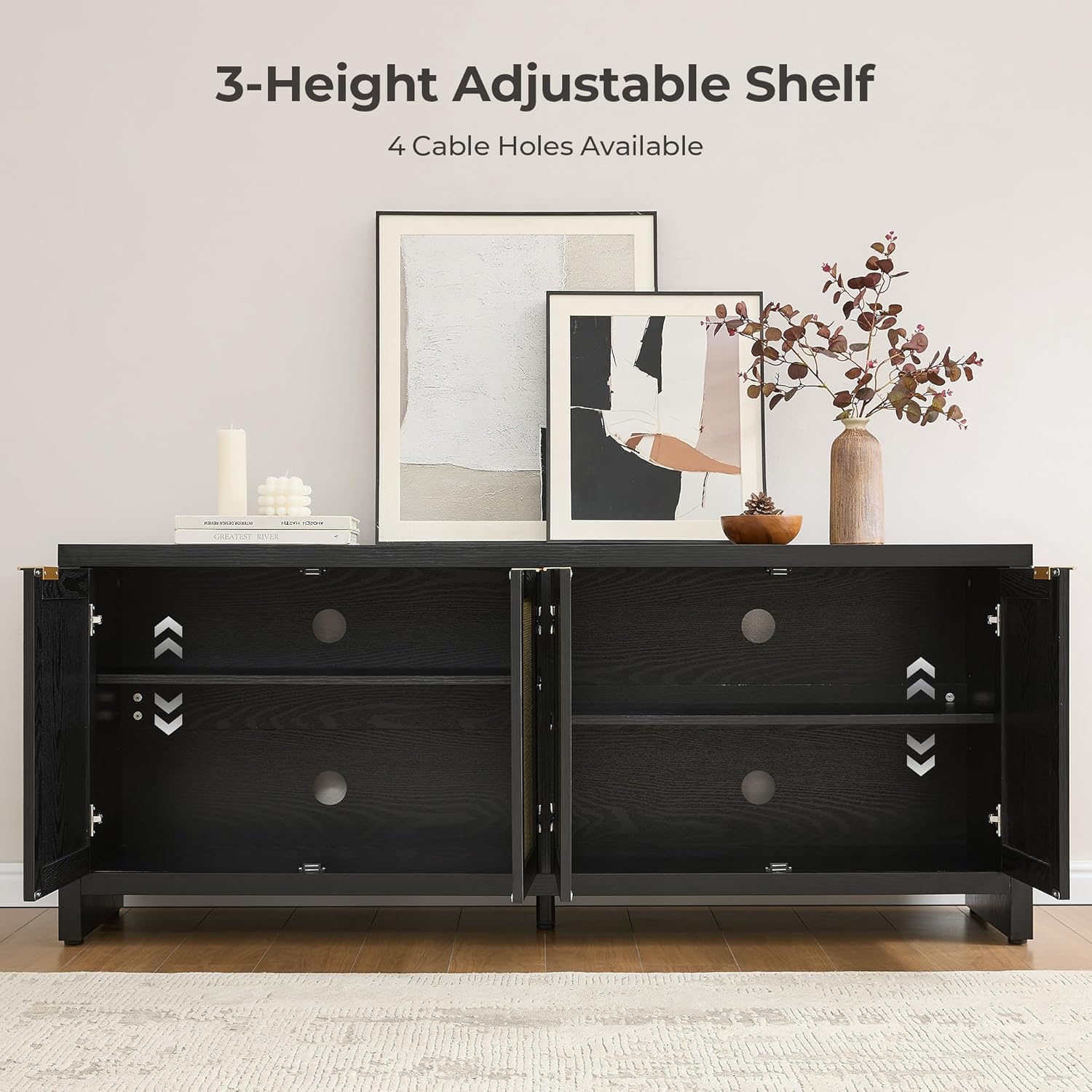
- Adjustable Shelves: The interior of each cabinet features two height-adjustable shelves. To adjust, remove the shelf, reposition the shelf pins to the desired height, and reinsert the shelf. This allows for customized storage of various media equipment, books, or decorative items.
- Cable Management: Four cable holes are strategically placed on the back panel of the unit. Utilize these openings to route and organize power cords and signal cables, keeping your entertainment area tidy and clutter-free.
- Door Operation: The cabinet doors are equipped with soft-close hinges for quiet and gentle closing.
6. Maintenance
Proper care will ensure the longevity and appearance of your TV stand.
- Cleaning: Wipe surfaces with a soft, dry cloth. For stubborn marks, use a slightly damp cloth with a mild, non-abrasive cleaner, then dry immediately. Avoid harsh chemicals or abrasive materials.
- Rattan Care: The rattan panels can be gently dusted with a soft brush or vacuum cleaner with a brush attachment. Avoid excessive moisture on rattan.
- Hardware: Periodically check and tighten all screws and fasteners to maintain structural integrity.
- Sunlight: Avoid prolonged exposure to direct sunlight to prevent fading or discoloration of the wood finish.
7. Troubleshooting
- Wobbly Stand: If the stand feels unstable after assembly, ensure all cam locks and screws are fully tightened. Check that the stand is on a level surface. Adjustable footpads (if present) can be used to level the unit.
- Doors Not Aligning: If the cabinet doors do not align properly or have uneven gaps, adjust the hinges. Most furniture hinges allow for minor adjustments (up/down, left/right, in/out) using a screwdriver. Refer to the specific hinge adjustment instructions in your assembly manual.
- Missing Parts: If any parts are missing or damaged upon arrival, do not proceed with assembly. Contact customer service for assistance.
8. Specifications
| Feature | Detail |
|---|---|
| Brand | SICOTAS |
| Model Number | TV005 |
| Color | Black Oak |
| Product Dimensions | 61.5"W x 15.6"D x 25"H |
| Recommended Use | TV Stand |
| Special Feature | Adjustable Shelf |
| Mounting Type | Floor Mount |
| Door Style | Shaker with Rattan Panels |
| Number of Shelves | 3 (2 adjustable per cabinet section) |
| Base Type | Legs |
| Assembly Required | Yes |
| Frame Material | Wood, Rattan |
| Item Weight | 79.2 pounds (35.9 kg) |
9. Customer Support
For any questions, concerns, or assistance with your SICOTAS TV Stand, please contact our professional customer service team. We are committed to ensuring your satisfaction before and after your purchase.