1. Introduction
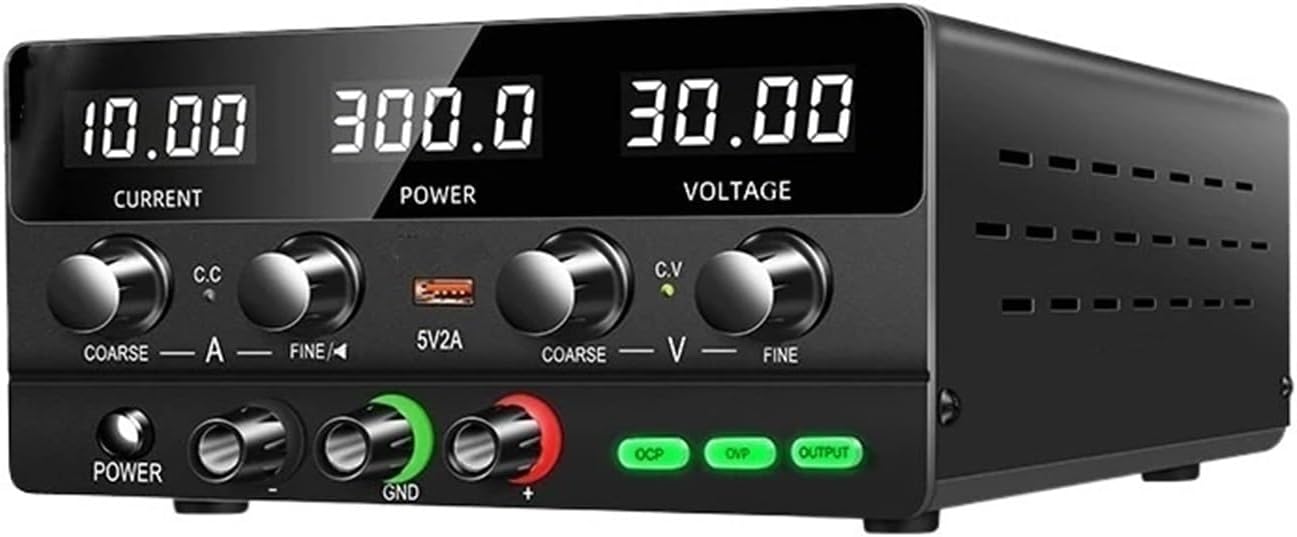
Figure 1: HQHSGCGVA SPPS-H3010 Bench Power Supply
This image shows the HQHSGCGVA SPPS-H3010 30V10A 220V Adjustable Bench Switching DC Power Supply from a front-right perspective. The digital displays for Current, Power, and Voltage are visible, along with the control knobs and output terminals.
This manual provides detailed instructions for the safe and efficient operation of your HQHSGCGVA SPPS-H3010 30V10A 220V Adjustable Bench Switching DC Power Supply. This device is designed to provide a stable and adjustable DC power source for various electronic applications, laboratory work, and maintenance tasks. Please read this manual thoroughly before use to ensure proper functionality and to prevent damage to the unit or connected equipment.
The SPPS-H3010 offers precise control over output voltage and current, featuring a maximum output of 30V and 10A, with a 220V input. It incorporates multiple protection mechanisms for enhanced safety.
2. Safety Instructions
To ensure safe operation and prolong the lifespan of the power supply, observe the following safety precautions:
- Power Source: Connect the unit only to a grounded 220V AC power outlet. Ensure the power cord is in good condition and properly connected.
- Ventilation: Do not block the ventilation openings on the unit. Adequate airflow is essential to prevent overheating. Operate the device in a well-ventilated area.
- Environment: Avoid operating the power supply in environments with excessive dust, humidity, direct sunlight, or extreme temperatures. Keep it away from liquids.
- Overload Protection: The unit is equipped with over-voltage (OVP), over-current (OCP), over-heat, and short-circuit protection. Do not intentionally bypass these safety features.
- Servicing: Do not attempt to open or service the unit yourself. Refer all servicing to qualified personnel. Opening the casing may expose you to dangerous voltages.
- Output Connection: Ensure the output terminals are correctly connected to the load. Reverse polarity can damage the power supply and the connected device.
- Children: Keep the device out of reach of children.
3. Product Features
- Adjustable Output: Provides continuously adjustable DC voltage up to 30V and current up to 10A.
- Digital Display: Clear LED displays for real-time monitoring of output voltage, current, and power.
- Protection Functions: Integrated Over-Voltage Protection (OVP), Over-Current Protection (OCP), Over-Heat Protection, and Short-Circuit Protection for safe operation.
- Constant Voltage (CV) & Constant Current (CC) Modes: Automatically switches between CV and CC modes depending on the load.
- Cooling System: Built-in fan for efficient heat dissipation, extending the product's service life.
- USB Output: Convenient 5V/2A USB port for charging or powering small devices.
- Compact Design: Space-saving and lightweight design suitable for various workbenches.
4. Components and Controls
Familiarize yourself with the front panel controls and indicators:

Figure 2: Front Panel Layout and Controls
This image displays the front panel of the HQHSGCGVA SPPS-H3010 power supply. Key components are labeled, including the digital displays for Current, Power, and Voltage, along with their respective coarse and fine adjustment knobs. Indicators for Constant Current (C.C) and Constant Voltage (C.V) are visible. The 5V/2A USB output, Power On/Off button, Negative Output Port, Ground (GND), Positive Output Port, Overcurrent Protection (OCP), Overvoltage Protection (OVP), and Output button are also clearly marked.
- Current Display: Shows the output current in Amperes (A).
- Power Display: Shows the output power in Watts (W).
- Voltage Display: Shows the output voltage in Volts (V).
- Current Coarse Adjustment (COARSE A): Large knob for significant adjustments to the output current limit.
- Current Fine Adjustment (FINE A): Small knob for precise adjustments to the output current limit.
- Constant Current Indicator (C.C): LED illuminates when the power supply is operating in Constant Current mode.
- 5V/2A USB Output: USB port providing a fixed 5V, 2A output.
- Voltage Coarse Adjustment (COARSE V): Large knob for significant adjustments to the output voltage.
- Voltage Fine Adjustment (FINE V): Small knob for precise adjustments to the output voltage.
- Constant Voltage Indicator (C.V): LED illuminates when the power supply is operating in Constant Voltage mode.
- Power On/Off: Button to turn the unit on or off.
- Negative Output Port (-): Black terminal for negative output connection.
- Ground (GND): Green terminal for chassis ground connection.
- Positive Output Port (+): Red terminal for positive output connection.
- OCP (Overcurrent Protection) Indicator: LED illuminates when overcurrent protection is active.
- OVP (Overvoltage Protection) Indicator: LED illuminates when overvoltage protection is active.
- Output Button: Enables or disables the main power output to the terminals.
5. Setup
- Unpacking: Carefully remove the power supply from its packaging. Inspect the unit for any signs of damage during transit. Retain the packaging for future storage or transport.
- Placement: Place the power supply on a stable, level surface. Ensure there is sufficient space around the unit for proper ventilation, especially around the rear fan and side vents. Avoid placing it near heat sources or in direct sunlight.
- Power Connection: Connect the provided 220V AC power cord to the power input socket on the rear of the unit, then plug the other end into a grounded 220V AC wall outlet.
- Initial Power On: Press the Power On/Off button on the front panel. The digital displays should illuminate.
- Output Cable Connection: Before connecting any load, ensure the power supply output is disabled (OUTPUT button LED off). Connect your load using appropriate test leads to the Positive (+) and Negative (-) output terminals. For safety, connect the ground (GND) terminal to the chassis of your circuit if required.
6. Operating Instructions
6.1 Setting Voltage and Current Limits
- Set Voltage: With the output disabled (OUTPUT button LED off), use the COARSE V and FINE V knobs to set the desired output voltage. Observe the Voltage Display.
- Set Current Limit: With the output disabled, use the COARSE A and FINE A knobs to set the desired maximum current limit. This acts as a safety feature to protect your circuit.
- Enable Output: Once voltage and current limits are set, press the OUTPUT button. The LED will illuminate, and power will be supplied to the output terminals.
6.2 Constant Voltage (CV) and Constant Current (CC) Modes
- Constant Voltage (CV) Mode: When the load current is below the set current limit, the power supply operates in CV mode. The output voltage remains constant at the set value, and the C.V indicator LED will be lit.
- Constant Current (CC) Mode: If the load current attempts to exceed the set current limit, the power supply automatically switches to CC mode. The output current is maintained at the set limit, and the output voltage will drop to protect the load. The C.C indicator LED will be lit.
6.3 Using the 5V/2A USB Output
The front panel includes a dedicated 5V/2A USB port. This port provides a fixed 5V output with a maximum current of 2A, independent of the main adjustable output. It can be used to power or charge compatible USB devices.
7. Maintenance
- Cleaning: Disconnect the power supply from the AC outlet before cleaning. Use a soft, dry cloth to wipe the exterior of the unit. Do not use abrasive cleaners or solvents.
- Ventilation: Periodically check the ventilation openings for dust accumulation. Use compressed air to gently clear any blockages to ensure proper airflow.
- Storage: When not in use for extended periods, store the power supply in a cool, dry place, away from direct sunlight and extreme temperatures. It is recommended to use the original packaging for storage.
- Cable Inspection: Regularly inspect the power cord and output cables for any signs of damage, fraying, or loose connections. Replace damaged cables immediately.
8. Troubleshooting
| Problem | Possible Cause | Solution |
|---|---|---|
| Unit does not power on. | No AC power, faulty power cord, internal fuse. | Check AC power connection. Ensure power cord is securely plugged in. If problem persists, contact support. |
| No output voltage/current. | Output disabled, OVP/OCP active, incorrect settings, faulty connection. | Press the OUTPUT button to enable output. Check if OVP/OCP indicators are lit. Verify voltage/current settings. Ensure output cables are correctly connected. |
| Output voltage/current fluctuates. | Unstable AC input, loose connections, faulty load. | Ensure stable AC input. Check all cable connections. Test with a different load to isolate the issue. |
| Over-protection (OVP/OCP) activates frequently. | Load exceeds set limits, short circuit in load. | Increase voltage/current limits if appropriate for the load. Check the load for short circuits or excessive current draw. |
| Unit becomes excessively hot. | Blocked ventilation, prolonged high load. | Ensure ventilation openings are clear. Reduce load or operate in a cooler environment. |
9. Specifications
| Parameter | Value |
|---|---|
| Model | SPPS-H3010 |
| Input Voltage | 220V AC |
| Output Voltage Range | 0-30V DC (Adjustable) |
| Output Current Range | 0-10A DC (Adjustable) |
| Output Power | 300W (Max) |
| Output Type | Single Channel |
| Input Frequency | 50/60Hz |
| USB Output | 5V / 2A |
| Protection Features | OVP, OCP, Over-Heat, Short-Circuit |
| Item Weight | 2.2 pounds (approx. 1 kg) |
10. Warranty and Support
For warranty information, technical support, or service inquiries, please contact your original point of purchase or the manufacturer directly. Retain your purchase receipt as proof of purchase for warranty claims.


